AutoSpellQueue
Melee, ranged, tank or healer - each spec gets its own baseline, and an algorithm folds in your latency. No fixed number, no manual tuning. Two checkboxes.
shot-world.png
Description
English
Tanks, healers, melee and ranged - every spec plays differently, so every spec gets its own spell queue window (SpellQueueWindow) baseline, and an algorithm folds in your latency. No fixed number, no manual tuning. Two checkboxes.
What the spell queue window actually is
You've felt it: you press your next ability as the cast bar is almost done, the game remembers the press, and the next spell fires the instant the cast ends. That buffer is the spell queue, and SpellQueueWindow is its length in milliseconds — how early a keypress still counts before the current cast / GCD ends. Blizzard ships it at 400 ms.
400 ms is a safety net for high latency. But if you play at 20–60 ms, it also means: the ability you fat-fingered still counts for the next 0.4 seconds.
Why some players feel "clunky" and others feel "sticky"
- Window too small — presses land early and get dropped, leaving a visible gap between casts. Brutal on high ping.
- Window too large — you press A, change your mind and press B, but the server already took A. Melee and combo-point specs feel this worst: short GCDs, high keypress rate, and 400 ms can cover nearly half a GCD.
The community rule of thumb: window ≈ your world latency + a bit of headroom — which is exactly why it shouldn't be a fixed number.
What this addon does
- Reads your spec and picks a feel baseline (~140 ms high-APM melee, ~150 ms standard melee, slightly higher for tanks, ~240 ms for casters).
- Adds your world latency + adaptive headroom (derived from measured jitter, 30–150 ms) and takes the larger of the two.
- Adjusts by context: cities use the baseline only; instances and the open world follow your latency.
- Clamps into the client's 0–400 ms range.
- Then stops probing on a fixed schedule: it re-checks on login, zone change, entering a dungeon or raid, or when latency really drifts. The learned latency is remembered across sessions.
You don't need to understand any of that. It's on by default, and there is nothing to configure: two checkboxes, and a reset-position button.
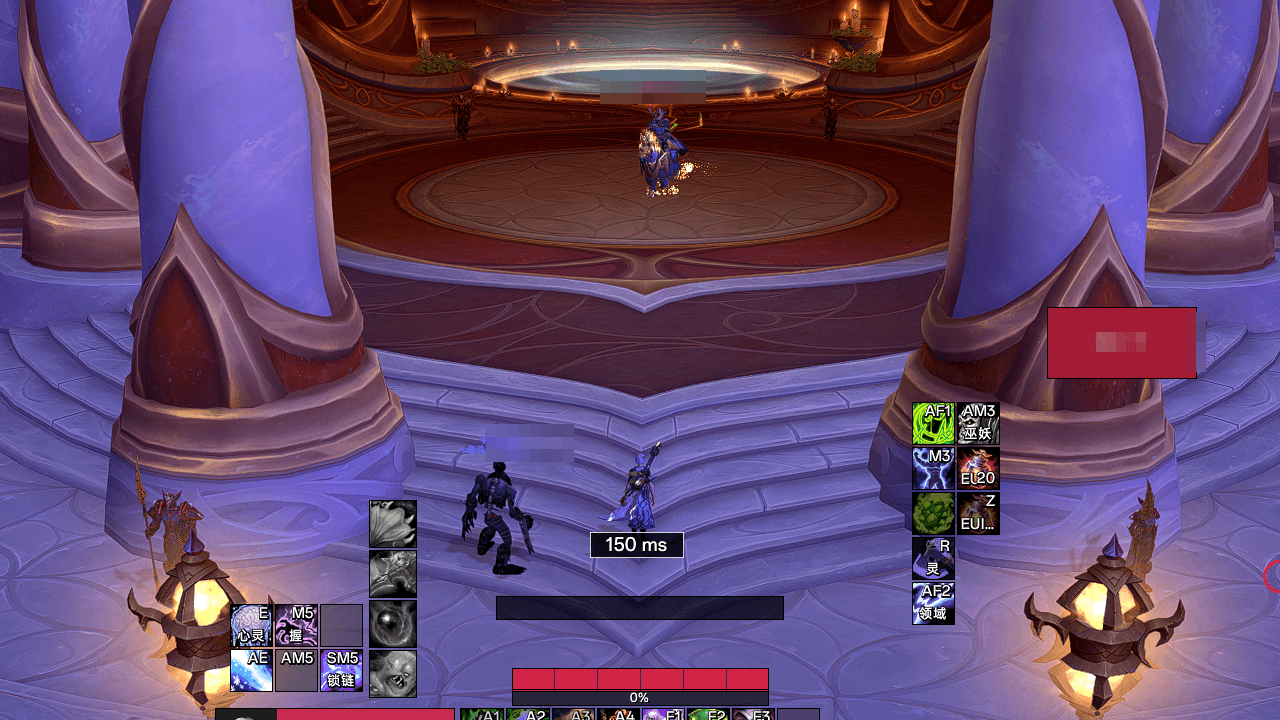
The number on screen talks — that number is the tolerance value (e.g. 220 ms), but its colour is about your connection: white when normal (border included), red once clearly worse than your usual. The rule is relative to your own normal, so a player who lives at 200 ms is not stuck looking at red.
What it is NOT (please read this part)
- No automation: it doesn't cast, press keys, run a rotation, or decide anything.
- No combat-log reading, no network calls, no telemetry, no data collection.
- The only thing it changes is the number you could change yourself with
/console SpellQueueWindow 200.
Ownership is deliberate: it only restores your value while its own value is still in place — if you or another addon changed it, it drops ownership and never overwrites you. It never writes during combat, it puts your value back before logout, and every write is verified by reading it back.
Who benefits: melee and combo-point DPS in M+ and raid; anyone above ~80 ms; casters who want cleaner end-of-cast chaining. Honest version: this is not an "install it and your DPS goes up" addon — it tunes feel. If you never noticed a problem, 400 was probably fine for you.
FAQ, short version: conflicts with other addons touching the same CVar (install only one); re-measures immediately on login / zone change / entering instances, then one drift check every 5 minutes; your value comes back when you disable it, because that value is yours. Retail 12.x only. It writes one local CVar — the same thing you can do with /console — and never touches combat logic, so it is not bannable material; still, never install anything that claims to play the game for you.
Feedback: GitHub Issues. MIT license.
简体中文
坦克、治疗、近战、远程,每个专精的节奏都不一样——插件给每个专精各自的施法容限(SpellQueueWindow)基准值,再用算法叠上你的延迟。不是固定数字,也不用你手动调;面板只有两个复选框。
「施法容限」到底是什么 :老玩家都经历过:读条快结束了,你按了下一个技能,游戏「记住」了这次按键,读条一结束立刻接上。这个缓冲区就叫施法队列,SpellQueueWindow 是它的长度(中文客户端里这个选项就叫施法容限),含义是「在当前读条 / GCD 结束前多少毫秒按下的键还算数」。暴雪默认给 400ms——对 20~60ms 的人,它同时意味着:你手滑按错的那个技能,也在 0.4 秒内都算数。
为什么有人觉得「卡手」,有人觉得「黏键」 :窗口太小,按早了不算数,出现肉眼可见的空档;窗口太大,你按了 A 又改按 B,服务器先收到了 A。近战和连击点职业最敏感:GCD 短、按键频率高,400ms 差不多能盖住半个 GCD。所以它不该是固定值。
这个插件做的事 :按专精给手感基线,叠上世界延迟与自适应余量(按实测抖动算,30–150ms)取大;城里只用基线,副本 / 团本 / 野外跟延迟走;夹在 0~400ms 内;之后不再固定轮询,只在登录、换区、进副本团本或延迟真的漂移时重测。学到的延迟跨会话记住。
面板里只有两个复选框 :「启用自动调整」和「显示悬浮状态条」。余量、写入阈值、延迟来源、上下限、检测频率全部由插件按实测数据决定。屏幕上的数字会说话:数字本身是容限值,颜色说的是你的网络——正常白色,明显高于平时转红;悬停会写明为什么。
它不是什么 :不自动施法、不代按键、不做输出循环、不读战斗日志、不联网、无遥测。它改的就是你自己也能用 /console SpellQueueWindow 200 改的那个数字。所有权设计很讲究:只在仍是自己的值时归还,绝不覆盖你;战斗中不写;登出前归还;每次写入读回校验。
常见问题:与同类插件冲突(只装一个);登录 / 换区 / 进本立刻重测,稳定后每 5 分钟一次漂移检查;关掉插件值会还原,因为那个值是你的。仅正式服 12.x。反馈走 GitHub Issues。MIT 许可。
繁體中文
坦克、治療、近戰、遠程,每個專精的節奏都不一樣——插件給每個專精各自的施法容限(SpellQueueWindow)基準值,再用演算法疊上你的延遲。不是固定數字,也不用你手動調;設定頁只有兩個核取方塊。
「施法容限」到底是什麼 :老玩家都經歷過:詠唱快結束了,你按了下一個技能,遊戲「記住」了這次按鍵,詠唱一結束立刻接上。這個緩衝區就叫施法佇列,SpellQueueWindow 是它的長度(中文用戶端裡這個選項就叫施法容限),含義是「在目前詠唱 / GCD 結束前多少毫秒按下的鍵還算數」。暴雪預設給 400ms——對 20~60ms 的人,它同時意味著:你手滑按錯的那個技能,也在 0.4 秒內都算數。
為什麼有人覺得「卡」,有人覺得「黏」 :視窗太小,按早了不算數,出現肉眼可見的空檔;視窗太大,你按了 A 又改按 B,伺服器先收到了 A。近戰和連擊點職業最敏感:GCD 短、按鍵頻率高,400ms 差不多能蓋住半個 GCD。所以它不該是固定值。
這個插件做的事 :依專精給手感基線,疊上世界延遲與自適應餘量(依實測抖動計算,30–150ms)取大;城裡只用基線,副本 / 團本 / 野外跟延遲走;夾在 0~400ms 內;之後不再固定輪詢,只在登入、切換區域、進副本團本或延遲真的漂移時重測。學到的延遲跨登入記住。
設定頁裡只有兩個核取方塊 :「啟用自動調整」和「顯示浮動狀態列」。餘量、寫入門檻、延遲來源、上下限、偵測頻率全部由插件依實測資料決定。畫面上的數字會說話:數字本身是容限值,顏色說的是你的網路——正常白色,明顯高於平時轉紅;滑鼠停留會寫明為什麼。
它不是什麼 :不自動施法、不代按鍵、不做輸出循環、不讀戰鬥紀錄、不連網、無遙測。它改的就是你自己也能用 /console SpellQueueWindow 200 改的那個數字。所有權設計很講究:只在仍是自己的值時歸還,絕不覆蓋你;戰鬥中不寫;登出前歸還;每次寫入讀回驗證。
常見問題:與同類插件衝突(只裝一個);登入 / 切換區域 / 進本立刻重測,穩定後每 5 分鐘一次漂移檢查;關掉插件值會還原,因為那個值是你的。僅正式服 12.x。回報走 GitHub Issues。MIT 授權條款。
The AutoSpellQueue Team