CraftPro
Record a recipe in one click from the crafting page or either order page: required / have / missing per material, with quality. Holdings count bags, bank and warband bank. Click a material to search the AH, or share the list in chat as item links.
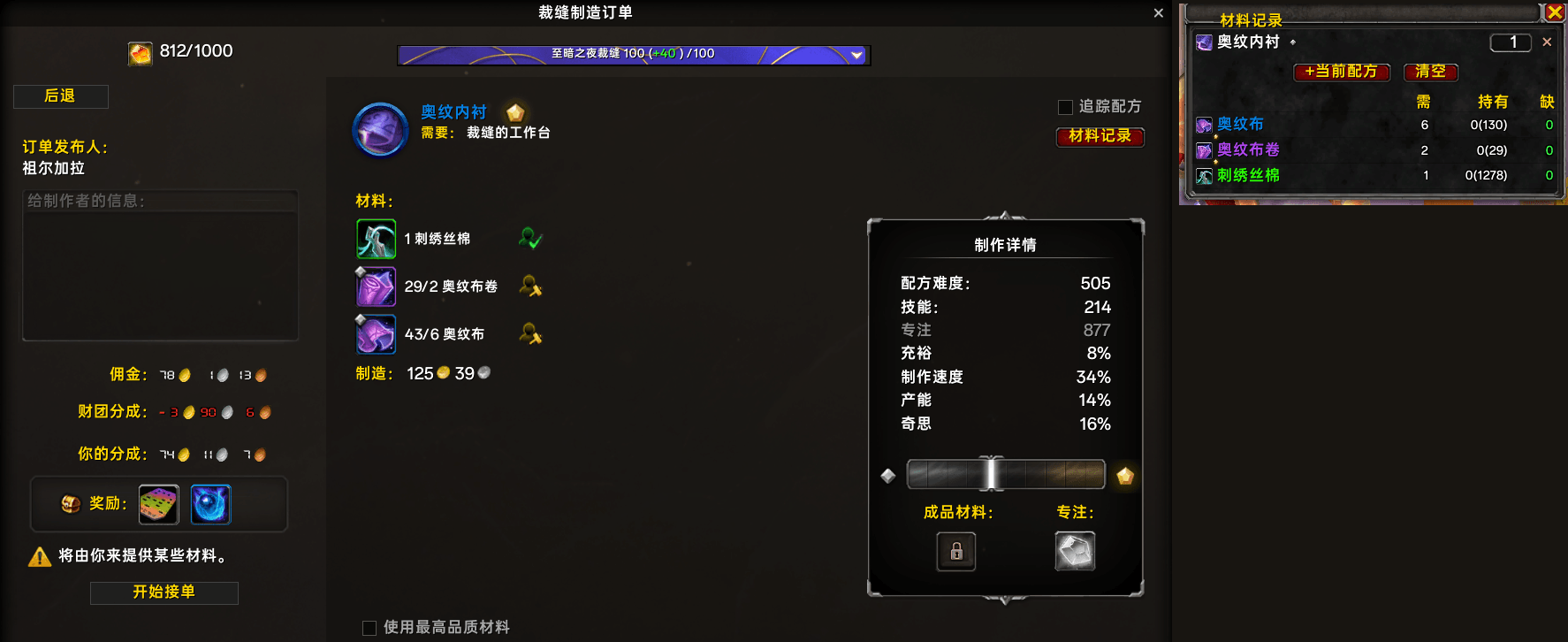
The order detail page in the crafting-orders tab and the material list: every material matches what the page shows, including the amount the order asks for.
Description
Crafting material checklist.
You know the moment: you are about to craft something and you cannot quite remember what the reagent is called, or which quality tier the recipe wants. So you get to the auction house and type the name out by hand. And once you are there, you still do not know whether the material is already in your bank, or in the warband bank from another character - so you buy it again, and it goes to waste.
CraftPro was built for that moment. Open a recipe, click one button, and it is on the list. The list then answers, for every material: how many the recorded recipes need, how many you actually have, and how many are still missing.
- Record from wherever the recipe shows up: the crafting page, the page where you publish a crafting order, and an order you opened in the profession window's crafting-orders tab. All three use the same recording path, so what lands in the list is exactly what the page shows.
- No more typing at the auction house: click a material row and the auction house opens with that material already searched.
- Share the list without retyping: outside the auction house, a click on the list writes every material into your chat line as a clickable item link, with the required amount. Hovering a link shows the item tooltip, so whoever receives it knows exactly what to bring.
- Quality is shown, not guessed: a badge appears only when that material really has quality tiers, the same rule the game page uses - materials without a quality difference get no stars - and names stay aligned in one column. The required amount follows the quality tier selected on the page, and on an order page the amount that order actually asks for.
- No more buying what you already have: holdings count your bags, your bank, your reagent bank and the warband bank - and the warband bank is shared across your characters, so what another character put there counts too.
- Auction-house purchases still in transit count toward "have" and are absorbed on arrival.
- One list holds up to 20 recipes; the same material used by several recipes is merged into one row.
- Minimap button to open or close the window.
It does not craft, does not press keys, calls no order-writing API, makes no network requests and collects no data. It never guesses: when the data for the page you are looking at is not available - a recraft, for example, has no stable per-craft material cost - it says why instead of recording something wrong.
简体中文
制作材料清单。
你大概遇到过这个场景:准备做一件东西,却想不起材料叫什么、要几星的品质;只好到拍卖行一个字一个字打出来搜。而且到了那儿,你也不确定银行里、或者别的角色放在战团银行里的那些是不是还有 —— 于是又买一份,白花钱。
CraftPro 就是为这个场景做的。打开配方,点一下按钮,它就被记进清单;之后清单逐材料告诉你:已记录的配方一共要多少、你手上实际有多少、还缺多少。
- 配方出现在哪就能在哪记:制作页、发布制造订单页,以及专业窗口「制造订单」页签里打开的订单。三处走同一条记录管线,记下的就是页面上显示的那一份材料。
- 拍卖行不用再打字:点一下材料行,拍卖行直接带着这个材料名打开搜索。
- 分享清单不用手打:不在拍卖行时,点一下清单就把所有材料以可点的物品链接写进聊天栏,链接后跟需求量;鼠标移到链接上会显示物品提示框,收到的人一看就知道要带什么。
- 品质是如实显示、不是猜的:只有该材料本身确实分品质档时才画徽标(判据与游戏页面一致),没有品质差异的材料不会被打上星数;材料名在同一列对齐。需求量跟随页面上选定的品质档;订单页则跟随这一单实际要求的数量。
- 不会再把已有的又买一遍:持有量来自背包、银行、材料银行与战团银行;战团银行是账号内所有角色共用的,别的角色放进去的材料也一并算进来。
- 拍卖行里还没到货的买入计入持有,到货后自动吸收。
- 一份清单最多放 20 个配方;多个配方用到同一种材料时合并成一行。
- 小地图按钮:左键开关窗口。
它不代做、不按键、不调用下单写接口、不发网络请求、不收集数据。它也绝不猜数:当前页面的数据拿不到时 —— 例如再造配方没有稳定的单次材料消耗 —— 会说明原因,而不是记一个错的进去。
繁體中文
製作材料清單。
你大概遇過這個場景:準備做一件東西,卻想不起材料叫什麼、要幾星的品質;只好到拍賣場一個字一個字打出來搜尋。而且到了那兒,你也不確定銀行裡、或者別的角色放在戰團銀行裡的東西是不是還有 —— 於是又買一份,白花錢。
CraftPro 就是為這個場景做的。打開配方,按一下按鈕,它就被記進清單;之後清單逐材料告訴你:已記錄的配方一共要多少、你手上實際有多少、還缺多少。
- 配方出現在哪就能在哪記:製作頁、發佈製造訂單頁,以及專業視窗「製造訂單」頁籤裡打開的訂單。三處走同一條記錄管線,記下的就是頁面上顯示的那一份材料。
- 拍賣場不用再打字:點一下材料列,拍賣場直接帶著這個材料名開啟搜尋。
- 分享清單不用手打:不在拍賣場時,點一下清單就把所有材料以可點的物品連結寫進聊天列,連結後接需求量;滑鼠移到連結上會顯示物品提示框,收到的人一看就知道要帶什麼。
- 品質是如實顯示、不是猜的:只有該材料本身確實分品質檔時才畫徽標(判據與遊戲頁面一致),沒有品質差異的材料不會被打上星數;材料名稱在同一列對齊。需求量跟隨頁面上選定的品質檔;訂單頁則跟隨這一單實際要求的數量。
- 不會再把已有的又買一遍:持有量來自背包、銀行、材料銀行與戰團銀行;戰團銀行是帳號內所有角色共用的,別的角色放進去的材料也一併算進來。
- 拍賣場裡還沒到貨的買入計入持有,到貨後自動吸收。
- 一份清單最多放 20 個配方;多個配方用到同一個材料時合併成一列。
- 小地圖按鈕:左鍵開關視窗。
它不代做、不按鍵、不呼叫下單寫入介面、不發網路請求、不收集資料。它也絕不猜數:目前頁面的資料拿不到時 —— 例如再造配方沒有穩定的單次材料消耗 —— 會說明原因,而不是記一個錯的進去。
The CraftPro Team