Stats Log: WoW Forever Statistics
- By
Per-character snapshots & account totals log for WoW: Forever statistics
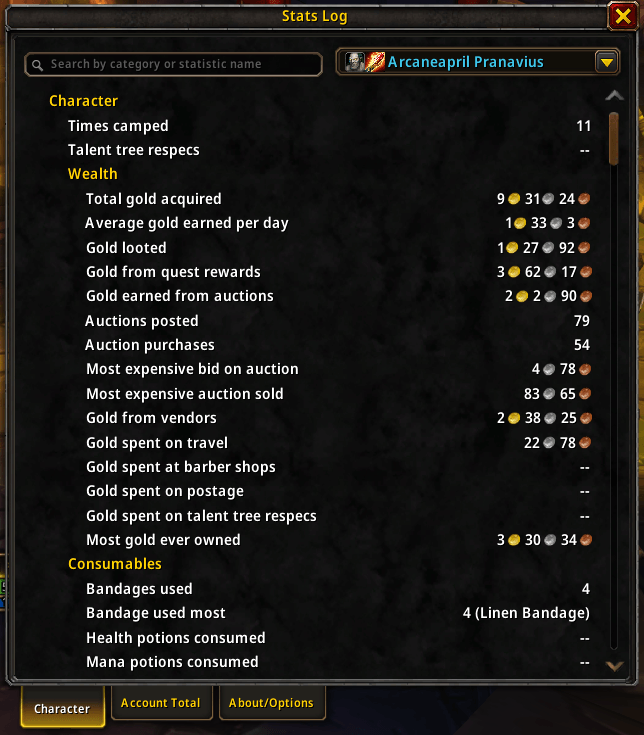
Description
Stats Log
Per-character snapshots & account totals log for WoW: Forever statistics
Feedback on this AddOn or any others that I develop/maintain is always welcome. If you enjoy using any of my AddOns and would like to support future development, it is greatly appreciated.



Highlights
- Browse all statistics tracked by the game, grouped by parent and child category
- Combines statistics from every character the AddOn has seen to display account-wide totals
- View any tracked character's statistics, even if it's not the one you're currently playing on
- Search bar to find specific categories or statistics
Summary
Stats Log satisfies your inner analyst by exposing character statistics outside the Character Info window in a digestible report-style format and also includes the capability to aggregate ad sum statistics values across account-wide in WoW: Forever. All statistics data shown is captured from what the game tracks automatically.
Upon certain in-game events, your character's current statistics are snapshotted and saved to the AddOn's database. This allows you to search and review statistics for that character even if you're logged into another character.The account totals for statistics are derived from these snapshots with the goal of staying as accurate and up-to-date as possible.
There is currently no method for tracking custom statistics since rendered values are based on what is available behind the scenes in-game.
When statistics snapshots are updated
- Character log in and log out
- Reloading the UI
- Opening the AddOn window
- Entering or leaving a resting area (at most every 10 seconds)
Known Issues
These statistics appear to be wrong on the Forever server itself: they count criteria with any progress instead of completed ones. There isn't any indication of this when viewing the statistics shown in the Character Info window, but the AddOn shows a warning icon next to these.
- Most Horde factions at Exalted
- Weapon skills at maximum skill
Supported Languages
All game data is sourced from the server directly and should display in the appropriate language. For any additional text, the following languages are supported:
- English (
enUS)
Usage
Type either /statslogor /stats in the chat frame to open the AddOn window.
- Character: Statistics for one character, chosen from the dropdown (current character by default)
- Account Totals: Statistics combined across all tracked characters
- About/Options: AddOn info and credits and an option to reset AddOn data
Both statistics tabs have a search box that filters by category or statistic name.
Planned Updates
- Increased language support (Looking for translators!)
- View for statistics comparisons against other players who also have the AddOn enabled
Stats Log: WoW Forever Statistics Team