Description
Soundrunner
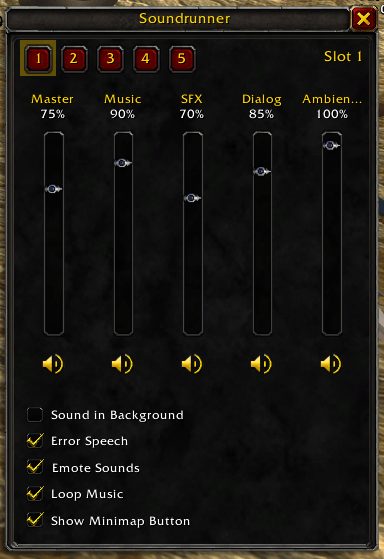
A compact volume mixer with five sound presets you can switch between in one click.
Soundrunner puts every sound channel on one small panel, so you can crank the music for a raid, mute ambience and music while you quest with your second monitor content of choice, or cut everything but dialog for a cutscene because of your old man ears, without digging through the game menu.
Features
A fader for every channel
- Master, Music, Sound Effects, Dialog and Ambience, each with its own fader and a live percentage readout.
- Drag a fader, or scroll the mouse wheel over it to move 5% per notch.
- Any channel your game client doesn't support is simply left out.
One-click mute
- A speaker button under each fader mutes or unmutes that channel.
- Muting never touches the volume, so unmuting brings the channel back exactly where it was.
- Muted channels dim, but their fader still works, so you can set the level before unmuting.
Extra sound options
- Sound in Background, Error Speech, Emote Sounds and Loop Music, as checkboxes on the same panel.
Five sound presets
- Numbered slot buttons along the top of the panel. Click one to switch to it.
- There's no Save button: every change you make is saved to the preset you're on, automatically.
- Right-click a slot to rename it, e.g. "Raid", "Questing" or "Streaming".
- Every preset starts out at Blizzard's default sound settings.
- Switching presets mutes first and unmutes last, so you never hear the volumes changing in between.
Stays in sync
- Change your sound in Blizzard's settings or through another addon, and the panel and your current preset update to match.
Stays out of your way
- Open it from the minimap button (drag it anywhere around the minimap edge) or a slash command.
- Right-click the minimap button to switch presets without opening the panel at all.
- Don't want another minimap button? Untick "Show Minimap Button" on the panel, pick "Hide Minimap Button" from its right-click menu, or type
/vol minimap. - Move the panel wherever you like. Its position, and whether it was open, survive a /reload.
- Press Escape to close it.
Slash commands
/vol,/sror/soundrunner: open or close the mixer./vol minimap: hide or show the minimap button.
Notes
- Presets are saved account-wide, so all your characters share them.
- Soundrunner only changes settings that take effect instantly. It never touches settings that need a game restart.
The Soundrunner Team