SoulShard Auto Deleter

Type how many Soul Shards to keep and the extras are deleted automatically as you play. Does nothing on other classes.
WowB_DOoEnN9Lt0.png

WowB_DOoEnN9Lt0.png

Description

Soul Shard Auto Deleter

Keep your shards. Reclaim your bags.

Choose how many Soul Shards your Warlock keeps. The addon automatically deletes extras as you play, freeing up bag space for everything else.

After trying every Soul Shard addon on Curse, I built this one with the features I wanted and nothing extra. No bloat, just lean code built for speed and efficiency. It does one thing and does it really well.


You might also like my Healthstone Auto Addon… check it out!


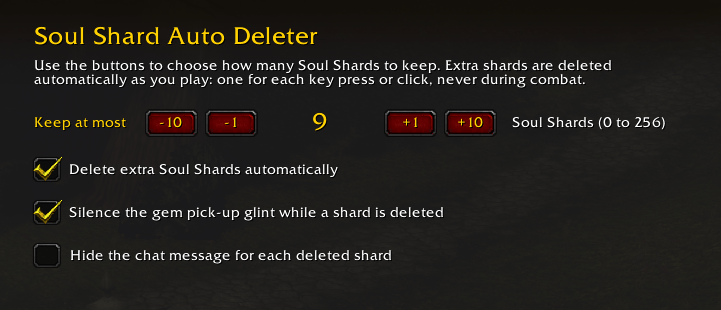
Soul Shard Auto Deleter settings

Get started

  1. Type /ssad to open settings.
  2. Use the −10, −1, +1, and +10 buttons to choose your shard limit.
  3. Keep playing. Extra shards are deleted as you press keys or click the game world.

Prefer a command? Type /ssad cap 5 to keep up to 5 Soul Shards.

You can also find settings under Game Menu > Options > AddOns > Soul Shard Auto Deleter.

Your limit. One shard at a time.

Blizzard requires a real key press or mouse click to delete an item. Each eligible input deletes one extra Soul Shard until you reach your chosen limit.

Your keys and clicks still work normally. A short chat message confirms each deletion.

Built with safeguards

  • Only deletes Soul Shards above your chosen limit.
  • Never deletes during combat.
  • Never deletes while an item is on your cursor.
  • Skips stacked shards to avoid deleting more than one at a time.
  • Stays off until you choose a limit.

To pause, untick the enable box or type /ssad off.

Friendly to your alts

Leave it enabled across your characters. On non-Warlocks, the addon stays inactive: no frames, registered events, or settings page.

Quick commands

  • /ssad : Open settings
  • /ssad cap 5 : Keep up to 5 Soul Shards
  • /ssad off : Stop deleting

Made for WoW Forever · Interface 16001

SoulShard Auto Deleter Team

profile avatar
Owner
  • 2
    Followers
  • 5
    Projects
  • 759
    Downloads

More from MaggewView all

  • Healthstone Auto project image

    Healthstone Auto

    Warlocks: one button or one hotkey creates a Healthstone, trades it to your target, and confirms the trade. Just spam it.

    • 11
    • October 10, 2026
  • Hide 2FA Bag Slots project image

    Hide 2FA Bag Slots

    Hide the locked 2FA authenticator bag slots and padlock "+" button. Clean backpack, full rows.

    • 43
    • October 10, 2026
  • FullSteel project image

    FullSteel

    FullSteel plays epic Varian roars on Charge/Intercept/Intervene and Diablo 2 barbarian shouts on warrior shouts, with per-ability toggles, volume sliders, and sound selection.

    • 552
    • February 26, 2026
  • Right Click Armor project image

    Right Click Armor

    Create a right click menu item that lets you copy a link to your clipboard so you can paste it into your browser and view character online.

    • 74
    • February 25, 2026
  • Healthstone Auto project image

    Healthstone Auto

    Warlocks: one button or one hotkey creates a Healthstone, trades it to your target, and confirms the trade. Just spam it.

    • 11
    • October 10, 2026
  • Hide 2FA Bag Slots project image

    Hide 2FA Bag Slots

    Hide the locked 2FA authenticator bag slots and padlock "+" button. Clean backpack, full rows.

    • 43
    • October 10, 2026
  • FullSteel project image

    FullSteel

    FullSteel plays epic Varian roars on Charge/Intercept/Intervene and Diablo 2 barbarian shouts on warrior shouts, with per-ability toggles, volume sliders, and sound selection.

    • 552
    • February 26, 2026
  • Right Click Armor project image

    Right Click Armor

    Create a right click menu item that lets you copy a link to your clipboard so you can paste it into your browser and view character online.

    • 74
    • February 25, 2026