Screenshot 2026-09-12 093028.png
Description
SnapSnack
The ultimate consumable management addon for WoW Classic
Supports: TBC Classic, Classic Era, and Classic Anniversary!
SnapSnack gives you quick, organized access to all your consumables through customizable icon grids. Click to use potions, food, elixirs, and more - all from a clean, configurable interface. Automatic bars keep your food, potions, teleports, weapon enchants and ammo up to date on their own, so the right item is always one click away.
Automatic Bars
Bars that fill themselves from your bags and keep up as you loot, level and zone - no lists to maintain.
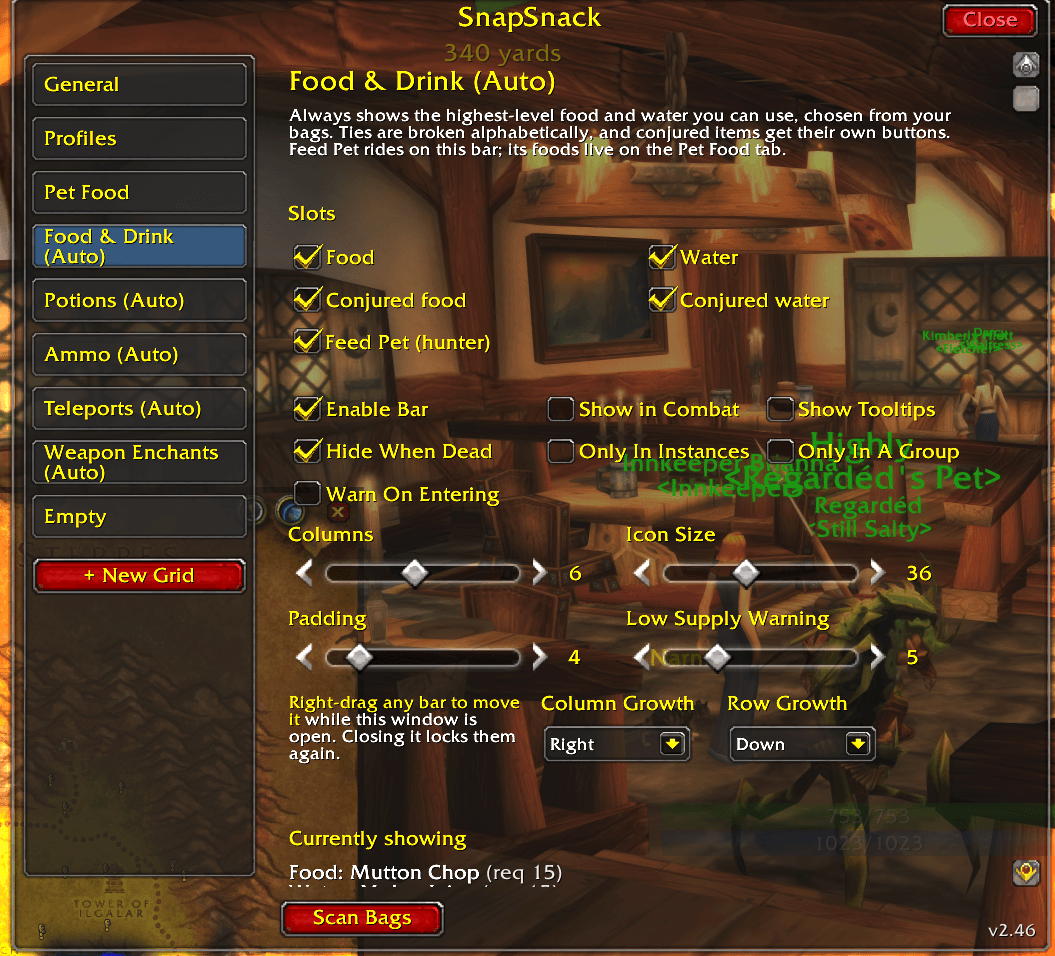
🍖 Food & Drink
- Always shows the highest-level food and water your character can actually use
- Conjured food and water get their own buttons alongside the vendor ones
- Table food wins the conjured slots - a Conjured Manna Biscuit from a Ritual of Refreshment outranks hand-conjured food and water, and shows as one button since it restores both
- Upgrade arrow - a small green arrow appears when you have outlevelled the food or water you are carrying, a nudge to restock
- Each slot can be turned off, and the whole bar can be disabled
🧪 Potions
- Best health potion and best mana potion, ranked by how much they actually restore - so a lower-level potion that heals more still wins
- Zone consumables appear alongside them wherever they work - walk into Tempest Keep and Bottled Nethergon Energy shows up, walk out and it goes away
- Healthstones and Mana Gems get their own buttons, counting every rank together and using the strongest first
- Bandages get their own slot, ranked by healing and shown only once your First Aid skill can use them
- Right-click the bandage to bandage your pet - your current target is never changed, and the button wears your pet's portrait while it can do this
- Right-click a potion for the alternatives - every health potion, mana potion, zone potion or bandage you carry, strongest first, with counts. Handy when the big one is on cooldown
- Anything you cannot use right now - under-level or out of its zone - never appears
- Stays visible in combat by default
Teleports
- Hearthstone, and substitutes such as Naaru's Embrace, which take its place
- All four engineering teleporters - Gadgetzan, Toshley's Station, Everlook and Area 52
- Parachute Cloak, while you carry a transporter - first click equips it, the next opens it
- Mage teleports and portals as two flyout buttons, found from your spellbook so new ones appear the moment you train them, in any language. Flyouts close themselves after 10 seconds
- An Extra Teleports list for anything else
⚔️ Weapon Enchants
- The best sharpening stone, weightstone or oil in your bags for each hand
- Each hand is only offered what its weapon can take - no sharpening stone for a mace, and no button for a shield or empty hand
- Rogue poisons take priority for rogues, defaulting to Instant on the main hand and Deadly on the off hand, with a per-hand override
- Left-click applies to the main hand, right-click to the off hand
- The icon counts down the enchant on your weapon and turns into a red
!the moment it lapses
🏹 Ammo (Hunters)
- Your equipped ammo and how much is left, on a bar of its own that you can put anywhere
- Low-supply warning defaults to 200, since ammo is counted in hundreds
Feed Pet (Hunters)
- A Feed Pet button on the Food & Drink bar, shown while your pet is out
- Picks the food itself - anything in your bags your pet could eat, highest level first. Drinks, buff food, alcohol and cooking reagents are left out
- Learns silently - food your pet refuses is dropped for that pet family and never offered again
- Each pet family keeps its own list, and lists can be preset for all 17 tameable families
- Its own config tab, with an editable feed order, colour-coded by how well each food suits your pet's level
- Prefer to choose? Untick automatic and build the list by hand
Features
Multiple Customizable Grids
- Create as many independent grids as you need to organize your consumables
- Drag items straight from your bags onto a bar - on a button to insert it there, on the background to add it at the end. Drag a button off to remove it
- Right-drag to position any bar while the config window is open; closing it pins them again. No locks, no handles
- Give each grid a custom name for easy identification
️ One-Click Item Usage
- Click any consumable icon to instantly use it
- Works with potions, food, elixirs, flasks, bandages, scrolls, and more
- Follows your Press and Hold Casting setting, so clicks fire the way you expect
Make Your Own
- Warlocks - an empty Healthstone slot becomes Create Healthstone
- Mages - an empty conjured food, water or Mana Gem slot becomes the conjure
- Right-click to make more even when the slot is not empty - top up before a run without opening your spellbook
Keybind Support
- Bind keyboard shortcuts to any consumable slot
- Keys follow the item (or the automatic slot), so they never wander onto something else as your bags change
- Easy keybind mode - just press
/ss bind, click a slot, press your key
Smart Buff Detection
- Outside cities: Items with active buffs automatically hide from the grid
- Inside cities: Buffed items appear desaturated (grayed out)
- Buff timers on icons show how long your flask, elixir or food has left
- Never waste consumables by accidentally re-buffing!
- City detection includes sanctuaries (Shattrath) and rest areas
Inventory Tracking
- See item counts directly on each icon
- Low supply warning - counts turn amber below a per-bar threshold and red at zero, with an optional chat line as you zone into a dungeon or raid
/ss restock- everything you are short of, grouped by bar, and whether the rest is in your bank or on an alt- Bank tracking - tooltips show how many are in your bank
- Alt tracking - see counts from your other characters
️ Cooldowns And Timers
- Cooldown sweeps on every icon
- Cooldown numbers in the middle of the icon, red under five seconds - off automatically when OmniCC, tullaCC, CooldownCount or ElvUI is loaded
- Counts, cooldowns and timers keep updating during combat
️ Visibility Rules
- Show in Combat per bar - off keeps your screen clean during fights
- Hide When Dead - on by default for the automatic bars
- Only In Instances and Only In A Group - show a bar only where you need it
Full Visual Customization
- Icon Size: 16-64 pixels
- Columns: 1-12 icons per row
- Padding: Adjustable spacing between icons
- Growth: Choose which way columns and rows grow
- Tooltips: Show/hide item tooltips on hover
- Minimap button, draggable anywhere, with a size slider
Per-Character Profiles
- Every character gets its own grids, positions, and keybinds
- Copy another character's layout across, reset a character, or delete a stored profile
- Bank and alt counts stay shared, so cross-character tooltips keep working
How To Use
Getting Started
- Install the addon and
/reload - Type
/ssto open the configuration panel - Click "Add Grid" to create your first consumable grid
- Drag items from your bags onto it, or search for them in the dropdown
Slash Commands
| Command | Description |
|---|---|
/ss |
Open configuration panel |
/ss bind |
Toggle keybind mode |
/ss scan |
Rescan bags for new consumables |
/ss restock |
What you are short of, and what is in the bank or on an alt |
/ss auto |
Report what the automatic bars selected, and why |
/ss petfood |
Pet food order and what has been ruled out |
/ss why |
Why each potion candidate is or is not on the bar |
/ss data |
Check every hand-entered item ID against the client |
/ss vis |
Why each bar is or is not on screen |
/ss click |
What each visible button will do when clicked |
/ss debug |
Dump internal state |
/ss reset |
Reset this character's settings |
Alternative commands: /snack, /snapsnack
Moving Bars
- Open the config window with
/ss- every bar shows a gold border and its name - Right-drag any bar (the icons work too) to where you want it
- Close the window - the bars are pinned again
Bars cannot be moved during combat.
Setting Up Keybinds
- Type
/ss bindto enter keybind mode (grids turn blue) - Click the consumable slot you want to bind
- Press the key you want to assign
- Press ESC to clear a binding, or click another slot
- Type
/ss bindagain or press ESC to exit keybind mode
Adding Consumables
The quick way: drag an item out of your bags and drop it on a bar - on a button to insert it there, on the background to add it at the end.
From the config window:
- Open config with
/ss - Select a grid from the left navigation panel
- Click in an empty item dropdown slot
- Start typing the item name to search
- Click the item from the dropdown list
- The item appears in your grid immediately
Tips & Tricks
- Quick buff check: Glance at your grid - if an elixir/flask is hidden, the buff is active!
- Organize by purpose: Create separate grids for "Raid Buffs", "PvP Consumables", "Food & Water", etc.
- Healer setup: Put mana pots and bandages in a small grid near your raid frames
- Tank setup: Health pots, armor consumables, and healthstones in easy reach
- Before a raid: run
/ss restockto see what to buy and what to pull from the bank - Alt tracking: The addon remembers consumable counts across all your characters
Configuration Options
Per-Grid Settings
- Enable/Disable - Toggle the entire grid
- Grid Name - Custom label (shows in tooltip when hovering the grid)
- Columns - Icons per row (1-12)
- Icon Size - Pixel size of icons (16-64)
- Padding - Space between icons (0-10)
- Column Growth / Row Growth - Which way the grid grows
- Show Tooltips - Toggle item tooltips on hover
- Show in Combat - Keep the grid on screen during combat
- Hide When Dead - Get out of the way while you are dead
- Only In Instances / Only In A Group - Show only where you need it
- Low Supply Warning - The count at which it turns amber
- Warn On Entering - One chat line listing what is short as you zone into a dungeon or raid
Item Management
- Add items by dragging them from your bags, or via the searchable dropdown
- Remove items by dragging them off the bar, or with the X button
- Reorder by dragging an item off and dropping it back on the button where you want it
- Per-item "hide at zero" and "show in combat"
Supported Item Types
SnapSnack automatically detects and supports:
- Potions (Health, Mana, Combat potions)
- Elixirs (Battle and Guardian)
- Flasks
- Food & Drink
- Bandages
- Scrolls
- Weapon Buffs (Oils, Sharpening Stones, Weightstones)
- Rogue Poisons
- Engineering consumables
- Healthstones and Mana Gems
- Drums
- Other consumable items
FAQ
Q: Why do some items disappear from my grid? A: Items with active buffs hide automatically when you're outside a city. This is intended behavior to reduce clutter. Go to a city/inn to see them (grayed out).
Q: Can I use items during combat? A: Yes! The buttons work during combat, and counts and cooldowns keep updating. A bar only hides in combat if its Show in Combat option is off.
Q: How do I move a bar?
A: Open the config window with /ss and right-drag the bar. There are no locks - closing the window pins everything.
Q: A button does nothing when I click it?
A: /ss click reports what each visible button is set to do, and why it might not.
Q: How do I see items from my bank/alts?
A: Hover over any item - the tooltip shows bank count and counts from other characters who have used SnapSnack. /ss restock lists the same counts for everything you are low on.
Q: My keybinds aren't working?
A: Make sure you exited keybind mode (press ESC or type /ss bind again). Also check for conflicts with other addon keybinds.
Q: How do I reset everything?
A: Type /ss reset - this will reload your UI with default settings.
Feedback & Support
Found a bug? Have a feature request? Leave a comment on the CurseForge page!
SnapSnack - Because every adventurer deserves a quick snack!
The SnapSnack Team