Compass Forever
- By
Uncover every zone map for the Explorer Legacy point: the shortest route through each zone, an arrow to every exact spot, and markers on the world map.
Description
Compass Forever
Uncover every zone map for the Explorer Legacy point without wandering around looking for the last little corner.
The Explorer Legacy challenge asks one character to uncover every zone map in Eastern Kingdoms and Kalimdor: 43 zones and 549 map areas, including Riverglades, Mount Hyjal and Shen'dralas. Some of those areas are tiny, and the game only counts them when you stand in exactly the right place. Compass Forever shows you where those places are, puts them in the best order, and points you at each one.
Features
Start a route from the world map
Open your map on any zone and a bar at the top tells you how many areas are left, with a Start route button. Every area you still need has a marker. Click any marker to go there next.
Automatic routes
Turn on Route me automatically when I enter a zone and you never have to open anything. Each time you enter a zone with areas left, a route starts and a banner tells you where to run:
Duskwood: 7 areas to uncover
Head northwest to Raven Hill, 420 yd
Every area you uncover is announced along with your next stop.
The shortest route
Routes start from where you're standing and take the shortest walk through everything left in the zone. With 11 or fewer areas left the route is exactly the shortest; with more, it's very close. If you uncover an area on the way to another, the route re-plans from where you are, so you never backtrack for nothing.
A waypoint arrow
A large arrow points at your next stop and shows the distance. It turns from red to green as you face the right way. Right-click it to skip a stop and save it for the end of the route.
A map of your progress
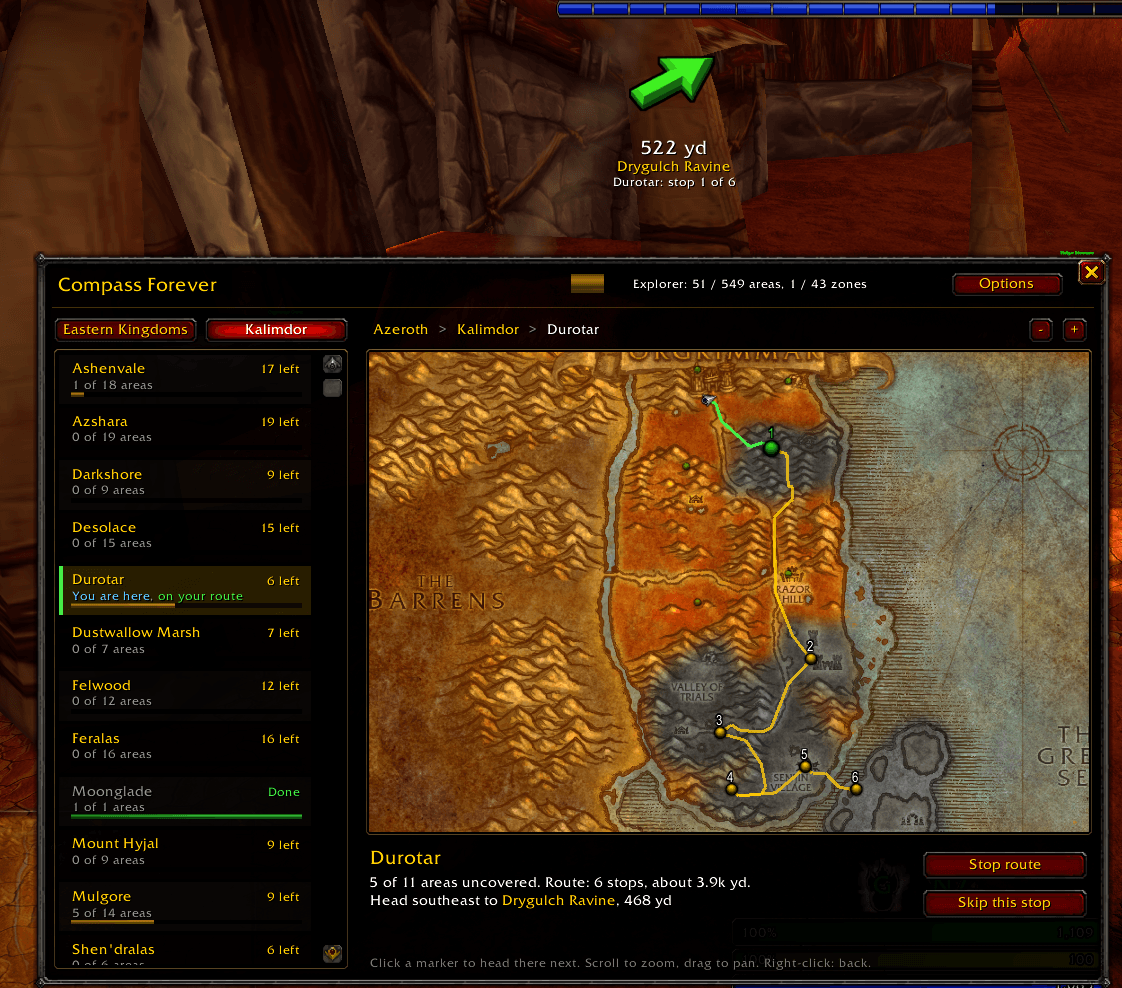
The Compass Forever window lists every zone with a progress bar. Pick one to see its real map:
- the parts you've uncovered, with fog over the rest;
- a marker on every area still to find;
- your route drawn as a line;
- you, moving along it.
A fanfare when you finish
Uncover the last area of a zone on a route and you'll get a fanfare. To use your own sound, put an Ogg file named
fanfare.ogg in the addon's Sounds folder. An update from the CurseForge app may replace that
folder, so keep a copy.
Exact spots, straight from the game
Most exploration guides give you a rough area. Compass Forever's spots come from the game's own terrain data. The game marks every 33-yard square of ground with the area it belongs to, and that's what it checks when you discover a place. For every area, Compass Forever picks spots that are:
- well inside the area, not on its edge;
- on flat ground you can walk to, not a cliff face;
- spread out, so your route can use whichever one is on its way.
The one exception is Undercity, which is entirely underground and has no surface ground of its own. Its marker is approximate and labeled that way.
Commands
| Command | What it does |
|---|---|
/cf | Open or close the window |
/cf route [zone] | Start a route through this zone, or the one named |
/cf auto | Turn automatic routes on or off |
/cf next | Show your next stop and its coordinates |
/cf skip | Save the current stop for the end of the route |
/cf stop | Stop the route |
/cf banner | Turn the on-screen messages on or off |
/cf arrow 1.5 | Arrow size, from 0.5 to 2 |
/cf probe | Show what the game is reporting; include this in bug reports |
You can also left-click the minimap button to open the window, or right-click it to start or stop a route in your current zone.
Notes
- Made for World of Warcraft: Forever.
- Exploration is per character, so progress is read separately for each character.
- Found a spot that doesn't uncover its area? Please report it with the output of
/cf probeand the zone and area name.
Compass Forever Team