Skyview
- By
Camera control for WoW Forever: zoom out as far as the client allows, tune zoom and turn speed, camera follow, and auto zoom-out on mount.
01-skyview-window.jpg
Description
Skyview
See more of Azeroth. Camera control built for WoW: Forever.
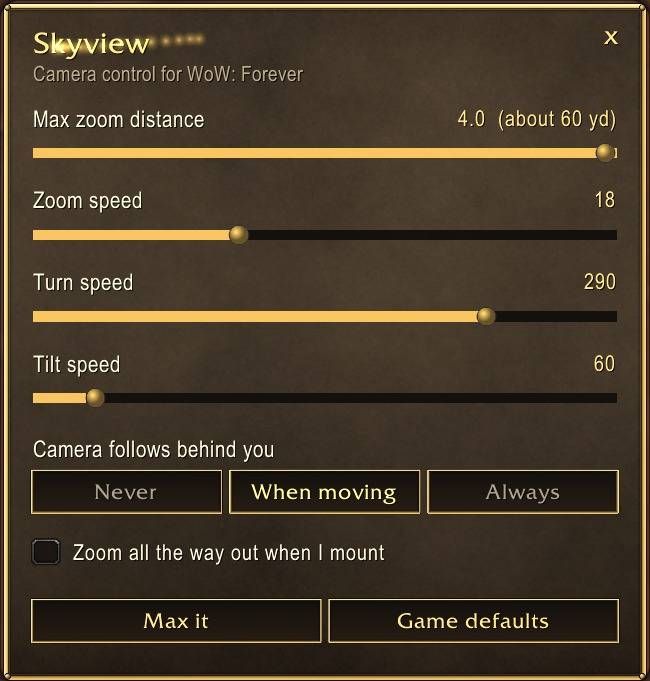
The game stops your camera at 1.9. Skyview finds out how far this client really lets you zoom, takes you there, and gives you a tidy panel for everything else the camera can do. No setup, no console commands.
What it does
- Max zoom, found for you. At login Skyview checks the client's real limit and zooms out to it. If a patch changes the limit, Skyview picks up the new one.
- Pick your distance. A slider from close-up to the furthest the client allows, shown in yards.
- Zoom, turn and tilt speed. Snappy or smooth, it's up to you.
- Camera follow. Never, only while moving, or always swing behind you.
- Zoom out when you mount. It's optional. The camera pulls all the way back when you mount, then returns to where you had it when you land.
- Max it / Game defaults. One click each.
- Keeps your settings. Loading screens sometimes reset the zoom limit, so Skyview sets it again. If you change a camera setting in the game's own options, Skyview keeps that too.
Commands
/skyview or /sky |
open the panel |
/skyview max |
furthest zoom |
/skyview 2.4 |
set a distance |
/skyview reset |
the game's defaults |
There's also a Skyview entry in the game's Options → AddOns.
Better with Classic Refined
Skyview works fine by itself. If Classic Refined is installed, it picks that up on its own:
- The panel uses Classic Refined's gilded look.
- Classic Refined hands over its camera settings, so the two never fight over the camera.
/cr zoomopens Skyview.
Made for WoW: Forever (1.60.1).
Skyview Team