Forever Angler
- By
One-key fishing for WoW Forever: F to cast, F to reel in, auto-loot, lure timer and one-click lures, skill tracker, catch log and splash boost.
01-angler-window.jpg
Description
Forever Angler
One key to cast, the same key to reel in. Fishing for WoW: Forever.
Equip a pole and press F (or any key you choose) to cast. When the bobber splashes, press it again. The fish goes straight into your bags. No hunting for the bobber with the mouse, no macros, and no fiddling with keybinds.
One-key fishing
- Cast and reel in on one key. It works only while a pole is equipped and you're out of combat. Take the pole off, or get pulled into a fight, and your key goes straight back to normal.
- Any key you like. Click Key in the window and press a key; Shift, Ctrl and Alt combos work too.
- Fish loot themselves. Fishing loot goes straight to your bags, and it can be turned off.
Hands-off tackle
- Lures on the same key. If your pole has no lure, your fishing key puts your best lure on first, then goes back to casting. When a lure runs out, the next press puts a fresh one on. WoW only lets an addon use an item on a key press, so it takes that one press.
- Your lure, your call. Change next to the lure switches between the lures in your bags, or Auto (the best one your skill can use). Lures you can't use yet are skipped.
- Tackle box. When the pole goes on, your best fishing gear from your bags goes on with it: hats, boots, gloves, anything with +Fishing. Your own gear comes back when the pole comes off. If something attacks you, your weapons go back on straight away and your armor follows once the fight ends.
- Restock at vendors. Talk to any vendor that sells lures and Forever Angler buys the best one you can use until you have 5. It never buys lures your skill can't use. You can set it to 10 or 20, or turn it off.
The Angler window
It opens when you equip a pole and closes when you take it off, or click the minimap button any time (right-click it to turn one-key fishing on or off).
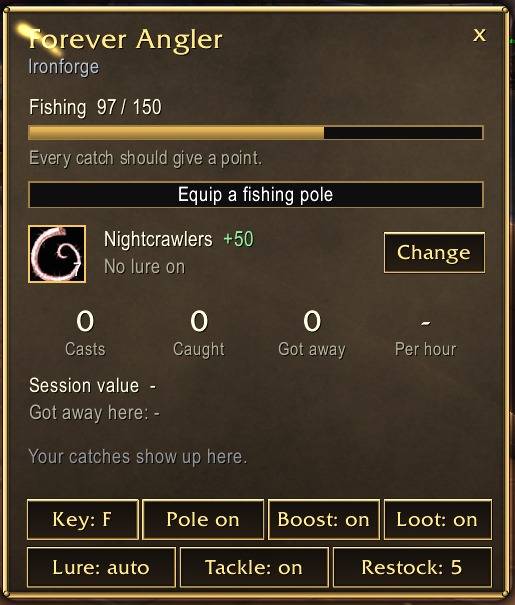
- Skill tracker: your Fishing skill, gear and lure bonus, and roughly how many catches the next point will take.
- Line timer: a bar that counts down while your line is out.
- Lures, one click: the window shows your best lure in your bags. Click it to put it on your pole. A timer shows how long the lure lasts, and you get a warning when it runs out.
- Session stats: casts, catches, fish that got away, and catches per hour.
- Session value: what your catch would sell for at a vendor.
- Catch log: icons and counts for this session. Hover over one for its all-time count.
- "Got away here": your escape rate in this zone, with a note when your skill is a bit low for the water, and the most common bites in this zone.
- Pole ↔ weapons: one button swaps between your best pole and your weapons. If something attacks you, your weapons go back on by themselves.
- Splash boost: while the pole is on, sound effects go to full and music and ambience go quiet, so you hear the splash. Your sound settings come back when the pole comes off.
Commands
/angler or /fish |
open / close the window |
/angler key G |
change the key |
/angler on / off |
one-key fishing on or off |
/angler reset |
clear session stats |
/angler auto |
open the window with the pole, or only by command |
/angler swap |
weapons back on when attacked: on or off |
/angler lure on / off |
lures on the fishing key |
/angler tackle on / off |
fishing gear swaps in with the pole |
/angler restock 5 |
lures to keep at vendors (0 = off) |
/angler minimap |
hide / show the minimap button |
Better with Classic Refined
Forever Angler works fine by itself. If Classic Refined is installed, it picks that up on its own:
- The window uses Classic Refined's gilded look.
- It takes over the fishing key you'd already set in Classic Refined.
- Classic Refined's built-in one-key fishing steps aside, so the two never fight over your key.
Made for WoW: Forever (1.60.1).
Forever Angler Team