Classic Refined
- By
A complete gilded HUD for WoW Forever: one bottom bar, unit panels, Combat Ledger, profiles and more
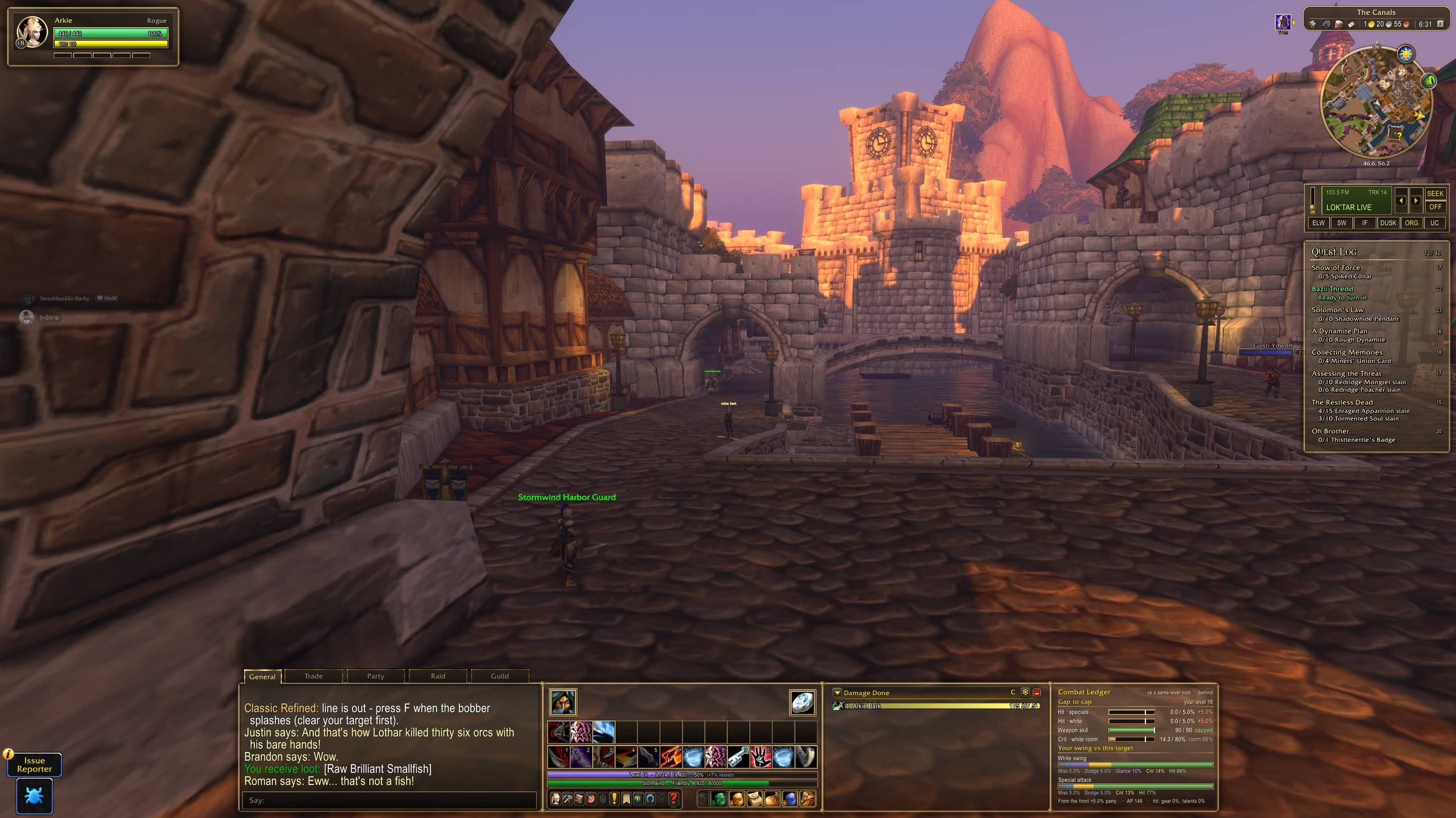
01-stormwind-canals-full-hud.jpg

02-bottom-bar-chat-bars-meter-ledger.jpg
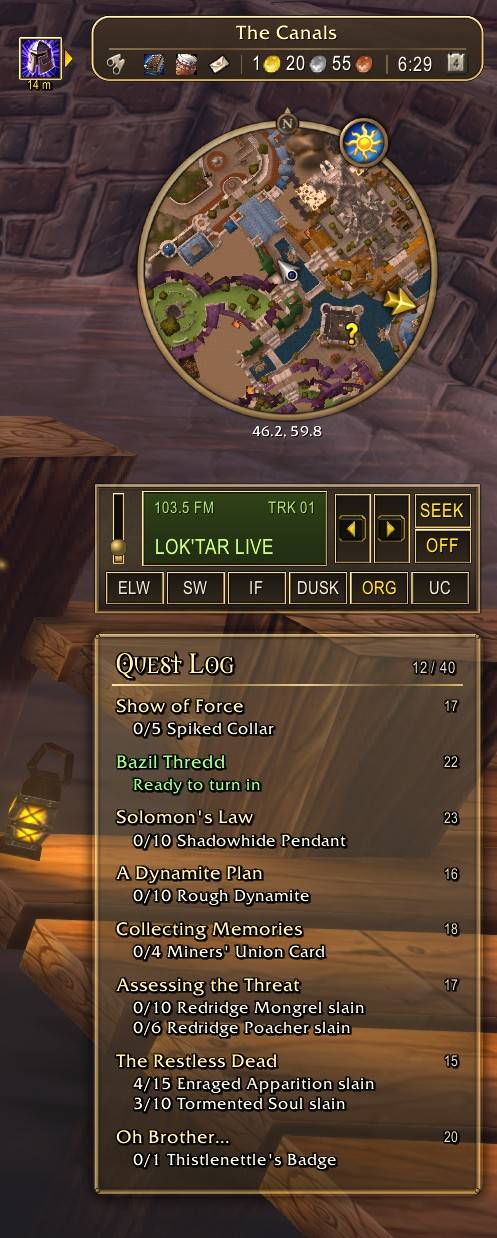
03-minimap-radio-quest-log.jpg
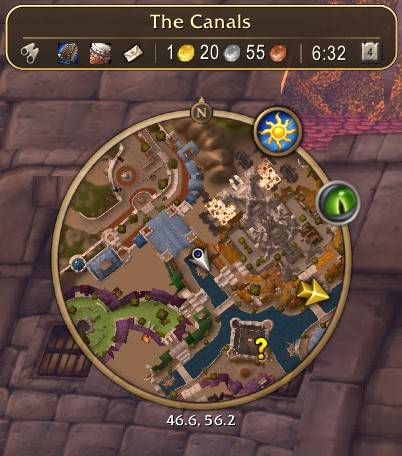
04-location-pill.jpg
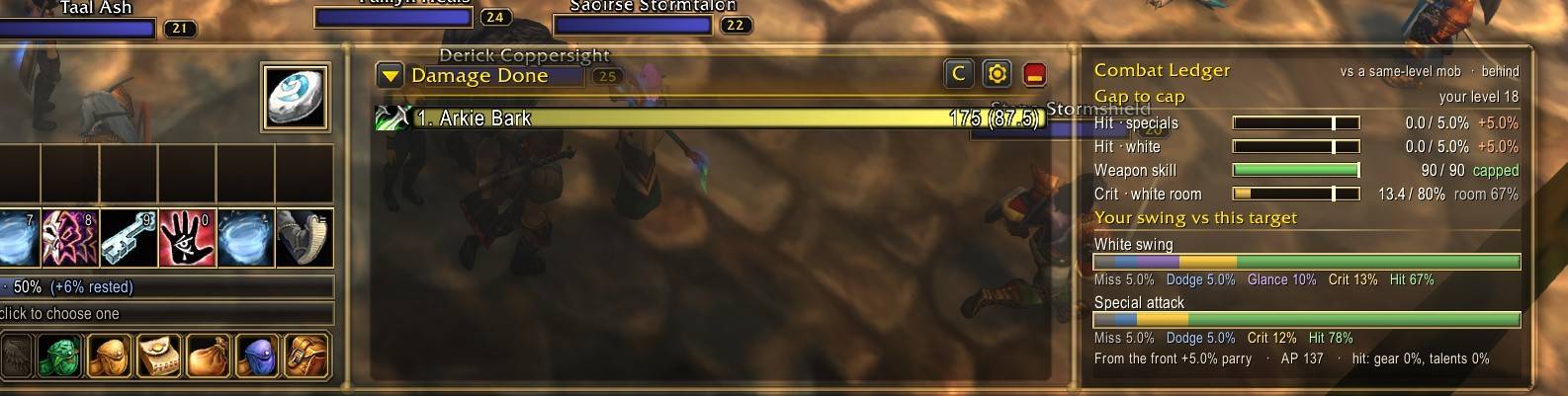
05-combat-ledger.jpg
Description
Classic Refined
A complete, gilded HUD for World of Warcraft: Forever
Leather, parchment and gold, built to feel like the game you remember, only sharper. Install it and the Classic Refined:Loaded look is there the moment you log in, fitted to your screen, from a 16:10 laptop to a 4K monitor or a 21:9 ultrawide.
⚡ Get started in 30 seconds
- Install and log in.
- The welcome window opens. Leave Use the Classic Refined:Loaded look ticked and choose any extras.
- Click Let's go. The UI reloads into the full layout.
Nothing opinionated happens without your say: key bindings, graphics and chat changes are all opt-in. Use /cr options for settings and /cr setup to see the welcome window again.
✨ Feature highlights
| One bottom bar | Chat, action bars, XP/rep, menu, damage meter and Combat Ledger in one gilded bar |
| Combat Ledger | How far each stat is from its cap against this target, and what closing the gap buys you |
| Threat dial | Easy to Deadly at a glance: your edge, its threat, and who dies first |
| Interrupt alert | Your target panel glows red when it casts something you can interrupt |
| Redesigned minimap | Gold ring, two-row location pill, coordinates, durability doll and group-finder eye |
| Compass | A gilded ring across the top of the screen: heading, coordinates, party members, your corpse and map markers |
| Collision-proof windows | Windows open side by side and never stack on each other or your party frames |
| Everything movable | Gold move boxes, snapping guides, and size and opacity sliders for every area |
| Cursor tracers | Glow and trail on your mouse pointer, so you never lose it in a raid |
| One-click fishing | F to cast, F to loot, nothing else to bind |
| Max camera zoom | Pull the camera out as far as the client allows |
| Profiles | Save and switch whole setups, including your Edit Mode layout |
| WoW Radio support | Play any zone's music anywhere, docked right under the minimap |
| Fits every screen | Laptops, 1080p, 1440p, 4K and ultrawide; frames hold their place through UI-scale changes |
The bottom bar
Chat, action bars 1–2, XP and reputation, the micro menu and bags, Blizzard's damage meter and the Combat Ledger, all in one gilded bar with gold dividers and a shared background.
- Stealth / stance has its own small box on the left; your Hearthstone has its own box on the right.
- Widen chat: drag the gold divider beside it. Chat grows to the left, stops at the screen edge, and your action bars stay put.
- Separate size sliders for action buttons, chat width, damage meter width and the Combat Ledger. The whole bar re-fits as you drag.
- Rock-solid in combat: nothing in the bar moves mid-fight.
Combat Ledger: close the gap
For your role (melee, tank, caster or ranged, picked automatically from your class, form and talents), the Ledger shows how far each stat that has a cap is from that cap against your current target's level, biggest gain first.
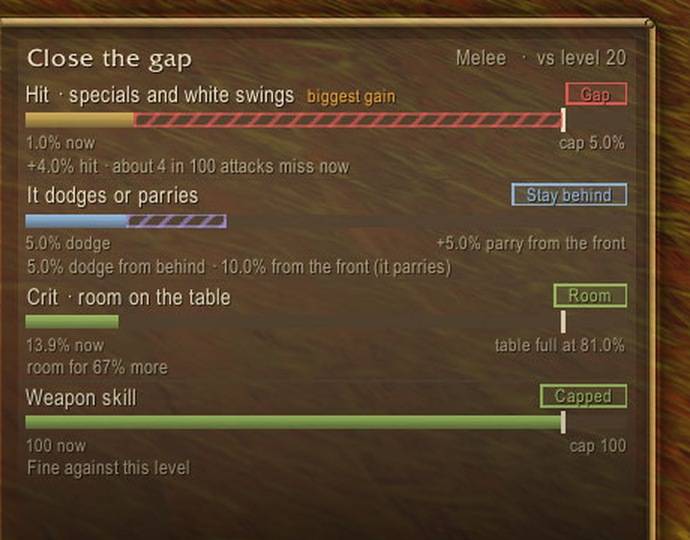
- Melee: hit for special attacks and white swings, weapon skill, crit room left on the attack table, and how often it dodges or parries (stay behind it).
- Tanks: defense for crit immunity, avoidance and block to go uncrushable, hit for threat.
- Casters: spell hit against its level, spell crit, resists.
- Every row says what closing the gap buys you, e.g. "+3.0% hit · about 9 in 100 attacks miss now". Gaps glow red, small gaps amber, capped stats green.
- Accounts for talents, hit from gear and set bonuses, crit suppression, the boss hit penalty and dual wielding.
Threat dial
Target anything you can fight and a gilded dial pops up beside you: your edge against its threat, with its portrait in the middle.
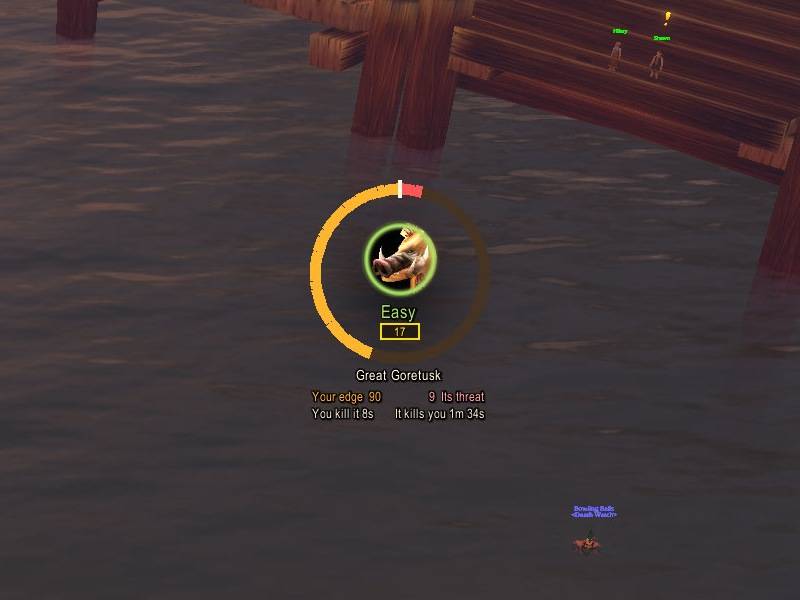
- A verdict at a glance: Easy, Fair fight, Tough or Deadly, with its level badge in the game's own level colours.
- You kill it in / it kills you in: the number that tells you whether to pull. Several mobs on you add up.
- It learns: how hard each mob really hits you is remembered by name, so the read sharpens as you play.
- Move it in Edit Mode,
/cr dial offto hide it.
Interrupt alert
When your target starts casting something you can interrupt, the target panel, its cast bar, the bottom bar and the quest log glow red from behind, with a flare as the cast starts. The glow turns amber while your own interrupt (Kick, Pummel, Counterspell, Earth Shock…) is on cooldown. /cr castalert off to turn it off.
A redesigned minimap experience
- Gold-ringed minimap with your coordinates underneath.
- Location pill:
- top row: zone name
- bottom row: tracking, mail, dungeon difficulty (5 · 5H · M), your gold, the time and the calendar
- Durability doll and group-finder eye sit neatly on the ring; Blizzard's floating icons are gone.
- Parchment quest log beneath, with readable ink and adjustable opacity.
Compass
A gilded ring floats across the top of the screen and turns as you turn, like the compass in a battle royale.

- Heading: N, NE, E… with degree numbers in between, and your exact heading and map coordinates underneath.
- Markers on the ring:
- gold diamond: your own marker, with the distance in yards (it clears itself when you arrive)
- blue diamond: Blizzard's map pin
- skull: your corpse on a corpse run
- coloured dots: your party (your own group in a raid)
- Drop a marker: Alt-click anywhere on the world map, or type
/cr way 45 62. - Click it: left-click opens the world map, right-click clears your marker.
- Make it yours: on/off, width, 3D tilt, the far side of the ring (what's behind you), coordinates and party dots in Options > Compass. Move it in Edit Mode.
- Dungeons and raids: the game doesn't share your facing with addons inside instances, so the compass steps aside there and comes back outside.
Dynamic, collision-proof windows
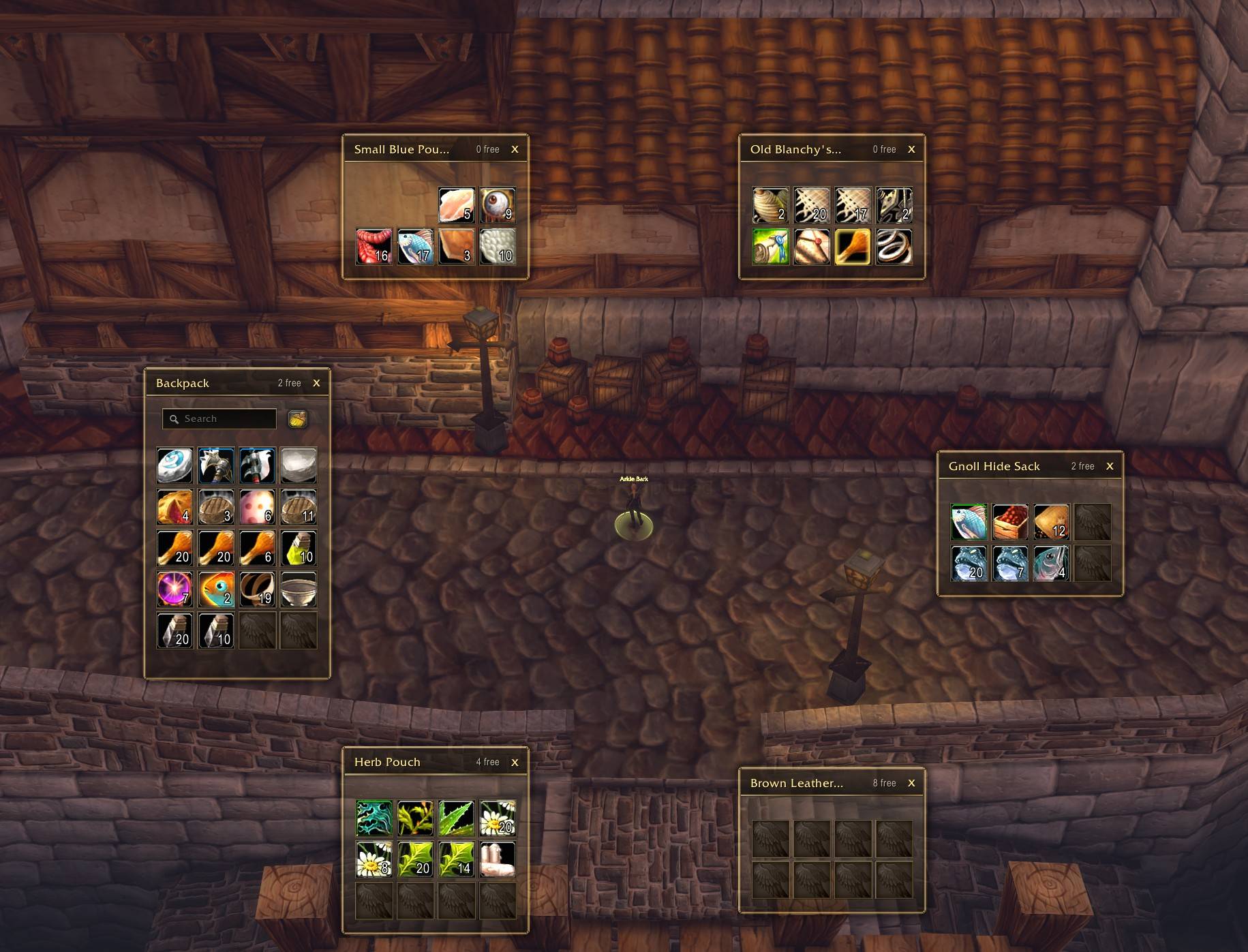
- No overlapping windows: they open side by side and shrink together if space is tight.
- Party frames stay clear: in a group, side windows open next to your party, never on top of it.
- Centred where it matters: the world map, flight map and game menu always open in the middle of the screen.
- Bags ring around your character. If a big window opens behind them, they slide to two tidy rows in the bottom-right, then come back.
- Item tooltips: "Equipped" comparisons always sit side by side with the item tooltip, never on top of it, and jump to whichever side has room.
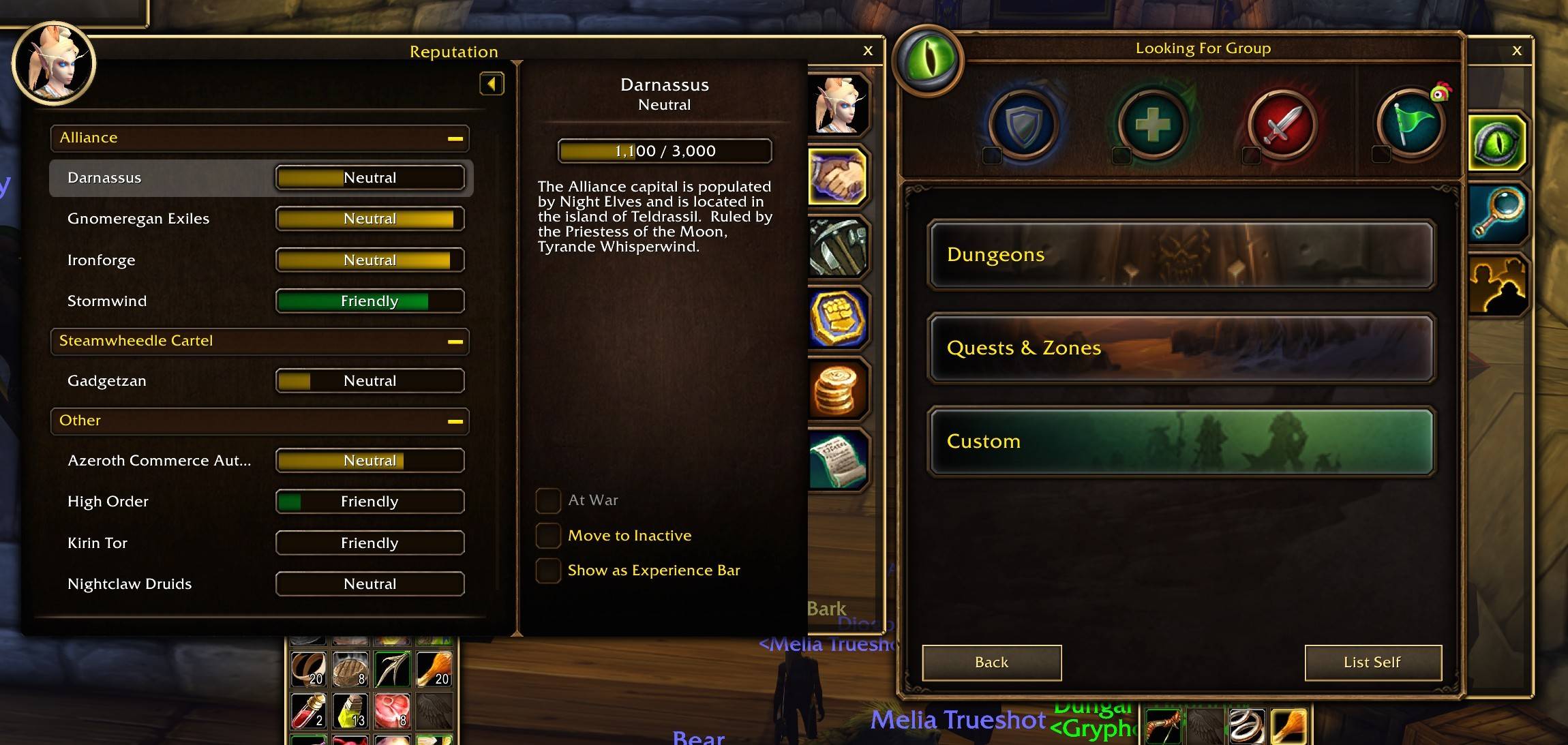
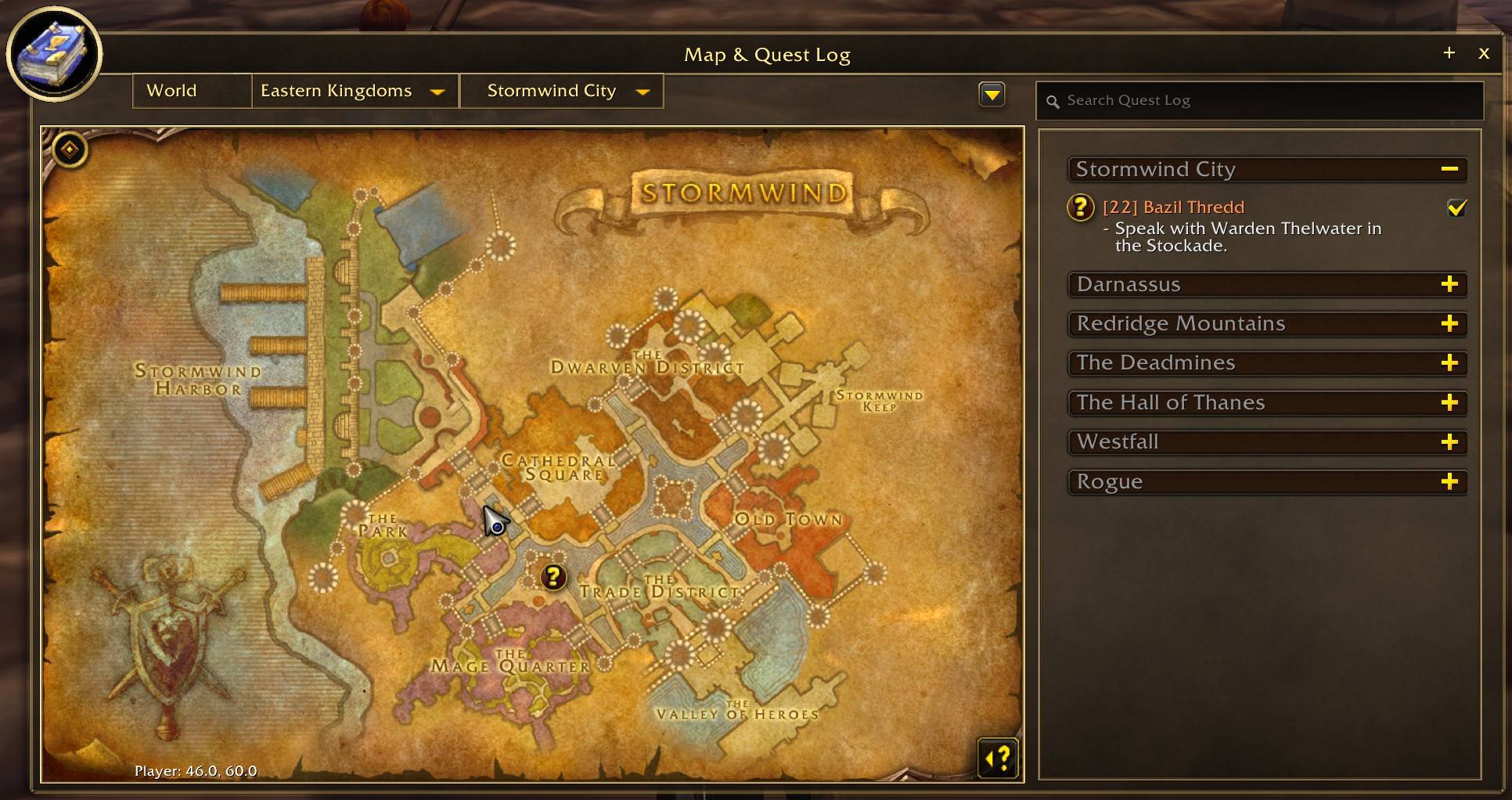
Every window, reskinned
- Windows covered: quest givers, quest log and world map, spellbook, talents, character, reputation, skills, contacts, group finder, professions, trainers, vendors, mail, the flight map, the game menu and books and letters.
- Consistent look: gold title bands, portrait rings and leather buttons.
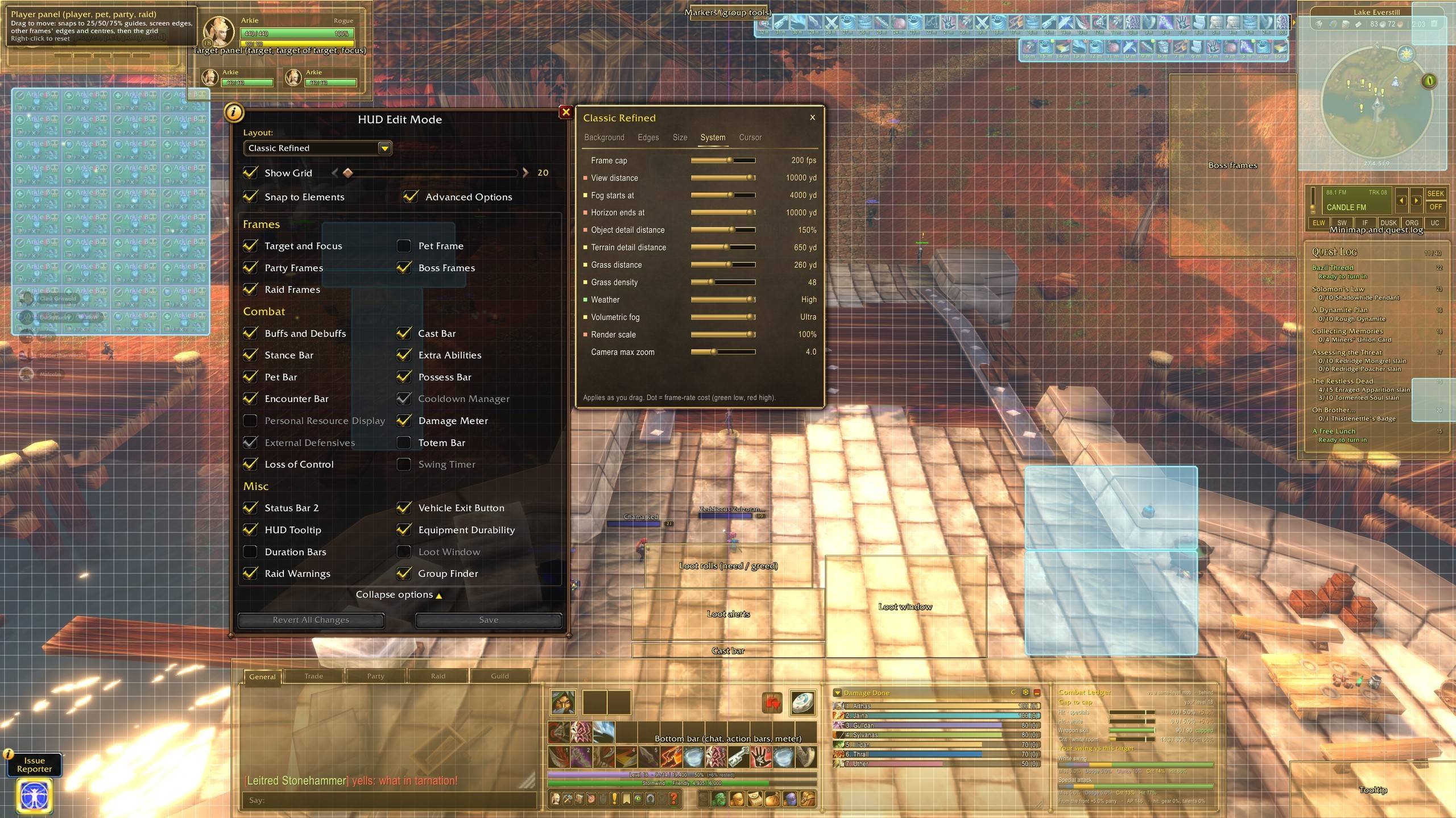
Edit Mode: move and size everything
- Move: open Edit Mode or type
/cr unlock. Every Classic Refined element gets a labelled gold move box:- player and target panels
- bottom bar
- minimap and quest log
- markers, cast bar, boss frames
- loot window, loot rolls, loot alerts
- tooltip
- Snap: boxes snap to screen edges, the 25/50/75% guides and each other, and panels never overlap.
- Reset: right-click any box to send it back home, or type
/cr resetfor everything. - Size: a slider for every area, plus one for everything.
- Background and edges: separate opacity sliders for each area, so you can go from solid to barely-there.
- Options panel: docks neatly beside Edit Mode so you can see both.
Cursor tracers (optional)
Never lose your mouse pointer in a raid again.
- Modes: Glow, Trail, or Glow + trail.
- Size: 50%–200%.
- Colour: Gold, White, Red, Green, Blue or Purple.
- Trail length: from a short spark to a long comet tail.
- Show: Always, In combat only, or In groups only.
- Shake to find: wiggle the mouse and the glow flares up.
- Out of the way: it hides while you hold right-click to turn the camera.
Find it in Options > Cursor or /cr cursor.
One-click fishing (optional)
With a fishing pole equipped:
- F casts your line.
- F again when the bobber splashes picks it up.
- Fishing loot goes straight into your bags.
Take the pole off and F goes back to normal. Change the key with /cr fishkey G.
Want more? Forever Angler (lures and fishing gear on the same key, vendor restock, catch log) takes over automatically if you install it, and Classic Refined's own fishing steps aside.
Maxed-out camera zoom
- Furthest view: Classic Refined lets the camera pull back as far as the client allows, for a proper view of the battlefield.
- Tunable: adjust it any time under Options > System > Camera max zoom.
- Skyview (zoom, speed and angle sliders, mount zoom-out) takes over the camera automatically if you install it.
System tab: hidden graphics settings, live
- Sliders: view distance, fog start, horizon, object and terrain detail distance, grass distance and density, weather, volumetric fog, render scale, frame cap and camera zoom.
- Live: each one applies as you drag and shows its frame-rate cost (green, yellow, red).
- Performance preset (optional): turns off 8× MSAA, raises the frame cap and trims a few costly extras.
/cr perf undorestores your exact old settings.
Chat
- Organised tabs (optional): Trade, Party, Guild and Raid lanes.
- Every tab still gets whispers and system messages.
- Trade stays out of General.
- Cleaner chat:
- Channel names are shortened:
[2. Trade - English]becomes[Trade]. - The Combat Log tab is hidden, but it keeps logging.
- The clutter buttons are removed.
- Channel names are shortened:
- Whispers show inline, so they never vanish into extra tabs.
Also included
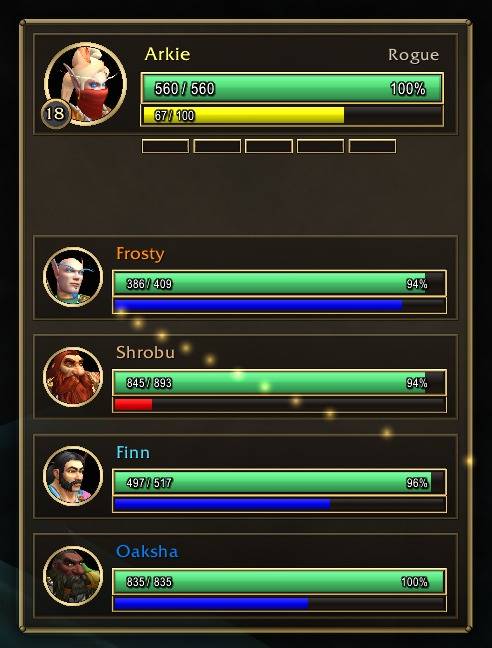
- Unit panels:
- player, pet, party and raid together
- target, target-of-target and focus together
- buffs and debuffs on your target and on every party member: debuffs first, yours gold-edged, others coloured by type, with timers, stacks and tooltips
- class colours and health numbers
- phase badge and range dimming
- Quick macros: a row of macro buttons in the action bar's top row, the same size as your action buttons. Drag a macro onto it, Shift+right-click to remove (
/cr macros). - Cure grid (healers): an old-school Decursive. One small cube per group member lights up in the debuff's colour when it's something you can remove; left-click casts your first cure on them, right-click your second (
/cr cure). - Combat frames: boss frames, a cast bar and a Markers drawer with one-click target and world markers.
- Nameplates: gold-trimmed, with a level badge, a warm glow on your target, and enemy mobs' buffs and debuffs above the name.
- Loot: the loot window opens at your mouse (
/cr loot fixedfor a fixed spot), and loot rolls and alerts are restyled and movable. - Profiles: save, load and switch whole setups, including your Edit Mode layout.
📻 Pairs perfectly with WoW Radio
WoW Radio plays any zone's music anywhere, car-stereo style, with 14 stations like 88.1 Candle FM, 104.7 Barrens Chat and 95.1 Elevator Music. With Classic Refined installed, it docks between the minimap and the quest log in the same gilded style, and a drum button on the location pill shows and hides it.
Commands
| Command | What it does |
|---|---|
/cr options |
Settings: Background, Edges, Size, System, Cursor, Compass, Profiles |
/cr setup |
The welcome window |
/cr unlock |
Move frames (or just open Edit Mode) |
/cr reset |
Every frame back to its default spot |
/cr profile save <name> · /cr profile load <name> |
Profiles from chat |
/cr cursor |
Cursor tracer settings |
/cr compass · /cr way 45 62 · /cr way clear |
Compass settings and markers |
/cr loaded |
Back to the shipped Classic Refined:Loaded look, fitted to your screen |
/cr fishing on/off · /cr fishkey <key> |
One-click fishing |
/cr ledger · /cr ledger role <melee/tank/caster/ranged/auto> |
Show / hide the Combat Ledger, or set its role |
/cr dial on/off · /cr castalert on/off |
Threat dial · interrupt alert |
/cr cure on/off · /cr plateauras on/off |
Cure grid · buffs and debuffs on enemy nameplates |
/cr perf · /cr perf undo |
Performance preset / restore your settings |
/cr help |
Full command list |
FAQ
Does it change my key bindings or graphics? Only if you tick those options in the welcome window. Y→Stealth, one-click fishing and the performance preset are all off unless you choose them.
Will the layout fit my screen? Yes. Positions are stored as fractions of the screen and every size follows it, Blizzard's own buttons, minimap and bags included, so it fits 16:10 laptops, 1080p, 1440p, 4K and 21:9 ultrawide alike. Change your UI scale and Classic Refined offers a quick reload to re-fit. Tweak anything in Edit Mode.
My screen doesn't look like the screenshots.
Type /cr loaded to switch to the shipped look, fitted to your screen. In Edit Mode, keep the Classic Refined layout selected; Blizzard's Classic and Modern layouts move the action bars and panels around.
Something overlaps or looks off.
Open Edit Mode, drag the gold box, and right-click a box to reset it. /cr reset puts everything back.
Combat Ledger isn't showing.
Type /cr ledger on. If it picked the wrong role (say, a feral druid reading as a caster), /cr ledger role melee fixes it.
Classic Refined is a fan-made interface addon and is not affiliated with Blizzard Entertainment.
Classic Refined Team