Skirmish Log
- By
Tracks every enemy player you fight: win/loss records, fight damage breakdowns, shareable map pins, and warnings when rivals return.
main-window-two-players.png
fight-window.png
Description
Skirmish Log
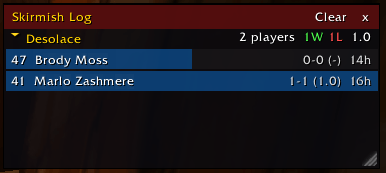
Remember every enemy player you fight in WoW Forever. Skirmish Log keeps a small meter-style window of the players you have fought in each zone, with your win/loss record against each one, a damage breakdown of every fight, and a warning when someone who beat you shows up again.
Features
- One row per enemy player in the current zone, newest fight first: level, name and Forever surname, class color, your record (wins-losses), W/L ratio, and how long ago you fought.
- Win, loss, or draw. They die while you are alive: a win. You die: a loss. Combat ends with nobody dead: a draw.
- Fight details on hover: race and class, full record, your last five fights, and the spells they and you cast most.
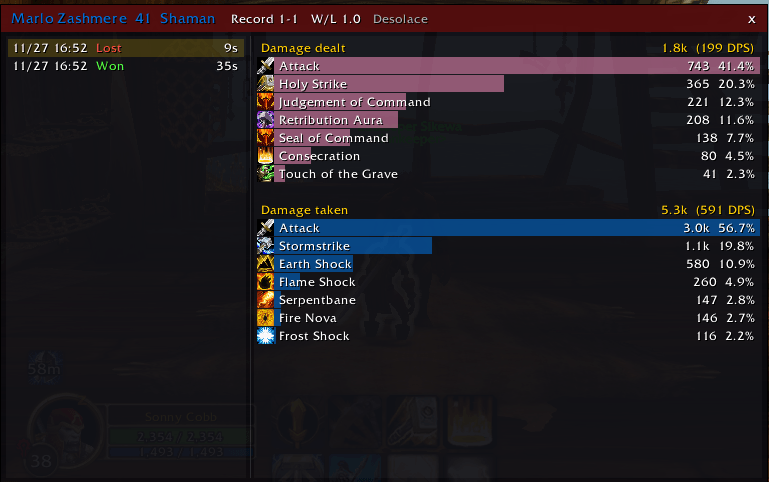
- Fight window: click a player to see every saved fight. Each fight shows damage dealt and taken with DPS, and one bar per attack with its spell icon, amount, and share. Hover a bar for hits, crits, average, and biggest hit.
- Share where you fought: right-click a player to set a map pin where you last fought them. The pin shows on your map and minimap, and your chat box opens with the pin's link and a note such as "killed me here". Press Enter to share it, or Escape to keep it. Right-click a fight in the fight window to pin that one.
- Rival warning: when a player who has beaten you appears on a nameplate, your target, or under your mouse, a chat warning (with a raid-warning sound) gives your record against them. At most once every five minutes per player.
- Kept per zone until you clear it. Click the zone name to view another zone's history. Clear (click twice) clears the zone you are viewing; Shift-click twice clears every zone.
Commands
| Command | What it does |
|---|---|
/skirmish, /fhl, or /hitlist |
Show or hide the window |
/fhl lock, /fhl unlock |
Lock the window's position and size |
/fhl reset |
Put the window back in the middle at its default size |
/fhl alerts on\|off |
Turn the rival warning on or off |
/fhl sound on\|off |
Turn the warning sound on or off |
/fhl status |
Show what this client lets the addon see |
/fhl name |
Check where your target's surname can be read |
/fhl meter |
Show what the client's damage meter recorded for the last fight |
How it works, and its limits
The Forever client gives addons no combat log, so Skirmish Log watches enemy players on your target, focus, mouseover, and nameplates. A fight starts only when one of you attacks the other; standing near each other is not a fight.
- Damage comes from the client's own damage meter, read a second or two after combat ends. Damage dealt is the damage that player took from you. If you also hit something else, the split between your spells is estimated (the bar's tooltip says so). Damage to or from anyone else is left out.
- An enemy who dies out of sight (no nameplate or target) ends as a draw.
- Values the client keeps restricted are skipped, never guessed.
- Fights in places where the client hides your position, such as instances, have no map location to pin.
Compatibility
WoW Forever beta 1.60.1, interface 16001. No other addons are required.
Records are saved in the ForeverHitListDB saved variable.
Skirmish Log Team