SkinningsSpots - Retail
- By
SkinningSpots marks top farming locations for gathering and materials on your maps using icons, heatmaps, and smart clusters. Enjoy real-time tracking with gold/hr tooltips, dynamic respawn timers, custom routes, and a logbook for WoW: Midnight
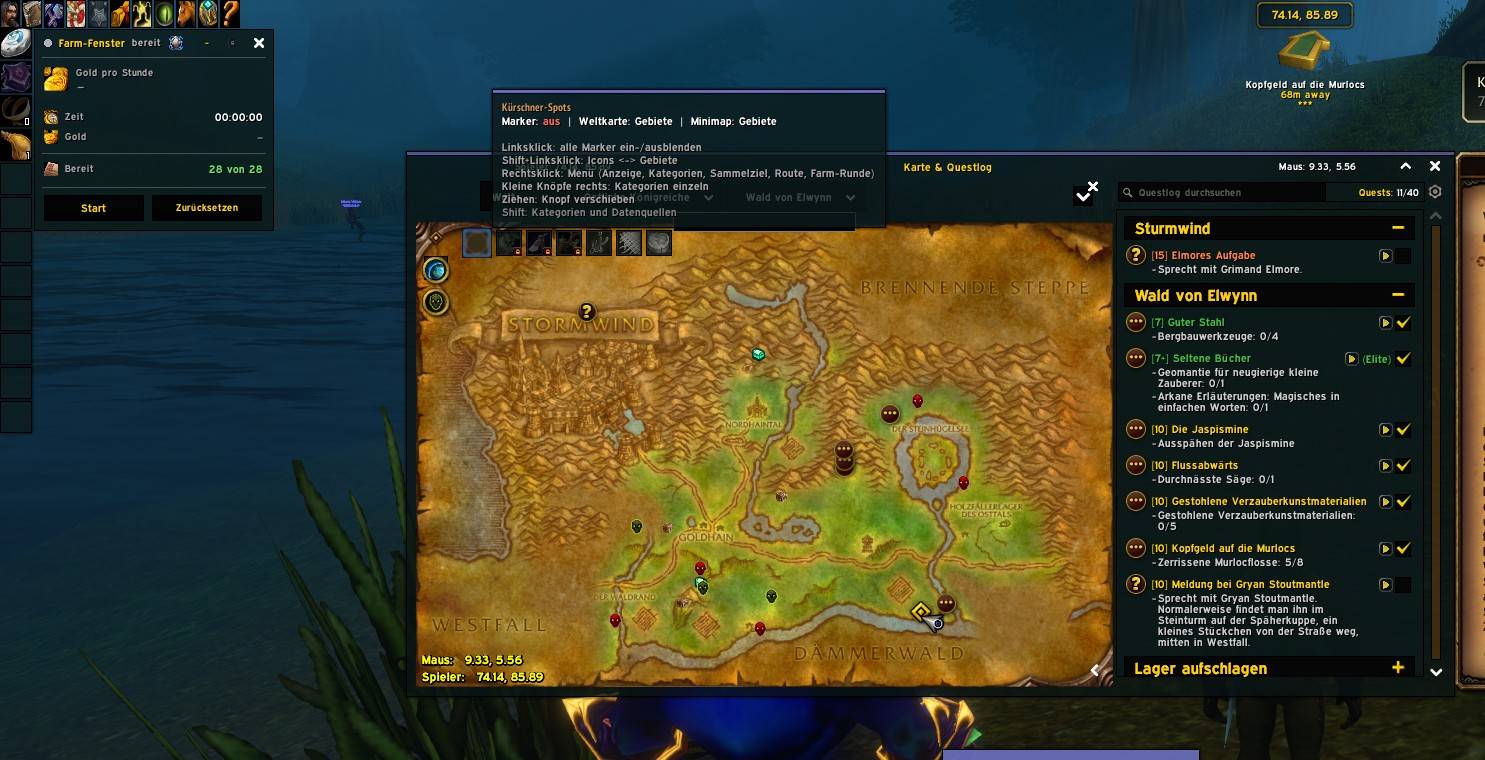
WoWScrnShot_111526_222405.jpg
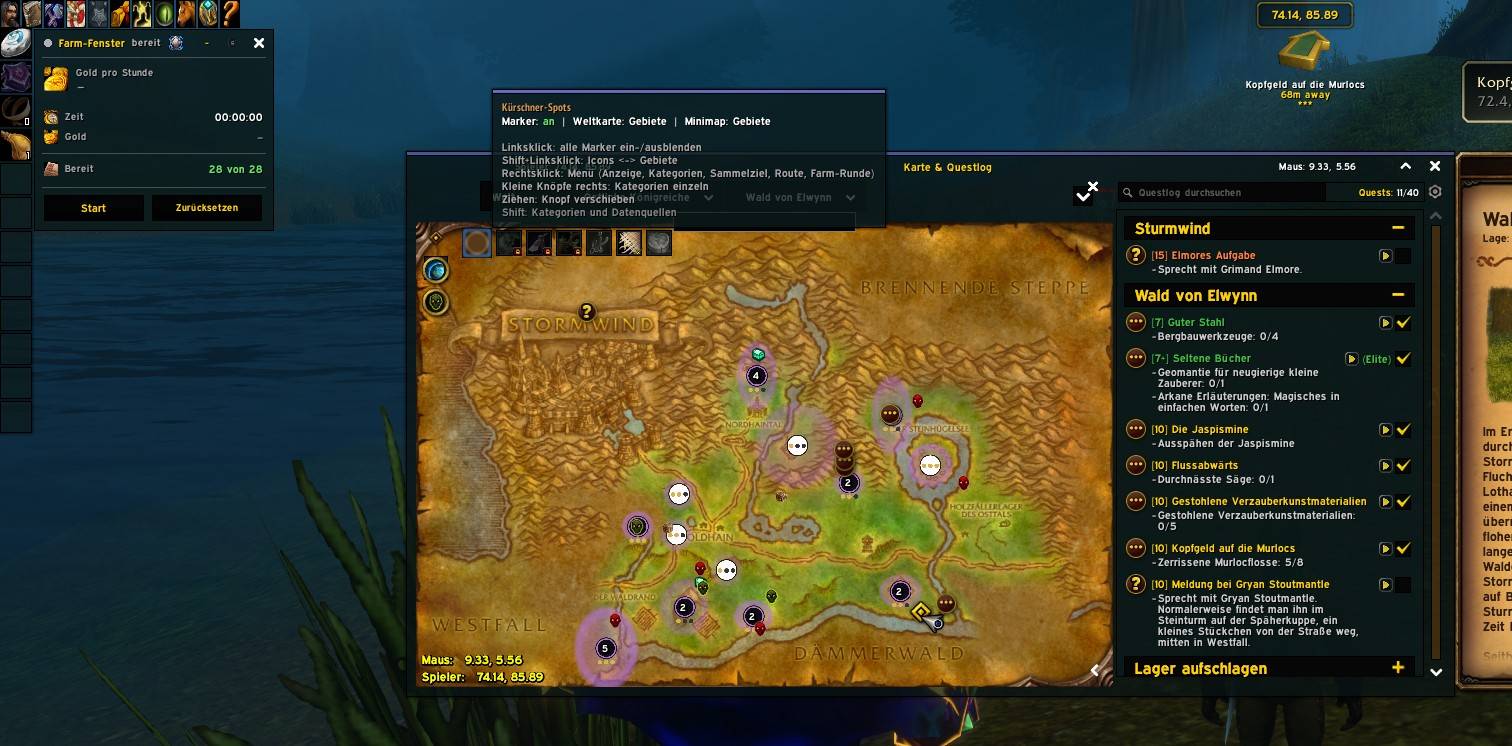
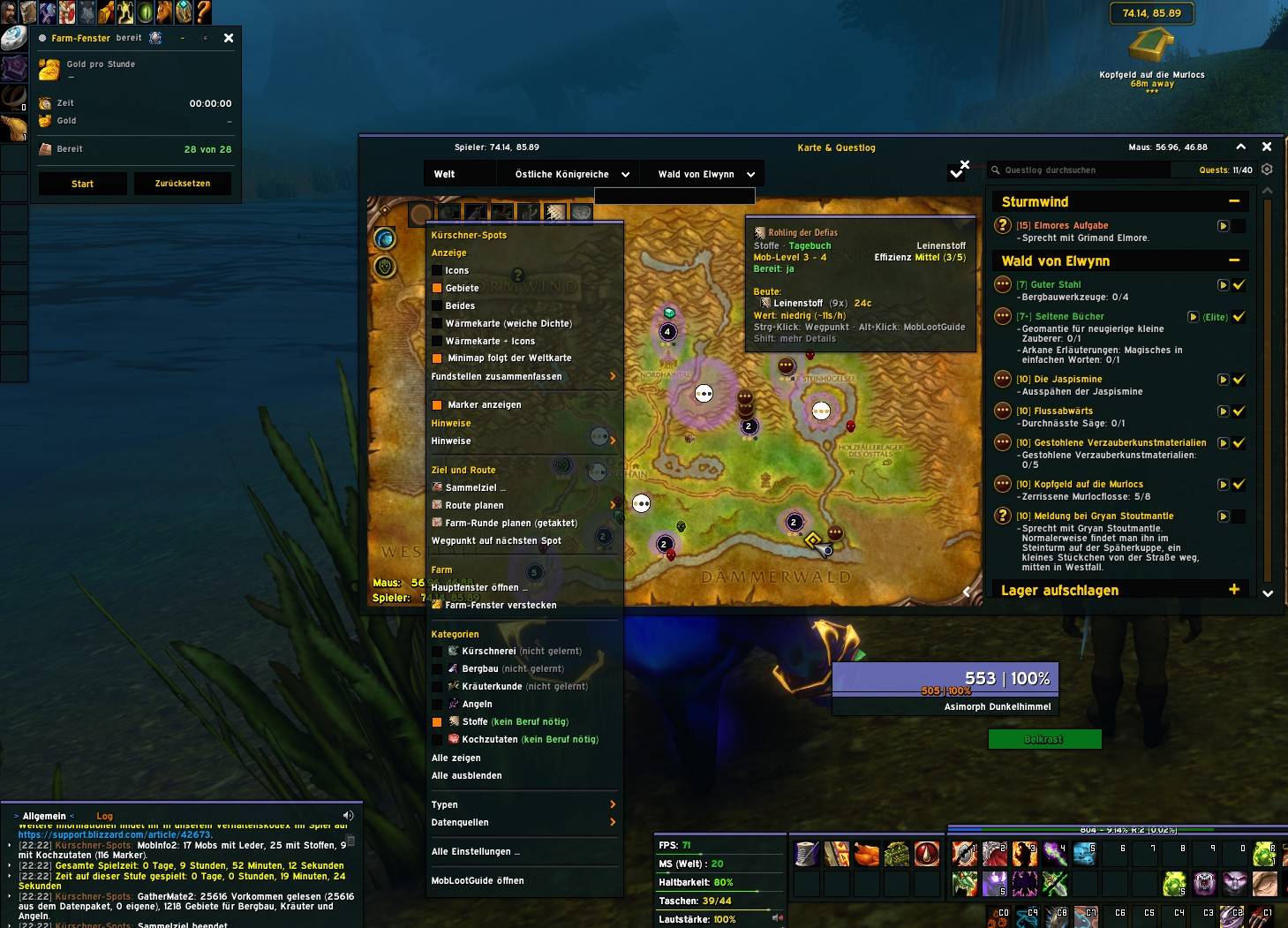
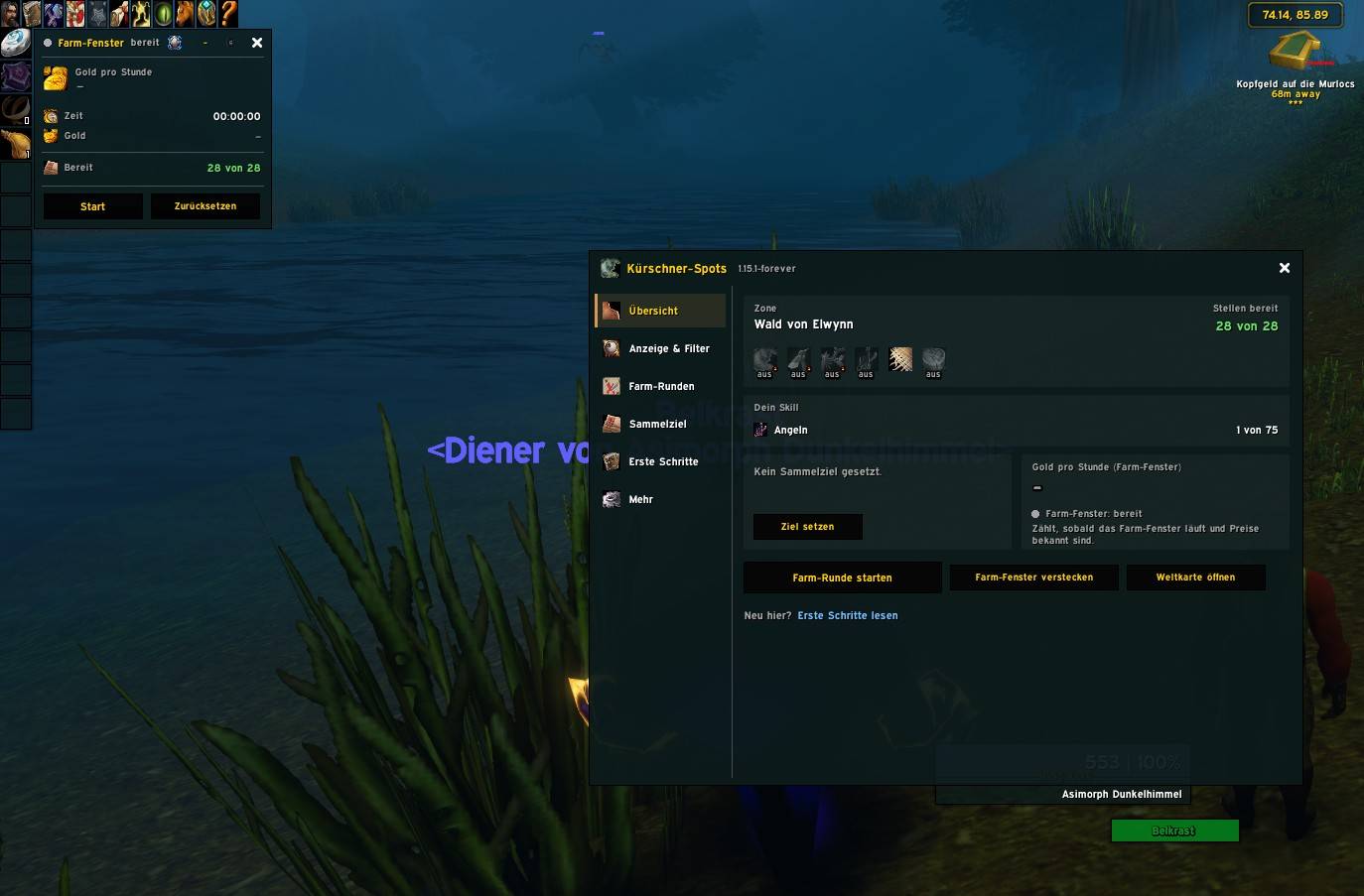
WoWScrnShot_111526_222435.jpg
Description
# Kürschner-Spots (SkinningSpots) – Retail / Midnight
> **Language note:** The addon interface is currently available in **German only**. All menus, tooltips and the in-game guide are in German. An English version is planned for a future update. The addon works with every client language – item and zone names come directly from the game.
**Kürschner-Spots** ("Kürschner" is German for *skinner*) shows you the best places for **skinning, mining, herbalism, fishing, cloth and cooking ingredients** directly on your world map and minimap. It remembers where you have gathered, knows when a spot respawns, plans timed farm loops through a zone and tells you how much gold per hour you are making.
This is the **Retail version for WoW Midnight**. Versions for **MoP Classic** and **WoW Forever** are available separately.
---
## Highlights at a glance
- Gathering spots as **icons, coloured areas or a heat map** on world map and minimap
- Knows the materials of **all expansions up to Midnight**
- **Skill per expansion** in tooltips, e.g. "Mining (Midnight): 45/100"
- **Profession colours** show where you still gain skill points
- **Personal journal** records every gathering action with its exact location
- **Respawn tracker** with countdown and a soft glow when a spot is ready again
- **Timed farm loop:** arrive at every spot just as it respawns
- **Save, load and rearrange** farm loops per zone
- **Gathering goal**, **farm window** with gold per hour and a **main window** with a detailed guide
- Works on its own, even better with **GatherMate2, MobInfo2, Auctionator, TomTom and ElvUI**
---
## Where do the spots come from?
- **Built-in spots** for Kalimdor, the Eastern Kingdoms, Outland, Northrend and Pandaria.
- **From Draenor to Midnight** the spots come from your **personal journal**, from **GatherMate2** (including the storage modules for Dragonflight, The War Within and Midnight) and from **MobInfo2**. The addon knows the leathers, ores, herbs, fish, cloth and meat of these expansions and sorts them correctly.
- The more you gather, the better your map becomes – especially in the newest zones.
---
## Features in detail
### Spots on the world map and minimap
- Sorted by category (skinning, mining, herbalism, fishing, cloth, cooking) and material type.
- Display modes: **icons**, **coloured areas** or **both**, plus a **heat map** on the world map.
- Area badges show the number of known spots and dots that rate the area's value.
- Markers only for **professions you have learned** (cloth and cooking ingredients always). Optionally show everything.
- A movable **map button** with menu for display modes, categories, data sources, route, goal and settings.
### Tooltips
Hover over an icon or area to see the required skill, your **skill in that expansion**, efficiency, expected loot, item value and **gold per hour** (with Auctionator), when you last gathered there and when it will be ready again, and the data source. Hold **Shift** for more details.
### Profession colours
A small coloured dot on the icon (a ring on areas) shows how likely you are to gain skill points:
- **orange** – many skill points, **yellow** – frequent, **green** – rare, **grey** – none left
- For Classic mining and herbalism nodes the colour is **exact**.
- For all newer expansions it is **estimated** from your progress in that expansion's skill line – the tooltip says "estimated".
**Tip:** Open your profession window once after logging in so the addon knows your skill for every expansion.
### Personal journal and respawn tracker
Every skinning, mined node, herb, catch and cloth or cooking drop is recorded with its exact position. Freshly harvested spots are shown dimmed with a countdown and **light up softly** when they are ready again. Waiting times are adjustable.
### Timed farm loop
Start it with `/ks loop` (or `/ks runde`), from the minimap button or the main window:
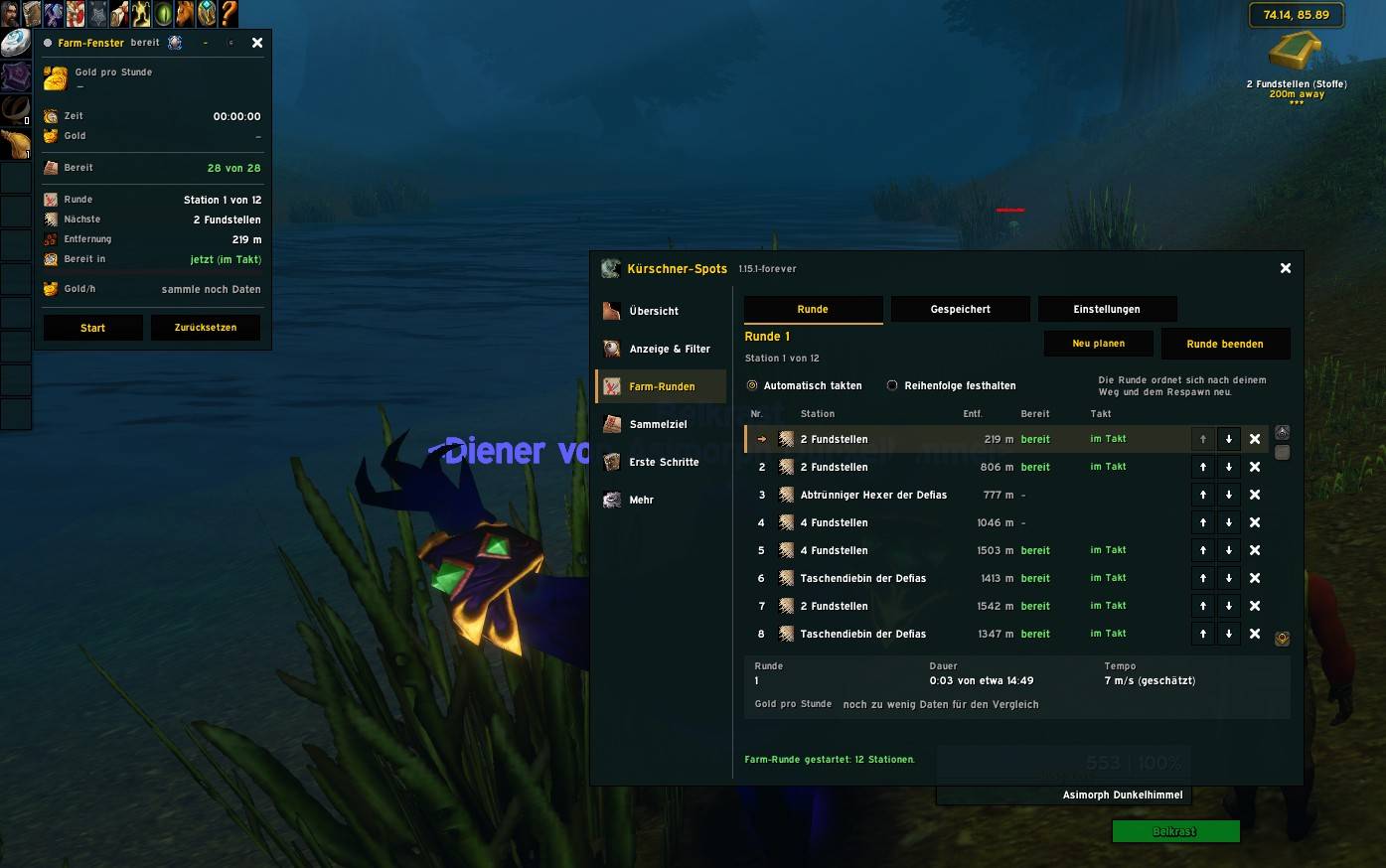
1. The addon picks the most rewarding visible areas in your zone (up to 12, adjustable).
2. It calculates when each one respawns and how long you need to get there.
3. It orders the stops so you **arrive just as a spot is ready again**.
4. While you gather, the loop **re-times itself live**.
5. A waypoint (TomTom or Blizzard) guides you, with numbered stops and countdown rings on the world map and an arrow with distance on the minimap.
6. A short sound tells you when a stop is ready.
7. The farm window compares **gold per hour with and without the loop** (as an estimate).
The loop learns your real travel speed while you move.
### Arrange and save farm loops
In the **Farm Loops** tab: move stops up or down, remove or skip them, keep your own order or time automatically, and **save loops under a name** per zone (up to 10), then load, rename or delete them.
### Gathering goal, route and farm window
- **Gathering goal** (e.g. 20 pieces of a leather) with map highlighting, banner and progress bar.
- **Route** through the zone by amount of data, gold per hour or your goal.
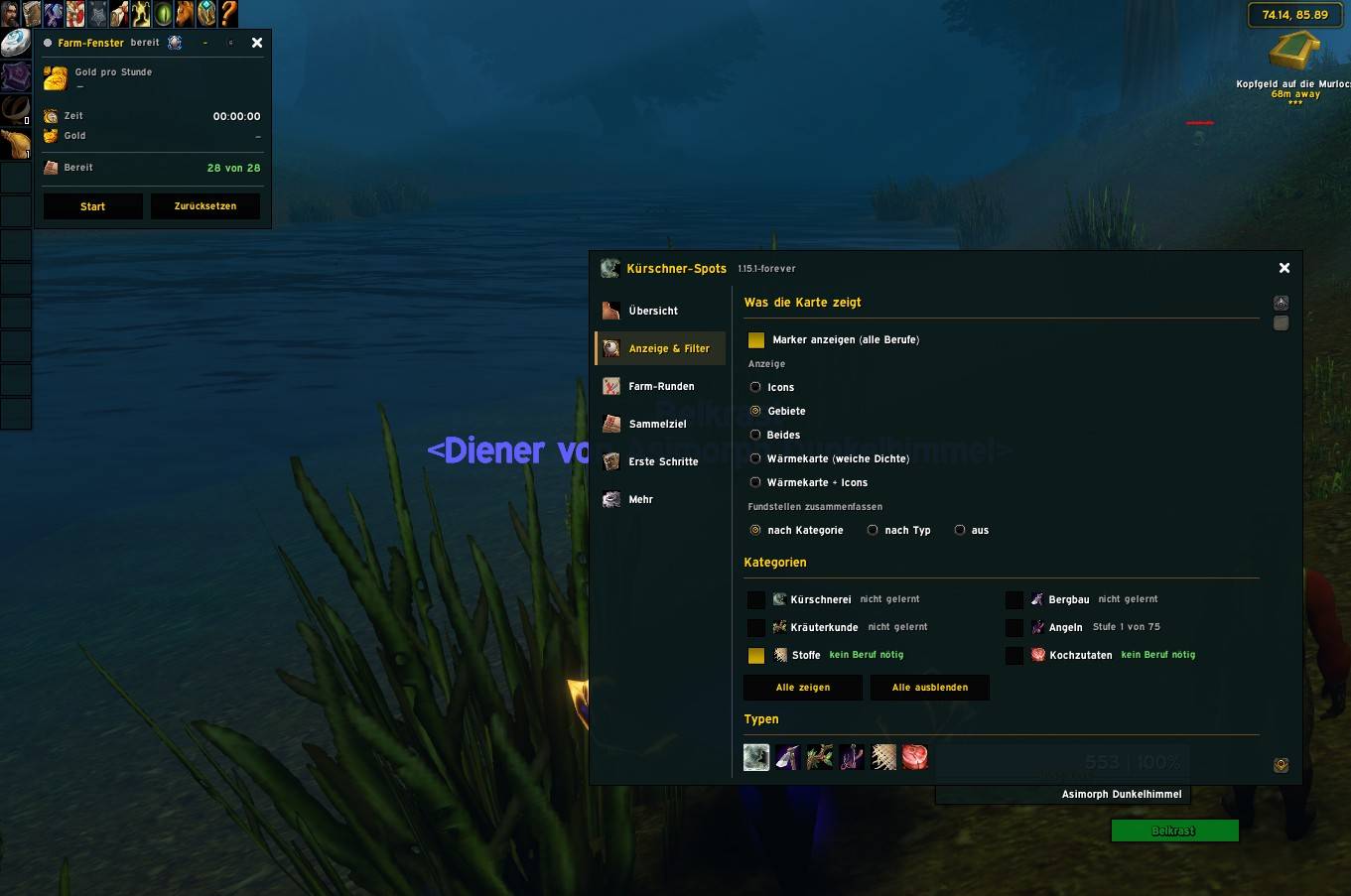
- **Farm window** with gold per hour, time, gold, counters per profession, ready spots, skill, goal and loot – collapsible, movable, scalable.
### Main window
Left-click the **minimap button** or type `/ks`. Six tabs: **Overview**, **Display & Filters**, **Farm Loops**, **Gathering Goal**, **Getting Started** (eleven chapters with step-by-step guide, commands and FAQ) and **More**.
### Minimap button
**Left-click:** main window – **Shift + left-click:** farm window – **Right-click:** quick filter. Drag it along the minimap edge (round or square / ElvUI).
### Built for Midnight
- Respects the addon restrictions of patch 12.x: no combat log, protected values in combat are skipped safely.
- Anything the game does not provide is caught quietly instead of throwing errors.
---
## Recommended addons (all optional)
| Addon | What it adds |
|---|---|
| **GatherMate2** + **GatherMate2_Data** + Storage modules | Mining, herb and fishing nodes, including Dragonflight, The War Within and Midnight |
| **MobInfo2** | Real loot data from mobs: leather, cloth and cooking ingredients |
| **Auctionator** | Auction prices for item value and gold per hour |
| **TomTom** | Waypoint arrow for routes and farm loops |
| **ElvUI** | Kürschner-Spots automatically adopts the ElvUI look |
## Commands (selection)
| Command | Function |
|---|---|
| `/ks` | Open the main window |
| `/ks befehle` | List all commands |
| `/ks start` | Open the Getting Started guide |
| `/ks loop` / `/ks runde` | Start the timed farm loop |
| `/ks runde aus` | End the farm loop |
| `/ks runde speichern <name>` / `laden <name>` | Save / load a loop |
| `/ks route gold` | Route by gold per hour |
| `/ks farben` | Toggle profession colours |
| `/ks knopf` | Show or hide the minimap button |
## Safety
The addon **only displays information**. It never moves your character, never clicks, never loots and never plays for you. Your journal and settings stay local in your SavedVariables – nothing is sent anywhere.
## Feedback
Found a bug or have an idea? Leave a comment on the project page – screenshots of error messages help a lot.
---
---
# Kürschner-Spots (SkinningSpots) – Retail / Midnight
> **Hinweis zur Sprache:** Die Oberfläche des Addons gibt es im Moment **nur auf Deutsch**. Alle Menüs, Tooltips und die Anleitung im Spiel sind deutsch. Eine englische Fassung ist für ein späteres Update geplant. Das Addon funktioniert mit jeder Spielsprache, denn Gegenstands- und Zonennamen kommen direkt aus dem Spiel.
**Kürschner-Spots** zeigt dir die besten Orte für **Kürschnerei, Bergbau, Kräuterkunde, Angeln, Stoffe und Kochzutaten** direkt auf Weltkarte und Minimap. Es merkt sich, wo du gesammelt hast, weiß, wann eine Stelle wieder bereit ist, plant getaktete Farm-Runden und sagt dir, wie viel Gold pro Stunde du verdienst.
Das ist die **Retail-Fassung für WoW Midnight**. Fassungen für **MoP Classic** und **WoW Forever** gibt es separat.
---
## Das Wichtigste auf einen Blick
- Sammel-Spots als **Icons, farbige Gebiete oder Wärmekarte** auf Weltkarte und Minimap
- Kennt die Materialien **aller Erweiterungen bis Midnight**
- **Skill je Erweiterung** im Tooltip, zum Beispiel „Bergbau (Midnight): 45/100“
- **Berufsfarben** zeigen, wo du noch Skillpunkte bekommst
- **Eigenes Tagebuch** merkt sich jedes Sammeln mit genauem Ort
- **Respawn-Merker** mit Countdown und sanftem Leuchten
- **Getaktete Farm-Runde:** an jeder Stelle genau dann ankommen, wenn sie wieder da ist
- Farm-Runden je Zone **speichern, laden und ordnen**
- **Sammelziel**, **Farm-Fenster** mit Gold pro Stunde und **Hauptfenster** mit ausführlicher Anleitung
- Läuft allein, noch besser mit **GatherMate2, MobInfo2, Auctionator, TomTom und ElvUI**
---
## Woher kommen die Spots?
- **Fest eingebaute Spots** für Kalimdor, die Östlichen Königreiche, die Scherbenwelt, Nordend und Pandaria.
- **Von Draenor bis Midnight** kommen die Spots aus deinem **Tagebuch**, aus **GatherMate2** (auch aus den Speicher-Modulen für Dragonflight, The War Within und Midnight) und aus **MobInfo2**. Das Addon kennt Leder, Erze, Kräuter, Fische, Stoffe und Fleisch dieser Erweiterungen und ordnet sie richtig ein.
- Je mehr du sammelst, desto besser wird deine Karte, gerade in den neuesten Zonen.
---
## Die Funktionen im Detail
### Spots auf Weltkarte und Minimap
- Sortiert nach Kategorie (Kürschnerei, Bergbau, Kräuter, Angeln, Stoffe, Kochzutaten) und Materialtyp.
- Anzeigearten: **Icons**, **farbige Gebiete** oder **beides**, dazu eine **Wärmekarte** auf der Weltkarte.
- Zahl-Abzeichen zeigen die Anzahl bekannter Stellen, Punkte den Wert eines Gebiets.
- Marker nur für **gelernte Berufe** (Stoffe und Kochzutaten immer). Auf Wunsch alles anzeigen.
- Ein verschiebbarer **Kartenknopf** mit Menü für Anzeige, Kategorien, Datenquellen, Route, Ziel und Einstellungen.
### Tooltips
Beim Darüberfahren siehst du den nötigen Skill, **deinen Skill in dieser Erweiterung**, Effizienz, Beute, Warenwert und **Gold pro Stunde** (mit Auctionator), wann du zuletzt dort warst und wann die Stelle wieder bereit ist, und die Datenquelle. Mit **Shift** gibt es mehr Details.
### Berufsfarben
Ein kleiner Farbpunkt am Icon (bei Gebieten ein Ring) zeigt, wie wahrscheinlich du Skillpunkte bekommst:
- **orange**: viele Skillpunkte, **gelb**: oft, **grün**: selten, **grau**: keine mehr
- Bei Bergbau und Kräutern in den Classic-Zonen ist die Farbe **genau**.
- Bei allen neueren Erweiterungen wird sie aus deinem Fortschritt in dieser Erweiterung **geschätzt**. Der Tooltip schreibt dann „geschätzt“ dazu.
**Tipp:** Öffne nach dem Einloggen einmal dein Berufsfenster, damit das Addon deinen Skill in jeder Erweiterung kennt.
### Tagebuch und Respawn-Merker
Jede Häutung, jedes Erz, jedes Kraut, jeder Fang und jeder Stoff- oder Kochzutaten-Fund wird mit genauer Position gemerkt. Frisch abgeerntete Stellen erscheinen gedämpft mit Countdown und **leuchten sanft auf**, sobald sie wieder bereit sind. Die Wartezeiten sind einstellbar.
### Getaktete Farm-Runde
Starten mit `/ks runde`, über den Minimap-Knopf oder das Hauptfenster:
1. Das Addon wählt die lohnendsten sichtbaren Gebiete deiner Zone (bis zu 12, einstellbar).
2. Es rechnet aus, wann jedes wieder bereit ist und wie lange du dorthin brauchst.
3. Es ordnet die Stationen so, dass du **genau dann ankommst, wenn die Stelle wieder da ist**.
4. Während du sammelst, **taktet sich die Runde live neu**.
5. Ein Wegpunkt (TomTom oder Blizzard) führt dich, mit nummerierten Stationen und Countdown-Ringen auf der Weltkarte und einem Pfeil mit Entfernung auf der Minimap.
6. Ein kurzer Ton meldet eine bereite Station.
7. Das Farm-Fenster vergleicht **Gold pro Stunde mit und ohne Runde** (als Schätzung).
Die Runde lernt dein echtes Lauftempo mit.
### Farm-Runden ordnen und speichern
Im Reiter **Farm-Runden**: Stationen hoch und runter schieben, entfernen oder überspringen, eigene Reihenfolge festhalten oder automatisch takten, und **Runden unter einem Namen speichern** (je Zone bis zu 10), laden, umbenennen oder löschen.
### Sammelziel, Route und Farm-Fenster
- **Sammelziel** (zum Beispiel 20 Stück eines Leders) mit Hervorhebung auf der Karte, Merkband und Fortschrittsbalken.
- **Route** durch die Zone nach Datenmenge, Gold pro Stunde oder deinem Ziel.
- **Farm-Fenster** mit Gold pro Stunde, Zeit, Gold, Zählern je Beruf, bereiten Stellen, Skill, Ziel und Beute, einklappbar, verschiebbar, skalierbar.
### Hauptfenster
Linksklick auf den **Minimap-Knopf** oder `/ks`. Sechs Reiter: **Übersicht**, **Anzeige & Filter**, **Farm-Runden**, **Sammelziel**, **Erste Schritte** (elf Kapitel mit Schritt-für-Schritt-Anleitung, Befehlen und häufigen Fragen) und **Mehr**.
### Minimap-Knopf
**Linksklick:** Hauptfenster, **Shift + Linksklick:** Farm-Fenster, **Rechtsklick:** Schnellfilter. Am Rand der Minimap verschiebbar (rund oder eckig / ElvUI).
### Gebaut für Midnight
- Beachtet die Addon-Regeln von Patch 12.x: kein Kampflog, geschützte Werte im Kampf werden sicher übersprungen.
- Was das Spiel nicht hergibt, wird still abgefangen, statt Fehler zu werfen.
---
## Empfohlene Addons (alle optional)
| Addon | Was es bringt |
|---|---|
| **GatherMate2** + **GatherMate2_Data** + Speicher-Module | Fundorte für Bergbau, Kräuter und Angeln, auch für Dragonflight, The War Within und Midnight |
| **MobInfo2** | Echte Beutedaten von Mobs: Leder, Stoffe und Kochzutaten |
| **Auctionator** | Auktionspreise für Warenwert und Gold pro Stunde |
| **TomTom** | Wegpunkt-Pfeil für Routen und Farm-Runden |
| **ElvUI** | Kürschner-Spots übernimmt automatisch den ElvUI-Look |
## Befehle (Auswahl)
| Befehl | Funktion |
|---|---|
| `/ks` | Hauptfenster öffnen |
| `/ks befehle` | Alle Befehle anzeigen |
| `/ks start` | Erste Schritte öffnen |
| `/ks runde` | Getaktete Farm-Runde starten |
| `/ks runde aus` | Farm-Runde beenden |
| `/ks runde speichern <Name>` / `laden <Name>` | Runde speichern / laden |
| `/ks route gold` | Route nach Gold pro Stunde |
| `/ks farben` | Berufsfarben an/aus |
| `/ks knopf` | Minimap-Knopf zeigen oder verstecken |
## Sicherheit
Das Addon **zeigt nur an**. Es bewegt deinen Charakter nie, klickt nie, plündert nie und spielt nie für dich. Tagebuch und Einstellungen bleiben lokal in deinen SavedVariables, es wird nichts verschickt.
## Rückmeldung
Einen Fehler gefunden oder eine Idee? Hinterlasse gern einen Kommentar auf der Projektseite. Screenshots von Fehlermeldungen helfen sehr.
SkinningsSpots - Retail Team