MobLootGuide Retail
- By
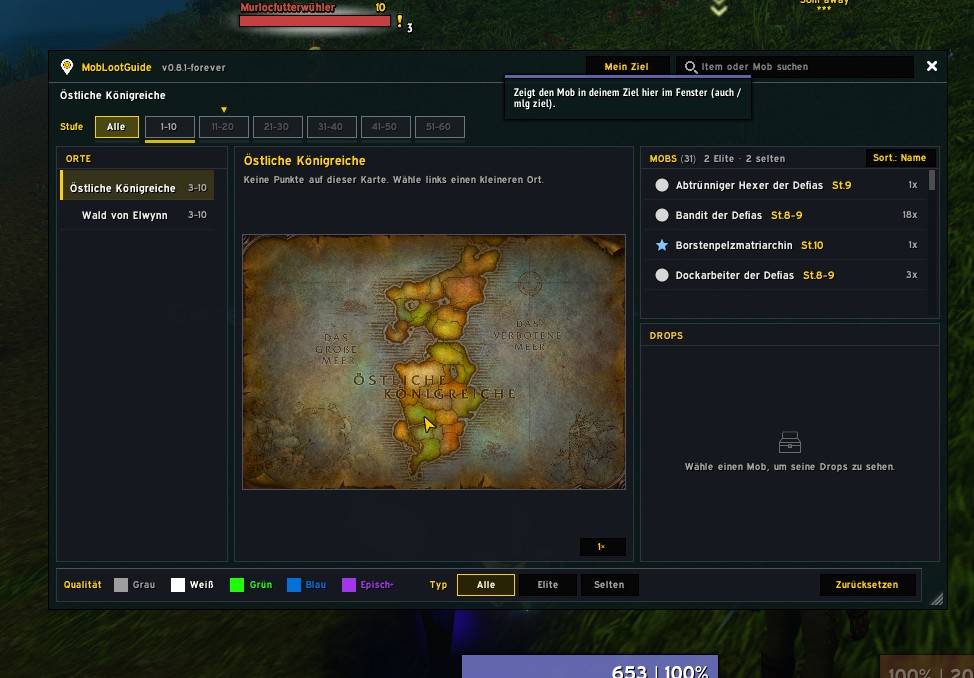
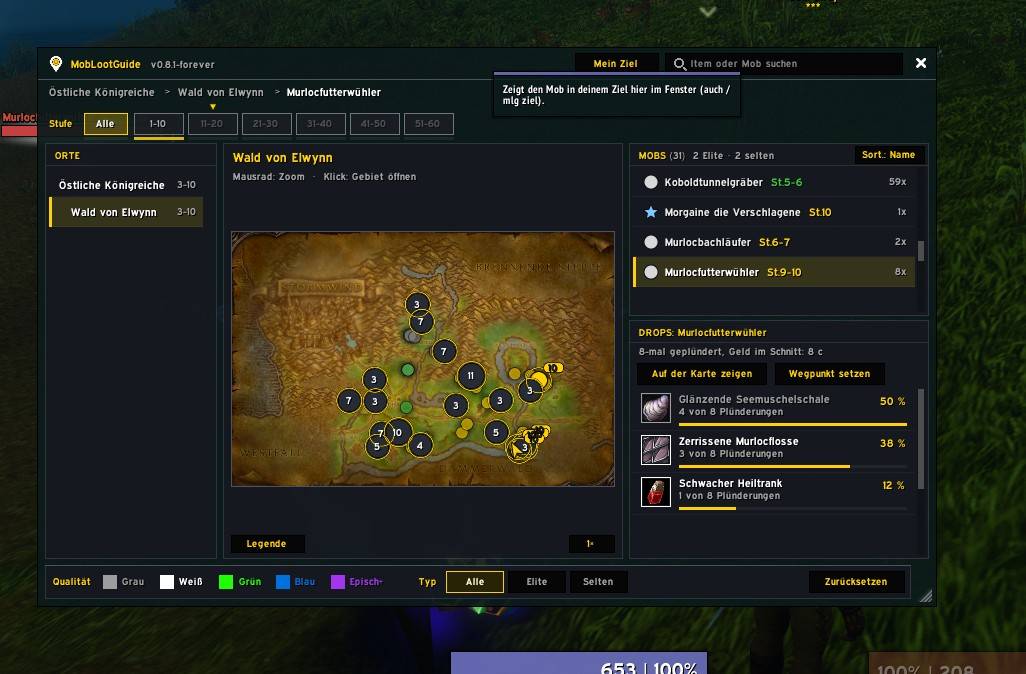
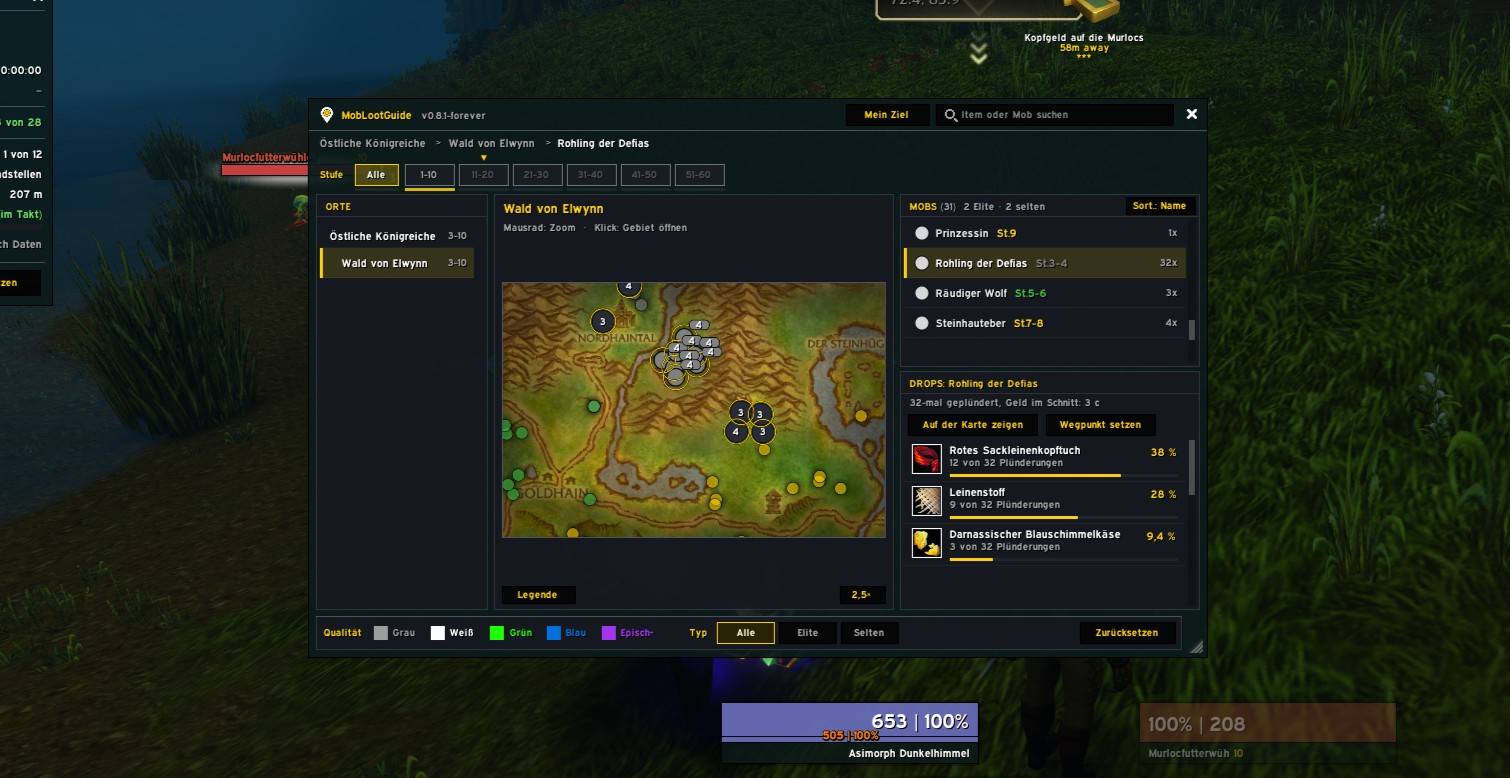
Like AtlasLoot for the open world: see which regular mobs drop what in each zone, on a map with level brackets and real drop rates recorded while you play. For MoP Classic, Forever and Retail.
WoWScrnShot_111526_233009.jpg
WoWScrnShot_111526_233013.jpg
WoWScrnShot_111526_233039.jpg
WoWScrnShot_111526_233048.jpg
WoWScrnShot_111526_233118.jpg
Description
### English
**MobLootGuide** is a loot guide for the open world. Think of AtlasLoot, but instead of raid bosses it covers the regular mobs in every zone: where they are and what they drop.
> **Note:** MobLootGuide is currently available in **German only**. An English version may follow later.
**What it does**
- **Records your loot while you play.** Every mob you loot is saved together with its drops, so you get real drop rates such as "12 of 40". Skinning, mining, herbalism, fishing and pickpocketing are not counted.
- **Imports your existing MobInfo2 data** with one command (`/mlg import`), so you don't start from zero.
- **Only displays information.** It never plays, clicks or loots for you.
**The window** (`/mlg` or the minimap button)
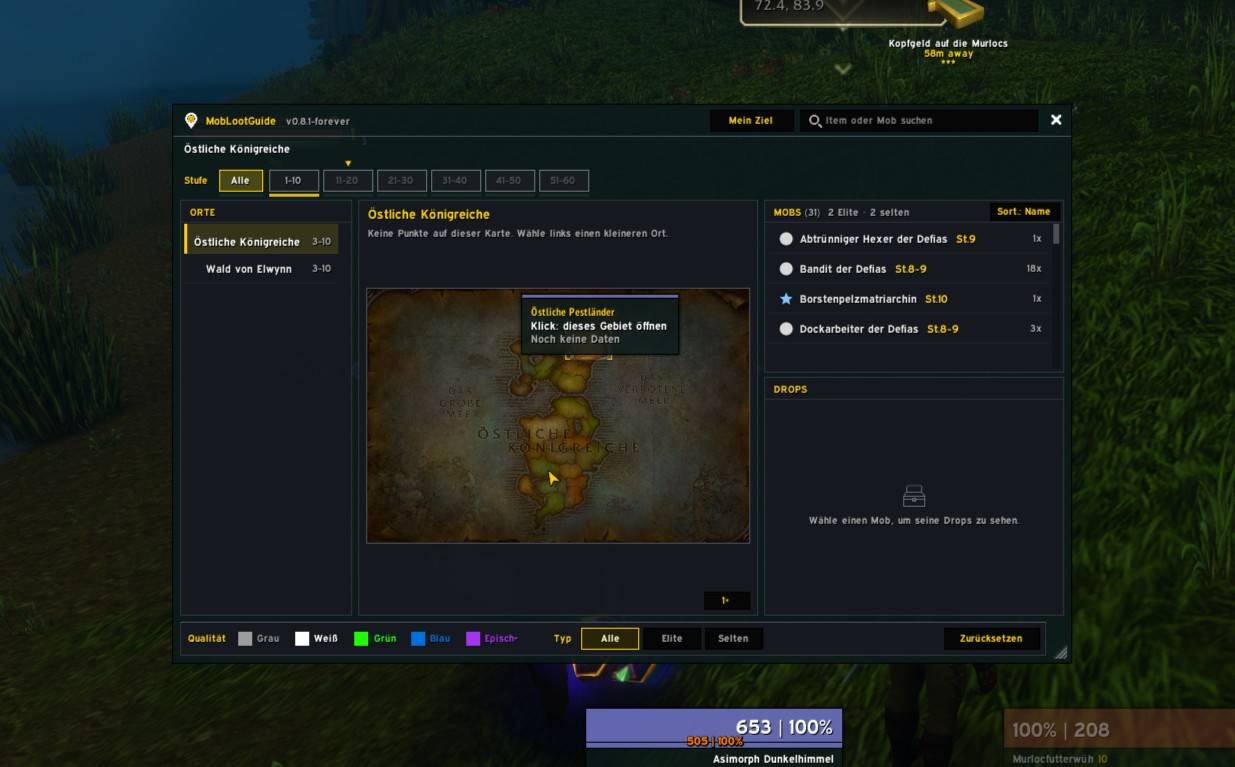
- Zones on the left, a **zone map** in the middle, mobs and their drops on the right.
- **Level brackets** in steps of 10 (MoP Classic: 1–90, Forever: 1–60, Retail: up to the current max level) with a marker for your own level.
- **Map pins** in difficulty colours (grey, green, yellow, orange, red) with shapes for normal, elite, rare and boss. Nearby mobs are grouped, and you see your own position as an arrow.
- **Explored areas look just like on your world map.** Zoom, pan, and click a zone to open it.
- **Search** for items or mobs.
- Drops with quality borders and a small drop-rate bar.
**More features**
- **Mob tooltip:** hover over a mob to see its best drops.
- **"Mein Ziel" (My Target):** `/mlg ziel` jumps straight to the mob you have targeted.
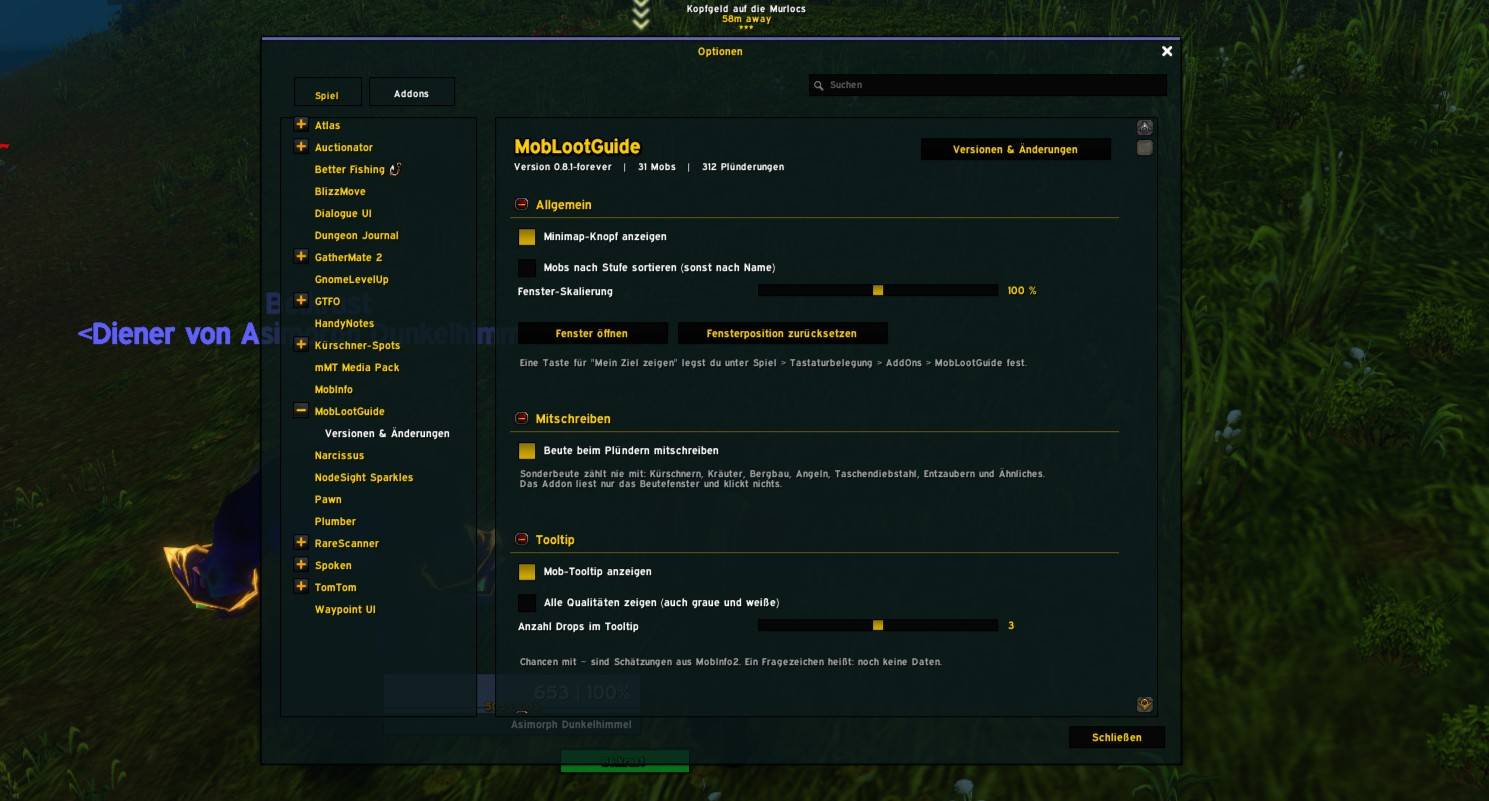
- **Options menu** under Esc → Options → AddOns, plus a **"Versionen & Änderungen"** page with all updates (`/mlg neu`).
**Recommended addons (all optional)**
- **MobInfo2** – MobLootGuide can import its collected mob and loot data.
- **Kürschner-Spots** – works hand in hand with MobLootGuide: show mobs and item locations on the world map, set waypoints, and see skinning info right in MobLootGuide. Both addons share their data.
- **TomTom** – used by Kürschner-Spots for waypoints when you set them from MobLootGuide.
MobLootGuide works perfectly fine on its own. None of these addons are required.
**Available for:** MoP Classic, WoW Forever and Retail.
---
### Deutsch
**MobLootGuide** ist ein Beute-Führer für die offene Welt. Wie AtlasLoot, nur statt Raid-Bossen für die ganz normalen Mobs in jedem Gebiet: wo sie stehen und was sie fallen lassen.
> **Hinweis:** MobLootGuide gibt es im Moment **nur auf Deutsch**. Eine englische Fassung kann später folgen.
**Was es macht**
- **Schreibt deine Beute beim Spielen mit.** Jeder Mob, den du plünderst, wird mit seinen Drops gespeichert. So entstehen echte Drop-Chancen wie „12 von 40“. Kürschnern, Bergbau, Kräuterkunde, Angeln und Taschendiebstahl werden nicht mitgezählt.
- **Übernimmt deine vorhandenen MobInfo2-Daten** mit einem Befehl (`/mlg import`), damit du nicht bei null anfängst.
- **Zeigt nur an.** Es spielt, klickt oder plündert nie für dich.
**Das Fenster** (`/mlg` oder Minimap-Knopf)
- Gebiete links, eine **Gebietskarte** in der Mitte, Mobs und ihre Drops rechts.
- **Stufen-Leiste** in 10er-Schritten (MoP Classic: 1–90, Forever: 1–60, Retail: bis zum aktuellen Maximallevel) mit Markierung deiner eigenen Stufe.
- **Kartenpunkte** in Schwierigkeitsfarben (grau, grün, gelb, orange, rot), mit Formen für Normal, Elite, Selten und Boss. Dicht beieinander liegende Mobs werden zusammengefasst, und du siehst dich selbst als Pfeil.
- **Erkundete Gebiete sehen aus wie auf deiner Weltkarte.** Zoomen, verschieben und Gebiete anklicken.
- **Suche** nach Items oder Mobs.
- Drops mit Qualitätsrahmen und kleinem Balken für die Drop-Chance.
**Weitere Funktionen**
- **Mob-Tooltip:** Beim Überfahren eines Mobs siehst du seine besten Drops.
- **„Mein Ziel“:** `/mlg ziel` springt direkt zu dem Mob, den du im Ziel hast.
- **Optionsmenü** unter Esc → Optionen → AddOns und eine Seite **„Versionen & Änderungen“** mit allen Updates (`/mlg neu`).
**Empfohlene Addons (alle freiwillig)**
- **MobInfo2** – MobLootGuide kann dessen gesammelte Mob- und Beutedaten übernehmen.
- **Kürschner-Spots** – arbeitet Hand in Hand mit MobLootGuide: Mobs und Fundorte von Items auf der Weltkarte zeigen, Wegpunkte setzen und Kürschner-Infos direkt in MobLootGuide sehen. Beide Addons teilen ihre Daten.
- **TomTom** – wird von Kürschner-Spots für Wegpunkte genutzt, wenn du sie aus MobLootGuide heraus setzt.
MobLootGuide funktioniert auch ganz allein. Keines dieser Addons ist Pflicht.
**Erhältlich für:** MoP Classic, WoW Forever und Retail.
MobLootGuide Retail Team