QuestWatch - Simple Improved Quest Tracker
- By
Vanilla-Like quest tracker with added functionality such as sort by nearest. Compatible with DungeonJournal
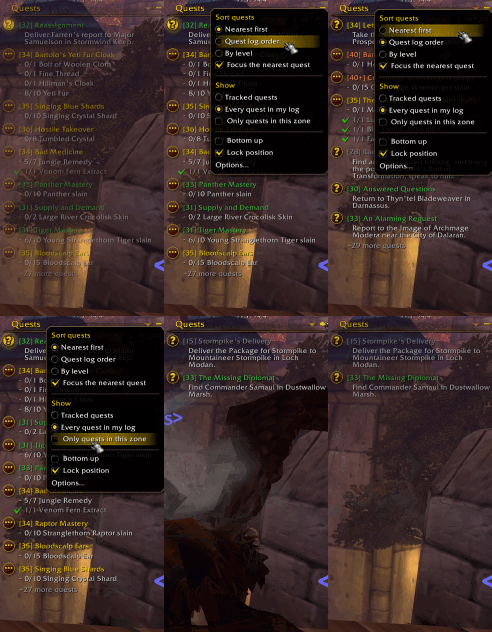
GifRec_2026-11-18_20-48-48.gif
Description
Questwatch
A quest tracker that looks just like the game's own, rebuilt from scratch so it doesn't glitch, and able to sort your quests by how close they are.
What it does
- Looks like the default tracker. Same bars, fonts, colors and spacing, the same round quest icons,
[12]levels in difficulty colors, "(Dungeon)" tags, and green checks on finished objectives. With the Classic experience preset it uses the Classic art, like the game does. - Nearest first. Quests sort by how close their objective (or turn-in) is, updated every second. A quest only moves up when it's clearly closer, so quests at the same distance don't swap back and forth. Quests the game can't place on the map follow, with the ones in your zone first.
- Other sorts. Quest log order, or by level.
- Focus the nearest quest (optional). The focus and the game's waypoint follow the closest quest. Picking one yourself holds it until you change zone.
- Tracked quests or every quest in your log.
- Only quests in this zone (optional).
- Dungeon quests fold away. Dungeon and raid quests sit in a folded "Dungeon Quests" section at the bottom. Inside that dungeon its quests unfold and go to the top.
- Timed quests count down ("Time Remaining: 4:32"), red in the last minute.
- Quest items get a button next to their quest that works in combat, with cooldown and range.
- Party progress. Hover a quest title in a group to see your party's progress. Party members with Questwatch share their counts even when they're far away.
- Bottom up (optional). The Quests bar sits at the bottom and the list unfolds upward, still read top down. A sub-option puts the nearest quest right above the bar. It has its own position, so it can sit by your action bars.
- DungeonJournal support. With the DungeonJournal addon, a dungeon you Track there becomes its own section at the top, in place of the journal's little window. Quests you haven't picked up show a ! and where to get them. Click the ! to see where on the map.
- Works with HUD Shade. The tracker fades with the rest of your HUD.
Using it
- Click a quest title to open it in the quest log. Shift-click to link it in chat.
- Right-click a quest to focus it, untrack it, share it or abandon it.
- Click a quest's round icon to focus it.
- The arrow on the Quests bar (or a right-click on the bar) opens sorting and options.
- The "−" folds the list. Dungeon sections and Dungeon Quests have their own.
- Unlock in the options and drag the Quests bar to move the tracker.
The default tracker is hidden while Questwatch is on, including after Edit Mode changes. Turn off "Hide the default tracker" in the options to see both.
Notes
- Quest-item buttons are secure, so they work in combat. While one is on screen in combat, the order holds still until combat ends, so nothing gets blocked.
- With the Classic preset, the game turns quest map points off. Without them it may not know how far a quest is, and Nearest first falls back to zone order. Turn quest points of interest on under Options, Preset, for full sorting.
- It does almost no work while you stand still: quest updates are batched into one redraw, and the distance check runs once a second.
Commands
/qwor/questwatch: options/qw lock//qw unlock: lock or unlock the position/qw reset: back to the default spot/qw hide//qw show: fold or unfold the list
QuestWatch - Simple Improved Quest Tracker Team