Minimap Radial Button Button
- By
Makes the sun/moon icon on your minimap toggle the rest of the buttons in a foldout radial manner. Better than a drawer IMO. Manually Sortable.
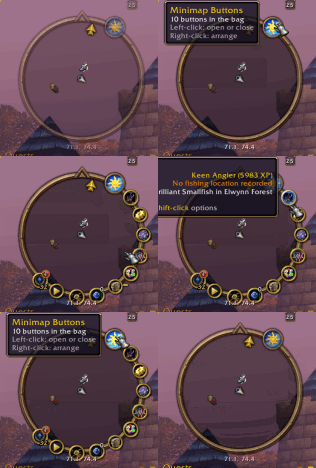
GifRec_2026-11-18_20-47-51.gif
Description
Minimap Radial Button Button
Clears every addon's button off your minimap edge and tucks them behind the day/night sun at the top right of the minimap.
What it does
- Click the sun and the addon buttons fan out around the edge of the minimap, starting just below the sun and running down the right side.
- Click the sun again (or press Escape) and they fold back into it.
- Buttons skip the spots taken by Blizzard's own minimap buttons. If there are too many for one ring, a second ring starts further out.
- New buttons from addons that load later are picked up on their own.
- The sun lights up when you hover it, and turns into the moon at night like the normal one.
Arranging
Right-click the sun (or type /mrbb arrange):
- Drag a button to move it to another spot.
- Right-click a button to leave it on the minimap where it was.
- Buttons left on the minimap show a +. Click it to tuck the button away again.
- A-Z sorts them by addon name. Done finishes.
Your order is saved.
Notes
- Only addon buttons are taken. Blizzard's own buttons (tracking, mail, the zoom buttons and so on) and map pins stay where they are.
- Works with LibDBIcon buttons and with addons that make their own.
- If an addon moves or fades its button, the button goes straight back to its spot.
- Secure buttons are left alone, so nothing gets blocked in combat.
- It does no work at all while it sits still, open or closed.
Commands
/mrbb: fan the buttons out or fold them away/mrbb arrange: drag buttons into order/mrbb az: sort A-Z/mrbb list: list the buttons and where they are/mrbb reset: tuck every button away again, sorted A-Z/mrbb debug: print each button's state, for bug reports
Minimap Radial Button Button Team