Sharpie's Gear Judge Laboratory
- By
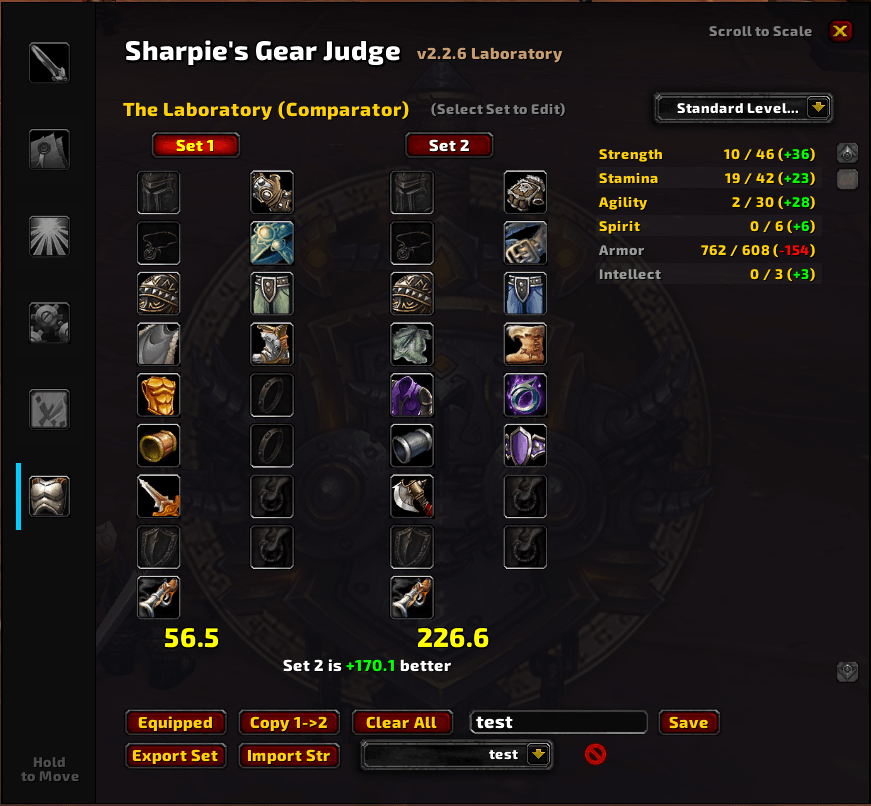
The Laboratory is a specialized module for the Sharpie's Gear Judge (SGJ) addon, it provides a powerful side-by-side gear comparator that allows you to simulate and score potential gear sets against your current stat weights.
Screenshot 2026-02-01 140814.png
Description
Sharpie's Gear Judge [Laboratory]
Version 3.1.0 | Requires Sharpie's Gear Judge | Works on WoW Forever and TBC Anniversary
🔥 New in 3.1.0
- Level Look-Ahead: score both sets with another level's weights; items you can't wear yet are tinted red.
- A profile for each set, including Talents builds, with each item's score on its icon.
- Cap Check under each set, As Linked / Best Enchants, Inspect Target and Roadmap Picks.
- Best in Bag fixes: no item in two slots, no gear you can't wear, safe Shift-Click equipping.
- Translated into every WoW Forever language.
Overview
- The Laboratory ("The Lab") is a plugin for the Sharpie's Gear Judge (SGJ) addon.
- It is a side-by-side gear comparator: build two gear sets and score them with your stat weights, without needing to own or equip the items.
- Whether you are importing a "Best-in-Slot" list from SeventyUpgrades, testing a single upgrade from a chat link, or checking what the Roadmap's picks are worth, the Lab shows which set is better and by how much.
Features
- Dual Set Comparison: Build two full gear sets (Set 1 and Set 2) and see a direct score comparison.
- A Profile for Each Set: Each set has its own scoring profile: your raid profiles, your leveling roles and, with Sharpie's Gear Judge Talents, its builds for your class. Put the same gear in both sets to see how it holds up for another spec or build. Each item shows its own score on its icon.
- Level Look-Ahead: A level slider scores both sets with the stat weights of another level, so you can see whether a piece is worth keeping for later. Items you can't wear yet at that level are tinted red. Now returns to your own level.
- Cap Check: Under each set's score you see its hit (or spell hit) for damage dealers, or defense for tanks, against the same targets as Gear Judge's Stat Logic rings. Red is short, green is there, yellow is well past it.
- Enchants: As Linked scores each item with its own enchant; Best Enchants fills every enchantable slot with the best enchant for your level. Each set shows how many slots are unenchanted and what the best enchants would add.
- Multi-Format Import: Import gear from SeventyUpgrades (JSON), SimulationCraft / Raidbots (SimC), plain item lists, or a string exported from the Roadmap or the Lab.
- Live Score Difference: Shows which set is better and by exactly how much. When the two sets use different profiles, the Lab says so instead of comparing scores on different scales.
- Stat Breakdown: A scrollable panel with Set 1, Set 2 and difference columns for every stat, color-coded.
- Smart Slotting: Handles 2H vs. 1H weapon conflicts and automatically fills empty Ring/Trinket slots.
- Save/Load System: Save your theorycrafted sets for each character, load them later, or delete them.
How to Use
- Open the Lab: Click the "The Lab" tab in the main Sharpie's Gear Judge window.
- Add Items to the active set (outlined in gold):
- Shift-Click any item in chat, your bags (bag addons like Baganator and Bagnon included) or AtlasLoot.
- Equipped: pulls in your character's current gear.
- Best in Bag: builds the highest-scoring set from your bags. Shift-Click it to equip those upgrades for real (items that would bind to you are listed in chat for you to equip yourself).
- Import String: paste data from SeventyUpgrades, SimC/Raidbots or the Roadmap's Export.
- Inspect Target: loads the gear of the player you have targeted (scored with your profile).
- Roadmap Picks: loads your gear with the Roadmap's recommended upgrades swapped in, for the dungeon selected in the Roadmap or the whole set built in its Chain Mode.
- Edit: Right-click or shift-click a slot to empty it. Use Copy Set 1 to Set 2, Export Active Set and Clear All to manage sets.
- Compare: Pick a set with its button above the gear to edit it.
- Analyze: View the score difference under the sets and the detailed stat changes in the right-hand panel.
- Click the ? button for in-game help.
Translations
- The Lab is translated into English, German, Spanish (Spain and Latin America), French, Brazilian Portuguese, Russian, Korean and Traditional Chinese.
Installation
- Ensure you have the base addon Sharpie's Gear Judge installed.
- Place the
SharpiesGearJudge_Laboratoryfolder into yourInterface\AddOnsdirectory. - The Laboratory will automatically register as a new tab in the SGJ main window.
Feedback
- Found a bug? Come say hi on the Discord.
🧩 The Sharpie's Gear Judge Suite
- Sharpie's Gear Judge (core): tooltip verdicts, stat weights, Cap Guardian, bag and quest upgrade arrows.
- Roadmap: ranks every dungeon and quest zone by the upgrades it holds for you.
- The Laboratory: build and compare two full gear sets.
- Talents (WoW Forever): talent build guide with weights that follow your build. See every build online.
- XP Bar: experience bar with quest turn-ins and the upgrades waiting for your next level.
- Roster: which of your alts an item upgrades, a gear grid of every character, and the BoE Finder.
Sharpie's Gear Judge Laboratory Team

Owner