Sharpie's Gear Judge
- By
Advanced Gear stat comparison, analyzes your equipment slots, class, spec, and current level for Forever, Classic Era, Anniversary & TBC
Screenshot 2026-10-04 154523.png
Screenshot 2026-01-14 205151.png
Screenshot 2026-10-04 152621.png

Screenshot 2026-01-14 205122.png
Screenshot 2026-10-04 152550.png
Description
Sharpie's Gear Judge (Classic Era, TBC Anniversary & WoW Forever)
The Final Verdict on your gear.
Sharpie's Gear Judge (SGJ) is a real-time theorycrafting engine and UI enhancement for World of Warcraft: Classic Era, the TBC Anniversary Edition, and the WoW: Forever beta.
Unlike addons that give items static points (e.g. "Hit = 10 pts"), SGJ understands context. It knows if you are hit-capped, if a helm swap will break your Meta Gem, whether a quest reward beats what you're wearing, and in TBC it can project the best gems and enchants for an item before you equip it.
🔥 What's New
3.2.4
- Weapon racials removed (WoW Forever): the 2026-10-15 beta patch removed Human Sword, Orc Axe and Dwarf Mace Specialization, so weapons now score the same for every race.
- Feral Druids value weapon DPS (WoW Forever): Cat and Bear Form swing your weapon's DPS, so a stronger weapon now scores higher. Rake now scales with Attack Power.
- Leveling weights checked against the current models (WoW Forever): curves rebuilt for the 2026-10-15 patch, and dungeon weights for tanks, healers and several damage specs checked against public beta dungeon logs.
- Talent-based weights on non-English clients: talent adjustments and leveling profile choice now work in every language on Forever and Classic Era.
- Fixed: a Lua error on login about secret auras.
3.2.1 – 3.2.3
- Roster plugin support: weapon and relic bonuses can be worked out for your alts, so the new Roster plugin can score gear for them.
- Gear for PvP (WoW Forever): a new option that scores gear for fighting other players, at every level. Toggle it at the top of the
/sgjwindow, in Protocol, or with/sgj pvp. - Gear is judged without buffs: food, elixirs and party buffs no longer move your hit caps or scores. Buff Assumptions (Assume Raid Buffed / Assume World Buffed) now work on every version, not only TBC.
- Dual Specialization ready (WoW Forever): each spec keeps its own profile, Gear for PvP setting and gear, and tooltips can show upgrades for your other spec.
- Item Score on tooltips: shows the item's own score in its slot next to the one you wear.
- Item sets and enchants rebuilt from each game's own client data, and every language WoW Forever ships in is supported.
3.2.0
- A fresh look: the window is now 900×700, and every tab is laid out in three columns.
- Receipt, Protocol, Stat Logic and Weapon Thunderdome redesigned.
- Stat Logic rings follow your role: tanks, healers, casters and melee each get their own cap rings, using the same hit and defense targets your gear is scored against.
Earlier (3.1.x)
- Gear for Raiding (WoW Forever): hit and defense targets slide toward raid caps from level 50.
- Relics are rated: all 25 new Forever librams, idols and totems, plus the 19 Classic relics Forever kept.
- Profession window arrows, including Forever's new professions window.
🚀 Key Features
⚔️ Built for WoW Forever
- Level-60 weights for every class, worked out with each build's own talents: damage and tank profiles from the wowsims Forever simulator, healer profiles from a healing model in which healers downrank as they do in game.
- Profiles that match how you play: Raid, Solo Leveling, Dungeon Leveling, AoE Farming and PvP, named after the builds in the Talents plugin (for example "Arms: Raid", "Holy: Dungeon Leveling").
- Leveling weights level by level for every Forever spec, from 10 to 59, built from the talents, spells and gear stats each spec actually has at that level. Your actual talents adjust them.
- Hit and defense targets follow your level. While leveling that's 5% hit (3% spell hit) against same-level mobs. With Gear for Raiding on, the targets slide toward the raid caps (9% hit, 16% spell hit, 440 Defense, uncrushable) from level 50.
- Gear for PvP: Stamina, armor and burst count for more, and hit stays at the player-vs-player caps. The first time a realm looks like a PvP realm, Gear Judge offers to turn it on.
- Relics are rated, and new race/class combinations are supported.
🧠 Dynamic "Cap Guardian" Engine
The Judge watches your stats in real time and penalizes gear that would drop you below a critical threshold.
- Weight scalers (proactive): hit and defense weights shrink as you approach your caps, so every item is scored with your current needs in mind.
- Cap Guardian (reactive): if you're at or above a cap and a swap would drop you below it, the item gets a score penalty and a tooltip warning.
- Tank defense: 490 at 70 on TBC, 440 at 60 on Era, and on Forever a slide to 440 from level 50 (with Gear for Raiding on). Only applies when your profile weights defense.
- Judged without buffs: caps and thresholds read your gear and talents, not the food, elixirs or party buffs you happen to have on.
- Buff Assumptions (all versions): turn on Assume Raid Buffed or Assume World Buffed to credit the buffs you'd have in a group, raid or with world buffs.
- Hybrid live preview: tooltips answer "if I swap this piece, where does my hit land?" without you equipping it.
🔮 Smart Projection (SimC-Lite)
- Gem simulator (TBC): three strategies — The Skeptic (empty sockets = 0), The Casual (respect socket colors), The Pro (min-max, off-color gems included).
- Gem quality tier (TBC): project sockets with Common, Uncommon, Rare or Epic gems.
- Enchant projector: compare items as if they had the best enchant for your level and spec. Your worn item shows which enchant that is.
- Meta gem enforcement (TBC): detects when a swap would turn off your Meta Gem.
- Progression-aware gem pool: on TBC progression servers, projected gems follow the Content Phase set in Roadmap.
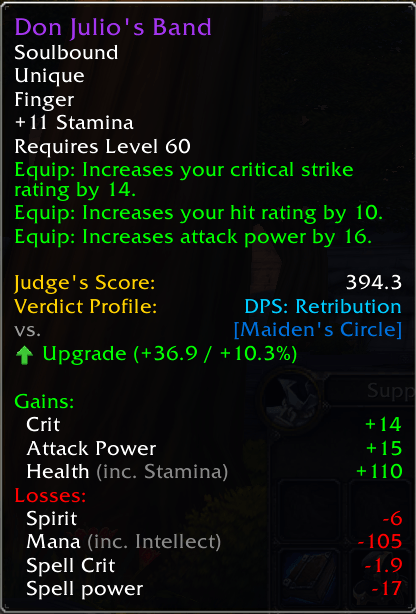
📊 Tooltip Verdicts
Hover any item: world drops, vendor goods, quest rewards, dungeon loot or AH listings.
- Judge's Score for your active spec (and any tracked off-specs).
- Item Score: the item's own score in its slot, and the score of what you wear there.
- Upgrade / Downgrade verdict with the score difference. One-handers for dual wielders are judged in the hand where they gain the most.
- Other spec (WoW Forever, Dual Specialization): an extra line when an item upgrades the spec you're not in.
- Context warnings: cap breaks, set bonus loss, meta deactivation, missing enchants, off-hand requirements and more.
- Shift-only mode: show verdicts only while holding Shift.
🎒 Bag, Loot, Quest & Profession Overlays
Turn the bag and loot arrows on in Protocol → Interface Options.
- Bag upgrade arrows (off by default): green and red arrows on bag items. Works with Blizzard bags, Bagnon, ElvUI, GudaBags and XLoot. Baganator: the arrow is a Sharpie's Gear Judge widget in Baganator's Icons tab, and SGJ can also be picked under Upgrade detection for the
upgradesearch. - Fast bag arrows (on when bag arrows are enabled): quick single-slot scoring, with a full check for set pieces and weapons.
- Loot roll arrows (off by default): highlights the best upgrade on group loot popups.
- Quest reward overlays: marks the best choice among quest rewards.
- Profession arrows (always on): recipes that craft an upgrade for you get a green arrow, in Forever's professions window and in the Classic profession and Enchanting windows (Era, TBC).
🧾 The Gear Receipt
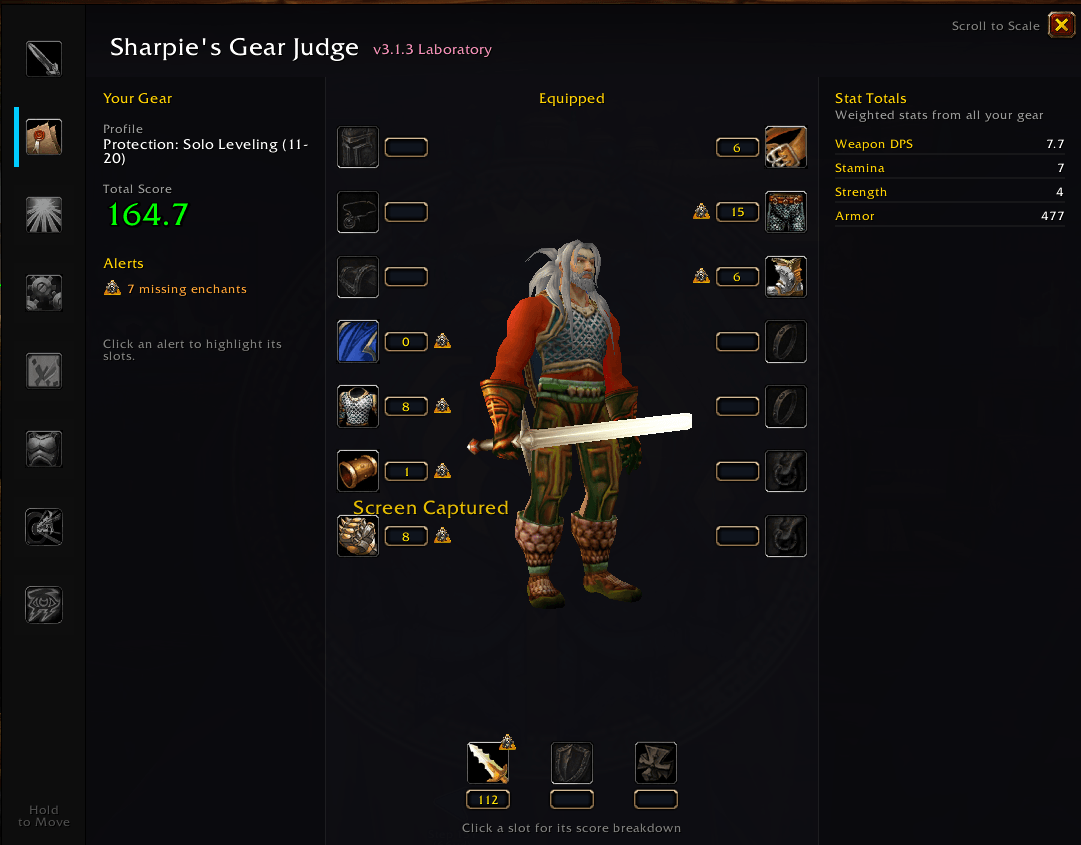
Your equipped gear at a glance (/sgj → Receipt).
- Left: your profile, total score and alerts ("2 missing enchants", "1 better item in your bags"). Click an alert to flash the slots it refers to.
- Middle: your character with each slot's score beside it. Click a slot for its score breakdown.
- Right: your weighted stat totals.
⚔️ Weapon Thunderdome (built-in)
A core /sgj tab: compare six weapon setups (two-hander, one-hand + off-hand, dual wield) side by side without equipping anything, with the winner and a ranking of every setup. This is not the full Laboratory paperdoll.
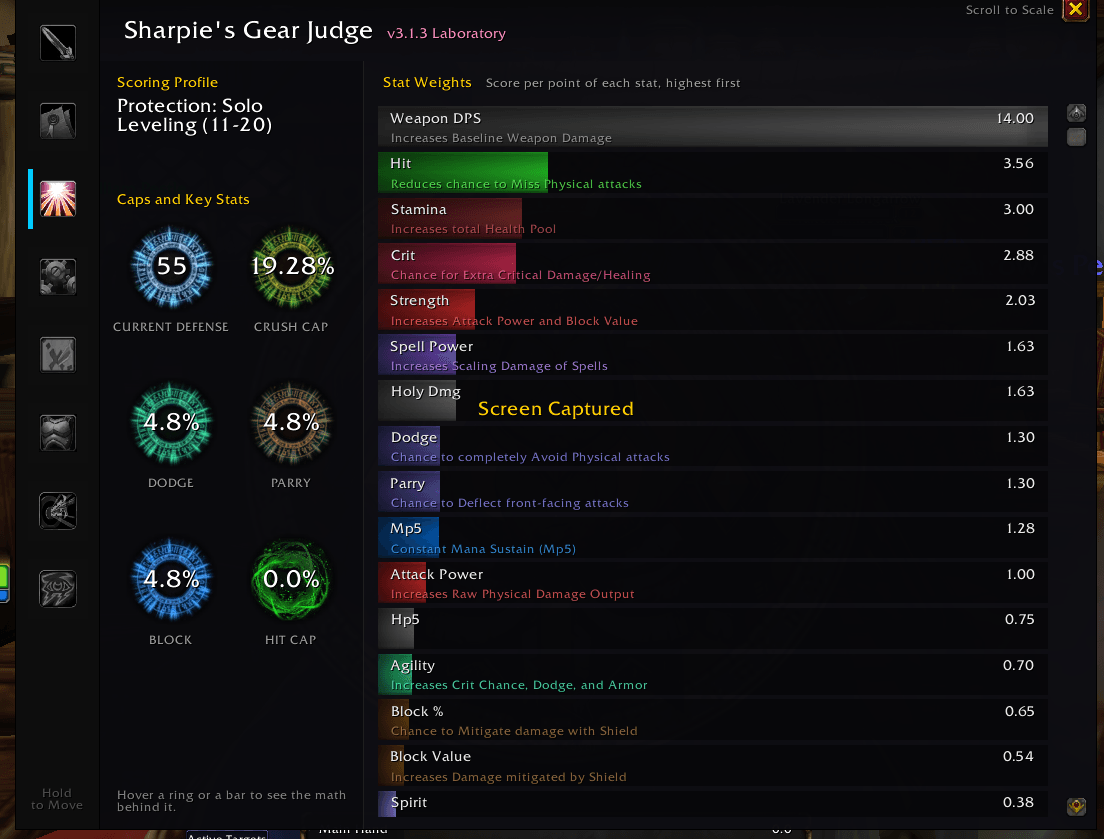
📐 Stat Logic
Your active profile, your cap rings (hit, defense and the like, picked for your role) and every stat weight. Hover a bar for the explanation and the math behind it.
🔬 The Laboratory Plugin
(Separate addon: SharpiesGearJudge_Laboratory)
- Build and compare full gear sets without owning the items: drag items from chat or bags onto a virtual paperdoll.
🗺️ The Roadmap Plugin
(Separate addon: SharpiesGearJudge_Roadmap)
- Ranks zones and dungeons by the upgrades they hold for your character.
- Content Phase dropdown (TBC progression) sets which projected gems are available. Without Roadmap, the phase setting exists but has no in-core UI.
📋 The Roster Plugin
(Separate addon: SharpiesGearJudge_Roster)
- Alt upgrades on tooltips: hover a tradeable item to see which of your other characters it upgrades, and by how much.
- Roster grid: a tab with one column per character and each slot's item and score, so you can see who needs gear most.
- BoE Finder: lists the tradeable items your characters hold (bags, bank and mail) that upgrade another of your characters, and who to send them to.
🌳 The Talents Plugin
(Separate addon: SharpiesGearJudge_Talents — WoW: Forever only)
- Talent build guide from level 10 to 60: the next talent glows in the talent window, a side panel shows your progress, and off-build points are flagged.
- Builds for every class, sorted by Max Level, Leveling (Solo / Dungeon) or Farming and by role.
- Gear Judge's weights follow the chosen build: its leveling profile while you level, its level-60 profile at 60.
- Browse every build online: Forever Class Builds lists each class's builds with their talent order by level and the leveling stat weights Gear Judge uses. It's updated as builds change, so it can be a little ahead of the latest release.
📈 The XP Plugin
(Separate addon: SharpiesGearJudge_XP)
- Experience bar with rested XP and quest turn-in projection, upgrades waiting in your bags, a level-up gear alert and a warning before your leveling weights change.
👥 Multi-Spec & Saved Baselines
- Tracked specs: turn on secondary specs in Protocol → Secondary Specs & Baselines, and tooltips show an upgrade line for each.
- Save Profile: snapshot your equipped gear as the baseline for a spec, so off-spec comparisons use (Saved) gear instead of what you're wearing. Essential for healers judging DPS drops while in healing gear.
- Clear: remove a spec's saved baseline.
- Dual Specialization (WoW Forever): each spec keeps its own scoring profile, Gear for PvP setting and last-worn gear.
💻 Slash Commands
| Command | Action |
|---|---|
/sgj or /judge |
Open or close the Gear Judge window |
/sgj config |
Open the settings (Protocol). /sgj options works too. |
/sgj import |
Import weights (Pawn strings, Sixty Upgrades) |
/sgj simple |
Toggle shortened stat names in tooltips |
/sgj colors |
Toggle stat colors in tooltips |
/sgj whatsnew |
Show the What's New window again |
/sgj pvp |
Toggle Gear for PvP (WoW Forever) |
/sgj jc |
Toggle Jewelcrafter gem evaluation (TBC) |
/sgj hitcheck |
Show your hit, where it comes from, and your targets (WoW Forever) |
/sgj talents |
Show the talents Gear Judge reads and the profile it picks |
/sgj dualspec |
Show what Gear Judge reads for each spec |
/sgj realm |
Show what the PvP realm check reads |
/sgjsave |
Reload the UI to save addon data to disk |
/sgjwipe |
Reset all Gear Judge settings to their defaults |
Gear Judge also has a page under Game Menu → Options → AddOns to open the window or its settings, see What's New and bring back the minimap button.
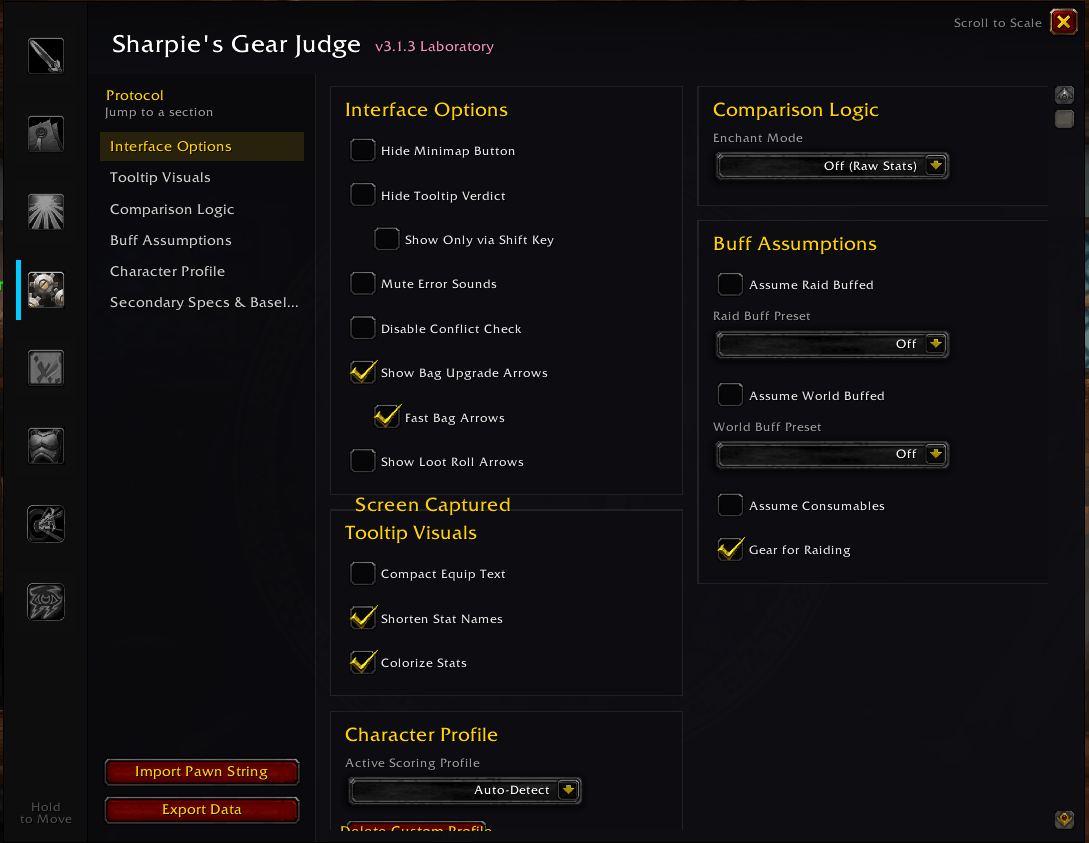
⚙️ Settings Guide (Protocol)
Open Protocol from the Gear Judge window or with /sgj config.
Interface Options
- Hide Minimap Button — Remove the minimap icon.
- Hide Tooltip Verdict — Disable SGJ lines on item tooltips.
- Show Only via Shift Key — Verdicts appear only while holding Shift.
- Mute Error Sounds — Stop the error sound when clicking invalid items.
- Disable Conflict Check — Stop the chat warning about Pawn/Zygor.
- Show Bag Upgrade Arrows — Off by default. Green/red arrows on bag items.
- Fast Bag Arrows — On by default; only applies when bag arrows are enabled.
- Show Loot Roll Arrows — Off by default. Arrows on group loot frames.
Tooltip Visuals
- Compact Equip Text · Shorten Stat Names · Colorize Stats
Comparison Logic
- Enchant Mode — Off (Raw Stats) / Current Only / Project Best.
- Gemming Logic (TBC) — The Skeptic / The Casual / The Pro.
- Gem Quality (TBC) — Common / Uncommon / Rare / Epic tier used when projecting empty sockets.
- Shield Tanks: No Two-Handers — On by default. With a shield tank profile, two-handers are never shown as upgrades.
Buff Assumptions (all versions)
Gear is always judged without the buffs you happen to have on. These add the ones you'd have in a group or raid.
- Assume Raid Buffed with a Raid Buff Preset — Off / Full Raid / 5-Player Group (Era, Forever) or Off / 25-Man Full / 10-Man Minimal (TBC).
- Assume World Buffed with a World Buff Preset — Off / Full World Buffed / DM Tribute Only.
- Assume Consumables — Assume temporary weapon buffs like Sharpening Stones or Weightstones.
- Gear for Raiding (WoW Forever, on by default) — From level 50, value hit and tank defense toward raid caps. Turn off if you won't raid. Greyed out while Gear for PvP is on.
- Gear for PvP (WoW Forever, off by default) — Score gear for fighting other players. Saved for each spec.
- Show Other Spec on Tooltips (WoW Forever) — With Dual Specialization, also show upgrades for your other spec.
Your own racials are always applied.
Character Profile
- Active Scoring Profile — Auto-Detect picks a profile from your talents. It does not pick imported Pawn profiles. Hybrid builds may show an "uncertain" note in Stat Logic, so pick one by hand if needed.
- Delete Custom Profile — Remove a profile you imported.
Secondary Specs & Baselines
- Check specs to track in tooltips.
- Save Profile — Store your equipped gear as that spec's comparison baseline.
- Clear — Remove a spec's saved baseline.
📥 Importing Custom Weights
Import Pawn strings (from SimC or WowSims) or Sixty Upgrades exports:
- Copy your Pawn string or Sixty Upgrades export.
- Type
/sgj importin game (or use Import Pawn String in Protocol). - Paste and confirm. SGJ creates a custom profile you can select in Protocol.
📥 Installation & Compatibility
One download for every client. SGJ detects which game you're running:
| Client | Support |
|---|---|
| Classic Era (1.15.x) | Hit %, Defense skill, T0–T3 sets, vanilla proc logic |
| TBC Anniversary (2.5.x) | Combat ratings, gems, meta gems, TBC sets, progression gem phases |
| WoW: Forever (beta) | Sim-built weights, level-by-level leveling weights, PvP weights, relics and class combinations |
Install
Install with the CurseForge app, or extract the SharpiesGearJudge folder into your game's Interface/AddOns folder:
_classic_era_/Interface/AddOns— Classic Era_classic_/Interface/AddOns— TBC Anniversary_classic_beta_/Interface/AddOns— WoW: Forever beta
Optional plugins
- SharpiesGearJudge_Laboratory — Virtual paperdoll / loadout testing.
- SharpiesGearJudge_Roadmap — Zone and dungeon loot rankings, and Content Phase control.
- SharpiesGearJudge_Roster — Alt upgrades on tooltips, a grid of every character's gear scores, and the BoE Finder.
- SharpiesGearJudge_Talents — Talent build guide for WoW: Forever, linked to Gear Judge's weights.
- SharpiesGearJudge_XP — Gear-aware experience bar.
Supported bag addons
Blizzard default bags, Bagnon, ElvUI Bags, Baganator, GudaBags, XLoot (loot rolls).
Localization
English, plus German (deDE), Spanish (esES, esMX), French (frFR), Brazilian Portuguese (ptBR), Russian (ruRU), Korean (koKR) and Traditional Chinese (zhTW). In Korean and Traditional Chinese the interface is translated, but some profile names and TBC gem and enchant names still show in English.
🏗️ How It Works (Brief)
Item tooltip / bag link
    → Parse.lua (scan stats, procs, sockets, set headers)
    → Helpers.lua (raw stats, ProcDB, gem/enchant projection)
    → Evaluator.lua (character score, upgrade delta, cap guardian)
    → Judge.lua / Interface.lua (draw tooltip verdict or bag arrow)
Set bonuses, meta requirements, weapon specialization, and raid-buff-adjusted caps are applied in the scoring engine — not as flat per-stat multipliers on individual items.
Credits
- Author: SuperSharpie
- Version: 3.2.4 (Classic Era, TBC Anniversary & WoW Forever)
- GitHub: Supersharpie/SharpiesGearJudge
- Discord: Join the Theorycrafting Hub
- Feedback: Found a weight that feels off? Drop by the Discord or open an issue on GitHub!
For detailed version history, see CHANGELOG.md.
Sharpie's Gear Judge Team

Owner