Sharpie's Loot Tracker
- By
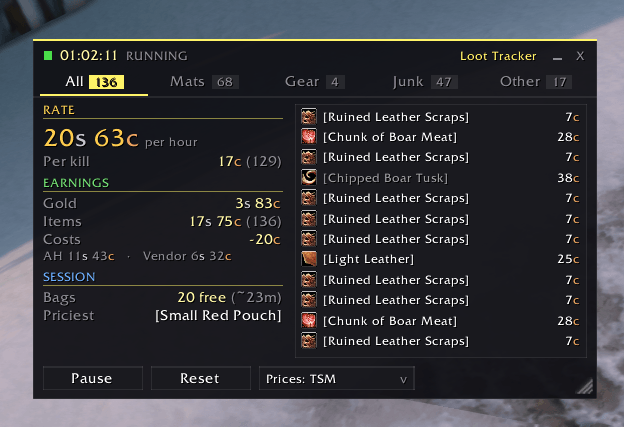
See what your farm is really worth: coin, items by category, and gold per hour.
Screenshot 2026-11-16 190924.png
Description
Sharpie's Loot Tracker
Version 1.1.1 | Works on WoW Forever
See what your farm is really worth: coin, items by category, and gold per hour.
Start farming and it tracks your session on its own: what dropped, what it's worth, what you spent, and how long your bags will last.



Available in: English, German, French, Spanish, Portuguese, Russian, Korean and Chinese.
🔥 New in 1.1.1
- Idle pause no longer fires while you loot quest items or items you ignore.
- Per kill (from 1.1.0) now works on grey mobs and at max level, because it also counts the mobs you loot.
- Prices button: pick your price source at the bottom of the window. Addons you don't have are greyed out.
- Resizable compact bar: drag its corner to change the width. Long text no longer runs under the buttons.
Features
- Gold per hour: the big number, a forecast from your whole session. It shows
--for the first 2 minutes, so one lucky drop doesn't give a huge figure. - Tabs: All, Mats, Gear, Junk and Other, each with an item count.
- Prices from your auction addon: TradeSkillMaster, Auctionator or Auctioneer, or vendor prices if you have none. The All tab splits item value into auction house and vendor. Hover a row to see where its price came from.
- Costs: money spent at vendors (repairs, food, ammo) comes off your gold per hour.
- Idle pause: no loot for 5 minutes, or going AFK, pauses the timer as of your last loot. Quest items and ignored items count as loot here. The next loot carries on.
- Bags: free slots and roughly how long until they're full, with an alert when they fill up.
- Big drop alert: a sound and on-screen warning for a drop worth 5g or more.
- Per kill: coin and items per kill. It counts kills that give you experience, or the mobs you looted if that's more, so it works on grey mobs and at max level too.
- Compact bar: one line with state, time, gold per hour and bags. Use the button in the header or double-click it, and drag its corner to change the width.
- Report: post a one-line summary to your group, guild or a friend.
- Ignore list: Ctrl-right-click a row to always ignore that item. Quest items are ignored by default.
Disenchanting, prospecting, milling and opening clams or lockboxes count what you got, not the item as well.
Commands
/slt or /loottracker
| Command | What it does |
|---|---|
/slt |
Show or hide the window |
/slt compact |
Switch between the full window and the one-line bar |
/slt start, pause, reset |
Control the session |
/slt report [say|party|guild|raid|instance|w <name>|self] |
Post a session summary |
/slt source auto|tsm|auctionator|auctioneer|vendor |
Where item prices come from |
/slt tsm <price string>|default |
Any TSM custom price |
/slt vendorfloor |
Never value an item below its vendor price |
/slt questgold |
Count quest reward gold |
/slt autostart |
Start a session on the first loot |
/slt idle <minutes> |
Idle pause time, 0 = off |
/slt costs |
Take vendor spending off the total |
/slt alert <gold> |
Big drop alert size, 0 = off |
/slt stale <days> |
Mark Auctionator prices older than this |
/slt ignore [item|clear] |
Ignore an item, list ignored items, or clear the list |
/slt unignore <item> |
Stop ignoring an item |
/slt questitems |
Ignore quest items |
Translations
Translated into English, German, Spanish (Spain and Latin America), French, Brazilian Portuguese, Russian, Korean and Traditional Chinese. Commands stay in English.
Installation
Place the SharpiesLootTracker folder into your Interface/AddOns directory.
Feedback
Found a bug? Come say hi on the Discord.
Sharpie's Loot Tracker Team

Owner