


SessionScout
- By
Choose your available time. See up to three of your own tasks that fit.
SessionScout helps turn a WoW to-do list into a plan for this session. Enter the tasks you want to do, give them time estimates and priorities, then choose your available minutes. It suggests up to three unfinished tasks whose combined estimates fit, favoring higher priorities.
For WoW Forever 1.60.1. Version 0.1.0 separates This session, where you choose your time and see suggestions, from My tasks, where you manage the list. Estimates and completion are manual; the addon does not discover activities, detect quest completion or calculate gear upgrades.
Experimental tracker: keep your chosen task on screen
Try SessionScout 0.2.0-alpha.4 — Forever if you want to test the features below. They are only in the experimental alpha; the standard 0.1.0 download and setup below remain unchanged. Back up your addon files and saved data before testing, and keep SavedVariables when updating.
Use the ZIP and manual installation instructions on the linked file page, then try it with something you already intend to do:
- Enter
/scout, open Choose myself (or Change task), and press Choose beside your task. Add one under My tasks → + New task if needed. - Close Scout. Your chosen task stays on a compact tracker. Drag its background somewhere convenient and play as usual.
- When you finish, press Done on the tracker. Undo restores it; Choose next opens the picker without choosing a replacement for you.
Short tracker trial and setup · Share a short result
You can also reply in this project's comments: what were you trying to remember, what do you normally use, and what helped or got in the way? Deciding not to use it or finding no benefit is useful feedback too.
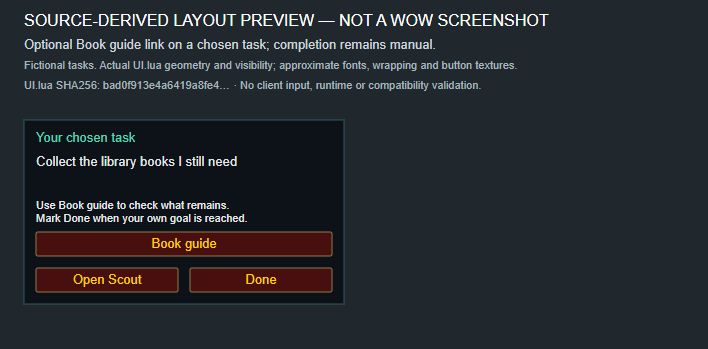
Earlier alpha.2 source-derived illustration, not an in-game screenshot. The task is fictional; fonts and textures are approximate. Book guide requires the separate, optional Librarian addon described below.
More tracker controls and limits
- Choose your task. Pick a suggestion or any unfinished task from My tasks. A task longer than your available time shows a warning without changing its estimate. Use suggestions returns to the planner.
- Keep a reminder on screen. Close Scout to leave a compact tracker for your chosen task. Mark it Done there; Undo restores it, and Choose next opens the picker. Scout does not choose a replacement automatically.
- Place it where you want. Drag the tracker's background to suit your layout. Its default position may overlap other controls; position restoration after reload still needs client verification.
- Open an optional book guide. Install and enable Librarian Books Forever separately. Edit your book task, select Guide: Library books, save and choose it. Book guide opens Librarian's journal from the chosen card or tracker. Librarian supplies the book locations and collection progress; Scout completion remains manual. The companion is optional, is not bundled, and is not needed for ordinary tasks. Guide links belong to the current character.
Scoped alpha.2 client checks verified task selection, tracker display, direct Done/Undo and opening Librarian 1.3.0 from the tracker, with existing tasks and completion records preserved. This is not a full compatibility check. See the tracker test record for the remaining checks and placement limitations.
Alpha.4 also fixes a completed daily/weekly reminder that could stay visible after its reset. Its visible completion card refreshes every 30 seconds. This correction passed automated checks but has not been tested at an actual server reset in WoW. The alpha remains experimental.
Interface preview

Source-derived preview of 0.1.0 with fictional, manually entered tasks. One saved task fits a 120-minute session. Fonts and button textures are approximate; this is not an in-game screenshot or a calculated gear recommendation.
Get started
- Download SessionScout 0.1.0 — Forever,
also available from this project's Files tab.
With WoW closed, extract the ZIP's
SessionScoutfolder into your ForeverInterface/AddOnsfolder. The resulting path must containSessionScout/SessionScout.tocdirectly. Keep your SavedVariables when updating. - Start Forever, enable SessionScout in the AddOns menu and enter
/scout. - Open My tasks → + New task. Enter a task name and estimated minutes, choose its priority, repeat setting and completion scope, then press Add task.
- Return to This session. Choose 15, 30 or 60 minutes, or enter 1–240 whole
minutes in Custom minutes and press Apply. For two hours, enter
120. - Mark a task Done when you finish. In My tasks → Completed, Undo makes it unfinished again. Leave a Next time, remember… note for your next session.
Nothing fits? A task estimated at 120 minutes will not appear in a 90-minute plan. The planner shows the shortest unfinished estimate so you can adjust your available time or edit an estimate that was inaccurate.
What is saved
- One-time, daily and weekly tasks, plus completion and your selected budget.
- Shared task definitions: editing or deleting a task affects every character. Completion can be separate for each character or shared across the account.
- A next-session reminder for the current character.
Daily and weekly completion uses reset times supplied by the server. If the required reset API is unavailable, SessionScout explains why completion could not be saved; it does not guess a reset schedule.
Ordinary task planning has no dependencies, external accounts or telemetry. General bag space and lowest equipped-item durability are shown outside combat.
0.1.0 compatibility
The 0.1.0 controls were checked with mouse and keyboard in Forever 1.60.1.70450:
creating and editing tasks, cancelling edits, Done/Undo, confirmed deletion,
custom budgets and invalid input. Existing tasks, completion and character
settings were preserved after /reload. The release differs from the tested
0.1.0-alpha.4 package only in its version strings.
Actual reset crossings, multiple-character use, combat transitions, extreme UI scales and long sessions still need testing. Retail and other Classic versions are not supported by this file. Installation and updating through the CurseForge app have not been verified; the manual installation steps above apply.
An earlier in-game image of 0.1.0-alpha.2 shows the previous layout with fictional tasks. It predates Custom minutes and the separate This session / My tasks views in 0.1.0.
Feedback
Did the reminder help you act on your chosen task? Did the suggestions help you choose, or did setup take more effort than it saved? Share a concrete example in the project comments or the short tracker feedback form. For bugs, include your addon and game versions and the steps that caused the problem. Remove personal information from screenshots; do not attach complete SavedVariables.
Source code is available under the MIT license. See the client test record for the scope of the checks.
SessionScout Team
