Senminimap
- By
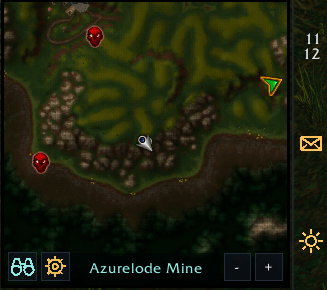
A modern square minimap with a customizable status dock, clean tracking menu, flexible positioning, and dark styling.
senminimap.png
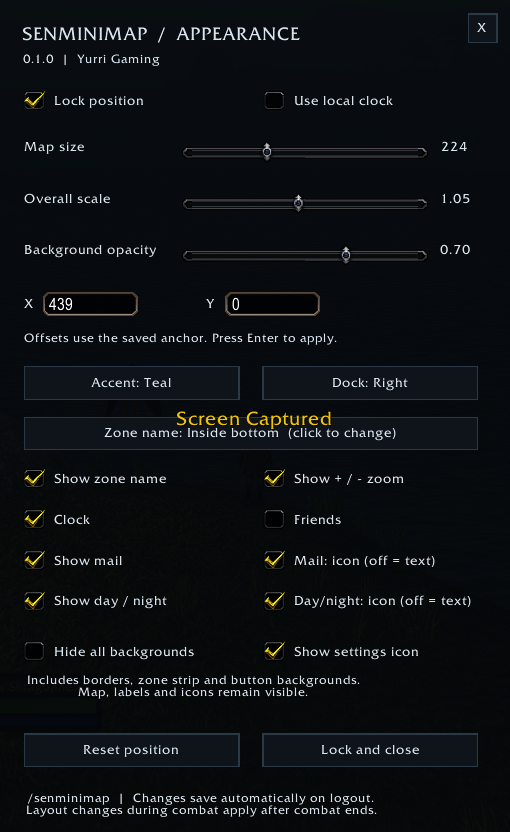
settings minimap.png
Description




🗺️ SenMinimap
A cleaner minimap. Your layout. Your style.
SenMinimap gives WoW Forever's minimap a square shape and a modern dark interface. Keep your clock, mail, friends, and day/night status together in a dock that fits your layout, then adjust the map's size, position, and appearance to make it your own.
🔲 A Square Minimap That Fits Your UI
- Adjust map size and overall scale.
- Choose Teal, Ice, or Amber accents.
- Set background transparency or hide the frame and dock backgrounds.
- Show the zone name above the map or centered inside its bottom edge—or hide it entirely.
- Use optional bottom-right zoom buttons or mouse-wheel zoom.
⚓ One Dock, Four Positions
Place the status dock above, below, left, or right of the map. Side docks are slim and match the full framed map height.
- 🕒 Clock: Server or local time. Side docks stack hours above minutes for a clear vertical display.
- ✉️ Mail: Text or envelope icon, highlighted when the game reports new mail.
- 👥 Friends: Head icon with the online count; click to open the friends window. On side docks, the count sits beneath the icon.
- 🌤️ Day/night: Text or sun/moon illustrations. (Show or hide each module independently.)
🔍 Clean Tracking Controls
Open the tracking menu with the binoculars button. A compact dark menu displays tracking options with their game icons and checkboxes. Toggle entries, uncheck all, or scroll for more. Click outside to dismiss it.
🖱️ Move It Easily
Unlock the minimap to display its drag overlay, move it from anywhere inside the box, then right-click to lock it. Numeric X/Y controls and Reset Position are available in settings. SenMinimap handles its own positioning and hides the old Blizzard minimap Edit Mode selection area.
⚙️ Open Settings
- Type
/senminimap. - Click the gold settings icon beside the binoculars.
- Go to Options → AddOns → SenMinimap → Open Settings.
(The settings icon can be hidden. The command always remains available, and
/senmapis also supported as an alias.)
⌨️ Commands
| Command | Action |
|---|---|
/senminimap |
Open or close settings |
/senminimap unlock |
Show the drag overlay |
/senminimap lock |
Lock the layout |
/senminimap reset |
Reset the map position |
💾 Installation & Compatibility
Install through CurseForge, or extract the senminimap folder into your client's Interface/AddOns directory and restart the game.
- Designed for WoW Forever, Interface 16001.
- No additional libraries or asset packs are required.
- Disable other minimap skins/movers to avoid conflicting layouts.
- Upgrading? If upgrading from the earlier
SenMapfolder, remove or disable that old folder before enabling SenMinimap; the included changelog explains how to migrate your preferences.
💡 First Install: The first installation starts with the layout unlocked so you can place it, a right-side dock, and mail/day-night icons enabled.
⚠️ Please Note
- The friends count covers in-game friends rather than Battle.net friends.
- Day/night follows server time (day from 06:00 to 17:59), rather than measuring zone lighting.
- Reading mail still requires a mailbox.
- The addon does not collect other addons' minimap buttons into a drawer.
🐛 Feedback
Found a problem? Include your client build, addon version, a screenshot or Lua error, and the steps to reproduce it in your report.
🛠️ Created by Yurri Gaming.
Senminimap Team