Senbar
- By
Clean, dynamic health and power bars for WoW Forever: smooth animation, Rogue/Druid combo points, 12 color presets, draggable bars and text, minimap icon.
addon senbar preview.png
text health senbar.png
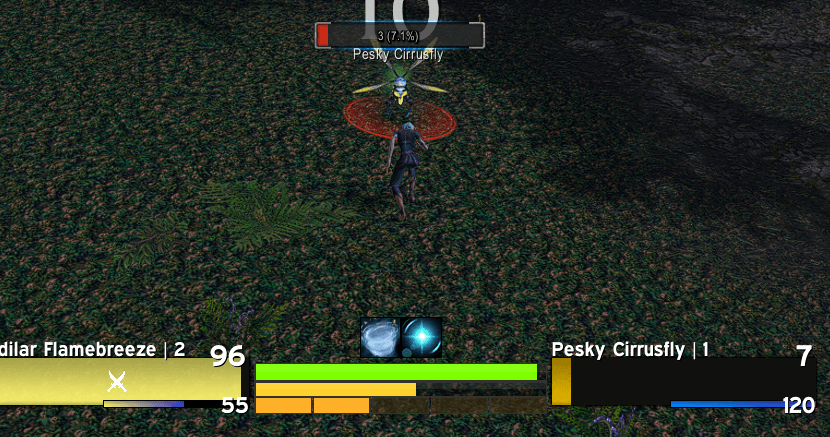
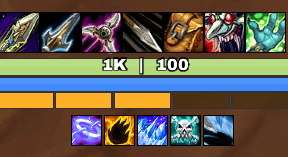
powerbar rogue combo.png
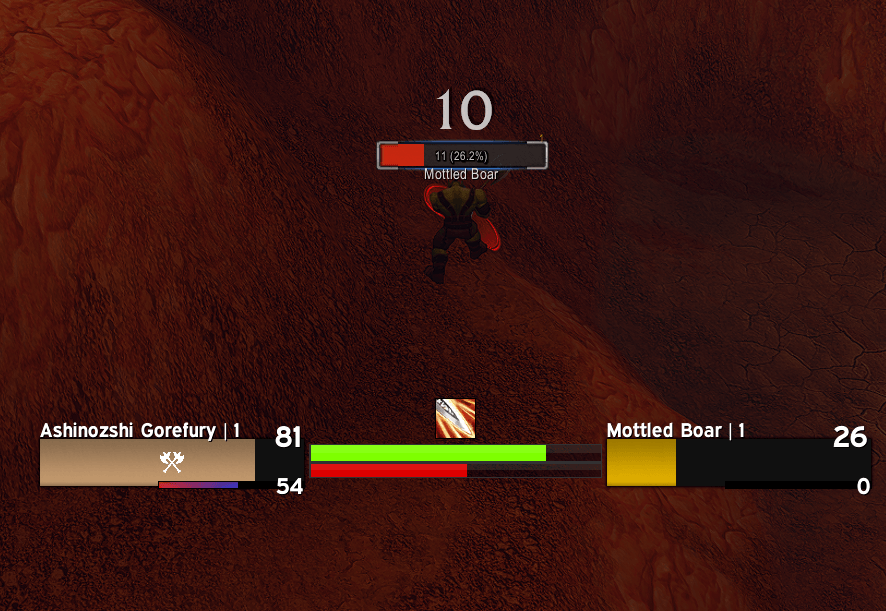
war rage.png
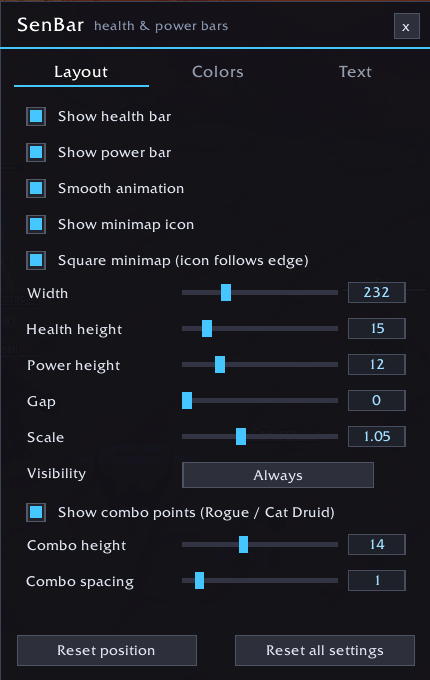
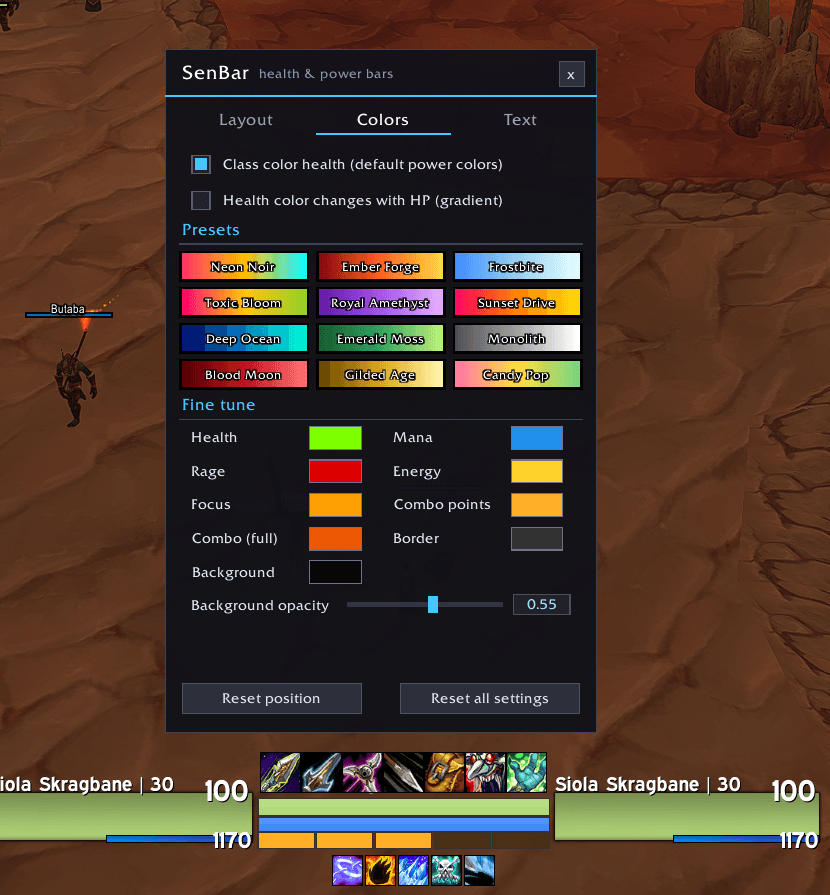
senbar settings.png
Description




SenBar
🟥🟪🟦🟩🟨🟧
Clean, dynamic health and power bars for World of Warcraft Forever. Smooth animation, combo points for Rogues and Cat Form Druids, 12 color presets, draggable bars and texts, and a modern settings panel.
✨ Features
- Health bar and power bar that update smoothly and follow your resource automatically (Mana, Rage, Energy, Focus). Druids switch resource when they shapeshift.
- Combo points row for Rogues and Druids in Cat Form, with its own height, spacing and colors.
- Class color health with default power colors (modern blue Mana, red Rage, yellow Energy), or a health gradient that shifts as your health drops, or a solid custom color.
- 12 color presets with unique looks: Neon Noir, Ember Forge, Frostbite, Toxic Bloom, Royal Amethyst, Sunset Drive, Deep Ocean, Emerald Moss, Monolith, Blood Moon, Gilded Age, Candy Pop.
- Fine tune every color: health, Mana, Rage, Energy, Focus, combo points, border, background and background opacity.
- Draggable bars and texts: open the settings and drag the bars, or drag each text, wherever you want.
- Text options: show or hide the health and power text separately, four formats (Current / Max, Percent, Current, Current | Percent), size and color.
- Text styles: Normal, Bold, Condensed, Condensed Bold, plus Cervo Neue from the included
Fontsfolder. - Type-in sliders: drag a slider, or click the number next to it and type an exact value.
- Minimap icon (can be hidden), with square minimap support.
- Visibility modes: always, in combat, in combat or with a target, hidden.
- Works on all Classic classes. No specializations needed.
📥 Installation
- Download the latest release.
- Extract the
SenBarfolder into your add-ons folder, for example:World of Warcraft\_classic_beta_\Interface\AddOns\ - Start the game (or type
/reload).
The folder must be named exactly SenBar.
🛠️ Usage
Type /sb (or /senbar) or click the minimap icon to open the settings.
- The bars unlock while the settings panel is open, so you can drag them and their texts. They lock again when you close the panel.
- Left-click the minimap icon to open the settings. Right-click it to lock or unlock the bars. Drag it to move it around the minimap.
| Command | What it does |
|---|---|
/sb |
Open or close the settings |
/sb lock / /sb unlock |
Lock or unlock the bars |
/sb minimap |
Show or hide the minimap icon |
/sb reset |
Reset the bar position |
/sb debug |
Print a diagnostic line (useful for bug reports) |
⚙️ Settings overview
- Layout: show or hide bars, smooth animation, minimap icon, width, heights, gap, scale, visibility, and the combo row settings.
- Colors: class color, health gradient, presets and fine tune color swatches.
- Text: show or hide texts, format, style, size, color, and reset text positions.
📝 Custom font
Put your .ttf file in the Fonts folder. SenBar loads Fonts\CervoNeueBlack.ttf for the "Cervo Neue" text styles. To use another font, replace that file with your own, keep the same name and type /reload. If the file is missing, SenBar falls back to the default game font.
🤔❓FAQ
The text does not show. Make sure "Show health text" and "Show power text" are on (Text tab). If it is still empty, type /sb debug and send the printed line when you report the problem.
I cannot move the bars. Open the settings with /sb: the bars unlock while the panel is open.
The minimap icon is off the edge of my square minimap. Turn on "Square minimap" in the Layout tab.
Where are my settings saved? In the SenBarDB saved variable. Settings from earlier test versions are migrated automatically.
💡 Reporting a bug
Please include your class, the exact error text (from BugSack or the in-game error popup) and the result of /sb debug.
Senbar Team