Salve
- By
WoW dispel, decurse & cleanse addon with Decursive-style one-click party dispelling for Magic, Curse, Poison and Disease, plus roots, snares & movement-removal alerts. One click to cleanse them all, and in the options bind them.

Description
Salve
Decursive-style dispelling, rebuilt for Midnight.
One click to cleanse them all, and in the options bind them.



Midnight made aura details private to addons. Older dispel addons were built around reading those details, so they became unreliable or stopped working.
As a long-time Decursive user, I wanted to preserve its simple rhythm: see the colour, click the box, cleanse the party. Salve rebuilds that idea for Midnight's new rules.
Blizzard decides which cells light up and what dispel colour they use; Salve supplies the clickable panel. It can show and remove debuffs your character can dispel, plus roots and snares when you enable a movement-removal spell that can answer them. It cannot inspect debuffs to rank individual spells, and optional sound alerts can only cover spell IDs in the current dungeon or raid catalogue.
What it does
One box per group member, in a small grid you can size and place anywhere.
It lights up instantly. A box takes the dispel colour of a matching debuff the moment that member catches something you can remove, and dims when they are clean.
One click to cleanse. By default, left click uses your primary dispel. Where your specialisation has a distinct second dispel covering other schools, it goes on right click automatically. Every detected action can be rebound.
Roots and snares can be actionable too. Enable a movement-removal spell such as Blessing of Freedom, bind it to a Salve cell, and the panel alerts you with its own colour and sound when Blizzard reports a root or snare. An edge-only sweep shows when the selected movement spell is on cooldown without hiding an active dispel.
Stack counts, drawn by the game itself, so they follow its own rules.
All supported dispelling classes: Paladin, Priest, Druid, Shaman, Monk, Evoker, Mage, and Warlock. Available spells are detected automatically when you change specialisation.
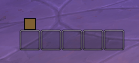 All clear!
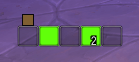 You really should be clicking that!
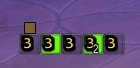 Waiting for that cooldown…
How it works
Salve never reads aura details to decide which cells light up.
It hands the game a filter for harmful auras this character can remove, along with the artwork for each box. The game decides what matches, when the dispel fill appears, what colour it is and what the stack count says.
This keeps the visible dispel panel small and quiet: Salve does not read or branch on aura data to decide which cells light up. Separate, location-scoped learning listeners record only readable aura metadata to improve the bundled catalogue; private auras remain inaccessible. Dispel colours come from the game's palette, so colourblind settings are respected automatically.
Getting started
Install, then type /salve.
The panel starts in the centre of your screen with a small gold grip above it. Drag the grip to place it. Use /salve lock or right-click the minimap button to hide the grip once you are happy.
Detected actions
The Actions page lists only spells your current character knows. Movement actions stay off until you explicitly bind them. “Area movement” is a ground-area utility, not a targeted cleanse: place it where affected allies can reach it.
| Class | Dispels | Frees movement (ally) | Area movement | Self only |
|---|---|---|---|---|
| Paladin | Cleanse: Magic, Poison, Disease; Cleanse Toxins: Poison, Disease | Blessing of Freedom; Blessing of Protection | None | Divine Shield |
| Priest | Purify: Magic, plus Disease with Improved Purify; Purify Disease: Disease | None | None | None |
| Druid | Nature's Cure: Magic, plus Poison/Curse with Improved Nature's Cure; Remove Corruption: Poison, Curse | None | None | Travel Form; Cat Form |
| Shaman | Purify Spirit: Magic, plus Curse with Improved Purify Spirit; Cleanse Spirit: Curse | None | Wind Rush Totem: Jet Stream only; frees allies in its area | Spirit Walk; Ghost Wolf |
| Monk | Detox (Mistweaver): Magic, plus Poison/Disease with Improved Detox; Detox: Poison, Disease | Tiger's Lust | None | None |
| Evoker | Naturalize: Magic, Poison; Expunge: Poison; Cauterizing Flame: Poison, Curse, Disease (cooldown-limited) | None | None | Hover |
| Mage | Remove Curse: Curse | None | None | Blink; Shimmer; Ice Block; Prismatic/Blazing/Ice Barrier: Energized Barriers only, snares |
| Hunter | None | Master's Call | None | None |
| Death Knight | None | None | None | Wraith Walk; Death's Advance |
| Demon Hunter | None | None | None | Fel Rush; Vengeful Retreat |
| Rogue | None | None | None | Shadowstep; Sprint |
| Warrior | None | None | None | Heroic Leap |
| Warlock | None | None | None | Demonic Circle: Teleport |
Talent-gated actions appear only when both the active spell and its enabling talent are known. Jet Stream and Energized Barriers remove snares, not roots.
Commands
| Command | Does |
|---|---|
/salve or /salve options |
Open the options panel |
/salve unlock |
Show the drag handle |
/salve lock |
Hide the drag handle |
/salve reset |
Put the panel back in the centre |
/salve version |
Print the loaded version and revision |
/salve debug |
Print a diagnostic report (probe remains an alias) |
/salve debug copy |
Open a selectable diagnostic report for copy/paste |
/salve snares |
List auto-captured root and snare spell IDs for sharing |
/salve learned / learned clear |
Inspect or clear learned spell IDs |
/salve help |
Print the command list in chat |
Type /salve or use Game Menu → Options → AddOns → Salve → Open Salve settings. The Blizzard page is a launcher for Salve's movable settings window, which remembers where you place it. Its seven pages are Appearance (layout and live preview), Visibility, Dispels, Troubleshooting, Learned Spells, Commands and About.
The Appearance page can show a full-size, non-clickable test panel at the addon's actual saved screen position. Its group-size, clear or dispellable state and cooldown controls update that panel immediately, and appearance changes use the same box styling and layout code as the live panel. The test panel closes with the settings window and automatically disappears when combat starts; navigating between settings pages leaves it running.
Settings worth knowing
Show unit names is off by default. The default 20 × 20 boxes are too small for names to fit. Turn names on and raise the box width to around 58 if you would rather have them.
Grid flow separates wrapping from direction. Rows can grow from the left or right edge; columns can grow from the top or bottom edge. The selected edge stays anchored as the roster changes, which makes it easier to line Salve up with unit frames.
The Dispels page shows each detected dispel and its mouse binding on one line. Movement removals are off by default: enable only the actions you consider valid, then bind them on the same row. Party-wide actions such as Blessing of Freedom can cast on the clicked member; personal actions such as Blink light only your own cell. Roots and snares use a separate configurable alert colour, while the normal dispel schools retain Blizzard's palette. Casting the selected movement removal shows an edge-only cooldown sweep, so its cooldown remains visible without obscuring an active dispel. Binding changes made during combat are safely applied when combat ends.
The Learned Spells page puts Copy learned spells at the top, before Salve's recorded readable dispellable auras and Blizzard-reported roots or snares grouped by location. It opens that catalogue ready for Ctrl+C. Every entry is a positive observation; a missing spell remains unknown rather than being presented as absent from an encounter.
Show units with nothing to dispel holds the panel's shape. Turning it off makes inactive cells transparent. Their click areas stay in place: mouse input cannot be changed on a protected frame during combat.
Alert sound is optional and off by default. When enabled, Salve loads only the bundled data module covering the current instance, then registers only its catalogued spell IDs matching schools your character can remove. Actionable roots and snares use a distinct Blizzard movement-alert sound; the Dispels page has separate test buttons for both sounds. Season 1, Season 2 and future catalogues can coexist without loading or activating one another. Run /salve debug to see the active module, spell ID count and native sound registrations.
Aura learning is always active. Outdoor discoveries are keyed to the current map; dungeon and raid discoveries are keyed to their instance. Salve listens for group aura changes and stores readable dispellable aura names, IDs and schools in the separate SalveLearnedDB block in its saved data; private auras cannot be learned. It also captures Blizzard-reported roots and snares for group members through the loss-of-control feed, so no command is needed during a pull. /salve learned clear removes the recorded catalogue.
Limitations
These are worth stating plainly, because they are not oversights:
- The visual dispel panel cannot prioritise or hide individual matching debuffs. Both would require inspecting aura details that addons are no longer permitted to use for this decision. This is a game restriction, not an unfinished priority system.
- Sound coverage is source-backed but not guaranteed complete. Encounter Journal data covers boss abilities, not every trash debuff. Aura learning can collect readable omissions; private auras still require curated data.
- Normal dispel colours cannot be customised, for the same reason. The game owns them. The independent root/snare alert colour can be changed in the Dispels page.
Licence
Salve is licensed GPL v3. See LICENSE.txt.
Sounds/AfflictionAlert.ogg is taken from Decursive by Archarodim and used under GPL v3.
The Salve Team