Roundtable
- By
A shared table for your group of friends: who's where, who crafts what, and who needs what, right in game.
WoWScrnShot_110126_171424.jpg
WoWScrnShot_110126_171550.jpg
WoWScrnShot_110126_171611.jpg
WoWScrnShot_110126_171619.jpg
WoWScrnShot_110126_171625.jpg
Description
Roundtable
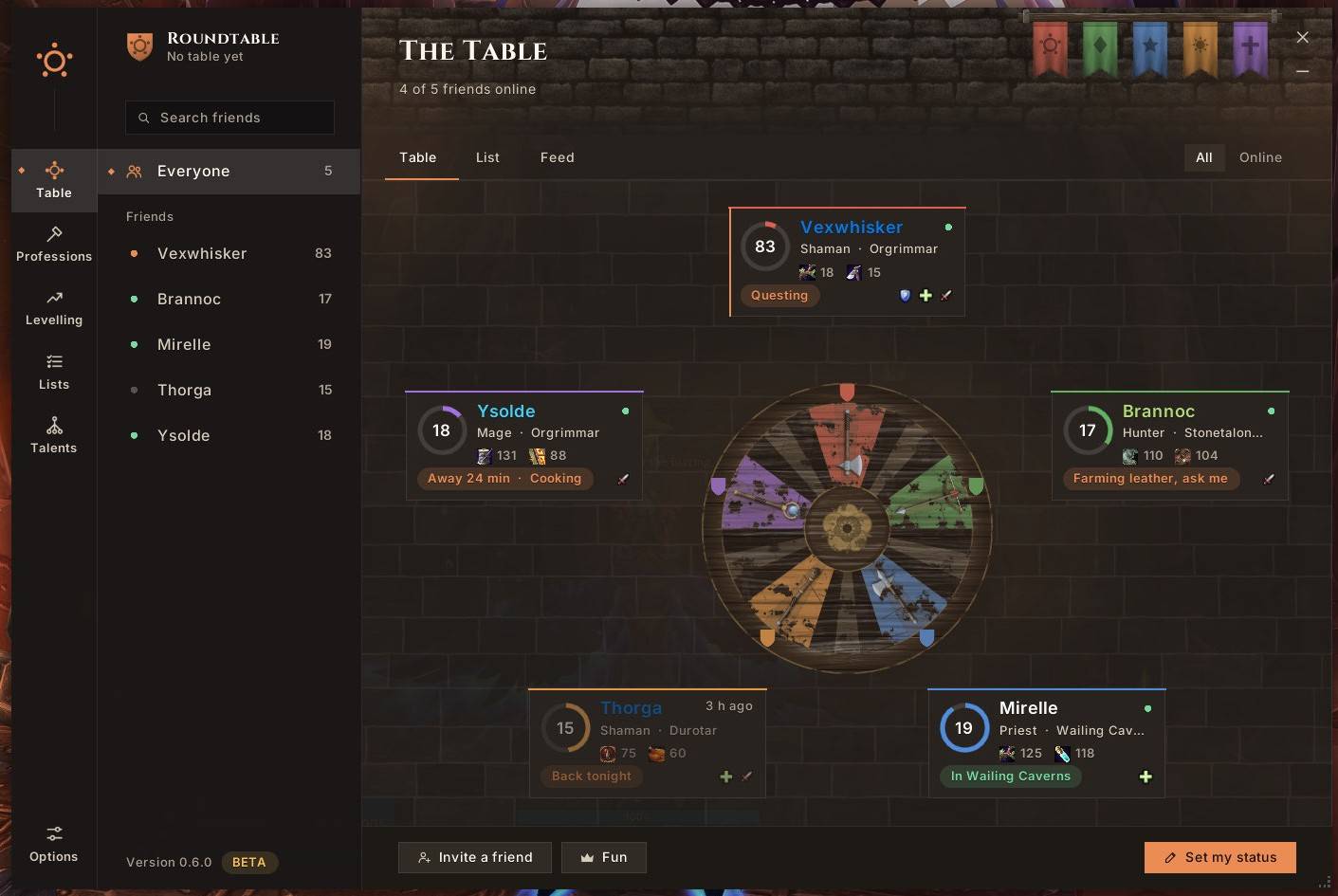
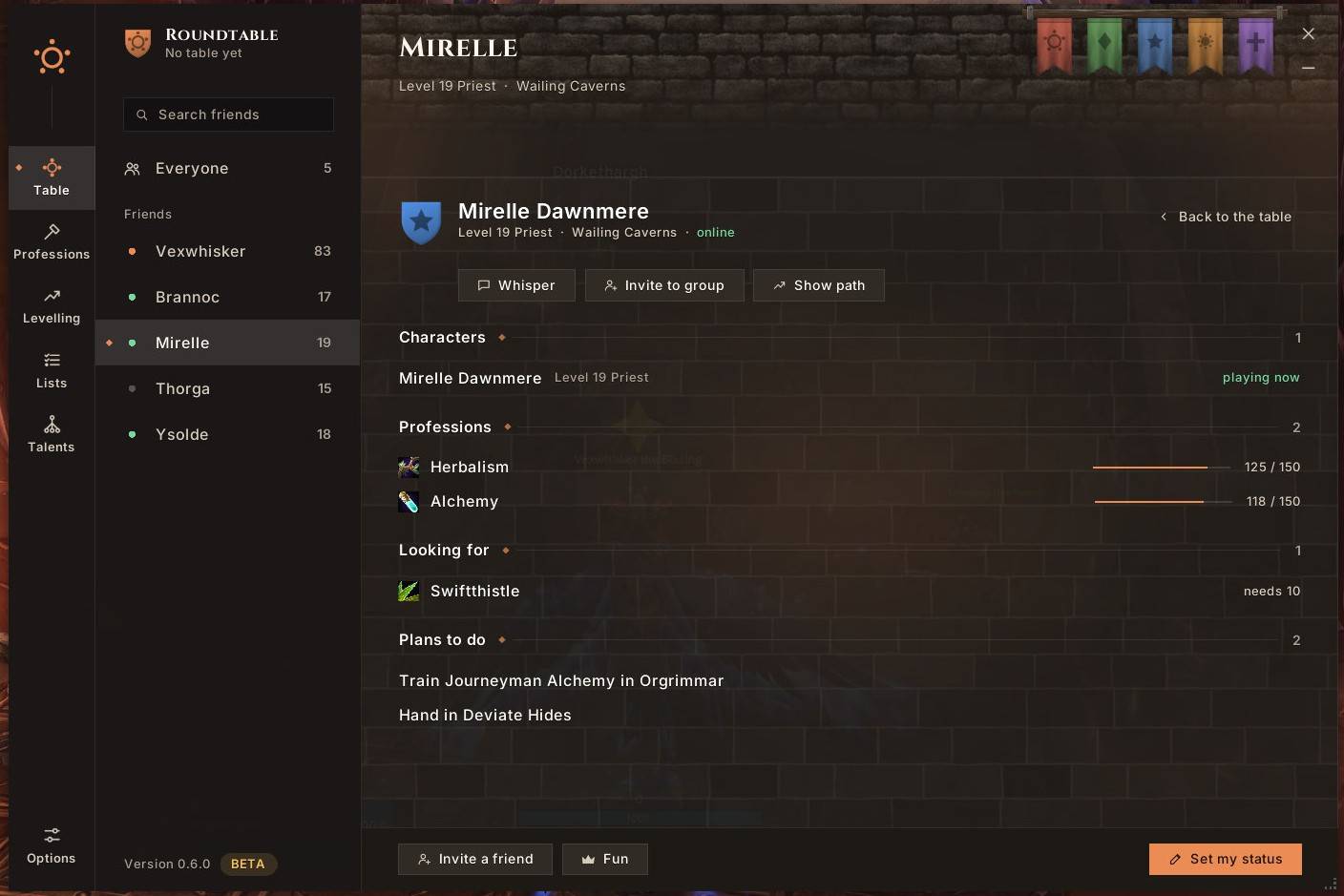
Your friends at one table. Roundtable is made for a small group of friends levelling together. Everyone sits at the same table: you see where your friends are, what they can craft, what they're looking for, and when someone reaches a milestone. No guild needed, but if you share one, link your table to it.
The Table
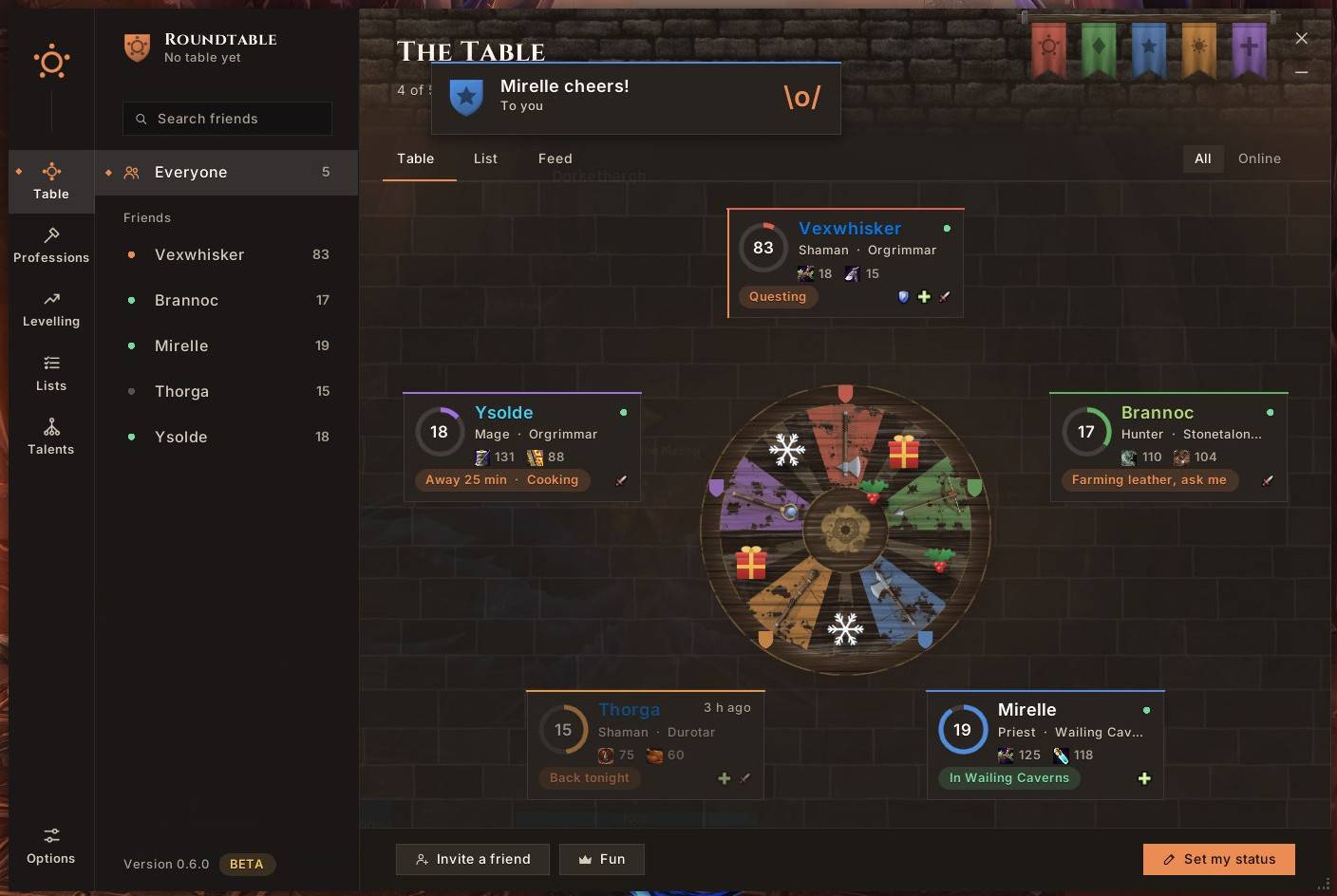
Your friends sit around a painted round table in a great hall. Each seat shows their level and experience, class and zone, their professions, the role they want to play, a short status ("Farming leather, ask me") and when they were last online. Each friend's weapon lies on the table, and their banner hangs on the wall. Prefer something compact? Switch to the list view.
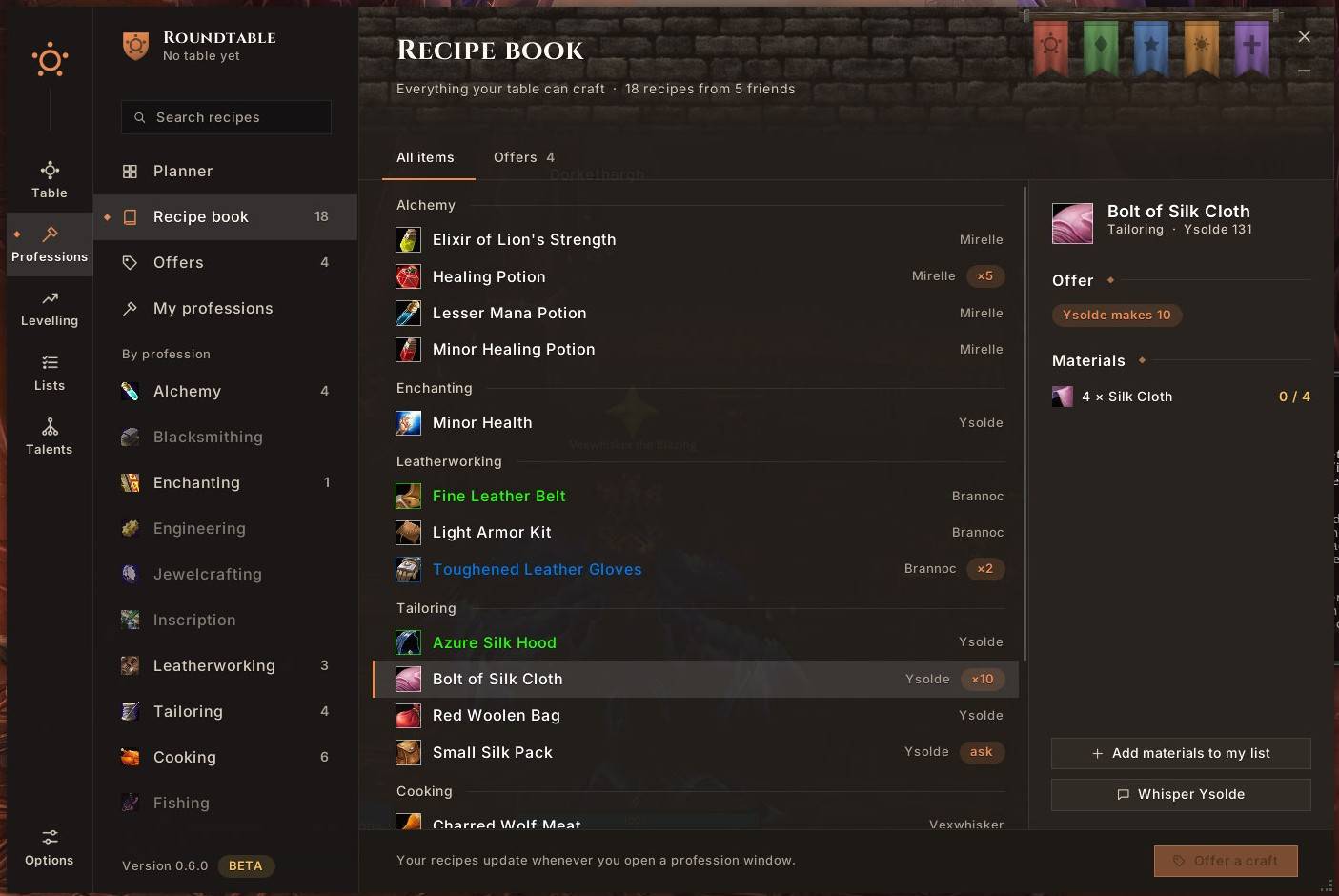
Professions, shared
- Profession planner: who has which profession, who plans which, and what's still missing at your table.
- Recipe book: everything your table can craft, with the game's own item tooltip, the materials, and who can make it.
- Craft offers: tell your friends how many of something you're happy to make, or "on request".
- My professions: your ranks and when you can train the next one, what gives skill points right now, and which recipes you can learn next, and where.
Shopping lists and tooltips
Put the materials you're collecting on your shopping list: counts update from your bags. Shared entries show up in your friends' item tooltips, so whoever finds a Silk Cloth knows you need four. Item tooltips everywhere also show who at your table can craft that item and who offers it, and recipe tooltips show which friends could learn it.
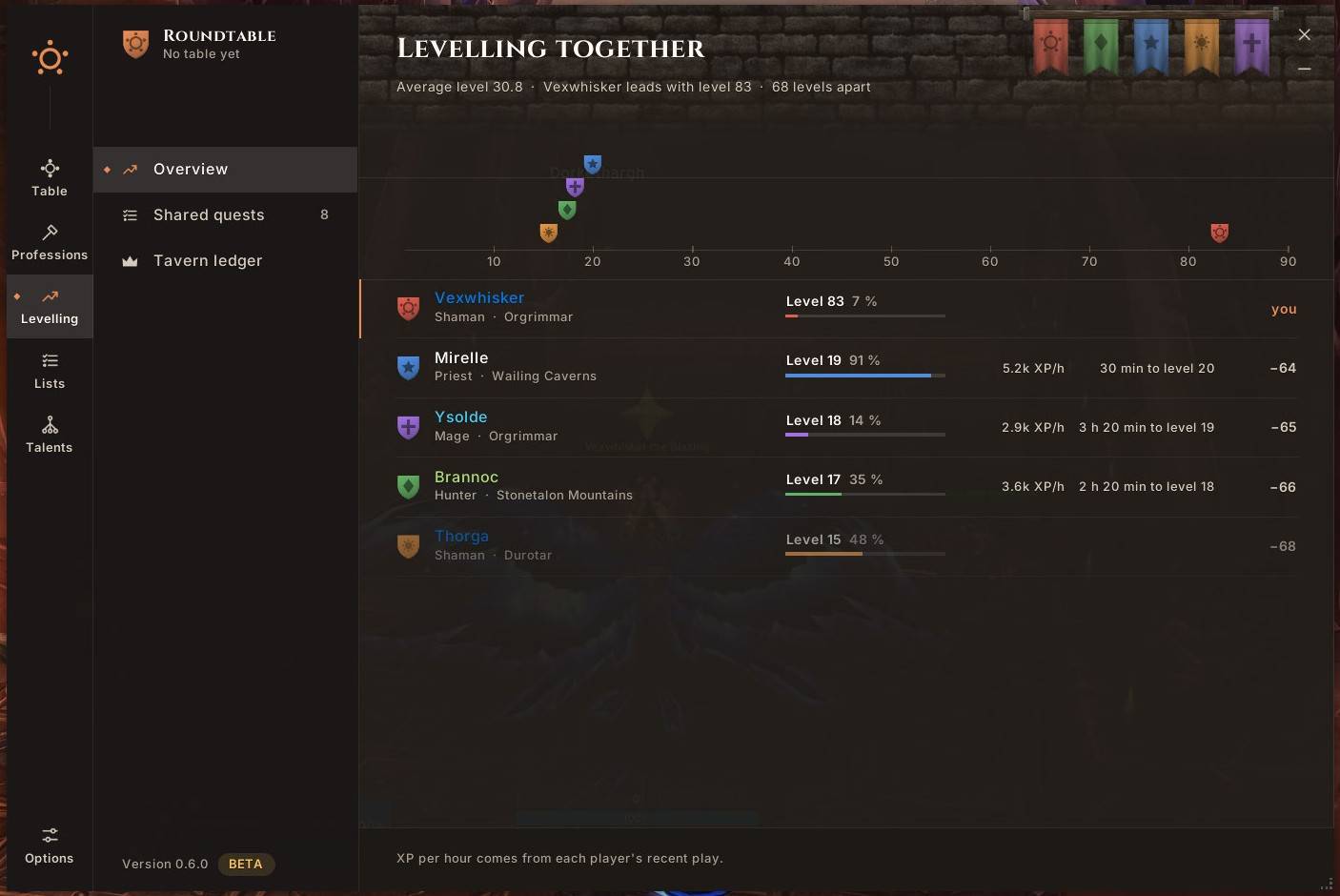
Levelling together
A level race with everyone's crest, XP per hour and time to the next level, the quests you have in common (and the ones a friend can share with you), and which dungeons fit everyone's level right now.
Your own planner
To-dos that can remind you at login, at a level or in a zone, and an on-screen tracker for your shopping list and to-dos. Running around? Fold the window into a small panel with who's online and your to-dos, or set a key to open Roundtable.
On the map
Your friends' crests on the world map and the minimap, outside dungeons. Right-click a friend and choose Show path: an arrow leads you to them, with the distance, and turns green when you're heading right at them.
Milestones
A small popup when a friend reaches a new level or a profession rank, and a feed of what happened at your table.
Talent plans
Plan your talents point by point on your class's own talent tree, drawn the way the game draws it, in the order you want them. Roundtable checks the plan against the tree's rules, shows your build at any level on a level bar, and reminds you in the tracker and the compact panel which talent comes next. It never spends a point for you.
Fun at the table
A dark banner when a friend dies. Reactions for your friends (cheer, hurry up, facepalm …), a break timer for everyone, "away for 15 min, cooking" on your seat, and a roll call. A tavern ledger counts deaths, jumps, hearthstones and more, and hands out weekly awards. Reaching the top level earns a knighting, and the table dresses up for Hallow's End, Winter Veil and other seasons.
Sharing a guild
Link your table to your guild and guildmates with Roundtable join with one click, no invitation or friends list needed. Updates then go once through the guild's addon channel instead of a whisper to each friend.
Good to know
- Everyone in your group needs Roundtable. It only talks to other copies of Roundtable.
- Add each other as friends in game, or share a guild. That's how Roundtable knows who's online.
- Private: everything travels in the game's hidden addon messages, only between the friends at your table. Nothing leaves the game.
- Recipes appear once each crafter opens their profession window.
- Try it alone:
/rt testseats four sample friends at your table (nothing is sent);/rt test offremoves them. - Made for WoW: Forever, and runs on TBC Anniversary (with heroic keys and raid attunements per friend) and Midnight too. English and German.
Commands
/rt: open or close Roundtable/rt table Name: create or rename your table/rt invite Name: invite a friend (your target if no name)/rt guild on: link your table to your guild;/rt join: take the seat your guild's table offers you/rt status text: set your status/rt todo text: add a private to-do/rt tracker: show or hide the on-screen tracker/rt path Name: show the path arrow to a friend;/rt path offhides it/rt test: preview with sample friends
Bugs and ideas
Leave a comment here. If something about professions looks wrong, /rt debug professions shows details you can copy into the comment.
Roundtable (Deutsch)
Deine Freunde an einem Tisch. Roundtable ist für eine kleine Gruppe von Freunden, die zusammen leveln. Alle sitzen am selben Tisch: Du siehst, wo deine Freunde sind, was sie herstellen können, was sie suchen und wann jemand einen Meilenstein erreicht. Ganz ohne Gilde.
- Die Tafelrunde: deine Freunde an einem bemalten runden Tisch, mit Stufe, Erfahrung, Gebiet, Berufen, Wunschrolle, Status und Waffe auf dem Tisch. Oder als kompakte Liste.
- Berufe: Berufsplaner, gemeinsames Rezeptbuch mit Tooltips und Materialien, Herstellungsangebote, deine nächsten Ränge und Rezepte.
- Einkaufslisten: geteilte Einträge erscheinen in den Tooltips deiner Freunde.
- Gemeinsam leveln: Stufenrennen, EP pro Stunde, gemeinsame Quests und passende Dungeons für alle.
- Dein Planer: Aufgaben mit Erinnerungen, eine Bildschirmanzeige und eine kompakte Ansicht für unterwegs.
- Auf der Karte: deine Freunde auf Welt- und Minikarte; mit Rechtsklick → Weg zeigen führt dich ein Pfeil zu ihnen.
- Meilensteine: ein kleines Popup, wenn jemand eine neue Stufe oder einen Berufsrang erreicht.
- Talentpläne: Plane deine Talente Punkt für Punkt im Talentbaum deiner Klasse; Tracker und kompaktes Feld zeigen, welches als Nächstes kommt.
- Spaß am Tisch: ein dunkles Banner, wenn jemand stirbt, Reaktionen, ein Pausen-Timer, „15 Min. weg, Kochen“ am Platz, ein Bereitschaftscheck, das Tavernenbuch mit wöchentlichen Auszeichnungen, ein Ritterschlag auf der Höchststufe und Saisondeko auf dem Tisch.
- Spiele: gemacht für WoW: Forever, läuft auch auf TBC Anniversary (mit heroischen Schlüsseln und Schlachtzugszugängen pro Freund) und Midnight.
- Gemeinsame Gilde: Verknüpft euren Tisch mit der Gilde, dann setzen sich Gildenmitglieder mit Roundtable mit einem Klick dazu, ganz ohne Einladung oder Freundesliste.
- Gut zu wissen: Alle in der Gruppe brauchen Roundtable und sollten sich im Spiel als Freunde hinzufügen oder in derselben Gilde sein. Alles bleibt im Spiel, in versteckten Addon-Nachrichten zwischen euch. Mit
/rt testkannst du alles allein ausprobieren.
Roundtable Team