RollDock Forever
- By
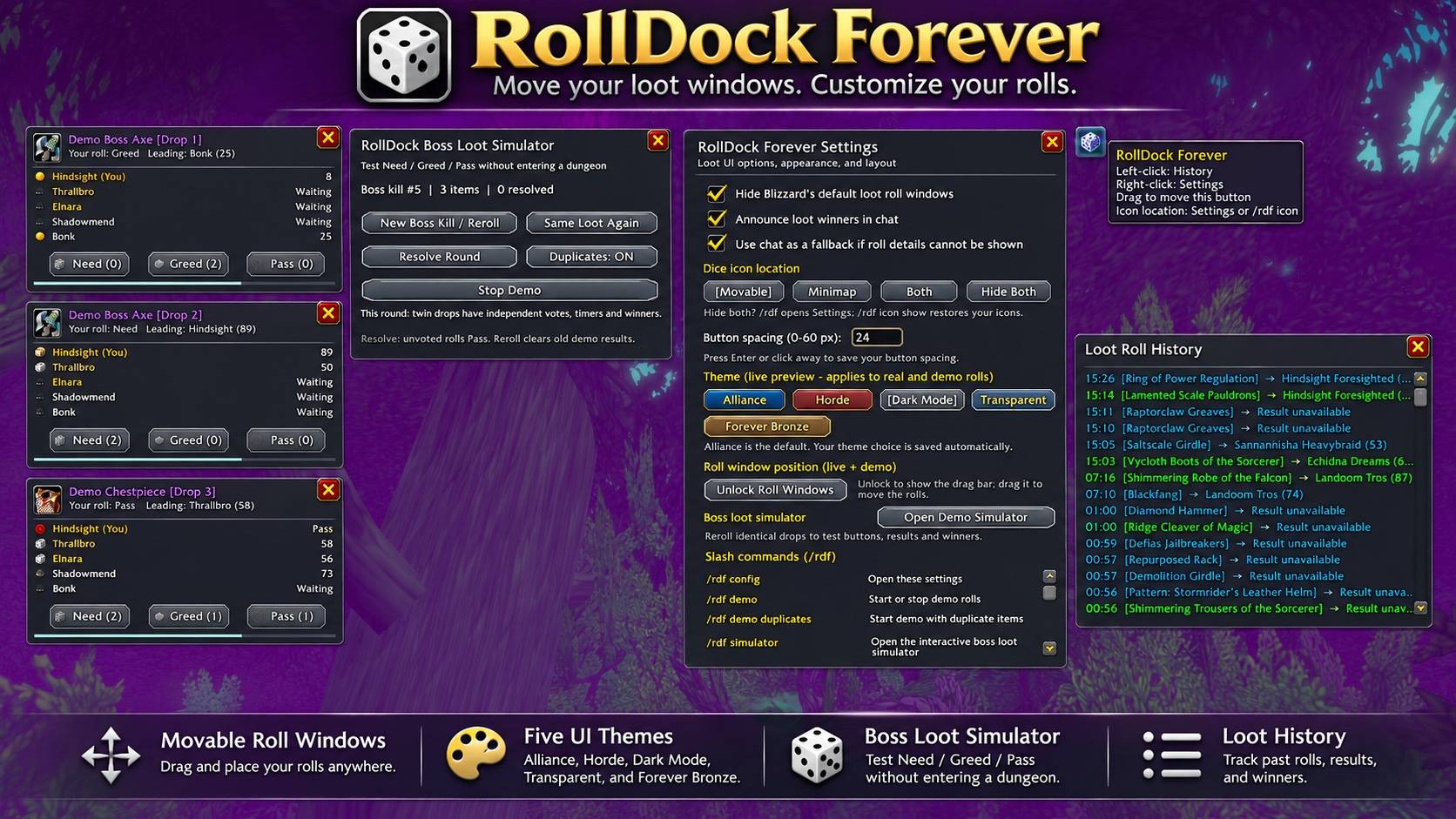
A compact, customizable loot roll addon for WoW: Forever featuring movable windows, adjustable Need/Greed/Pass button spacing, live player rolls, loot history, multiple UI themes, and an interactive demo mode to preview and customize your layout!
New UI refresh!
Description
RollDock Forever
Roll smarter. Loot cleaner. Play better.
Created by RipGut | v1.0.12 | World of Warcraft: Forever
Tired of bulky loot windows and awkward Need, Greed, and Pass buttons?
RollDock Forever replaces Blizzard's default loot roller with a sleek, customizable interface that keeps your screen clean and your loot decisions simple.
Track group rolls in real time, compare equipment, customize your layout, and even simulate boss loot encounters without entering a dungeon!
Features
Clean & Customizable Loot Windows
- Compact, movable loot windows with adjustable scale and stacking.
- Adjustable Need/Greed/Pass button spacing (0–60px).
- Display up to 5 simultaneous loot rolls.
- Four themes: Modern (default), Classic, Minimal, and Transparent.
- Instantly switch themes directly from Settings.
- Lock or unlock window positioning with a single click.
Live Loot Tracking
- See who's rolling Need, Greed, or Pass.
- View player names, roll numbers, and current leaders.
- Track winners and review previous rolls in Loot History.
- Optional winner announcements in chat.
- Improved item tooltips with equipment comparison support when available.
NEW: Interactive Boss Loot Simulator
Test your loot interface without running a dungeon!
- New Boss Kill — Generate fresh simulated loot drops.
- Same Loot Again — Repeat drops to test consecutive encounters.
- Resolve Round — Finish a simulation and determine winners.
- Duplicate Item Testing — Simulate identical drops with independent rolls.
- Duplicates ON/OFF — Control whether identical items appear.
- Stop Demo — End your simulation instantly.
Access it through Settings → Open Demo Simulator.
Reliability & Quality-of-Life Improvements
- Improved handling of identical item drops and independent roll results.
- More reliable tooltips, including after choosing a roll.
- Better Bind on Pickup confirmation handling.
- Blizzard's default loot roller remains available as a failsafe.
- Settings, themes, and window positions are saved automatically.
Quick Access
Use the movable dice button to access RollDock:
- Left-click: Loot History
- Right-click: Settings
- Drag: Reposition the button
Choose between movable and minimap buttons, or display both.
Getting Started
- Type
/rdfor right-click the dice button to open Settings. - Select your theme and adjust your preferred layout.
- Click Unlock Roll Windows to move your loot windows.
- Open Demo Simulator to test a boss loot encounter.
Your settings automatically carry over to normal gameplay.
Useful Commands
| Command | Description |
|---|---|
/rdf |
Open Settings |
/rdf demo |
Toggle quick demo mode |
/rdf history |
Open Loot History |
/rdf lock |
Lock loot windows |
/rdf unlock |
Unlock loot windows |
/rdf theme <name> |
Change theme |
/rdf help |
Show all commands |
Most options are also available directly in Settings — no commands required!
Compatibility & Feedback
Designed for World of Warcraft: Forever.
RollDock uses Blizzard's existing loot rolling system. Demo mode is fully simulated and never submits real rolls or adds fake loot history.
Found a bug or have a suggestion? Leave a comment! Your feedback helps us continue improving RollDock Forever.
Thank you to the hundreds of players supporting this addon!
Created by RipGut for the WoW: Forever community.
RollDock Forever — Less clutter. Fewer misclicks. More control.
RollDock Forever Team