Rematch EllesmereUI Skin (with Blank Window Fix)
- By
Reskins Rematch to match your EllesmereUI profile, and fixes the blank Rematch window in patch 12.1. The FixRematch shim is built in, so you don't need both.
Rematch EllesmereUI Skin
Makes Rematch look like the rest of your EllesmereUI setup. It also fixes the blank Rematch window in patch 12.1, so you don't need a separate addon for that.
You need both Rematch and EllesmereUI installed. This addon contains no part of either, and if you're not running both it quietly does nothing.
The whole idea is that it follows your EllesmereUI setup rather than imposing a look of its own. Window colour, transparency, accent colour, font and border all come from your active profile, read fresh each time. Change any of those in EllesmereUI and Rematch changes with it, including when you switch profiles. Popular imports like atrocityUI or AES work out of the box for the same reason.
Both of Rematch's homes are covered: the standalone window, and the Pet Journal tab inside the Collections window, where Rematch's own tabs are drawn to match the Collections tabs beside them.
Screenshots
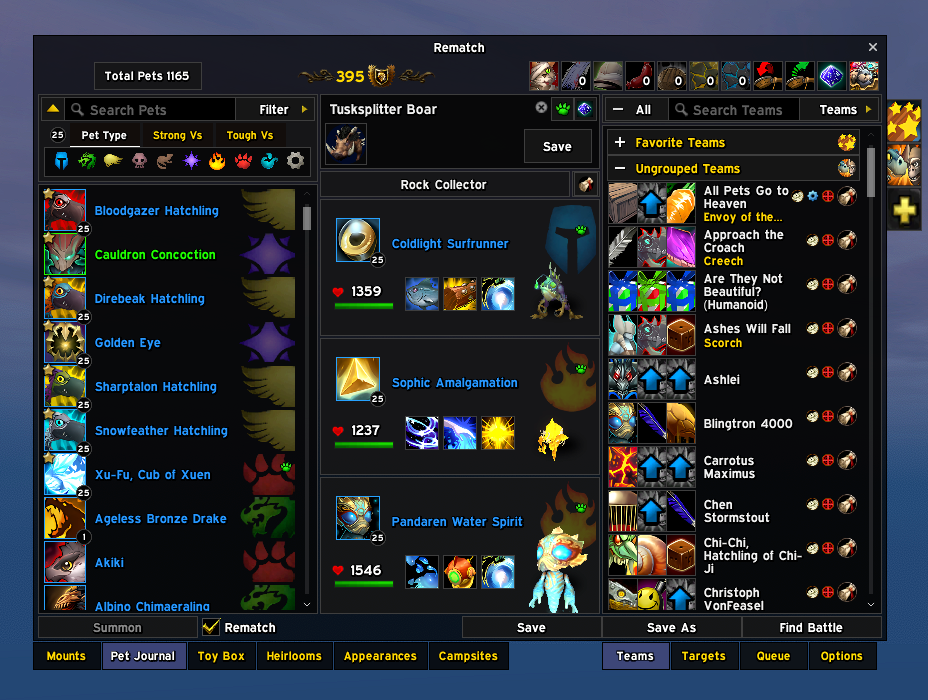
Teams in the Pet Journal on a Dark Mode profile, colour and transparency both from it. Rematch's own tabs sit level with the Collections tabs beside them.
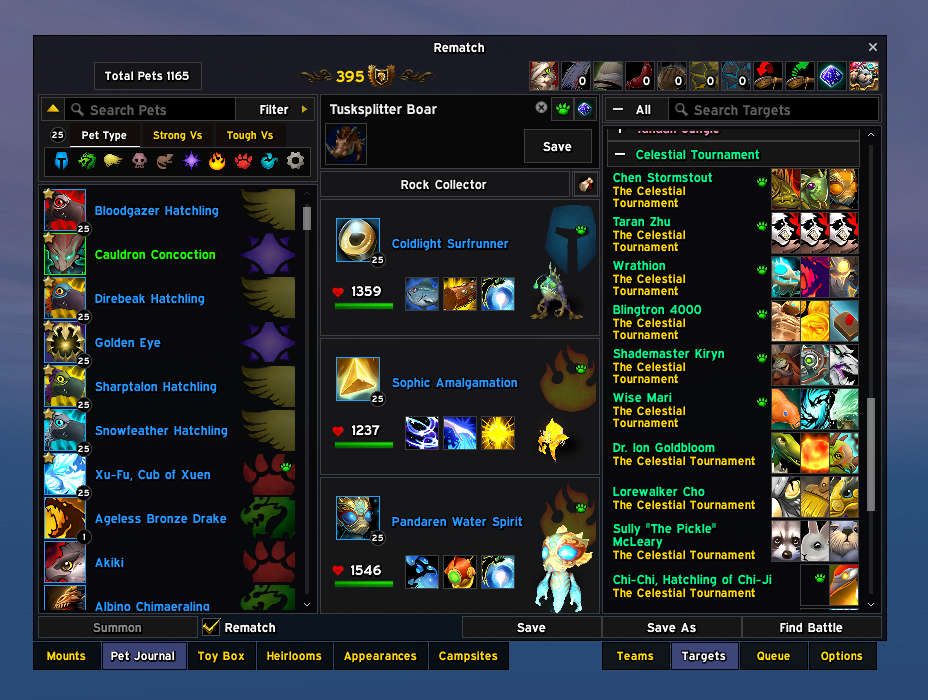
Targets, grouped by expansion, each trainer with the pets they bring.
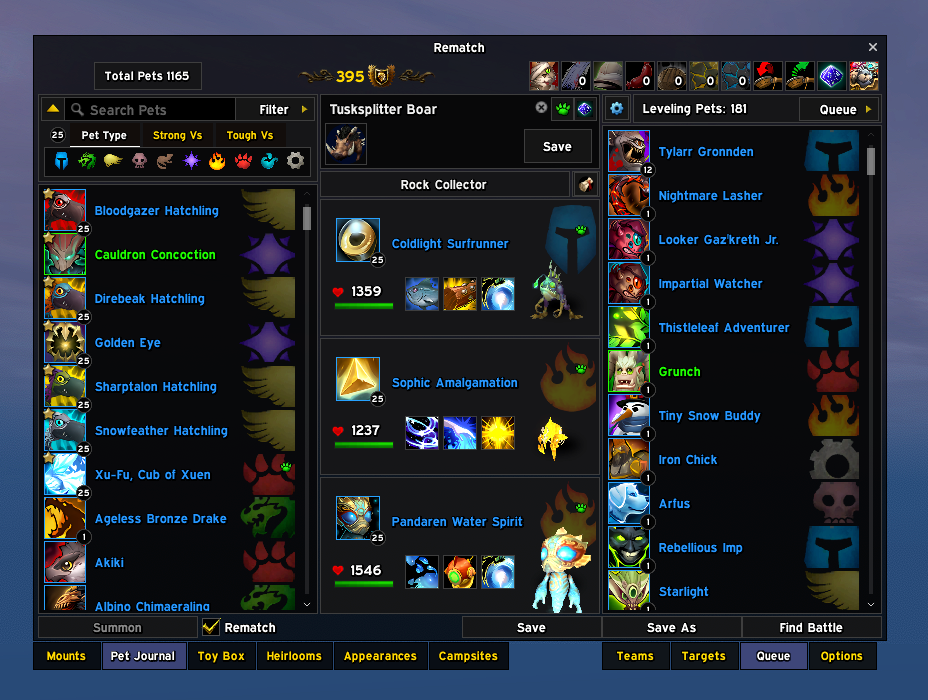
The leveling queue, with each pet's level in a badge on the corner of its icon.
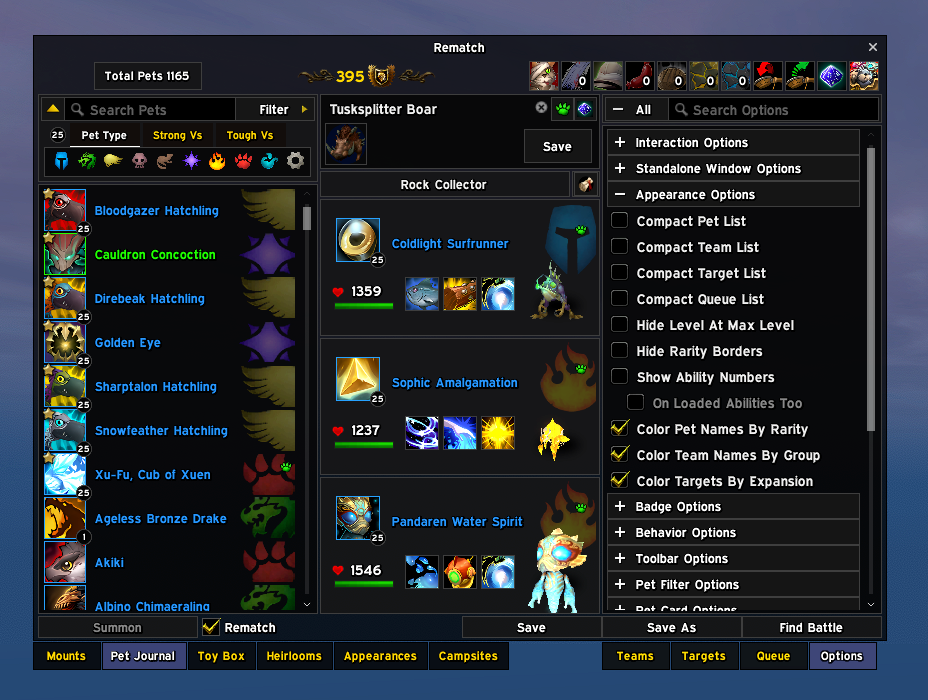
Rematch's own options, skinned to match, with checkmarks in your accent colour.
Goes well with
- MountsJournal EllesmereUI Skin is this same skin for MountsJournal, the mount tab one over, built on the same foundation so the two Collections tabs match each other as well as the rest of your UI.
- Or try my other addon, Postbox, a full mailbox replacement: clear a full inbox in one click or just the mail you choose, complete recipients as you type, and see what is waiting without visiting a mailbox. It wears your EllesmereUI or ElvUI look.
The 12.1 blank window
Patch 12.1 removed a small function Rematch relies on, and until Rematch is updated its window opens empty. This skin puts that function back, the same fix the standalone FixRematch addon provides, so you don't need both. If you already have FixRematch installed, the two get along fine. Once Rematch or the game supplies the function again, the fix switches itself off.
There is a second cause, which FixRematch does not cover. Inside a dungeon, delve, scenario or similar, the game refuses to tell addons the names of creatures. Rematch hit that refusal and gave up on drawing its whole window, so you got a blank panel. With this skin the window opens and works normally in instances. The one thing you'll notice is that your loaded target, and the target shown on any team, reads "Unknown (npc id 12345)" instead of the creature's name. As soon as you leave the instance the names come back on their own. Outside instances nothing changes at all.
What you'll notice
- The whole Rematch window in your EllesmereUI colours and transparency: title bar, tabs, panels, lists, search boxes, buttons, cards, menus and tooltips.
- Pet levels shown in a small round badge on the corner of each pet's icon, in lists, loadout slots and dialogs.
- Clean, centred scroll bars and flat buttons with the EllesmereUI border.
- In the Pet Journal, Rematch sits flush with the Collections window and its tabs line up with the Mounts, Toy Box and other tabs next to them.
Rematch itself is untouched. The skin only changes how things look, never what they do.
What it takes from EllesmereUI
Nothing is hardcoded, and no profile gets special treatment.
- Window colour and transparency — your profile's Dark Mode fill, colour and alpha both
- Accent (selected tabs, checkmarks, sliders, selection borders) — your EllesmereUI accent colour
- UI font — the font your EllesmereUI is set to
- Window border — the border texture and size from EllesmereUI's own options, including a size of 0 meaning no border
- Window style — whatever style you've set for the Collections window
These get re-read every time something is painted, never cached. Switch profile, reopen Rematch, done. There's nothing to import or keep in sync.
Options
Game Menu > Options > AddOns > Rematch EllesmereUI Skin
Most people will never need these. The defaults follow EllesmereUI.
- Window backdrop (default: EllesmereUI Dark Mode) — uses your Dark Mode colour and alpha. The other choice, Blizzard window art, uses EllesmereUI's own window texture, which is fully opaque and can't be made see-through.
- Follow EllesmereUI opacity (default: on) — uses your Dark Mode alpha. Turn it off if you'd rather set the transparency yourself.
- Opacity (default: 90) — your own transparency setting. Ignored while the option above is on.
- Window edge (default: thin dark line) — a crisp 1px edge. The alternative, EllesmereUI window frame, matches its windows exactly but brings a soft inner shading with it.
- Border style (default: follow EllesmereUI) — whatever border you've set in EllesmereUI's own options, texture and size. You can also pick one yourself from its border list, including Glow, Shadow and any LibSharedMedia borders.
- Border size (default: 2) — thickness, 1 to 4. Ignored while following EllesmereUI.
If something looks wrong
Type /rmeuiskin in chat. It prints what the skin did, which versions of Rematch and EllesmereUI you have, whether the 12.1 fix was needed, and how many creature names the game hid this session. If you report a problem, please paste that output along with a screenshot.
/rmeuiskin behind lists anything still drawing behind the window in the Pet Journal, and /rmeuiskin tabs compares Rematch's tabs against the Collections row beside them. Both print what the frames really carry, which is usually the fastest way to tell a bug here apart from a Blizzard or EllesmereUI change.
The skin is built in sections, so if a future Rematch update moves something, only that one piece loses its skin rather than the whole window.
Compatibility
Written for Rematch 5.3.1 and EllesmereUI 9.1.8. Works on EllesmereUI 8.6.6 and newer. With EllesmereUI's Blizzard Skin module running it appears in EllesmereUI's own Third-Party Addons list; without it, it works the same way on its own. Either way the look is identical and you don't need to do anything.
Credits and licence
GPLv3. Built on the same foundation as the author's MountsJournal EllesmereUI Skin. The MouseIsOver fix is the same one-line function FixRematch by unieagle (MIT) ships: both put back Blizzard's own removed line, and FixRematch found it first. Thanks also to Gello for Rematch, to EllesmereGaming for EllesmereUI, and to Gello and nihilistzsche, whose old Rematch ElvUI Skin showed what a Rematch skin needs to cover.
Unofficial, and not affiliated with any of those projects. Source and issues: GitHub.
The Rematch EllesmereUI Skin (with Blank Window Fix) Team