RecipeBook
- By
Find missing recipes for all of your professions and hunt them down with AddressBook and TomTom integration.
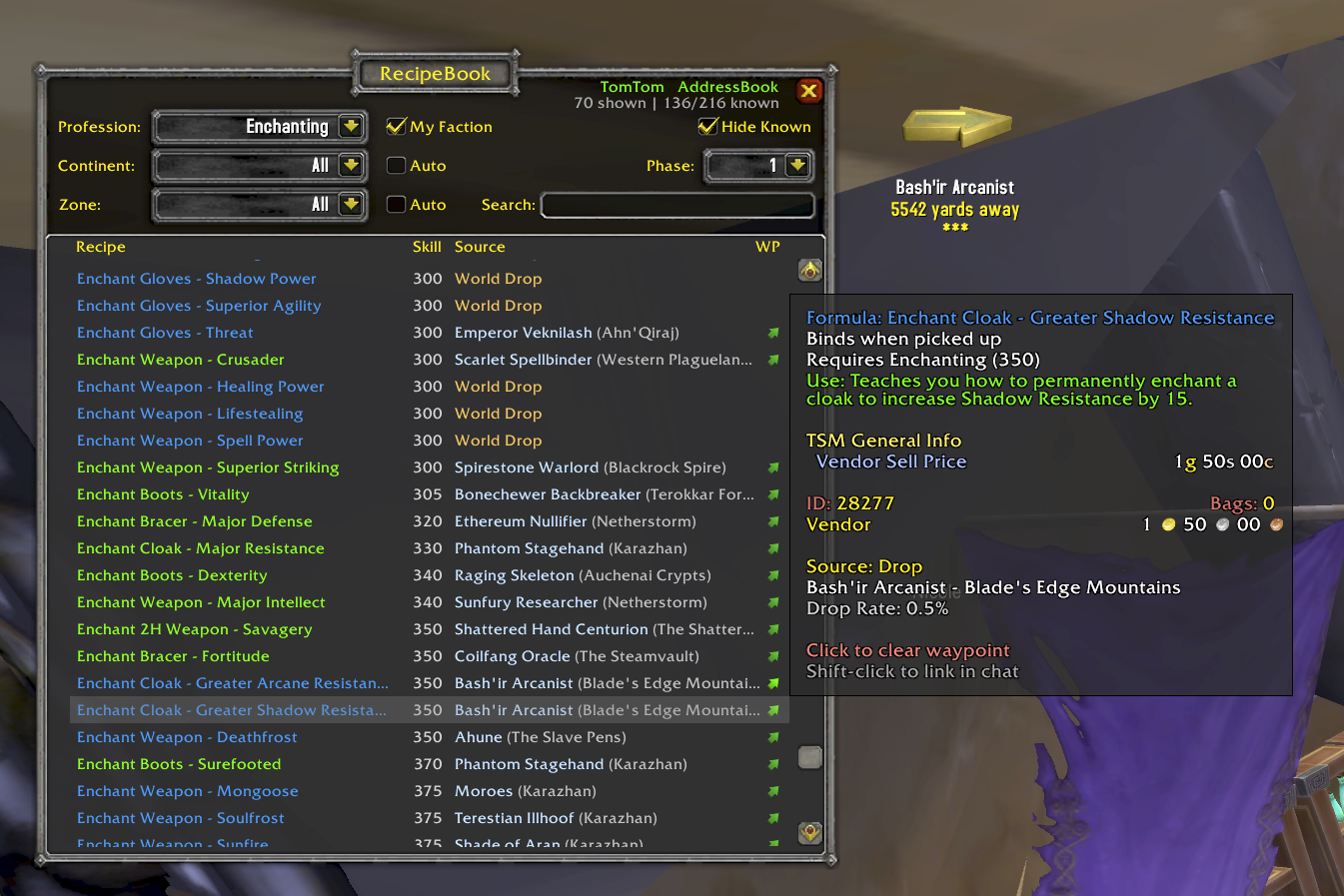
RecipeBook is a profession recipe browser for TBC Anniversary. Browse every recipe by source, track what you know across all your characters, see which guildmates can craft what, filter by zone and phase, and set waypoints to vendors and trainers.
Newest Feature
Guild Crafts
See which guildmates can craft what recipes in all professions. Right-click any crafter for Whisper (pre-filled with the recipe link) or Invite. Sharing is on by default — the first time you're in a guild, a one-time notice tells you how to disable it in Settings. Maintains data for all guilds of all your characters.
Features
Browse All Recipes
View every TBC profession recipe organized by source type — Trainer, Vendor, Quest, Drop, and more. 12 professions supported: Alchemy, Blacksmithing, Cooking, Enchanting, Engineering, First Aid, Fishing, Jewelcrafting, Leatherworking, Mining, Poisons, and Tailoring.
Source Grouping
Recipes are grouped into collapsible sections by how you obtain them. Expand or collapse Trainer, Vendor, Drop, Quest, and other categories to focus on what matters.
Known Recipe Tracking
Open your profession window and RecipeBook automatically scans what you've learned. Toggle "Hide Known" to see only the recipes you still need.
Continent & Zone Filtering
Narrow results by continent and zone. "Auto" mode detects where you are and filters automatically. Instance zones are mapped to their real-world continents.
Phase Filtering
Filter recipes by content phase (1-5). Only see recipes available in the current phase of the server, or browse ahead to plan your progression.
Faction Filter
Toggle "My Faction" to hide recipes from the opposite faction's vendors and quests. Non-BoP vendor recipes remain visible since they're tradeable via the neutral Auction House — opposite-faction vendors are marked with (A) or (H). Enabled by default.
Search
Search across all recipes by name. Results update as you type.
Waypoint Integration
Click the green arrow next to any vendor or trainer to set a TomTom waypoint via AddressBook. Requires both AddressBook and TomTom addons.
Recipe Linking
Shift-click any recipe to link it in chat.
Data Sources
Recipe data is sourced from RecipeMaster TBC.
Usage
- Minimap button: Left-click to open
/rb— Toggle RecipeBook/rb reset— Reset window position- Max phase, guild sharing, whisper template, and other preferences live in Settings (gear icon in the main window).
Installation
Extract the RecipeBook folder into your WoW AddOns directory:
World of Warcraft/_anniversary_/Interface/AddOns/RecipeBook/After installation, open all of your profession panels to allow RecipeBook to scan your known recipes.
AddressBook and TomTom are optional but recommended for waypoint integration.
RecipeBook Team