Random_Hearthstone
- By
Allows you to use a random Hearthstone from your collection via a single button.
Screenshot 2026-10-01 130546.png
Screenshot 2026-10-01 130511.png
Screenshot 2026-10-01 130559.png
Screenshot 2026-10-01 133036.png
Screenshot 2026-10-01 130610.png
Screenshot 2026-10-01 130633.png
Description
Random Hearthstone
Never hearth the same way twice.
Random Hearthstone adds a single, clean button to your screen. Every time you click it, the addon picks a different Hearthstone from your collection and uses it. You choose which stones are in the rotation, and the addon takes care of the rest.
If you own a drawer full of Hearthstone toys and always end up using the same one, this addon is for you.
Features
Random Hearthstone rotation
- Click the button once and it casts a randomly selected Hearthstone from the stones you own and have enabled.
- After each cast, the next stone is rolled automatically, so your next hearth is already queued up and ready.
- The base Hearthstone is always part of the rotation, so the addon always has something to cast.
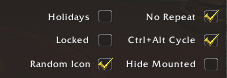
- Optional No Repeat mode never uses the same stone twice in a row (it takes effect once you have two or more stones in the pool).
- If a click fails to start a cast, the addon re-rolls so you aren't stuck clicking a stone that won't work.
Full control over your collection
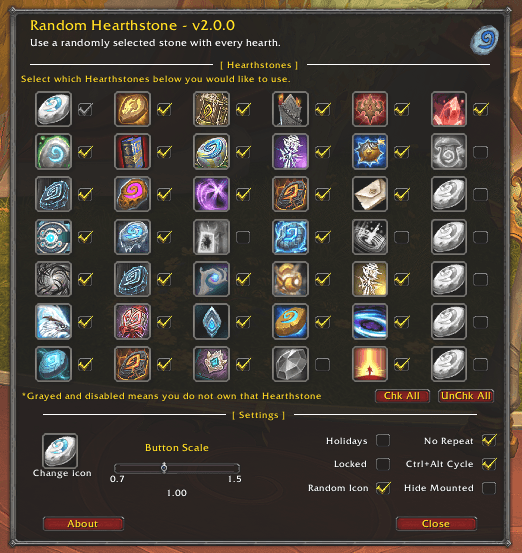
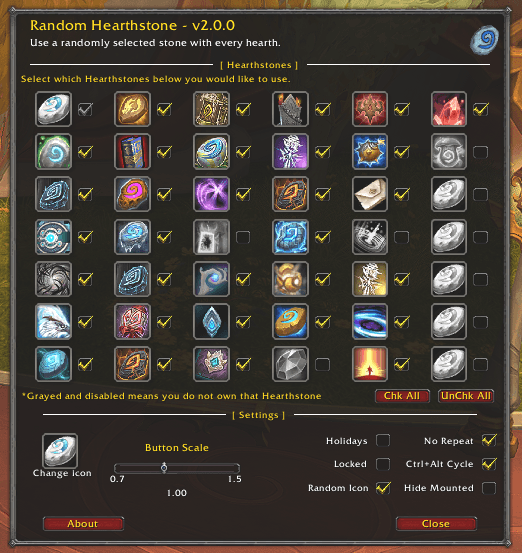
- A clean options grid shows every supported Hearthstone as an action-bar style button with a checkbox beside it.
- Stones you don't own are grayed out and disabled, so you can see what's still out there to collect.
- Chk All / UnChk All buttons for quick changes.
- Hover any stone for its full in-game tooltip.
- Your stone choices are account-wide. Toggle a stone off once and it is off on every character.
- Newly learned toys are enabled automatically on every character, so a new Hearthstone joins the rotation the moment you get it.
Holiday mode
Enable Holidays and, during each holiday event, the addon uses that event's Hearthstone instead of a random one. If you don't own that holiday's stone, it falls back to the normal random rotation and lets you know once, without spamming chat.
A button that looks and feels right
- The button uses the standard action-bar look, with a live cooldown swipe so you can see at a glance when your hearth is ready.
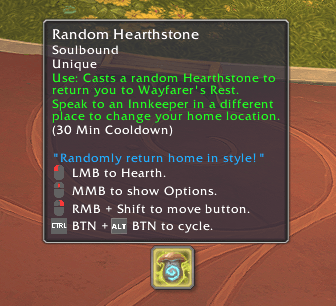
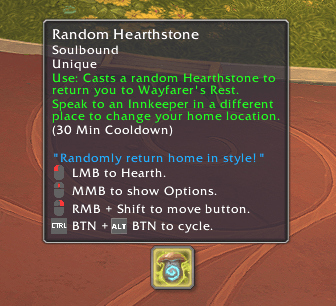
- A detailed tooltip shows your current home location and the time remaining on your cooldown.
- Shift + Right-click drag to move it anywhere on screen, and Lock it when it's where you want it.
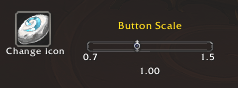
- Adjustable button scale, with the position kept in place as you change it.
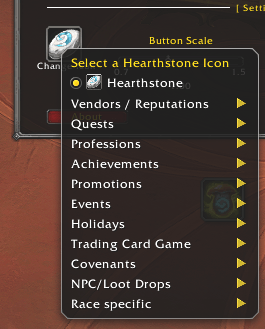
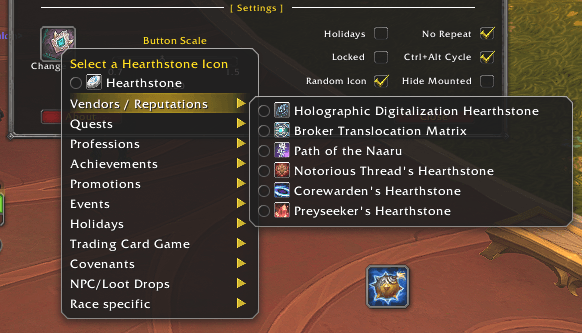
- Choose any Hearthstone icon from the Change Icon menu (organized by category), or turn on Random Icon for a different look each time.
- The button hides automatically while you are mounted (optional) and during pet battles.
Ctrl + Alt quick-cycle
Hold Ctrl + Alt to cycle the same button through other teleports, so one button covers all of your "get me home" options:
| Option | Available to |
|---|---|
| Random Hearthstone | Everyone |
| Dalaran Hearthstone | Anyone who owns the toy |
| Garrison Hearthstone | Anyone who owns the toy |
| Dreamwalk | Druids |
| Death Gate | Death Knights |
| Zen Pilgrimage | Monks |
| Astral Recall | Shamans (once learned) |
| Make Camp / Return to Camp | Vulpera |
The cycle only offers what your character can actually use. Cycling can be switched off in the options if it conflicts with your own keybinds, and it is ignored while you are typing in a chat box.
Built for modern WoW
- Combat safe. The addon respects combat lockdown. Anything that would be blocked is queued and applied the moment combat ends.
- Ready for 12.x. Cooldown handling is designed to work with the newer "secret value" restrictions, so cooldown displays don't throw errors.
- No memory leaks and no per-frame polling in the options or the tooltip.
- Localization-friendly. Spell names come from the game, not hard-coded English, so the cycle works on non-English clients. (The addon's own interface text is currently English only.)
- A keybinding is available under the AddOns section of your key bindings, plus an entry in the minimap addon menu and an Esc > Options > AddOns page.
Supported Hearthstones
New Hearthstones are added in updates as they are released.
Getting started
- Install the addon and log in. The button appears in the center of your screen.
- Left-click it to hearth with a random stone.
- Middle-click it, or type
/rh options, to choose your stones and settings. - Shift + Right-click drag to move it where you want it.
Controls
| Action | Result |
|---|---|
| Left-click | Hearth |
| Middle-click | Open or close the options |
| Shift + Right-click drag | Move the button |
| Hold Ctrl + Alt | Cycle between teleport options |
Slash commands
Type /rh or /randomhearthstone followed by:
| Command | Description |
|---|---|
help |
List the commands |
options |
Open the options window |
hide / show / toggle |
Change the button's visibility |
lock / unlock |
Lock the button so it can't be moved |
reset |
Reset the button position and scale |
whatsnew |
Show the changelog |
opscale {value} |
Change the scale of frames (0.85 default) |
about |
Show the about window |
Frequently asked questions
The base Hearthstone didn't cast. Why?
The base Hearthstone is an item, so it needs to be in your bags to be used. If it isn't, the addon will skip it when you have other stones enabled and tell you once in chat.
Do I need to set this up on every character?
No. Your stone choices are account-wide. Only the button's position, size and display options are saved per character.
Does it work with Warband toys?
Yes. If a toy is in your collection and usable by your character, it can be in the rotation.
Can I use it during combat?
Hearthstones can't be cast in combat, and the addon follows Blizzard's combat restrictions. Changes made in combat are applied as soon as combat ends.
Why can't I hearth every time I click?
Your Hearthstone cooldown is shared between all the stones in the rotation. The cooldown swipe and tooltip show exactly how long is left.
Where do I report a bug or suggest a stone?
Leave a comment or open an issue on this page. Please include your game version and any error text.
Compatibility
- Game version: World of Warcraft 12.1.0 (Midnight)
- Language: English interface
Credits
Created by Killdnaction (Moon-Guard).
In memory of Flydais.
Random_Hearthstone Team

Owner