ChromaticBars
- By
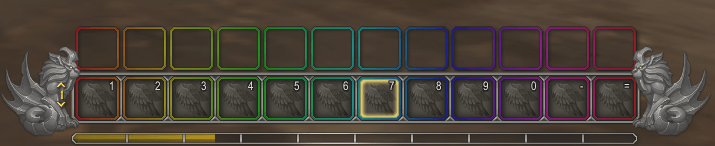
Gradient-colored action bar borders with dozens of themes, custom palettes, optional animation, and a self-contained minimap button — no external libraries required.
ChromaticBars
Colorful gradient borders for your action bars — rainbows, themed schemes, animated shifts, or fully custom palettes.
ChromaticBars paints the borders of your main action bars with smooth color gradients. Pick a built-in theme, animate the colors across the bars, or build your own palette and save it for later.
Features
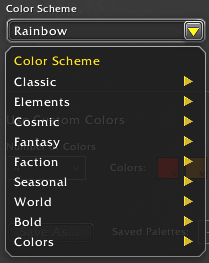
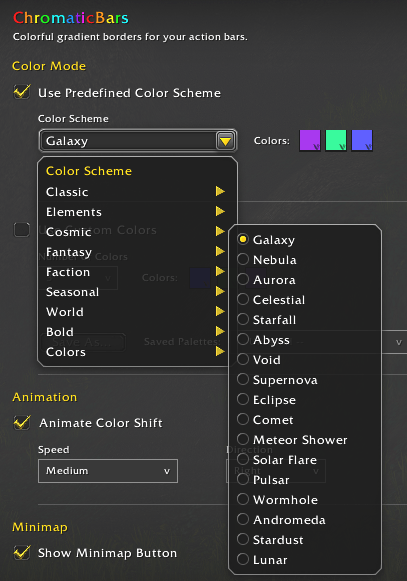
Predefined color schemes Dozens of built-in themes organized by category:
- Classic — Rainbow, Dark Rainbow, Pastel Rainbow, Full Rainbow, Class Color
- Elements — Fire, Ember, Molten, Frost, Frostfire, Thunder, Ocean, Forest, Jade
- Cosmic — Galaxy, Nebula, Aurora, Celestial, Starfall, Abyss, Void, Supernova, Eclipse, Comet, and more
- Fantasy — Holy, Light, Arcane, Shadowflame, Fel, Toxic, Blood, Death, Nature, Royal
- Faction — Horde, Alliance, Neutral, Argent Crusade, Kirin Tor, Cenarion
- Seasonal — Sunset, Autumn, Winter, Spring, Summer, Harvest, Pumpkin Spice, Snowfall, and more
- World — Midnight, Naga, Goblin, Scarlet, Dragonflight, Emerald Dream, Ashran, and more
- Bold — Candy, Neon, Pastel, Monochrome, Noir, Infrared
- Solid colors — Red, Blue, Purple, Gold-style singles, and other base colors
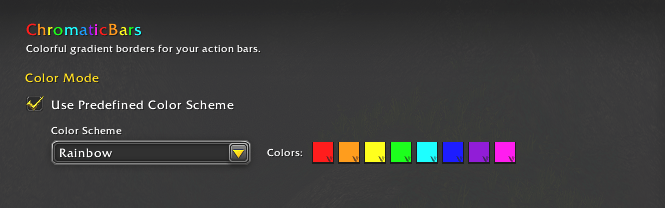
Class Color follows your character’s class automatically.
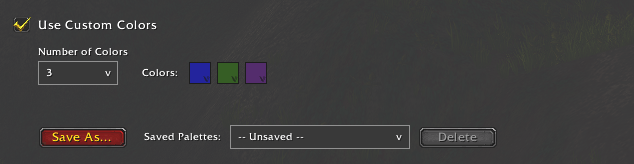
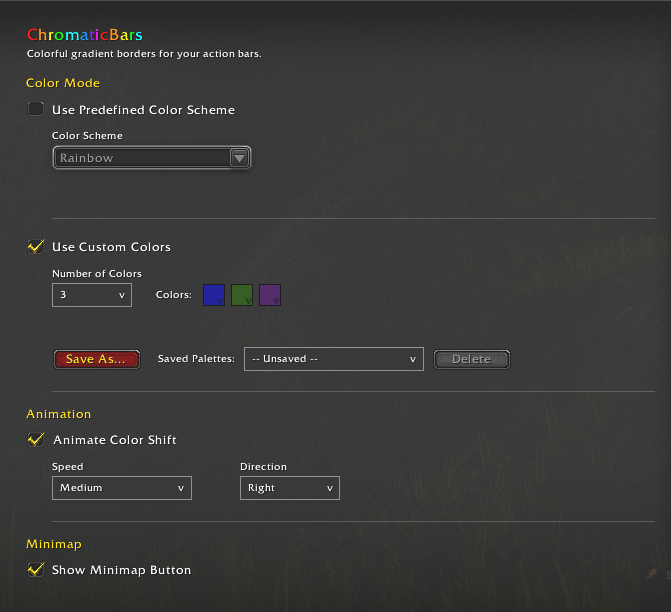
Custom colors Choose up to 20 colors, edit them with the built-in color picker, and save named palettes account-wide so every character can reuse them.
Animation Optionally shift colors across the bars:
- Directions: Left, Right, Up, Down
- Speeds: Slow, Medium, Fast, Very Fast
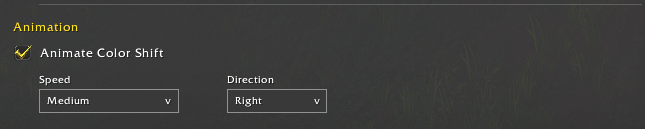
Works with both predefined schemes and custom palettes.
Bars supported Primary action bars, multi-bars, pet bar, stance bar, and possess bar.
Minimap button Draggable icon on the minimap edge. Click to open settings. No LibDataBroker or LibDBIcon required; still compatible with collectors such as MinimapButtonButton. Can be hidden in options.

Settings Opens in the game’s Options → AddOns panel when possible, with a standalone window as fallback (slash command or minimap).
Localization English (US) by default, with support for additional languages via a Locales folder (German, French, Spanish, Russian stubs included). Scheme names and UI text are localizable.
Slash commands
- /chromaticbars
- /cbars
Opens the ChromaticBars settings panel.
How to use
- Install and enable the addon.
- Open settings via the minimap button or /cbars.
- Choose Predefined Color Scheme and pick a theme, or enable Custom Colors and set your own.
- Optional: turn on Animate Color Shift and set speed/direction.
- Borders update live as you change options.
Notes
- Does not depend on LibDataBroker, LibDBIcon, or other third-party libraries.
- Saved variables: account-wide custom palettes; per-character scheme, animation, and minimap position.
- Designed for The War Within / Midnight-era clients (Interface 12.x).





Feedback
Bug reports, scheme ideas, and translation help are welcome on the CurseForge comments or issues page.
ChromaticBars Team

Owner