RaidSplitter
Automatically splits your raid into balanced groups (tanks, healers, melee, ranged, class spread, raid buffs) for split-mechanic bosses — with a simulator, an off-target DPS "pod" builder, and one-click apply. French interface.
Capture dâécran 2026-09-09 174443.png
Description
RaidSplitter
On a lot of recent fights the raid has to split in two (sometimes three) mid-combat. The hard part isn't cutting the raid in half — it's making sure each half can stand on its own: a tank, enough healers, some melee/ranged balance, and the buffs that actually matter on both sides. Doing that by hand before every pull is slow, and you always forget someone.
RaidSplitter does it for you. You open a window, look at the proposed split, and if you like it one click moves everyone into the right group.
How it works
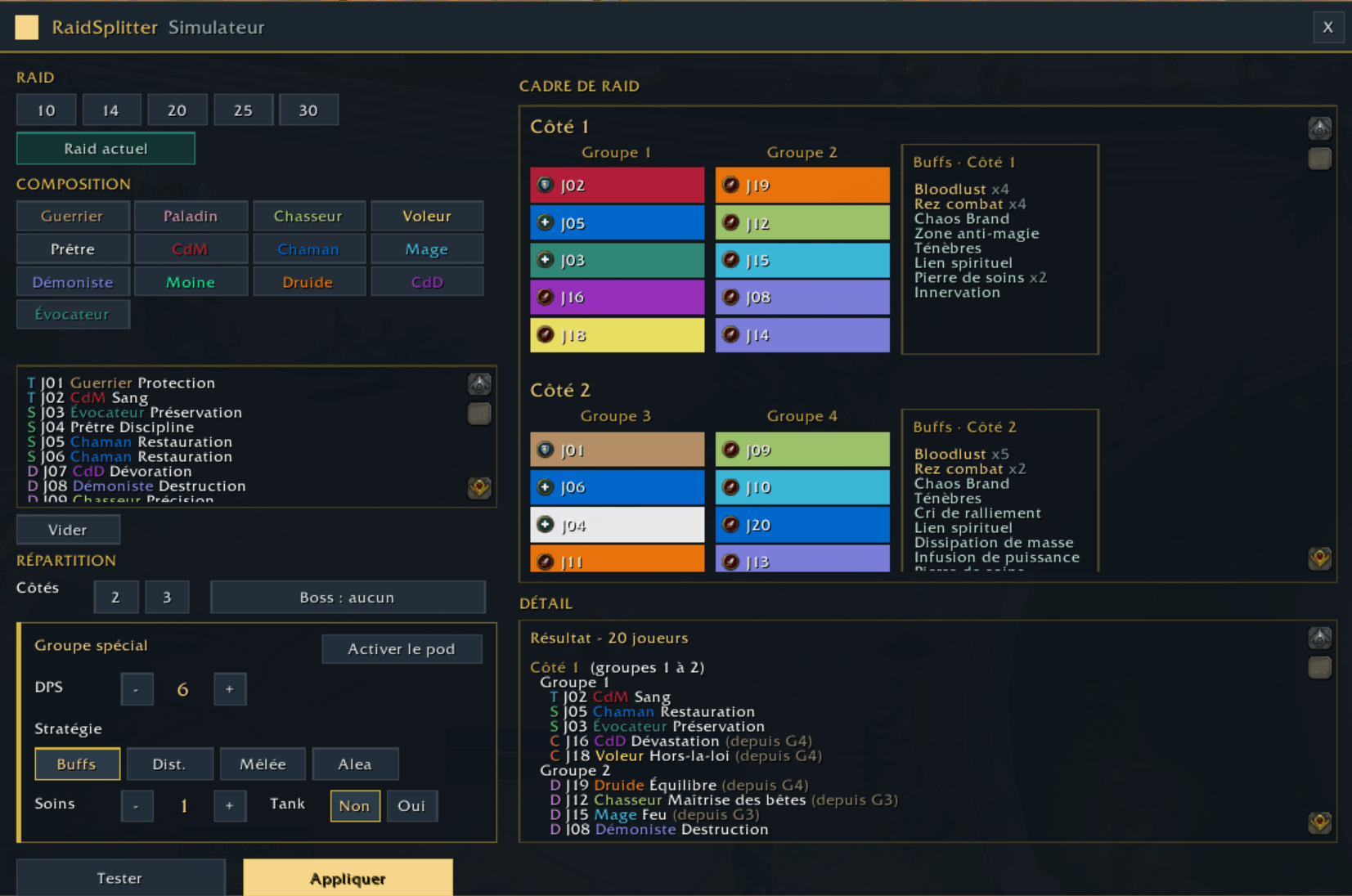
It all starts in the simulator (/rs sim). Load your current raid, build a comp by hand, or roll a random raid just to see. Pick how many sides (2 or 3), then Test: the result shows as a class-colored raid frame, with the buffs on each side, any gaps, and how many moves it takes. When it looks right, Apply reorganizes the groups.
Everything happens out of combat, and only if you're the raid leader or an assistant. If a move lands during a pull, it resumes on its own once the fight ends. You can also fire a split straight away with /rs go (2 sides by default, /rs go 3 for three). If there aren't enough tanks or healers for the split you asked for, it says so in red instead of quietly spreading people thin.
Buffs it tracks
This is really the point of the sort. Two effects are treated as critical — Bloodlust/Heroism and battle res — and it does its best to keep one on each side. Then come the target debuffs (Chaos Brand, Mystic Touch), raid defensives (Rallying Cry, Anti-Magic Zone, Darkness, Spirit Link, Devotion Aura), and the rest (Mass Dispel, Power Infusion, Innervate, Healthstone). If the raid only has one of something, it tells you rather than pretending to balance it.
Off-target pod
Sometimes you need to send a few DPS to handle something on the side, usually without a tank. That's what pod mode is for: pick how many DPS, add a healer or tank if you want, and choose how the group fills — buff-first (guarantees a battle res, Chaos Brand and Mystic Touch), ranged, melee, or random. The rest of the raid stays together on the other side.
VIP players
You can flag certain players as VIP — click their name in the simulator list, or use /rs vip in game (on your target, or by name). A VIP is always taken first into the pod, before the buff guarantee and the strategy. The VIP list is remembered from one raid to the next.
Commands
/rs sim, /rs go [n], /rs pod <dps> [buffs|dist|cac|rand] [heals] [tank], /rs vip [name].
Good to know
If you run BigWigs or DBM it uses LibSpecialization for accurate spec and melee/ranged detection, otherwise it falls back to class — a bit rougher, but it works. No required dependencies, nothing extra to install. Available in French and English, based on your client language. Still early, so if something breaks or a split looks off, drop a comment.
RaidSplitter Team