QuickMisdirection
One-button Misdirection / Tricks of the Trade that always targets your group's tank. The addon creates the macro, puts it on your bar and keeps it up to date by itself.
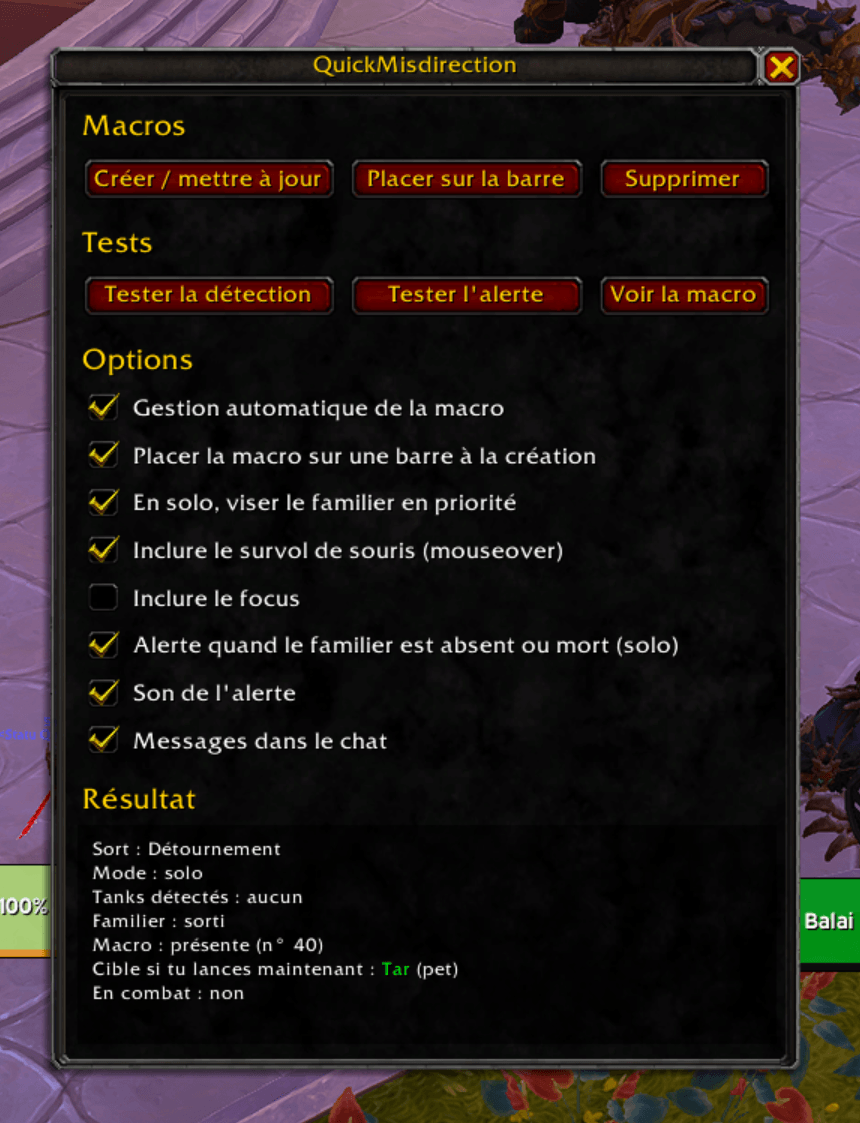
QuickMD.png
Description
QuickMisdirection
Creates and keeps up to date a Misdirection (Hunter) / Tricks of the Trade (Rogue) macro that always points at your group's tank. Drop the macro on a bar once and forget about it: QuickMisdirection rewrites it every time your group or roles change.
Inactive on classes other than Hunter and Rogue.
Features
- One macro, always current. A macro named
QuickMDis created and placed once on the first free action bar slot. Its body is rewritten on every group or role change — you never edit it by hand. - Smart target priority.
- In a group: mouseover → focus → tank 1 → tank 2 → pet.
- Solo: pet → mouseover → focus.
- Every step can be toggled in the options. Mouseover and focus are off by default (tick them if you want them).
- Party and raid aware. In a 5-player party the macro targets the group slot. In a raid it targets the tank's full name, falling back to the
raidNslot if the name can't be read. - Delves — Valeera companion. In Delves the companion Valeera Sanguinar is detected and redirected to. Her actual role is read from the Delve companion system, so "only when she is Tank" works correctly. Three modes via two checkboxes: only when Valeera is Tank (default), always Valeera, or always the pet. No effect outside delves.
- Cooldown on the button. The remaining cooldown of Misdirection / Tricks of the Trade is shown on the action-bar button holding the macro — independent of the Blizzard "countdown" setting, and it steps aside cleanly for third-party bars (Bartender, ElvUI, …).
- Minimap button. A draggable minimap icon (no external library); left-click opens the options.
- Pet alert for Hunters (solo). An on-screen and sound warning when your pet is missing or dead, with anti-spam (skipped while mounted, on a taxi, in a vehicle or resting; at most one alert every 20 seconds). No more false "pet not summoned" alert right after a loading screen.
- Re-tests on the move. The target is re-evaluated on every zone change and when entering or leaving an instance.
- Combat-safe. Macro edits are never attempted in combat; they are queued and replayed when you leave combat.
- Localized (English and French), per-character settings saved in
QuickMisdirectionDB.
Usage
- Open the configuration window with
/quickmd,/qmd, from the AddOns compartment (the icon near the minimap), or the minimap button. - Sections: Macros (create / place / delete), Tests (detection, alert, show macro), Options, and Result.
- The macro is placed automatically once; if no free slot is found, drag the
QuickMDmacro from/macroonto a bar yourself.
Options
| Option | Effect |
|---|---|
| Automatic macro management | Keep the macro up to date on group/role changes. |
| Place the macro on a bar when created | Auto-place on the first free slot. |
| Solo: target the pet first | Put the pet at the front of the solo priority. |
| Include mouseover | Add [@mouseover,help,nodead]. (off by default) |
| Include focus | Add [@focus,help,nodead]. (off by default) |
| Alert when the pet is missing or dead (solo) | Hunter-only pet warning. |
| Alert sound | Play a sound with the warning. |
| Chat messages | Print status lines in the chat frame. |
| Show cooldown seconds on the action button | Countdown on the button holding QuickMD. |
| Show the minimap button | Toggle the minimap icon. |
| In delves, redirect to Valeera (companion) | Include the Delve companion as a target. |
| In delves, only when Valeera is a Tank | Only redirect to Valeera when her spec is Tank. |
Feedback
Found a bug? Open the settings window, click Test detection, and include the text of the result box (it shows the last error) in your report.
QuickMisdirection Team