CataGuildNotes
A Notes tab for your guild window: every member's public and officer note in one sortable table — with a main/alt tree, trial-period tracking, orphan-alt highlighting, live guild stats, and secure one-click promote/demote.
anon_out.png
Capture dâécran 2026-09-20 130454.png
Description
CataGuildNotes
Every guild keeps its real information in the notes — who is an alt of whom, when someone joined, who is still on trial, who to promote next. But the default guild window crams those notes into a single column you have to hover to read, with no way to sort, group or act on them. CataGuildNotes turns that into a proper table.
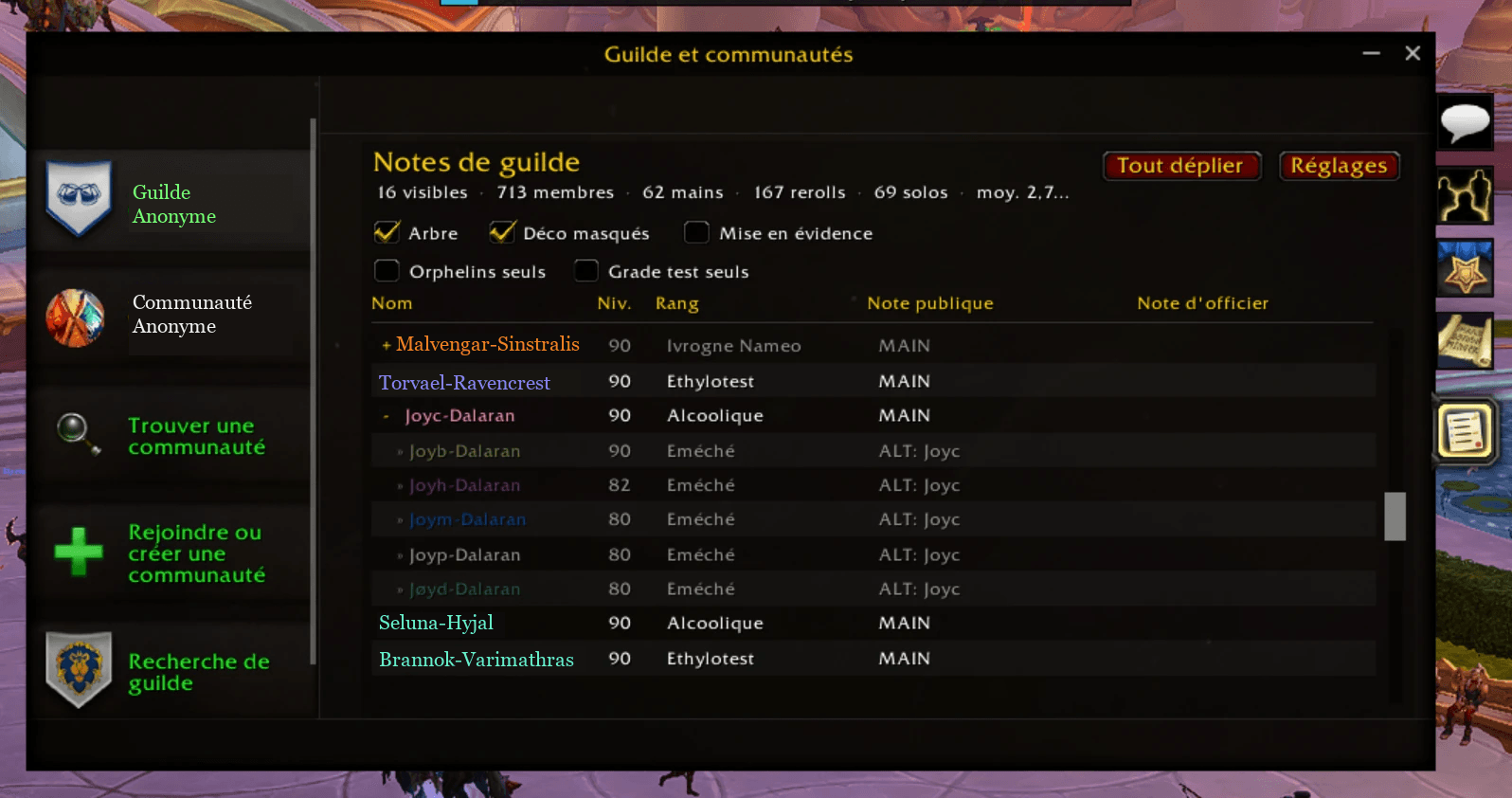
It adds a Notes tab right inside the guild window, next to Roster, Perks and Info. One click and every member is laid out in full: name, level, rank, public note and officer note, all readable at once, class-colored, and with the tools guild officers actually need built on top.
The Notes tab
The tab lists your whole roster in five columns — Name · Level · Rank · Public note · Officer note — instead of one truncated field. Class colors, online/offline dimming, alternating rows, a scrollbar and mouse-wheel scrolling. Officer notes are shown only when your rank is allowed to read them; the addon never exposes anything you could not already see.
Mains and alts, as a tree
Most guilds write ALT: MainName in an alt's public note. CataGuildNotes reads that and builds a main to alt tree: every alt is grouped under its main, and you fold or unfold a main with a click — or use Collapse all / Expand all. Tree view is on by default and starts fully collapsed, so even a 400-member roster opens as a clean list of mains; expand only the ones you care about.
When an alt is online but its main is offline, the offline main and its other alts are still shown alongside, so you always see the whole character set behind a player.
Trial-period tracking
New recruits usually sit at a trial rank for a fixed number of days, with their join date written in the officer note. The addon parses that date, compares it to the trial length, and shows for each trial member either the days remaining (J-x) or a ready-to-promote flag once the period is over — plus a running count of how many members are due. No more scrolling through notes to work out who has finished their trial.
One-click promote / demote
Hover a member and secure up / down arrows appear to move them one rank at a time. Blizzard blocks add-ons from changing guild ranks silently, so these are secure buttons: the click is yours, one rank per click, and they only appear when your own permissions actually allow that promotion or demotion for that specific member. No tainted actions, no automation behind your back.
Highlighting and filters
Turn on highlighting to spot the odd cases at a glance:
- orphan alts — an alt whose main is not in the guild (marked in purple),
- big mains — players with more than four alts (marked in blue, with the count).
Filters, as checkboxes right in the tab:
- Hide offline — show only who is online (offline alts of an online main stay visible in tree view),
- Orphans only — list just the orphan alts, grouped by the main they claim,
- Trial grade only — list just the members still on trial.
Guild statistics
The tab footer keeps a live count: members shown, number of mains, number of alts, and the average alts per main — a quick read on how alt-heavy your guild really is. An optional inactivity cutoff (15 / 30 / 60 / 90 / 180 / 365 days) drops members who have not logged in within that window from the stats, so the numbers reflect your active roster rather than everyone who ever joined.
Settings
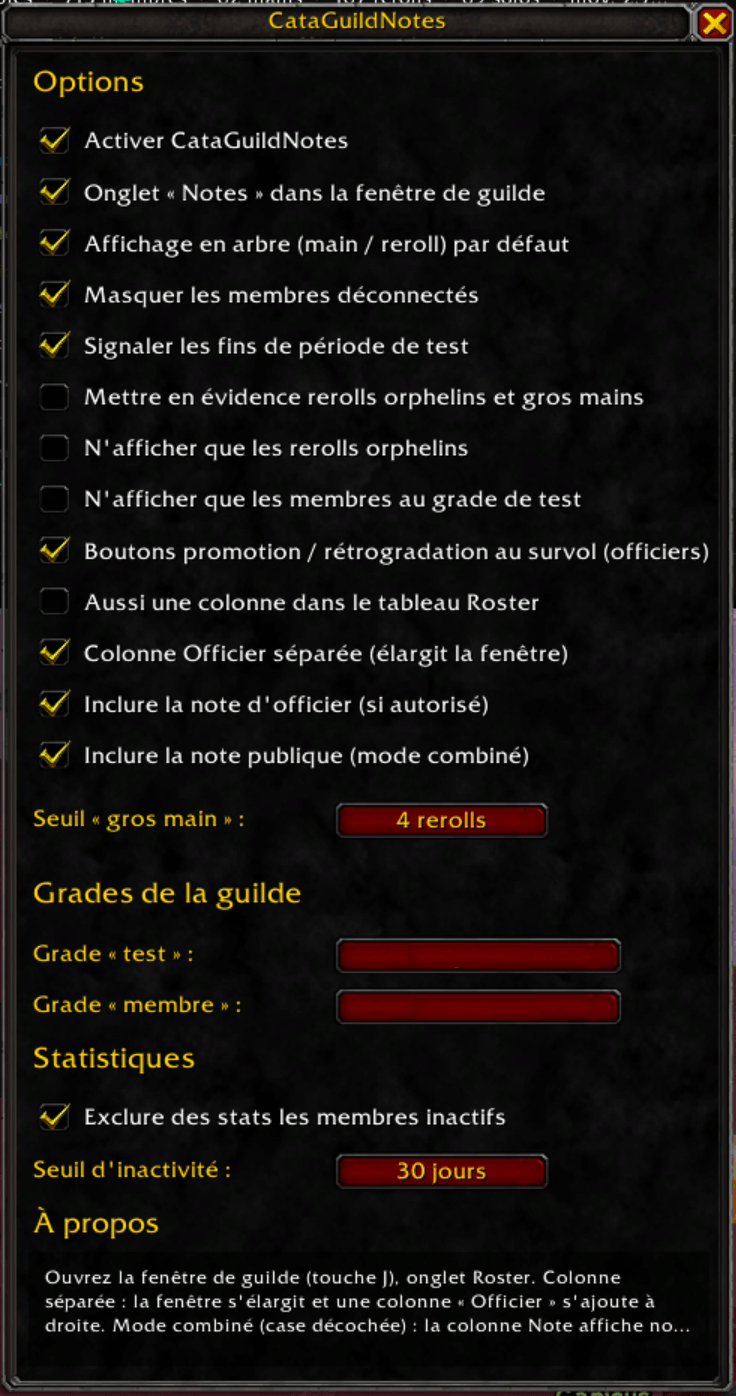
Open the panel from the Settings button in the tab, or with /cgn (or /cataguildnotes). Everything is configurable:
- which of your guild's actual ranks is the trial grade and which is the member grade — picked from a dropdown of your real ranks, so it works whatever your guild calls them,
- the inactivity window for stats,
- every filter and highlight, plus an optional extra column in the built-in roster view.
Commands
/cgnor/cataguildnotes— open the settings panel/cgn debug— print diagnostics (guild status, permissions, memory use)
Good to know
Read-only and taint-safe: the addon only ever reads notes and ranks, and the single write-like action (promote/demote) goes through Blizzard's own secure path. It stays light on memory even on large rosters — refreshes are debounced and internal tables are pooled rather than rebuilt. Saved settings are per character.
The in-game interface is currently in French; this page is written in English so the addon is easy to find. If you would like an English interface, say so in the comments.
The CataGuildNotes Team