QuiverShift
- By
Stop guessing, start hitting harder: real-time optimal DPS coaching for Hunters at every level.
ezgif-834d53177457c1ab.gif
Description
Description
I have moved QuiverShift development to a single addon that works for all Classes. Forecast does the same thing but will work with all of your characters in the same addon. Please check it out:
https://www.curseforge.com/wow/addons/forecast
New in 2.0.0
- Rebuilt on the ForeCast engine.
- Your settings, HUD position, DPS benchmark and learned fights carry over from 1.x
- Adds optional sounds, live damage during fights, learning from your fights, and the HOW button for "How am I doing"
- Settings window is now two columns so it fits smaller screens
- New option, on by default: group threat management (lets the tank pull, holds at 85%, suggests Feign Death)
New in 1.12.0
- Optional damage per spell window after the fight
MAJOR UPDATE 1.11.0
- Spell icons are now clickable!
- Enable in the settings window
New in 1.10.0
- Interrupt cues: when your target starts casting something you can stop, Scatter Shot (or Intimidation if it's on cooldown) lights up red.
- Cooldowns used, not hoarded: Rapid Fire and Intimidation now fire on every worthwhile fight, not just elites, and Marksmanship hunters get Aimed Shot whenever it's ready, still timed between Auto Shots.
- Pet panel: see what your pet is casting, a live health bar, and a Mend Pet alert at a threshold you choose (25% by default). Threshold is shown in yellow and bar turns red if Mend Pet is suggested.
- Compact HUD: a slimmer panel with your aspect and pet status on one row, and the option to fade or hide it out of combat.
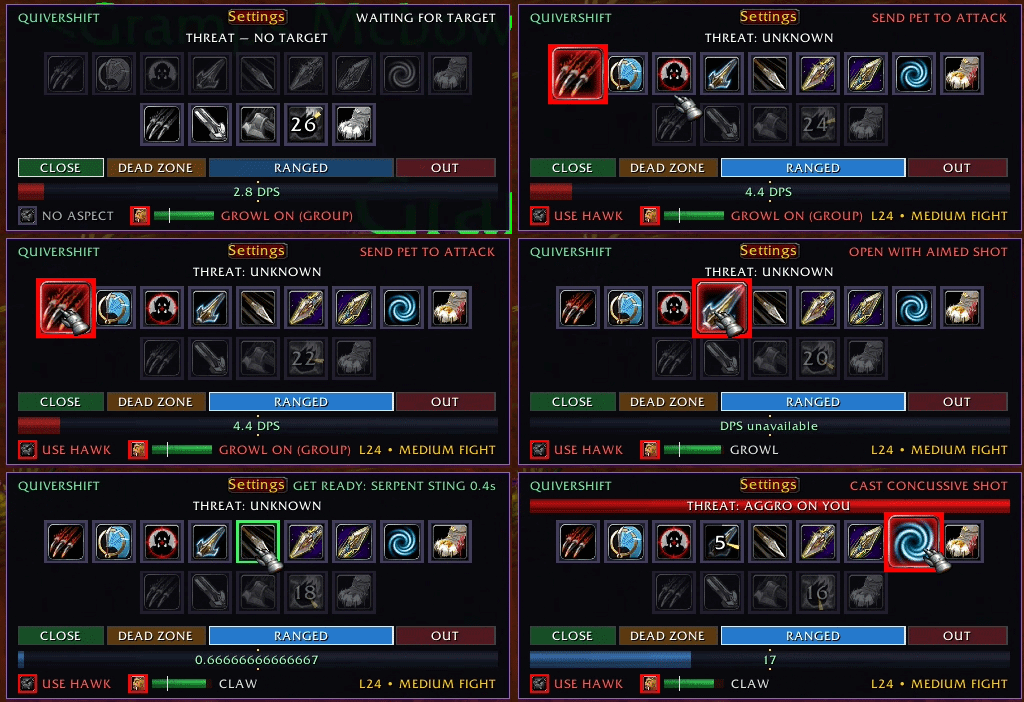
QuiverShift tells a Hunter exactly what to press, and exactly when.
It reads your level, the spells you have learned and your talents, watches the fight, and lights up the right ability at the right moment. It is built for WoW Forever and its rotation follows Kargoz's 1-60 Beast Mastery leveling guide.
QuiverShift never casts spells or commands your pet. It only shows you what to press.
Three colours, one glance
- 🔴 Red: cast now. The icon grows and gets a bold red border. It turns red just inside your spell queue window (400 ms by default) before the spell is ready, so pressing it then fires the spell the instant it is available. No wasted time between casts.
- 🟢 Green: get ready. The spell that will turn red next, with a countdown, so you can line up the key.
- 🟡 Yellow: wait. Let something automatic happen. Auto Shot shows yellow during its half-second windup before each shot, so you know to stand still and not delay it, and when you should let it land before a cast-time shot like Aimed Shot. Your pet's icon shows yellow at range when your threat is too close to your pet's, meaning hold your shots.
Aspect indicator
A small icon at the bottom of the HUD shows the aspect you have on. It turns green when it's your best aspect for damage (Aspect of the Hawk, or Monkey before you learn Hawk) and red with "USE HAWK" when it isn't, but only when it matters: in combat or lined up on a hostile mob, so it never nags while you travel with Cheetah. It remembers what you cast during combat and notices when you die.
Pet panel
Right next to it: what your pet is doing (the ability it's casting or just used, or ATTACKING / IDLE) and a pet health bar that goes green, yellow, then red below your Mend Pet threshold. Mend Pet lights up red when your pet drops below that threshold (a slider in settings, 25% by default).
The pet icon's border also turns red when your pet isn't set up well: Growl autocast off while you're solo (or on while you're in a group and stealing the tank's aggro), none of its damage abilities on autocast, an AoE pet ability on autocast about to break your Freezing Trap, or no pet as you line up a pull. Hover it to see every pet ability, its autocast state and the pet's health.
Two static bars: ranged and melee
- Each bar shows every ability QuiverShift can suggest in that range, including ones that only become usable sometimes (Mongoose Bite, Counterattack).
- The icons never shuffle around; only the highlight moves. The whole bar swaps when you step into or out of melee, and the dead zone keeps the bar you were on, so it never flickers.
- Only spells you have actually learned appear. Icons shrink to fit as your spellbook grows.
A smart rotation
- Opener: Hunter's Mark (optional) → send your pet → open with Aimed Shot, or the best shot you have. You never press Auto Shot; your first shot starts it.
- Priority: Rapid Fire and Intimidation on most fights, Bestial Wrath on long ones, Summon Hawk (keeps up to two), Serpent Sting when the target lives long enough, Aimed Shot on long single-target fights, Arcane Shot early on and for quick kills.
- Melee: Mongoose Bite and Counterattack when they become usable, Immolation Trap, Raptor Strike.
- Single target: group abilities like Multi-Shot, Volley and AoE traps are left to you.
- Interrupts: Scatter Shot, then Intimidation, when your target casts something you can stop.
- Situational: Concussive Shot when a mob runs at you, Frost Trap when one is on you and your pet is down, Mend Pet when your pet drops below your chosen health, Scorpid Sting on elites, Deterrence in an emergency. Only one sting at a time, and shared trap cooldowns are respected.
- Fight length awareness: QuiverShift estimates how long the target will live, from its health loss, elite status and level. Short fights get quick damage; long fights and elites get damage-over-time spells and cooldowns. The estimate is shown on the HUD.
- Shared cooldowns: it knows that Arcane Shot and Summon Hawk share a cooldown, and so do Aimed Shot and Multi-Shot.
- Auto Shot timing: it measures your Auto Shot speed and only suggests Aimed Shot right after a shot lands, so it never delays your Auto Shot.
Built for WoW Forever
- Cooldown prediction: Forever hides cooldowns during combat, so QuiverShift predicts them from your own casts. Real cooldown times seen out of combat are learned automatically and improve the predictions.
- Debuff tracking: it tracks your Serpent Sting and Hunter's Mark on each target from your casts, because the game can report them missing while they are still on the mob. No clipped or wasted stings.
- Level-aware: your level is read live. For example, it favours Arcane Shot over Serpent Sting at low levels, as the guide recommends.
- Automatic scanning: spells and talents are scanned at login and again whenever you learn something new. Every Hunter ability from 1 to 60 is classified, so new spells join the rotation the moment you train them. Nothing to set up.
/qs spellsshows what was found and why each spell is or isn't used.
Managed threat (optional)
- When a mob turns on you, it suggests Disengage, then Intimidation, and Feign Death in an emergency. It waits a few seconds into each pull first, so your pet has a chance to grab aggro.
- At range, it tells you to hold your shots when you are about to pull threat off your pet.
- Turn it off, and these suggestions and icons disappear entirely.
HUD extras
- Range band: close, dead zone, ranged or out of range, highlighted for your target.
- Threat bar: turns red when the mob is on you.
- DPS bar: compares the current fight with the average of your recent fights.
- Compact: the whole HUD fits in a slim panel.
- Movable and lockable: drag the title strip, or lock it in place.
- Out of combat: keep the HUD visible, fade it, or hide it. It comes back as soon as you target a hostile mob, so the pre-pull cues still show.
Settings and commands
Open the settings window with the Settings button on the HUD or /qs.
| Command | What it does |
|---|---|
/qs |
Open or close settings |
/qs rescan |
Rescan spells and talents (normally automatic) |
/qs spells |
List learned spells: in the rotation, not suggested (with the reason), or unrecognised |
/qs range |
Show the raw range checks for your target |
/qs hawk <seconds> |
Set how long a Summon Hawk lasts (for the two-hawk limit) |
/qs lock / /qs unlock |
Lock or unlock the HUD position |
/qs show / /qs hide |
Show or hide the HUD |
/qs version |
Show the installed version |
Settings: Mend Pet threshold, HUD lock, HUD visibility, out-of-combat show/fade/hide, aspect indicator, pet panel, DPS bar, Hunter's Mark reminder, Managed threat, and Immolation Trap weaving at range.
Credits
- Rotation priorities from Kargoz's WoW Forever 1-60 Beast Mastery Hunter leveling guide on mobalytics.gg.
- Talent data from talentsforever.com, used under CC BY 4.0.
QuiverShift Team