QuickTarget
- By
Type a name, then target it with one key, even in combat. Built for WoW Forever.
Screenshot 2026-09-22 120245.png
Screenshot 2026-09-22 120310.png
Description
QuickTarget
Type a name, press a key, and that target is selected. Even in combat.
Built for World of Warcraft: Forever.
Features
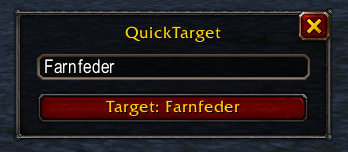
- Target by name with one key - type a name once, then target it with a keybind or with the button in the QuickTarget window.
- Works in combat - the key keeps working during combat. Only changing the name has to wait: a name typed in combat is applied automatically once combat ends.
- Full or partial names - QuickTarget clears your current target first, then looks for the exact name. If nobody is found, it looks for a name that begins with your text, so "Lyreena" finds Lyreena Duskblade. If nobody matches, it tells you in chat instead of silently leaving you on an old target.
- Small and simple - one movable window, one keybind, one slash command. With EllesmereUI installed the window takes its look.
Getting started
- Type
/qtto open the window. - Type a name. The button follows as you type.
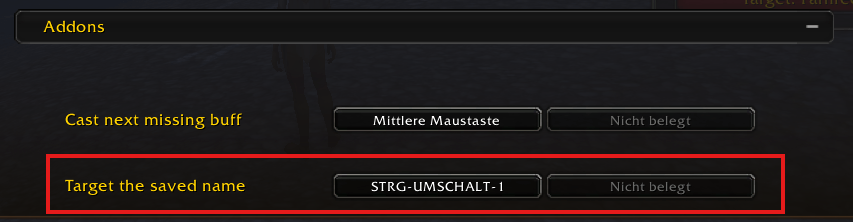
- Click the target button, or bind Key Bindings -> QuickTarget -> Target the saved name.
You can also set the name directly, for example /qt Hogger.
Ideas for use
- Hunting a rare or a quest NPC
- Picking one specific mob out of a crowd
- Finding a group member quickly
Good to know
- The window cannot be opened, closed or moved during combat, because it holds a secure button. The keybind is not affected.
- Partial names match the beginning of a name, not the middle: "Duskblade" does not find Lyreena Duskblade. That is how the game's own /target works.
Deutsch
Namen eingeben, Taste drücken, Ziel ist angewählt. Auch im Kampf.
Funktionen
- Ziel per Name mit einer Taste - Namen einmal eingeben, dann per Taste oder über den Button im QuickTarget-Fenster anwählen.
- Funktioniert im Kampf - die Taste geht auch im Kampf. Nur das Ändern des Namens muss warten: ein im Kampf eingegebener Name wird automatisch übernommen, sobald der Kampf endet.
- Ganze oder halbe Namen - QuickTarget löscht zuerst dein aktuelles Ziel und sucht den exakten Namen. Findet es niemanden, sucht es einen Namen, der mit deinem Text beginnt: "Lyreena" findet Lyreena Duskblade. Passt niemand, steht das im Chat, statt dass du unbemerkt beim alten Ziel bleibst.
- Klein und einfach - ein verschiebbares Fenster, eine Taste, ein Befehl. Mit EllesmereUI übernimmt das Fenster dessen Look.
Loslegen
/qtöffnet das Fenster.- Namen eingeben. Der Button läuft beim Tippen mit.
- Auf den Button klicken oder Tastaturbelegung -> QuickTarget -> Target the saved name belegen.
Direkt setzen geht auch, zum Beispiel /qt Hogger.
Gut zu wissen
- Das Fenster lässt sich im Kampf nicht öffnen, schließen oder verschieben, weil es einen geschützten Button enthält. Die Taste ist davon nicht betroffen.
- Halbe Namen müssen der Anfang des Namens sein: "Duskblade" findet Lyreena Duskblade nicht. So arbeitet auch der Spielbefehl /target.
QuickTarget Team