QuestTrackerPlus
- By
Keep your quest tracker focused with quick zone and dungeon tracking for WoW Forever.
Description
QuestTrackerPlus
Keep your quest tracker focused on the adventures ahead.
QuestTrackerPlus adds controls above your quest tracker, making it easier to follow quests relevant to a zone or dungeon without manually sorting through your quest log.
Features
Quick-action buttons
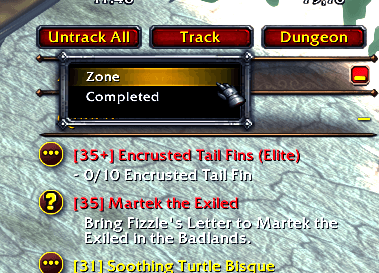
- Untrack All — Stop tracking all quests in your quest log.
- Track — Choose one of three options:
- Current Zone — Add quests matching your current zone.
- Specific Zone — Choose from zones with matching quests in your log and add quests for that zone.
- Completed — Add completed quests ready to hand in, regardless of zone. Failed quests are excluded.
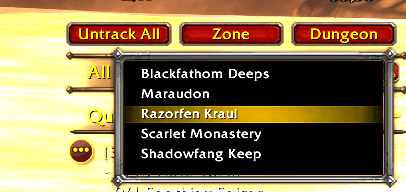
- Dungeon — Track quests related to your current dungeon or raid. Outside an instance, choose from a list of dungeons associated with quests in your log.
The Track options add quests without untracking your existing selections. Dungeon tracking replaces the selection, except for completed quests retained by the Prioritize completed quests option.
Zone matching uses quest-log categories and known objective locations, even when a quest is listed under a different category. It also checks turn-in locations for completed quests and delivery quests without recorded objectives.
Dungeon quest chains
QuestTrackerPlus also checks known quest chains, helping you keep track of related steps that may not be listed under the dungeon itself.
Optional automation
- Auto-track on zone change — Replace unrelated tracked quests with quests relevant to the new zone or subzone. Disabled by default.
- Auto-track on dungeon entry — Replace the selection with related dungeon or raid quests on entry. Enabled by default.
- Prioritize completed quests — Keep completed quests during automatic zone and dungeon selection and prioritize them when the Blizzard tracker is full. Enabled by default.
- Show quick-action buttons — Show or hide the button panel. Enabled by default.
Configure these options under Settings → AddOns → QuestTrackerPlus, or type /qtp.
Commands
/qtp— Open the addon settings./qtp zone— Track quests relevant to your current zone./qtp untrack— Stop tracking all quests.
You can also use /questtrackerplus in place of /qtp.
Compatibility and requirements
QuestTrackerPlus is designed for World of Warcraft: Forever and includes its quest database. Questie is optional:
- When Questie and its tracker are enabled, the buttons attach above Questie's tracker and operate on its tracked quests.
- Otherwise, the buttons use the Blizzard tracker. Blizzard's quest-watch limit applies; existing tracked quests are kept when a Track action runs out of space.
Questie has its own setting for displaying completed quests. If Show Completed Quests is disabled in Questie, completed quests may be tracked but hidden from its tracker. Questie tracking can also differ from Blizzard's quest-watch checkboxes.
Quest and location matching depends on available database and map information. Some quests or locations may not be included, and Specific Zone requires the game's map API.
Credits
QuestTrackerPlus uses LibQuestDB for quest and location data and includes Ace3 libraries.
QuestTrackerPlus Team