MailPlus
- By
Enhances the WoW mail interface with easy recipient picking from Favorites, Battle.net friends, and Recent contacts.
Description
MailPlus
Send mail to friends and your other characters without retyping names.
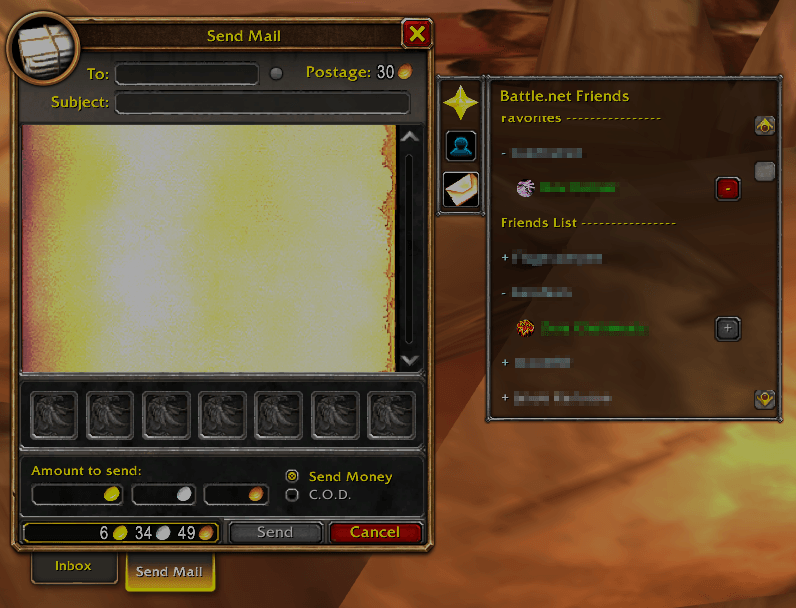
MailPlus adds a contact panel beside the Send Mail tab in the mailbox. It is designed for World of Warcraft: Forever and gives you quick access to saved contacts, Battle.net friends, mail history, and your own characters.
🌟Features
- Four contact lists — Open Favorites, Battle.net Friends, Recent Mail, or My Characters from the buttons beside the mail form.
- Choose a Battle.net character — Expand a friend account to see known WoW characters and select one to fill in the recipient field. Battle.net-favorited accounts are grouped at the top.
- Keep favorite recipients handy — Add or remove characters with the
+and-buttons. The add button is disabled when the character's known faction or ruleset does not match yours. - Find your other characters — MailPlus remembers characters you log in on and lists them under My Characters.
- Check contact details — Hover over a contact to see last-known class, level, faction, ruleset, online status, and mail history. This information is not a guarantee that mail can be delivered.
- Review recent mail — Recent Mail combines up to 25 distinct outgoing recipients, recorded after a successful send, with up to 25 incoming senders found in your inbox.
💡Use
- Open a mailbox and select Send Mail.
- Choose a contact-list button beside the mail form.
- Click a character to fill in the recipient field.
MailPlus Team