Questie Target Window
- By
A small movable window with a button for each NPC of your nearest Questie quest: click to target it. Also shows the quest items you can use. English and Italian.
20e05aa6-afd8-49ce-b82f-bc72520baaa5.png
17af3de4-3ebb-4c93-8c51-2030e53b99ed.png
7cf6ff8b-e213-4a46-8e4f-cbfefcf0920c.png
Description
Questie Target Window
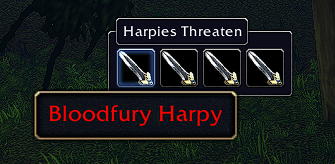
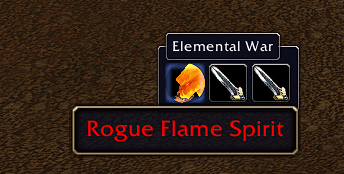
A small movable window for World of Warcraft Forever with a button for each NPC of the quest in your log that is closest to you, as Questie sees it. Click a button to target that NPC. No more scanning the screen for the right mob or hunting through the crowd for the quest giver.
Requires Questie.
Features
Targets window
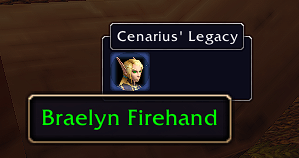
Enemies of the nearest quest on the top rows, friendly NPCs — and the NPC you hand the quest in to, once it is complete — at the bottom. The quest name sits on the tab at the top left. Hover a button to see the name: red for enemies, green for friendly NPCs.
Portraits that stay
A button shows the NPC's portrait as soon as you target it, mouse over it, or have it near you with its nameplate on, and keeps it afterwards — even when you lose the target or the list changes.
Active Items window
A button for each quest item you carry that you can use, with its cooldown. It only shows up when you are close to the target of that quest (40 yards by default), because that is where you use it.
Safe in combat
The buttons are the game's own secure buttons, so they work in combat. The lists update when the fight ends.
Yours to place
Drag a window by its panel or its tab. The position is saved. Lock it with a command — Alt-drag still moves it.
Installation
Install from CurseForge, or copy the QuestieTargetWindow folder into Interface\AddOns and type /reload.
Commands
All commands start with /qtw. Typing anything else lists the available commands.
| Command | Effect |
|---|---|
/qtw lock / /qtw unlock |
Lock or unlock the windows (Alt-drag still moves them) |
/qtw scale <n> |
Resize the windows (0.5 to 2) |
/qtw distance <n> |
Only show NPCs within that distance of Questie's nearest spawn (0 = no limit, the default) |
/qtw proximity on|off |
Only show NPCs that have a nameplate near you (off by default) |
/qtw items on|off |
Show or hide the Active Items window (on by default) |
/qtw itemdistance <n> |
How near to a quest's target you must be to see its items (40 by default, 0 = no limit) |
/qtw reset |
Back to the default position, scale and settings |
How it works
Once Questie is ready, the addon asks it once a second for the quests in your log, the distance to each one, and the NPC data. It picks the nearest quest and shows the enemies of its open objectives — or the NPC to hand it in to when it is complete.
Quest items come from the quests in your log: the item that starts or is used for the quest, the required items, and the item objectives. The game decides which ones can be used, and only those in your bags or worn are shown.
If Questie lacks something the addon needs, it prints one message in chat and stays idle.
Languages
English and Italian. Other clients fall back to English.
Source
The addon is tested against a small fake of the game client, and every release runs the tests first.
Questie Target Window Team