Quest Radar
- By
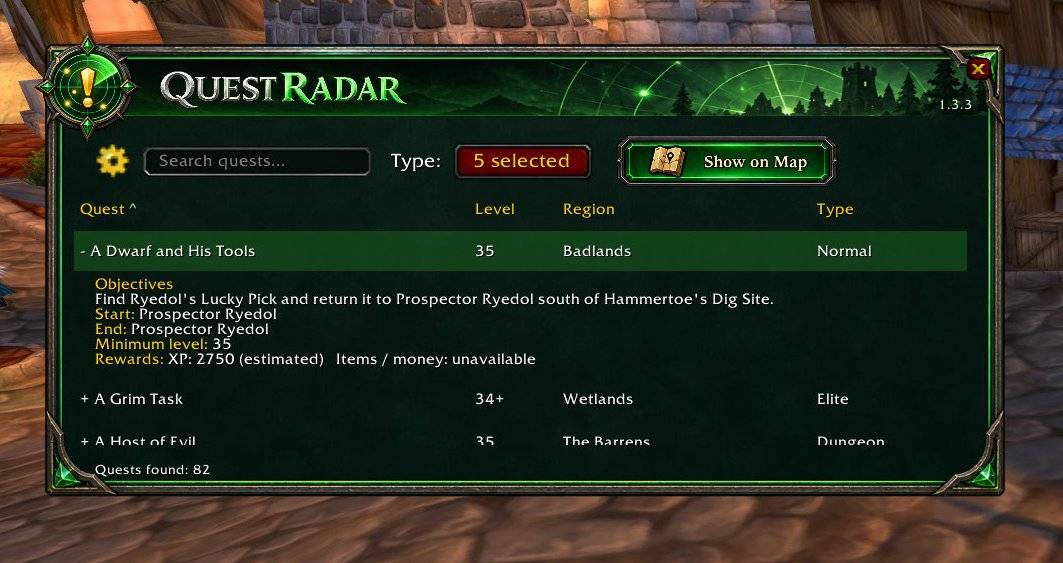
Quest Radar organizes the quests available through Questie into a searchable list, with filters, sorting and expandable quest details.
WoWScrnShot_102726_225822.jpg
Description
Quest Radar
Find your next adventure without searching through every quest marker on the map.
Quest Radar organizes the quests available through Questie into a searchable list, with filters, sorting and expandable quest details.
/qr or /questradar — Open or close Quest Radar.
Features
- Search quests by name or starting region.
- Combine quest types: Normal, Dungeon, Elite, Event, PvP and Trivial.
- Filter by level: use an automatic range around your character’s level or set a manual minimum and maximum.
- Filter by region to focus your search.
- Sort columns by quest name, level, region or type.
- Expand quest details with a click to view objectives, quest starters, turn-in NPCs, minimum level and estimated XP when available.
- Show on Map: open the quest’s starting region. For starters inside a dungeon, open the entrance region when Questie provides that information.
- Quest counter shows how many results match your filters.
- Saved options preserve your preferences between sessions.
All presented in a compact, emerald radar-themed interface.
Requirements
Questie is required. Quest Radar uses Questie’s quest database and availability rules. Questie settings can therefore affect which quests appear.
The Trivial checkbox also controls Questie’s low-level quest visibility, affecting its map markers.
Commands
/qror/questradar— Open or close Quest Radar./qr refresh— Refresh the quest list.
Compatibility
Developed and tested on WoW Classic Era.
Quest Radar Team