Quest Progress Alert
- By
Shows quest progress (looted quest items, kills, objectives) as eye-catching animated popups instead of the small yellow text, with stacking, sounds and lots of options.
screenshot1.png
Description
Turns the small yellow quest progress text at the top of the screen ("Glowing Crystal: 3/8") into an eye-catching animated popup you won't miss.
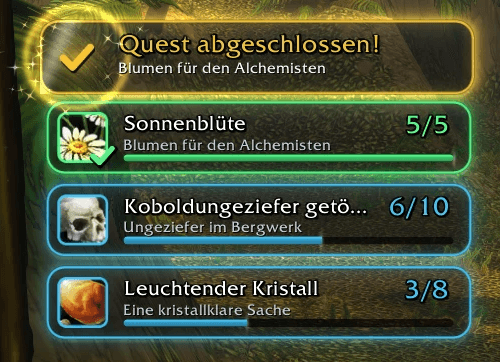
- Popup cards with icon, objective, counter, progress bar and quest name, on a dark glowing card that stands out on any background.
- Several things at once: every objective gets its own card, and the cards stack. More progress on the same objective updates its card (with a "+1" and a little pop) instead of adding a new one.
- Objective complete: the card turns green, gets a check mark, a ring burst and sparkles.
- Quest complete: an extra golden "Quest complete!" banner once all objectives are done.
- Sounds for progress, completed objectives and completed quests, each selectable or off.
- Real icons: collected items show their own icon. Kill objectives show the head of the enemy: the addon remembers every enemy you see (target, mouseover, nameplates, targets of your group) for the session, so it also works when a group member made the kill. Unknown enemies get a skull.
- Questie (optional): with Questie installed, the item icon shows right away even for the very first item, and objectives like "Murlocs slain" find the right enemies.
Game version: WoW Forever only. Classic Era and other versions are not supported.
Usage
Everything works right away. The options are under Options > AddOns > Quest Progress Alert or with /qpa:
- which progress to show (items, kills, other objectives, quest complete, failed quests) and whether to hide the yellow default text
- display time, display time for completed objectives, fade-out
- number of popups at once, stack direction, size, width, spacing, position
- font, font size, background opacity, glow, icon, enemy portraits, Questie for icons, progress bar, quest name, animations, sparkles, colors
- sounds and sound channel
Commands:
/qpa: options/qpa test: shows a short test sequence/qpa move: unlocks the position (drag the frame, right-click to lock it)/qpa reset: resets the position
License
MIT, see LICENSE.
Source code and issues
Quest Progress Alert Team