Active Gear Highlight
- By
Highlights the equipment set you're wearing on your action bars, with one smart button per set that equips it, or saves or re-equips it when you changed it.
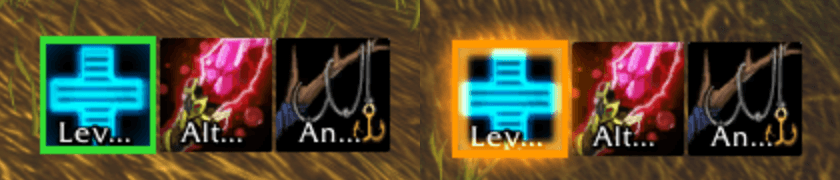
Green border: you're wearing this set. Orange glow: you changed it.
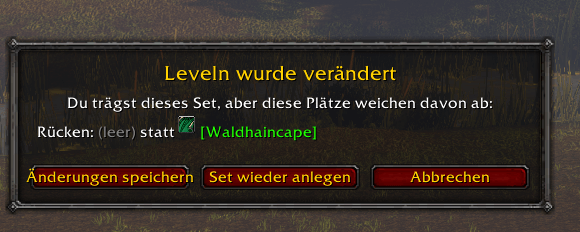
Clicking a set you changed lists the changed slots and lets you save the changes or put the set back on.
Description
A World of Warcraft addon that turns each equipment set into one smart action button: it equips the set, and when you changed the set you're wearing, it offers to save the changes or re-equip the set. The button of the set you're wearing gets a thick border, so you always see which set you have on.
- One button per set: click to equip a set you're not wearing
- Save changes in one click: got an upgrade? The button of your set glows, a click shows what changed and saves it, or puts your set back on (for the Carrot on a Stick moments)
- See your set at a glance: a static border marks the set you're wearing (green), turns orange and glows when you changed it, and red when items of it are missing (e.g. in the bank)
- Set icons: each macro shows the icon of its set and follows when you change it; renamed sets update their macros
- Drag from the Equipment Manager: dragging a set out of the character window gives you its macro
- "Current set" button: an optional macro that always shows the set you're wearing
- Works with your action bars: Blizzard's bars, Bartender4, Dominos, ElvUI, EllesmereUI, DaylightUI and other bars built on LibActionButton
- Combat aware: a set you click in combat is equipped as soon as combat ends
- Available in all languages of the WoW Forever client
Game version: WoW Forever only. Classic Era and other versions are not supported.
Getting started
- Create your equipment sets as usual in the Equipment Manager of the character window.
- Drag a set from the Equipment Manager onto an action bar. You get an Active Gear Highlight macro with the set's name and icon. (Shift-drag still gives Blizzard's own set button.)
- Click it.
The macros are character macros (/agh <set name>), created when you first drag a set. You can also write them yourself.
What a click does
| Situation | Click |
|---|---|
| You're not wearing the set | Equips it (in combat: as soon as combat ends) |
| You're wearing the set, unchanged | Nothing, the set is already on |
| You're wearing the set, but changed it | Opens a window with the changed slots: Save changes, Re-equip set or Cancel |
| Modifier | Effect |
|---|---|
| Shift-click | Saves your current gear to the set right away (asks first if you're wearing another set) |
| Ctrl-click | Equips the set again, which undoes your changes |
Saving keeps the slots that the set ignores ignored, just like the Equipment Manager.
"The set you're wearing" is the set you equipped last, no matter how (macro, Blizzard's set button, Equipment Manager). It is remembered per character across sessions. When your gear exactly matches another set, that set becomes the one you're wearing.
Border and glow
| Color (default) | Meaning |
|---|---|
| Green | You're wearing this set, unchanged |
| Orange, glowing | You're wearing this set, but your gear differs from it |
| Red, glowing | You're wearing this set, but some of its items are not in your bags |
The tooltip of a set button lists the changed slots and the click actions. Colors, border thickness and the glow can be changed in the options. Blizzard's own equipment set buttons get the border too (can be turned off).
Options
Options > AddOns > Active Gear Highlight, or /agh.
- Ask before saving (when off, a click on a changed set saves right away)
- Shift-click saves, Ctrl-click re-equips
- Equipment Manager gives macros
- Chat messages
- "Current set" macro: puts a macro on your cursor that always stands for the set you're wearing
- Glow when changed, mark Blizzard's set buttons too, border thickness, colors
Slash commands
| Command | Effect |
|---|---|
/agh <set> |
Equip the set, or save/re-equip it when you changed it (also /activegear) |
/agh save <set> |
Save your current gear to the set |
/agh restore <set> |
Equip the set again (also /agh equip <set>) |
/agh current |
Like /agh <set> for the set you're wearing |
/agh macro <set> |
Put the set's macro on your cursor |
/agh macro |
Put the "Current set" macro on your cursor |
/agh options |
Open the options (also just /agh) |
/agh help |
List the commands |
The addon used to be called Smart Gear Switcher. Its old commands /sgs and /smartgear still work, and set macros written with them are switched to /agh automatically.
Languages
All languages of the WoW Forever client: English, German, French, Spanish (EU and Latin America), Brazilian Portuguese, Russian, Korean, Simplified and Traditional Chinese. The language follows your WoW client.
License
MIT, see LICENSE.
Source code and issues
Active Gear Highlight Team