Coby's Public Order Whisper (POW!)
- By
Whisper a customer directly from public crafting orders with a custom message, item link and tip amount. Offer personal orders from the profession table, with an option to edit your whisper before sending.

01-PublicOrderWhisper-order-list.png
02-PublicOrderWhisper-message-settings.png
03-PublicOrderWhisper-bubble-options.png
04-PublicOrderWhisper-sending-options.png
Description
Coby's Public Order Whisper

A whisper button on public crafting orders in WoW Midnight.
Public orders have no reply button. Coby's Public Order Whisper puts a chat bubble after every customer's name: one click whispers them your message, with the item they asked for linked in, so you can offer to craft it as a personal order.
Features
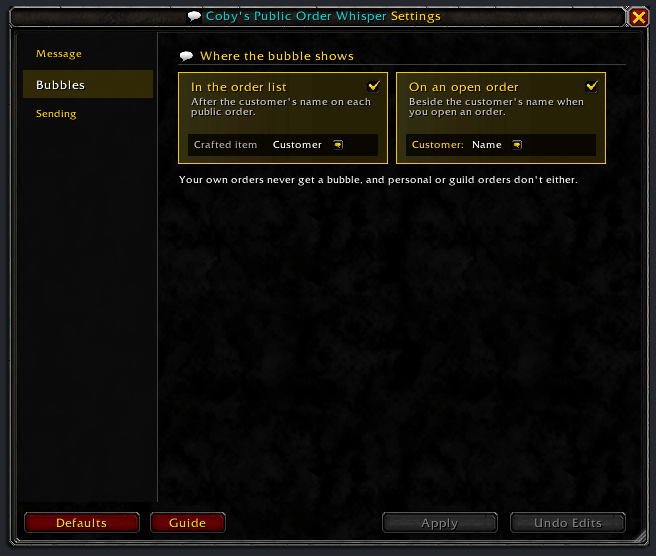
- A bubble on every public order placed by another player, in the order list and on an open order.
- One message you write once, filled in per order:
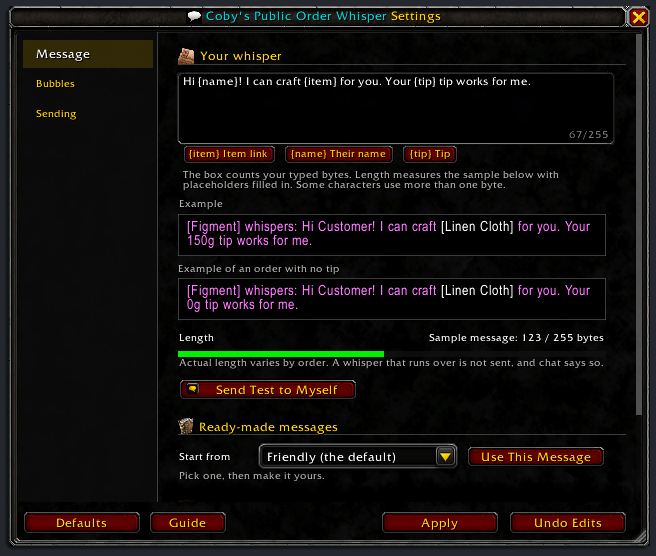
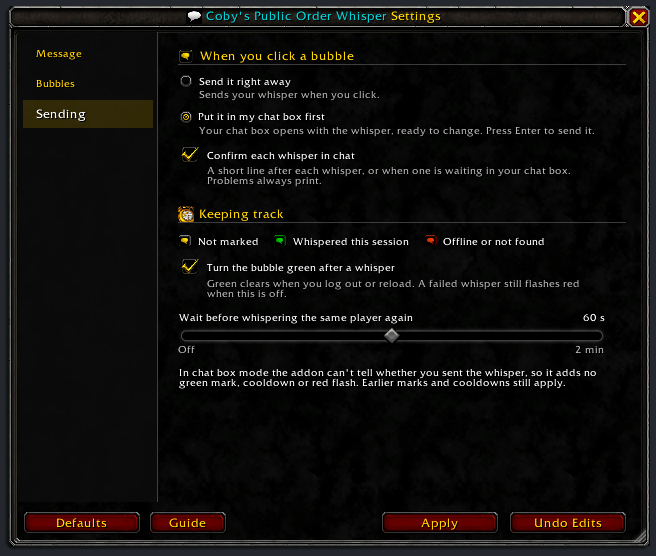
{item}(a link to the item, at the quality asked for when the game has that link),{name}(their name, without the realm) and{tip}(their tip, 0g when there is none). - The bubble turns green once you have whispered that player (you can turn this off), and flashes red (dropping the green) if the game says they are offline or don't exist. Green clears when you log out or reload.
- A per-player cooldown (60 seconds, up to 120, or off), so a double click or a second order from the same customer doesn't whisper them twice. The bubble's tooltip counts it down.
- Optional: put the whisper in your chat box first, to edit it before you press Enter. That click doesn't mark the bubble or start the cooldown.
- Ready-made messages to start from, and Send Test to Myself to see how yours reads.
Quick start
- At a profession table, open the crafting orders and pick the Public tab.
- Hover a bubble to see who it whispers and your message.
- Click it. The player gets your message (or, in chat box mode, it waits in your chat box for Enter).
WoW whispers hold 255 bytes; some characters use more than one, and an item link takes about 100. A message that would run over is not sent, and chat says so. The settings measure an example for you.
Install
CurseForge: https://www.curseforge.com/wow/addons/public-order-whisper
Manual: Drop the PublicOrderWhisper folder into your Interface/AddOns/. No dependencies.
Slash commands
/pow settings              Open or close the settings window
/pow guide                 Open or close the feature guide
/pow changelog             Open or close the changelog: what changed in each version
/pow addons                Every addon by Cobanyte, with CurseForge links and pictures (also /pow other, /pow more)
/pow debug                 Open or close the debug log window
/pow reset windows         Put every window back to its default place and size
/pow message               Show the current whisper message
/pow message <text>        Set the whisper message
/pow cooldown              Show the whisper cooldown
/pow cooldown <seconds>    Set the per-player cooldown (0 = off)
/pow selftest              Whisper the current message to yourself
/pow reset                 Restore every setting to its default
/pow version               Print the addon version
/pow help                  Show this help
/pow on its own opens the settings; /publicorderwhisper works the same as /pow.
Guide and what's new
/pow guide (or Guide in the settings) opens a short guide; it opens by itself for new players. /pow changelog lists what changed; after later updates it opens by itself.
Settings
Open with /pow settings, the gear beside the close button of the crafting orders window, or the minimap addon list. Changes wait for Apply; Undo Edits drops them.
- Message: your whisper, the placeholder chips, an example as the customer sees it, its length in bytes, Send Test to Myself, and ready-made messages.
- Bubbles: show the bubble in the order list, on an open order, or both.
- Sending: send right away or put it in your chat box first, a chat line after each whisper, the green mark, and the cooldown.
Troubleshooting
No bubble on the order list. Only the Public tab gets bubbles, and only on other players' orders. Check Bubbles in /pow settings. A row reached in combat gets its bubble when combat ends. If it still fails, /pow debug shows why.
Chat says the whisper is too long. A real order's item link can be longer than the example. Chat gives the size in bytes: shorten the message by at least the difference.
The bubble flashed red. The player is offline or doesn't exist; public orders can outlast their customer's session.
"Secret number value" errors from MoneyFrame with another crafting-order addon. That error comes from the other addon. This addon hides it only when it comes from the crafting orders window, and notes it in /pow debug; every other error still shows. With an error addon such as BugSack, that addon shows it instead.
License
GPL-2.0. See LICENSE.
Issues / feedback
Found a bug? Run /pow debug, press Copy Last 250 and send the text with a line about what you were doing. The log holds the addon version, your WoW build and your settings.
- Email: hackythings@gmail.com
- BugSack errors: whisper them to Figment-Illidan in game.
- CurseForge: comment on the project page for questions and feedback.
- GitHub: open an issue for bugs you can reproduce.
Coby's Public Order Whisper (POW!) Team