


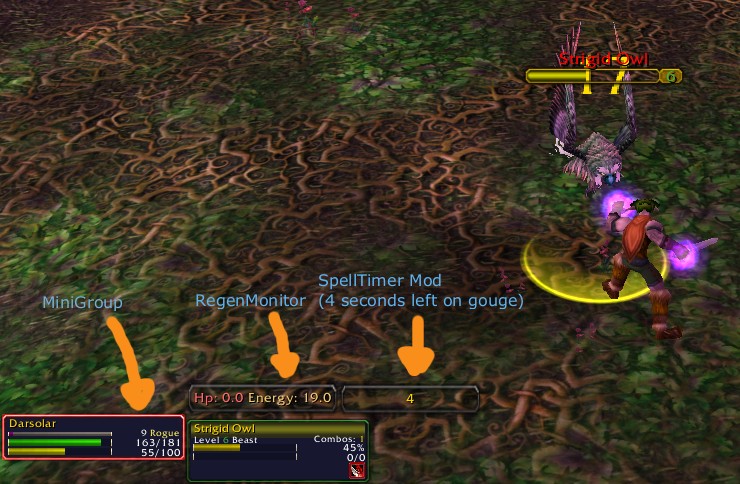
Rogue Gouge Timer
Description
{{{
- !html
Name: SpellTimer
Author: Jake Bolton (ninmonkey) ninmonkeys@gmail.com
About:
SpellTimer allows you to know how much time is remaining on a debuff/ability like gouge, or immolation. (Currently it can be used to time anything) You can call it with
/stimer set <Seconds>
(Example if you use 30, and it will start at 30 and count down 30 seconds.) It also will change colors as the time gets closer to 0. Normal color, once it hits 10 seconds it turns orange then when it hits 5 seconds it turns red. It also automatically dissapears from the screen when the time reaches 0.
Notes: If you want the window to show so you can place it properly, then set the timer to a high number of seconds. Example:
/stimer set 200
Then you can make it dissapear by setting a low number.
/stimer set 1
(Once it reaches 0, it dissapears)
Installation:
Copy the PlayerNotes directory into your "World of Warcraft\Interface\AddOns\" directory. (mod path should be: "World of Warcraft\Interface\AddOns\SpellTimer")
Features:
-dragable bar
-counts the time you set
-colors change based on time left, the text changes color starts yellow, ends up as red.
-Counts down time until it reaches zero, then it dissapears (to save space).
-can set width
Commands:
/spelltimer help
/stimer
shows help
/stimer set <number>
Sets the timer to <number>
/stimer status
Shows status(Width of different frames, Visibility, etc.)
/stimer <width>
Sets the width of the text (Default 128)
/stimer toggleautosize
Toggles auto-resizing the button to the smallest width possible. (shrink wrap to the text)
Examples:
If you want to time Immolation:
/cast Immolate(Rank 2)
/stimer set 15
If you want to time gouge (assuming your gouge lasts 4 seconds, it may be longer), use this macro:
/stimer set 4
/cast Gouge(Rank 1)
Planned for next version:
-Toggle Spell Name display
-Start timer right *after* spell has been cast, and don't start if spell fails (interruption, canceled, etc.)
Ideas to be implemented:
-toggleable name of what it is timing
-multiple timers availible (ie: calling the function appends a timer, instead of replacing the current one, this is why titles would be required)
-if target dies, automatically end timer
-user configurable time to change color (and color value)
-allow user set update speed (currently updates at one second, may want a faster update if the timer requires a decimal)
-shorter default width, or save user width.
-removeable border
-player set transparency background and color
}}}
The SpellTimer Team
