


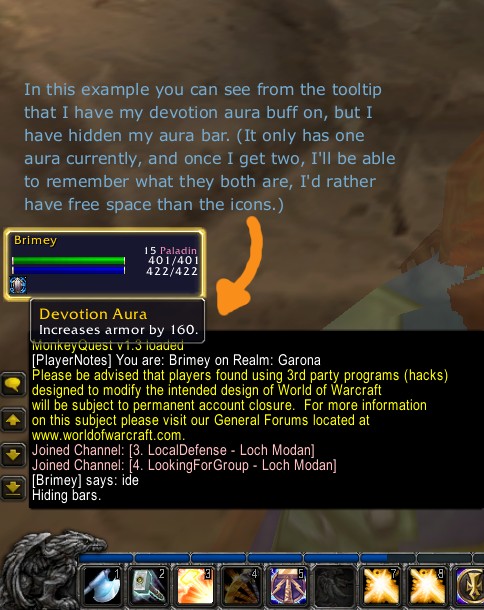
Example
Description
{{{
- !html
Name: HideShiftBars
Author: Jake Bolton (ninmonkey) ninmonkeys@gmail.com
About:
Ever wanted to remove that annoying stealth bar(Or warrior/druid/paladin bars)? Since you know the button will stealth you, and there are no other buttons, this mod allows you to hide it.
You can never have too much space :P
This mod allows you to toggle the visibility of the rogue stealth bar, warrior stance bar, paladin aura bar, and druid shape shifting bar. (Hide/Show the stealth/Stance/Aura/Shape bar)
Contact: If you have any suggestions, or problems, the best way to get ahold of me is to email me. Otherwise you can use the notes at the bottom of this page.
Notes:
You'll want to grab the latest version because it has the updated interface number for blizzard's patch.
Installation:
Copy the HideShiftBars directory into your "World of Warcraft\Interface\AddOns\"
directory. (mod path should be: "World of Warcraft\Interface\AddOns\HideShiftBars")
Note: If the folder "addons" does not exist, then you must create it. In
explorer(My Computer), you can right click and choose new->folder.)
Commands:
/shiftbar help
/shiftbar
Shows help
/shiftbar toggle
Toggles the shiftbars on or off (stealth/stance/aura/shape)
Examples:
If you are a rogue, and you have the stealth bar visible, just type:
/shiftbar toggle
and it dissapears. To make it return, type:
/shiftbar toggle.
This works for warrior/rogue/druid/paladins
Features:
-Allows you to toggle the visibility of the rogue stealth
bar, warrior stance bar, paladin aura bar, and druid shape
shifting bar. (Hide/Show the Stealth/Stance/Aura/Shape bar)
-allows you to see the hunters aspect bar, which is not normally visible. (by toggling the bar on for the hunter class) This may require also using the AuraAspects mod, I haven't tested it without that mod.
}}}
The HideShiftBars Team
