Profplus
- By
A complete profession window for WoW Classic Era: what you can craft, what you're missing and where to find it, and how to reach 300.** Profplus replaces the default profession windows (Enchanting included) with one larger, cleaner window.
profplus2.png
profplus.png
profplus3.png
Description
Profplus
# Profplus
**A complete profession window for WoW Classic Era: what you can craft, what you're missing and where to find it, and how to reach 300.**
Profplus replaces the default profession windows (Enchanting included) with one larger, cleaner window. It also tracks recipes and profession cooldowns across all your characters, guides you from 1 to 300, and adds disenchanting tools.
---
## Features
### A better profession window
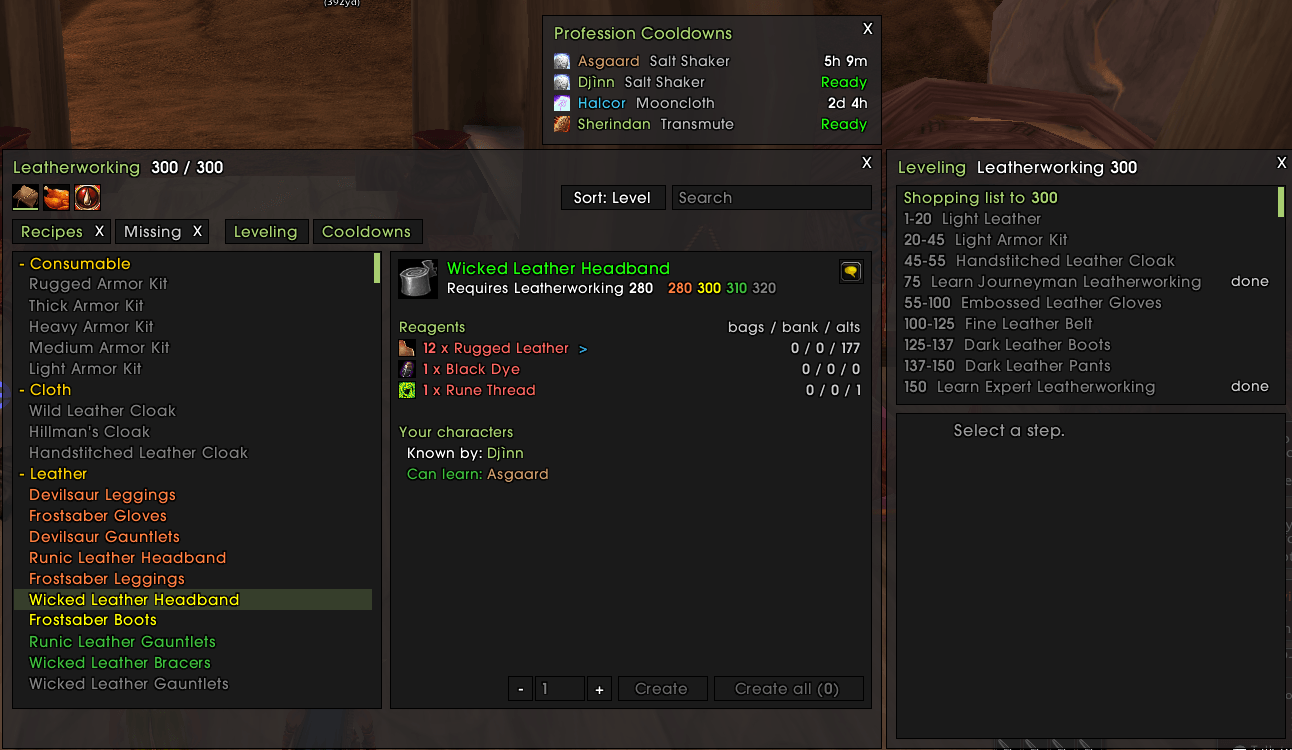
- Recipe list with skill-up colors, sorted by level or A-Z.
- Search by recipe name, created item or recipe scroll.
- Reagents show how many you have in your bags, your bank and on your other characters (needs [Inventorium](#works-well-with)).
- **Create** / **Create all**, with − / + buttons to set the amount (Shift = by 10, mouse wheel works too).
- Click a reagent marked **>** to open the recipe that makes it, then go back with **< Back to …**.
- One-click buttons to switch to another profession. These are secure buttons, so they keep working out of combat (unlike some other profession addons).
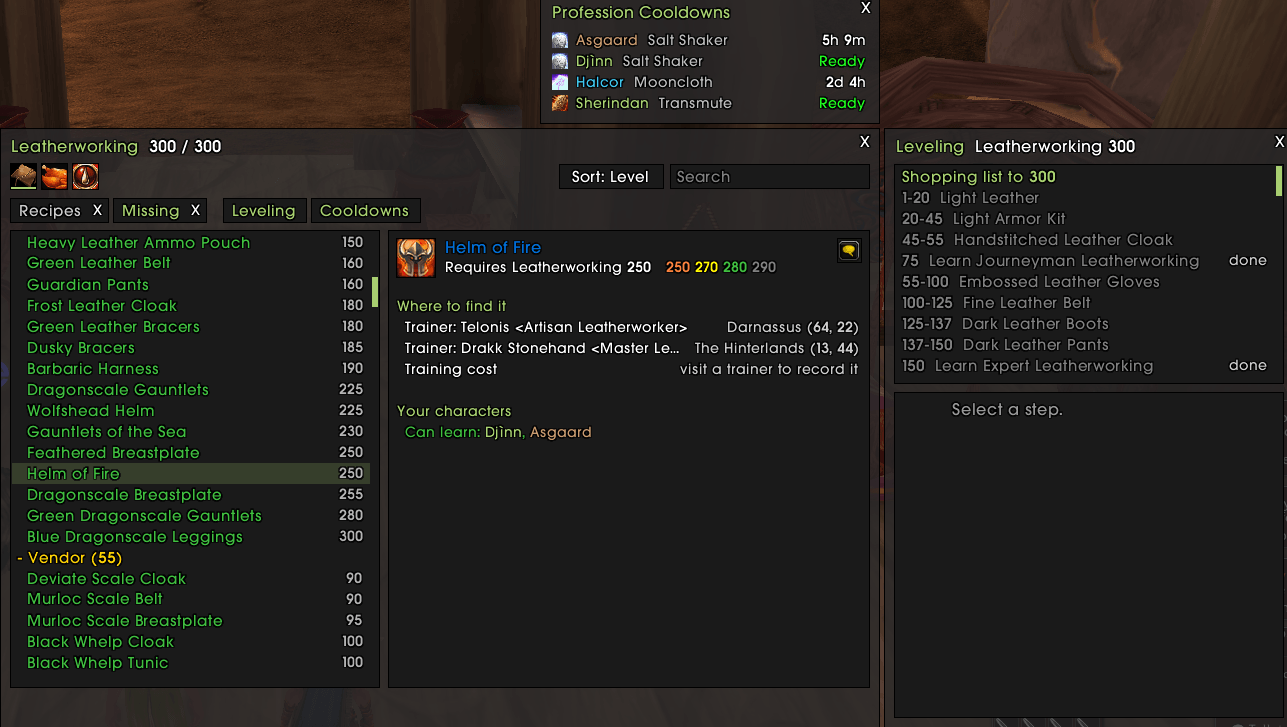
### Missing recipes, and where to get them
- A **Missing** tab lists every recipe you don't know yet, grouped by source: trainer, vendor, quest, drop, world drop…
- Shows where to find each one (zone and coordinates) and which of your characters can learn it.
- **Next rank**: how to unlock your next rank (trainer, book, or quests such as *Triage* or *Clamlette Surprise*).
- **Specializations** (Leatherworking, Blacksmithing, Engineering): the quest for your faction, its objectives and requirements, with a step-by-step guide.
### Leveling guide 1 → 300
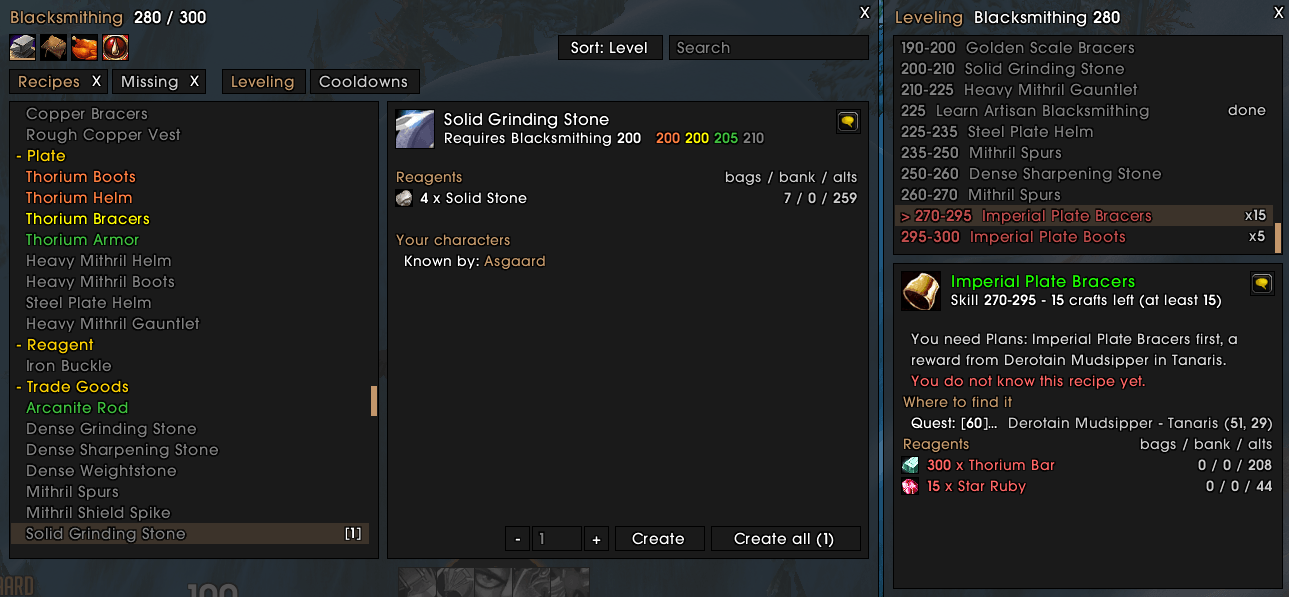
- A **Leveling** window docked to the side of the profession window.
- The path to 300 step by step. Your current step is picked from your skill, with the number of crafts left.
- A **shopping list** for the rest of the path, minus what your characters already own.
- Click a step to select its recipe in the profession window and craft it right away.
- Rank lines at 75 / 150 / 225 tell you where to train next.
### Profession cooldowns
- Track **Mooncloth**, **Alchemy transmutes** and the **Salt Shaker** for every character, in one small window (**Cooldowns** button or `/pp cd`).
- A summary of your cooldowns in chat when you log on, and a message when one is ready.
### Recipe tooltips
- Hover a recipe scroll to see which of your characters **already know it**, **can learn it now**, or **need more skill**.
- Training costs and exact skill requirements are recorded when you visit a trainer. Limited vendor stocks are recorded when you visit a vendor.
### Disenchanting and lockpicking
- **Disenchant results** in item tooltips: dust, essences, shards and Nexus Crystals, with quantities, drop chances and the Enchanting skill needed.
- **Alt + click** an item in your bags to:
- disenchant it (green, blue, purple items),
- pick the lock of a lockbox (Rogues),
- open a lockbox with a skeleton key (Blacksmiths).
### Share in chat
- **Shift + click** a recipe to link the item.
- **Ctrl + Shift + click** a recipe, or use the chat button, to link its reagents: `[Healing Potion]: 1x [Peacebloom], 1x [Silverleaf]…`. In the leveling window, this links the reagents for every craft left in the step.
---
## Commands
| Command | Action |
|---|---|
| `/pp` | Toggle the window (last profession, saved data) |
| `/pp missing` | Open on the Missing tab |
| `/pp leveling` | Open with the leveling window |
| `/pp tabs` | Reopen closed tabs |
| `/pp cd` | Profession cooldowns of all characters |
| `/pp cdreport` | Toggle the cooldowns summary at login |
| `/pp replace` | Toggle replacing the default profession windows (then `/reload`) |
| `/pp tooltip` | Toggle "who knows / can learn" in recipe tooltips |
| `/pp disenchant` | Toggle disenchant results in tooltips |
| `/pp scale <0.5-2>` | Window scale |
| `/pp delete <Name-Realm>` | Forget a character |
| `/pp reset` | Reset the window position |
| `/pp help` | List all commands in chat |
`/profplus` works too.
---
## Getting started
1. Install, then log on.
2. **Open each profession once on each character** so its known recipes and cooldowns are recorded.
3. That's it. The Profplus window now opens every time you open a profession.
## Works well with
- **Inventorium** (same author): reagent counts and shopping lists include the bags and banks of all your characters, and the watch button of the bags opens the cooldowns.
- **ElvUI / ToxiUI**: Profplus uses the same flat look and follows your ElvUI colors and font.
## Not compatible with
Please disable these addons while using Profplus, as they do the same job:
- **Skillet-Classic** (also replaces the profession window)
- **Molinari** (same Alt + click)
- **Disenchant Buddy** (same tooltip)
---
## Credits and license
Profplus is a new addon, written from scratch. It is not a fork of another addon. It does reuse **data** (and one small mechanism) from these open-source projects, with thanks to their authors:
| Project | License | What Profplus uses |
|---|---|---|
| [AtlasLootClassic Continued](https://www.curseforge.com/wow/addons/atlaslootcontinued) by Okrah and Lag (original AtlasLootClassic by Hoizame) | GNU GPL v2 | Recipe list, reagents, skill-up levels (extracted by a script into `Data/Recipes.lua`) |
| [Questie](https://www.curseforge.com/wow/addons/questie) / [QuestieDB](https://github.com/Questie/QuestieDB) by the Questie team | GNU GPL v3 | Where recipes come from: vendors, drops, quests, NPC locations (`Data/Sources.lua`) |
| [Skillet-Classic](https://github.com/b-morgan/Skillet-Classic) by b-morgan | GNU GPL v3 | A few skill level values, used to correct the data above |
| [Skillwright](https://github.com/vBaustad/Skillwright) by Vebjørn Baustad | MIT, © 2026 Vebjørn Baustad | Leveling paths 1 → 300 (`Data/Paths.lua`) |
| [Molinari](https://www.curseforge.com/wow/addons/molinari) ([source](https://github.com/p3lim-wow/Molinari)) by p3lim | MIT, © 2006-2008 Trond A Ekseth, 2009-2026 Adrian L Lange | Lists of non-disenchantable items, lockboxes and skeleton keys (`Data/Molinari.lua`), and the idea of a secure button placed over the bag item for Alt + click |
The MIT copyright notices are kept at the top of the files that use this content.
Because it contains GPL data, **Profplus is released under the GNU General Public License v3** (full text in the `LICENSE` file of the addon).
## How Profplus differs from these projects
None of the projects above does what Profplus does as a whole. Profplus only takes data from them and builds its own features on top:
- **vs Skillet-Classic**: both replace the profession window, but the Profplus window, its code and its look (ElvUI style) are its own. Profplus is built around finding and leveling: the **Missing** tab with recipe sources, rank and specialization guides, "who knows / can learn" across your characters, the docked leveling guide, profession cooldowns and disenchanting tools. Only a few skill level values are taken from Skillet, no code.
- **vs AtlasLoot and Questie**: they are a loot browser and a quest helper. Profplus does not show loot tables or quests; it only uses their data to tell you where to get the recipes you are missing, inside the profession window.
- **vs Skillwright**: Skillwright computes leveling routes from prices. Profplus shows a fixed path built from Skillwright's routes, inside the profession window, with a shopping list that counts the items on all your characters.
- **vs Molinari**: Molinari also does milling and prospecting. Profplus only offers Alt + click for disenchanting, lockpicking and skeleton keys, as one small part of a profession addon, and adds disenchant results to tooltips (its own tables, not taken from Molinari).
## Feedback
Found a bug or a wrong recipe source? Please open an issue or leave a comment with the error message (BugSack is helpful) and the recipe or item involved.
The Profplus Team