


Inventorium2026
- By
inventorium 1.png
inventorium 2.png
inventorium 3.png
inventorium 4.png
inventorium 5.png
Description
Inventorium
Early development.
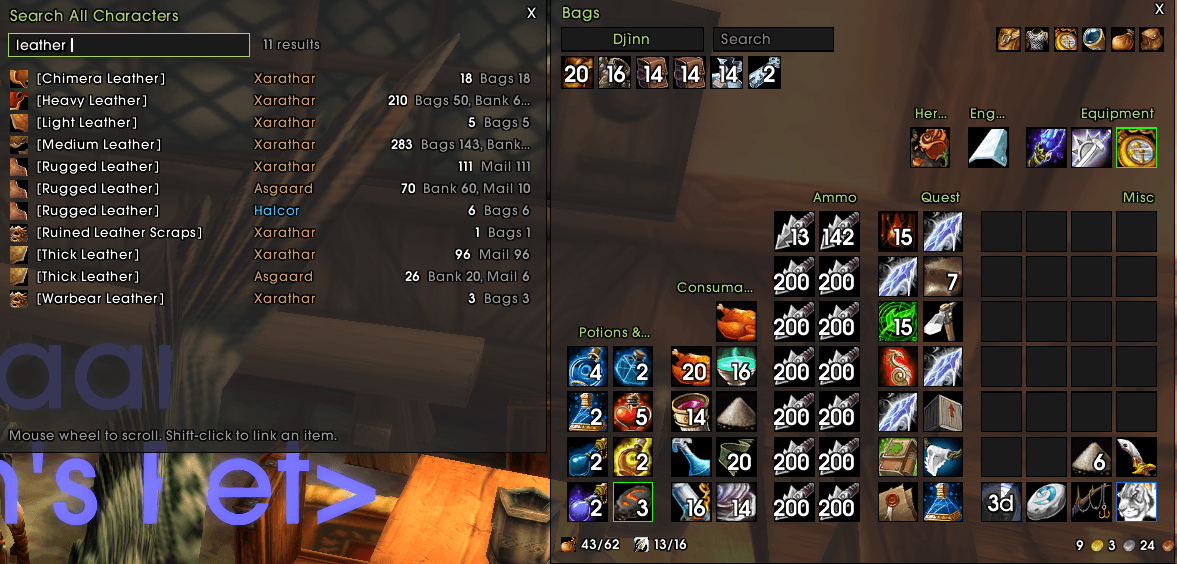
**Bags, bank and alts in one place for WoW Classic Era: categorized bags, a bank you can browse anywhere, and profession cooldowns for all your characters.**
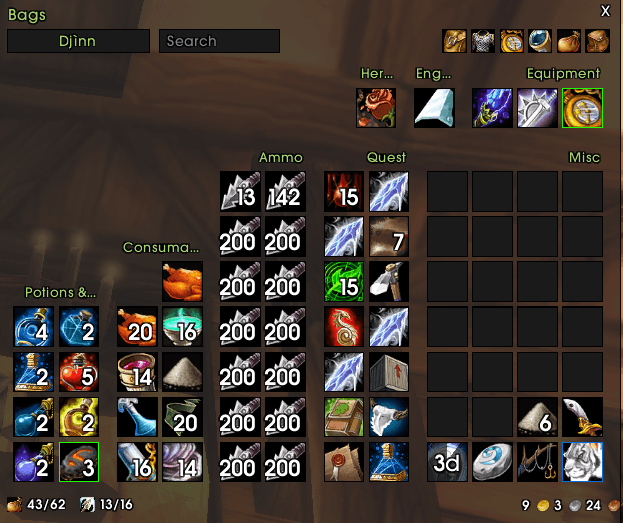
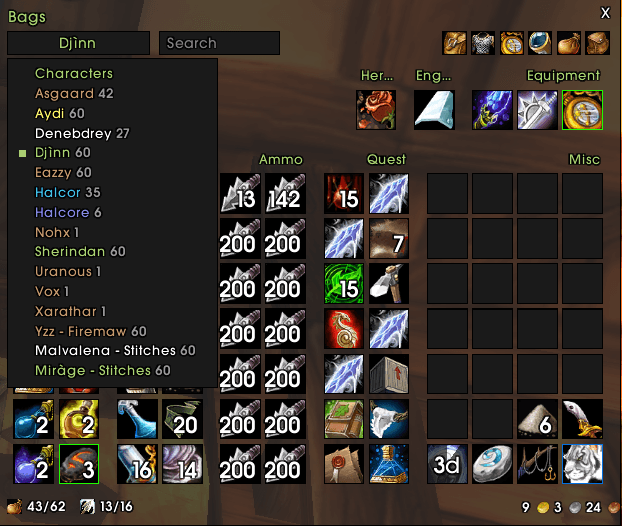
Inventorium replaces the default bags and bank with a single window that sorts your items by category. It remembers the bags, bank, mail and equipment of every character you log on, so you always know who has what.
---
## Features
### Categorized bags
- One window for all your bags, with items grouped by category: Quest, Equipment, Potions & Elixirs, Consumables, Herbs, Mining, one category per profession…
- Finer categories than the default: Potions, Elixirs & Flasks, Food & Drink, Bandages, Scrolls, and trade goods grouped by profession.
- **Custom categories**: Alt + right-click any item to move it to another category or create a new one (e.g. "Raid Mats").
- ArkInventory-style layout: compact blocks that fill the window width, with adjustable columns and categories per row.
- New items glow until you close your bags.
- Bag bar to swap bags, highlight a bag's items, and show the keyring.
### Bank, anywhere
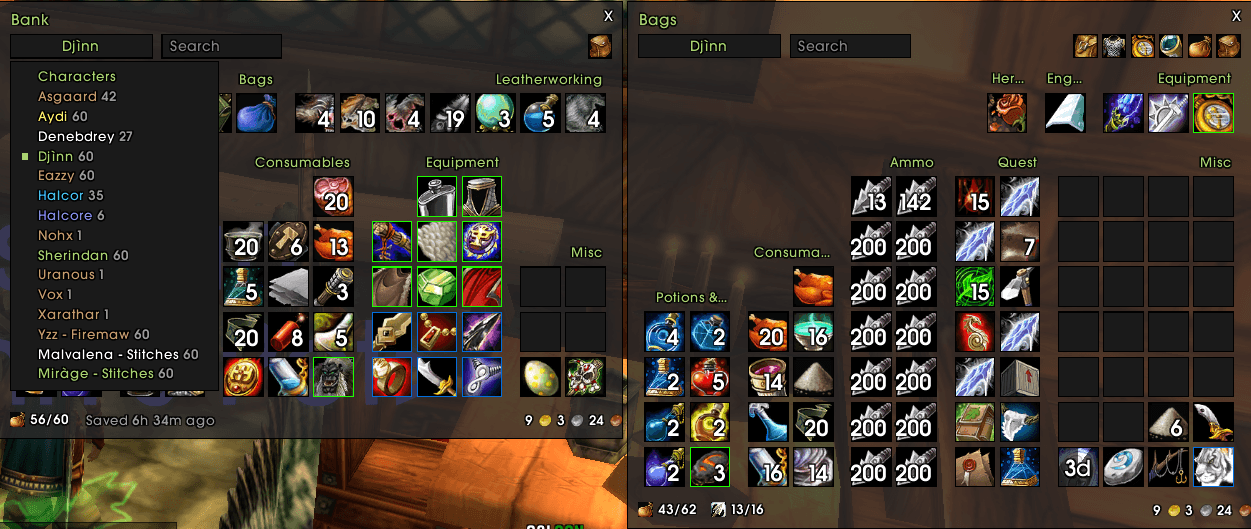
- A bank window in the same style that replaces the default one.
- **Browse your bank from anywhere** using saved data, even when you're nowhere near a banker.
- **Restack** button (bags and bank): merges partial stacks.
- **Deposit** button: tops up the stacks already in your bank with the same items from your bags.
- Buy bank slots straight from the bank bar.
### All your characters
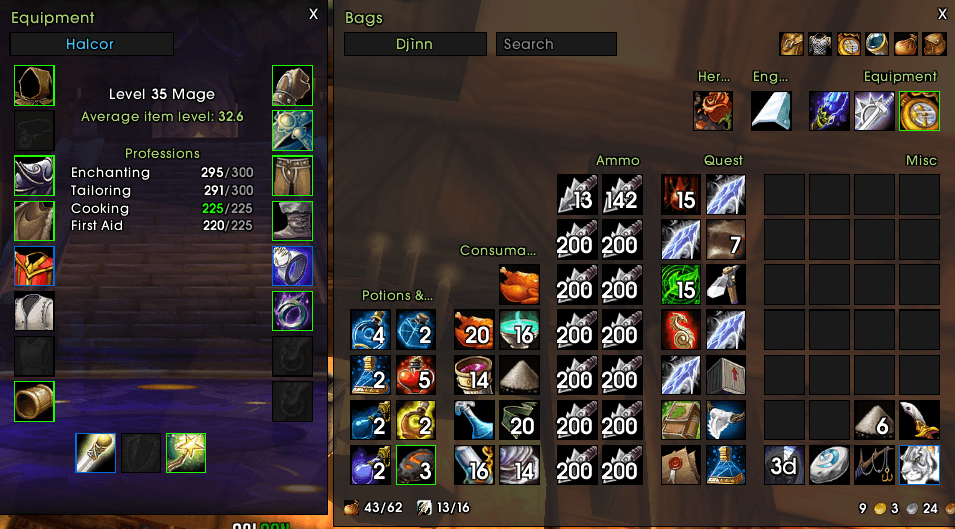
- View the **bags, bank and equipment** of any of your characters.
- **Item counts in tooltips**: how many of an item each character has (bags, bank, mail, equipped).
- **Search** an item across all characters: `/inv search arcanite`.
- **Total gold**: hover your money to see each character's gold and the total.
- Choose which characters are counted: this realm and faction (default), this realm, or everywhere.
### Profession cooldowns
- Track **Mooncloth**, **Alchemy transmutes** and the **Salt Shaker** for every character.
- A summary of ready cooldowns in chat when you log on.
### Quality of life
- Grey items are **sold automatically** at merchants.
---
## Commands
| Command | Action |
|---|---|
| `/inv` | Toggle bags |
| `/inv bank` | Toggle bank (saved data when away from the banker) |
| `/inv equip` | Equipment viewer |
| `/inv cd` | Profession cooldowns |
| `/inv search [text]` | Search all characters |
| `/inv junk` | Toggle selling grey items |
| `/inv glow` | Toggle the new item glow |
| `/inv columns <6-24>` | Window width in slots (default 12) |
| `/inv perrow <1-10>` | Categories per row (default 5) |
| `/inv anchor bottomright\|topleft` | Where the first category is placed |
| `/inv scale <0.5-2>` | Window scale |
| `/inv tooltip` | Toggle item counts in tooltips |
| `/inv scope faction\|realm\|all` | Characters counted in tooltips, search and gold |
| `/inv cdreport` | Toggle the cooldown summary at login |
| `/inv replace` | Toggle replacing the default bags (then `/reload`) |
| `/inv catdel <name>` | Delete a custom category |
| `/inv delete <Name-Realm>` | Forget a character |
| `/inv reset` | Reset window positions |
| `/inv help` | List all commands in chat |
`/inventorium` works too.
---
## Getting started
1. Install, then log on each of your characters once.
2. Visit a banker once on each character so their bank is recorded.
3. For cooldowns, open the profession window once on each crafter.
## Look
Flat ElvUI style. With **ElvUI** loaded, Inventorium reads the colors and font from your ElvUI profile and follows any changes you make. Without ElvUI, it uses a built-in ElvUI / ToxiUI-like palette.
## Works well with
- **Profplus** (same author): a full profession window. It uses Inventorium's data to count reagents across all your characters.
## Not compatible with
Disable other bag addons (ArkInventory, Bagnon, AdiBags…) while using Inventorium.
---
## Credits
Item lists (potions, elixirs, food, reagents by profession…) are generated from **LibPeriodicTable-3.1** (LGPL v2.1).
## Feedback
Found a bug or an item in the wrong category? Please open an issue or leave a comment
The Inventorium2026 Team
