Profession Knowledge Treasures
- By
Tracks and routes Midnight profession knowledge treasures and Darkmoon Faire profession quests, filtered to your character's professions.
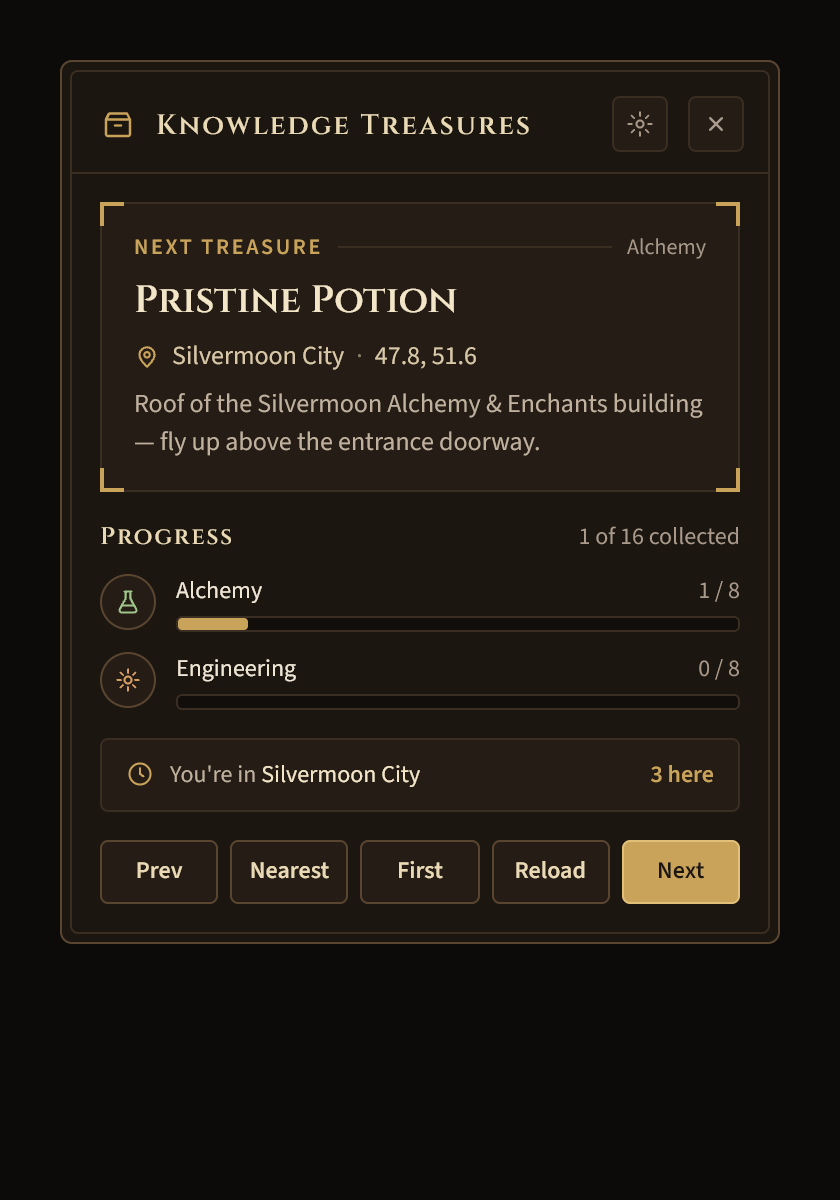
A · Artisan's Ledger@2x.png
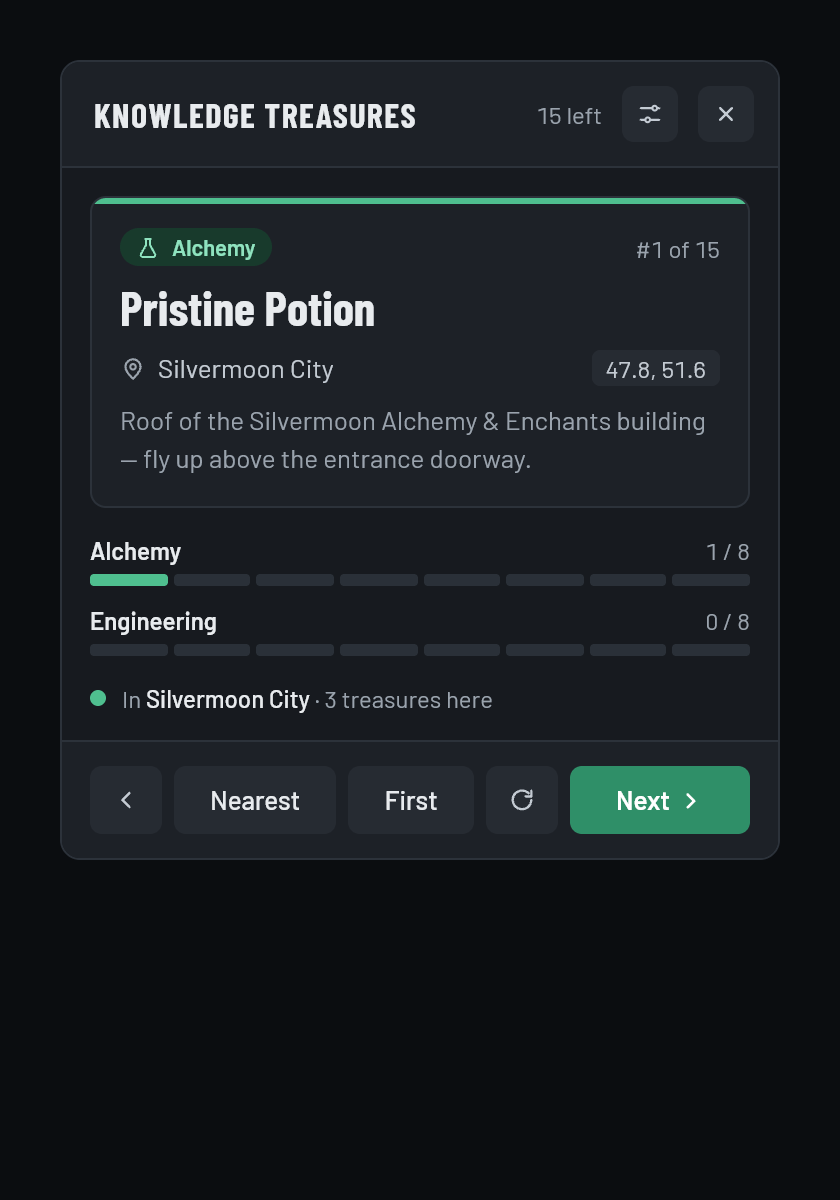
B · Workbench@2x.png
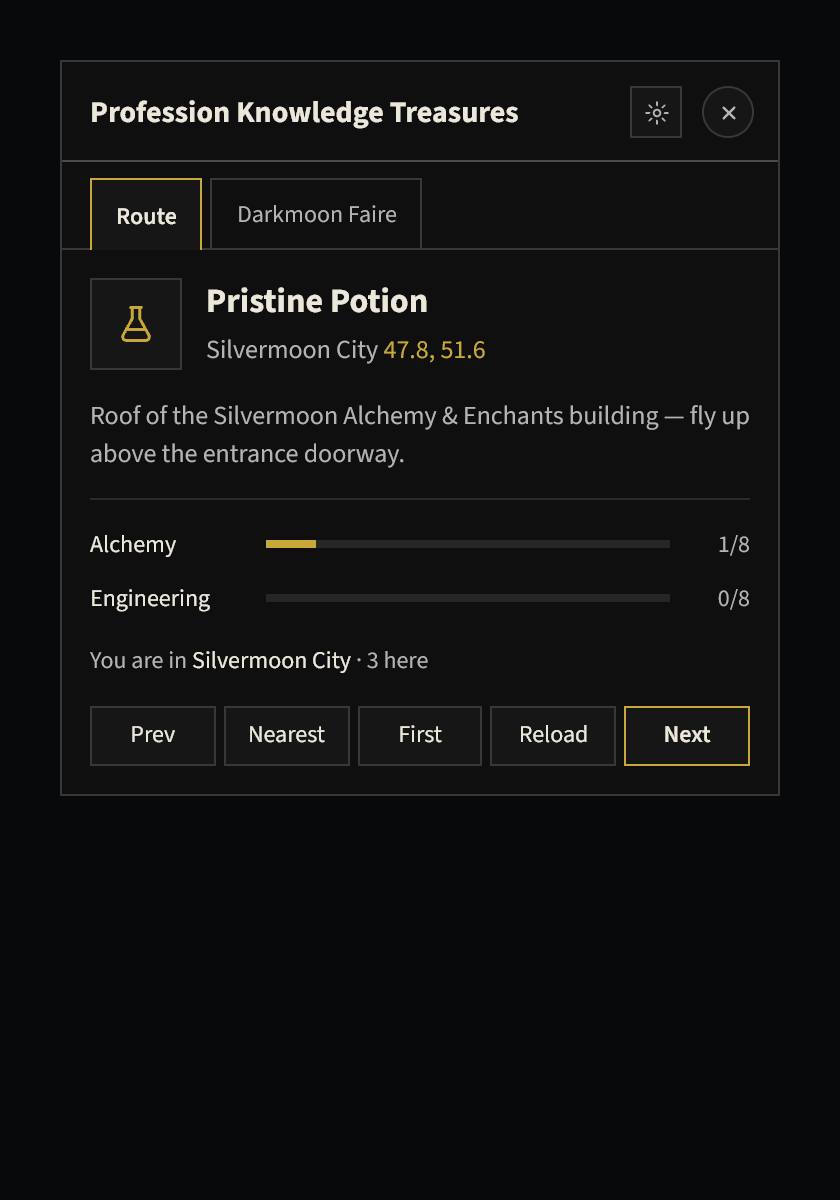
C · House style + profession accents@2x.png
Description
Profession Knowledge Treasures
Find every profession knowledge treasure in Midnight — and know exactly where to go next.
Profession Knowledge Treasures builds a route through every uncollected knowledge treasure for your professions, points you to the next one with a waypoint, and moves on automatically as you loot. It also walks you through the monthly Darkmoon Faire profession quests, one step at a time.
What It Does
- Finds your professions automatically — you only see treasures for the professions your character actually has
- Builds a short route — starts from where you're standing and moves through the zones in an efficient order
- Points you to the next treasure — drops a waypoint on the in-game map and, if you use TomTom, on TomTom's arrow too
- Tells you which portal to take when the next treasure is in a different zone, and puts the waypoint right on the portal
- Moves on automatically — when you loot a treasure it points you to the next one, and when you enter a new zone it jumps to the nearest treasure there
- Shows your progress — treasures collected for each profession at a glance
- Notes on tricky treasures — a short tip for each one, including which are hidden by phasing or need a quest or achievement first
- Darkmoon Faire quest helper — everything you need for each monthly +2 knowledge quest (see below)
Covers all eleven crafting and gathering professions: Alchemy, Blacksmithing, Enchanting, Engineering, Herbalism, Inscription, Jewelcrafting, Leatherworking, Mining, Skinning and Tailoring.
Zones: Silvermoon City, Eversong Woods, Zul'Aman, Atal'Aman, Voidstorm / Slayer's Rise, Harandar / The Den.
Pick Your Look
The first time you log in, a window lets you choose how the addon looks. You can change it any time in Settings or with /pkt theme.
- Artisan's Ledger — warm walnut and brass with engraved borders, like a craftsman's notebook
- Workbench — flat and modern, with a different color for each profession and one pip per treasure
- Lixard Classic — clean black, grey and gold, matching my other addons
Everything is drawn by the addon itself — no default game frames — with a custom icon for each profession.
Minimize It While You Travel
Don't want a big window on screen while you fly from point to point? Press the minimize button in the header and the tracker shrinks to a slim bar showing your next treasure, its zone and coordinates, and how many are left. Use the arrow on the bar to skip ahead, or expand it any time. You can also type /pkt mini.
Darkmoon Faire Quests
Each month the Darkmoon Faire offers a +2 knowledge quest for every profession. When you arrive at the Faire, the helper opens on its own and shows only the quests for your professions:
- Whether each quest is Available or Done this Faire
- The vendor's name and where to find them
- What to bring with you, with tips on where to get each item
- What the vendor provides
- Numbered steps from accepting the quest to turning it in
Press the minimize button and the window becomes a slim bar showing just the step you're on. Use the arrows to move to the next step (or back) while you work through the quest. When you finish a profession's last step, the next arrow moves on to your next profession.
How to Use It
Once installed, it just works. The tracker opens when you log in if you have treasures left, and closes itself when you've collected them all.
- Install it and log in, then pick a look.
- Follow the waypoint to the first treasure and loot it.
- The waypoint moves to the next one automatically.
- Use the buttons to skip around, or minimize the window and keep going.
If your professions aren't detected, type /pkt profs and pick them yourself (up to two).
Buttons
| Button | What it does |
|---|---|
| Prev / Next | Go to the previous or next treasure |
| Nearest | Jump to the closest treasure in your current zone |
| First | Go back to the start of your route |
| Reload | Rebuild the route |
| Minimize | Shrink the window to a slim bar |
| Gear | Open settings |
Settings
- Appearance — switch between the three looks
- Waypoint system — in-game waypoint and TomTom, in-game only, TomTom only, or a map pin with no arrow
- Professions — choose them manually if auto-detection misses them
Commands
| Type this | To do this |
|---|---|
/pkt |
Show or hide the tracker |
/pkt next / /pkt prev |
Go to the next or previous treasure |
/pkt first |
Go to the first treasure on your route |
/pkt nearest |
Go to the nearest treasure in this zone |
/pkt reload |
Rebuild the route |
/pkt list |
List your remaining treasures in chat |
/pkt mini |
Minimize or expand the tracker |
/pkt theme |
Choose your look |
/pkt dmf |
Show or hide the Darkmoon Faire helper |
/pkt profs |
Pick your professions manually |
/pkt settings |
Open settings |
The minimap button works too: left-click for the tracker, right-click for the Darkmoon Faire helper, middle-click for settings.
Good to Know
- Some treasures in Atal'Aman are phased and only appear after you finish the local storyline.
- Some treasures need a specific quest or achievement first. The tracker shows a note when that applies.
- A few treasures share a spot. In Zul'Aman, the Alchemy and Enchanting treasures are on the same cart.
- Darkmoon Faire quests reset every month and give +2 knowledge per profession.
Why Profession Knowledge Treasures?
Hunting down 88 tiny collectibles across five zones is tedious. This takes care of the route, the portals and the tracking so you can just follow the arrow.
Fonts: Cinzel, Source Sans 3, Barlow and Barlow Condensed, used under the SIL Open Font License.
Profession Knowledge Treasures Team