DFL Profession Journal
Profession leveling guide for WoW Forever: every profession 1-300, farm routes with map pins, recipe sources, a shopping list and auction house profit.

Description
DFL Profession Journal
A profession journal for World of Warcraft Forever (client 1.60.1). It shows what to craft next, where each recipe and material comes from, what to buy, and what sells.
What it does
Guide
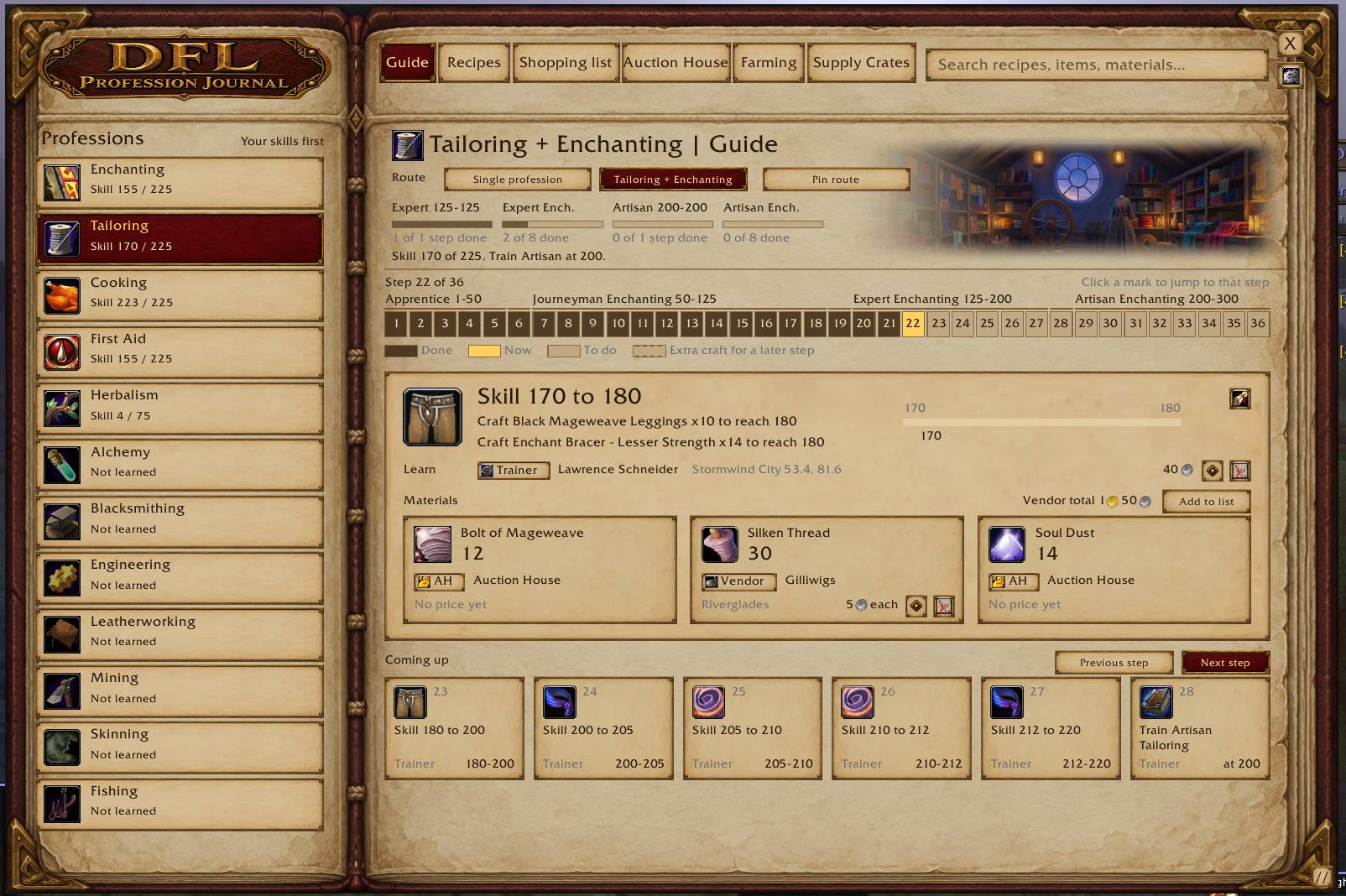
- A leveling route for each of the 12 professions: Alchemy, Blacksmithing, Enchanting, Engineering, Leatherworking, Tailoring, Cooking, First Aid, Mining, Herbalism, Skinning and Fishing.
- One page per step. It shows what to craft, your skill bar, where to learn the recipe with Pin and Map buttons, the materials as tiles, and the next six steps.
- A strip with one mark per step. Click a mark to jump to that step. Steps behind you are filled, the step you are on is gold.
- Extra routes: Tailoring with Enchanting, Fishing with Cooking, three paired gathering routes, and versions of Alchemy, Blacksmithing, Engineering, Leatherworking and Cooking for players without the matching gathering profession.
- When a vendor teaches a recipe and more than one seller is recorded for your faction, a More vendors button lists the nearest ones with zone, coordinates and price.
- The top of the Guide is one compact panel with your skill line, the route choice, Pin route and a progress bar per rank.
- The step strip uses larger numbered boxes.
Recipes
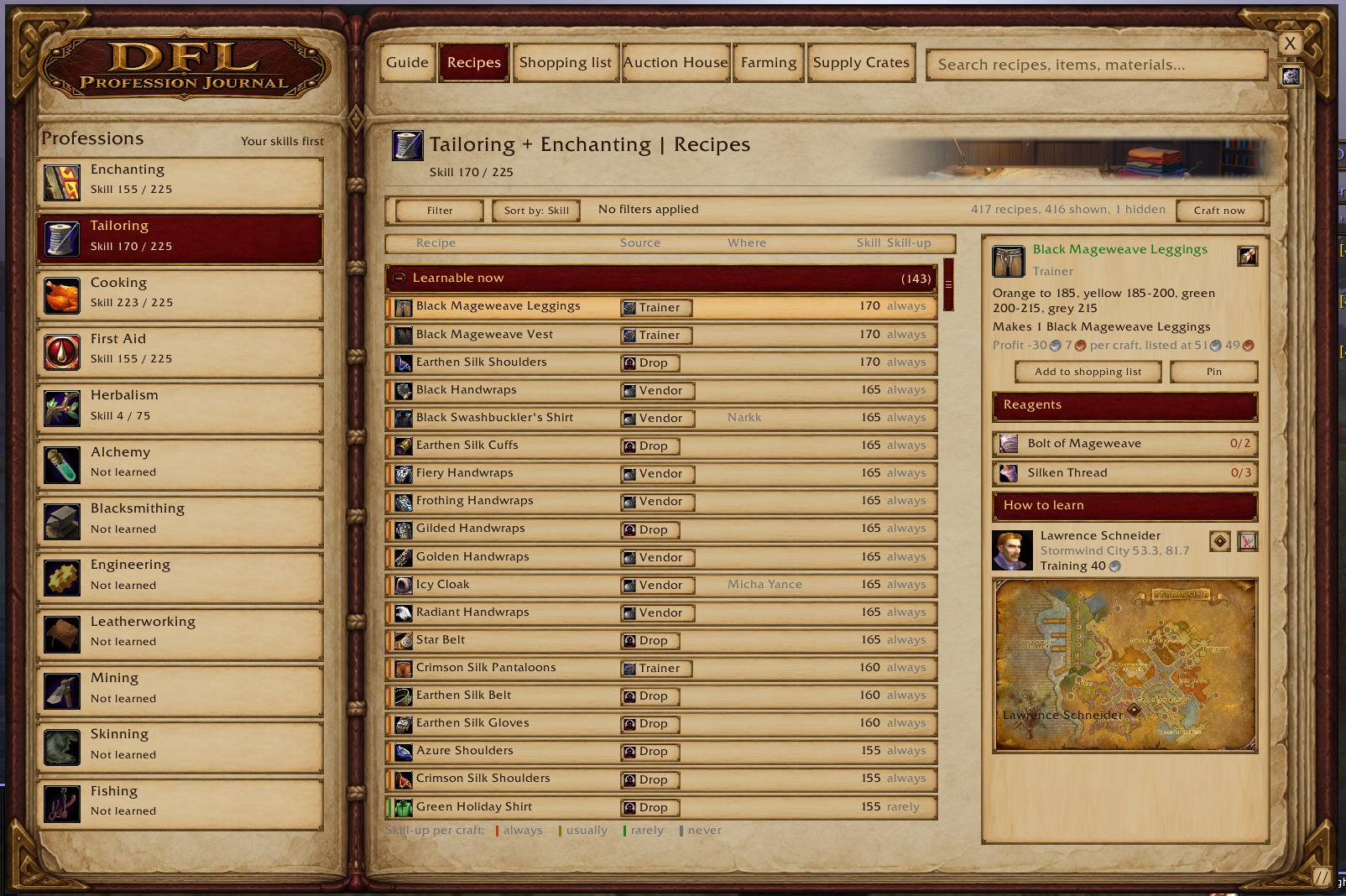
- A table of every recipe for the profession with its source, where to get it, the skill needed and the skill-up colour. Three groups fold open and closed: Learnable now, Known and Learn later.
- Sources are told apart: trainer, vendor, dungeon and raid drop, world drop, quest and reputation.
- Pick a recipe to see its materials with what you have and what you need, how to learn it, the seller or trainer, the zone, the price, a small zone map when there is room, and the pattern price on the auction house.
- Add to shopping list, Pin, and a Craft now list.
- All mine shows the recipes of every profession you have.
Shopping list
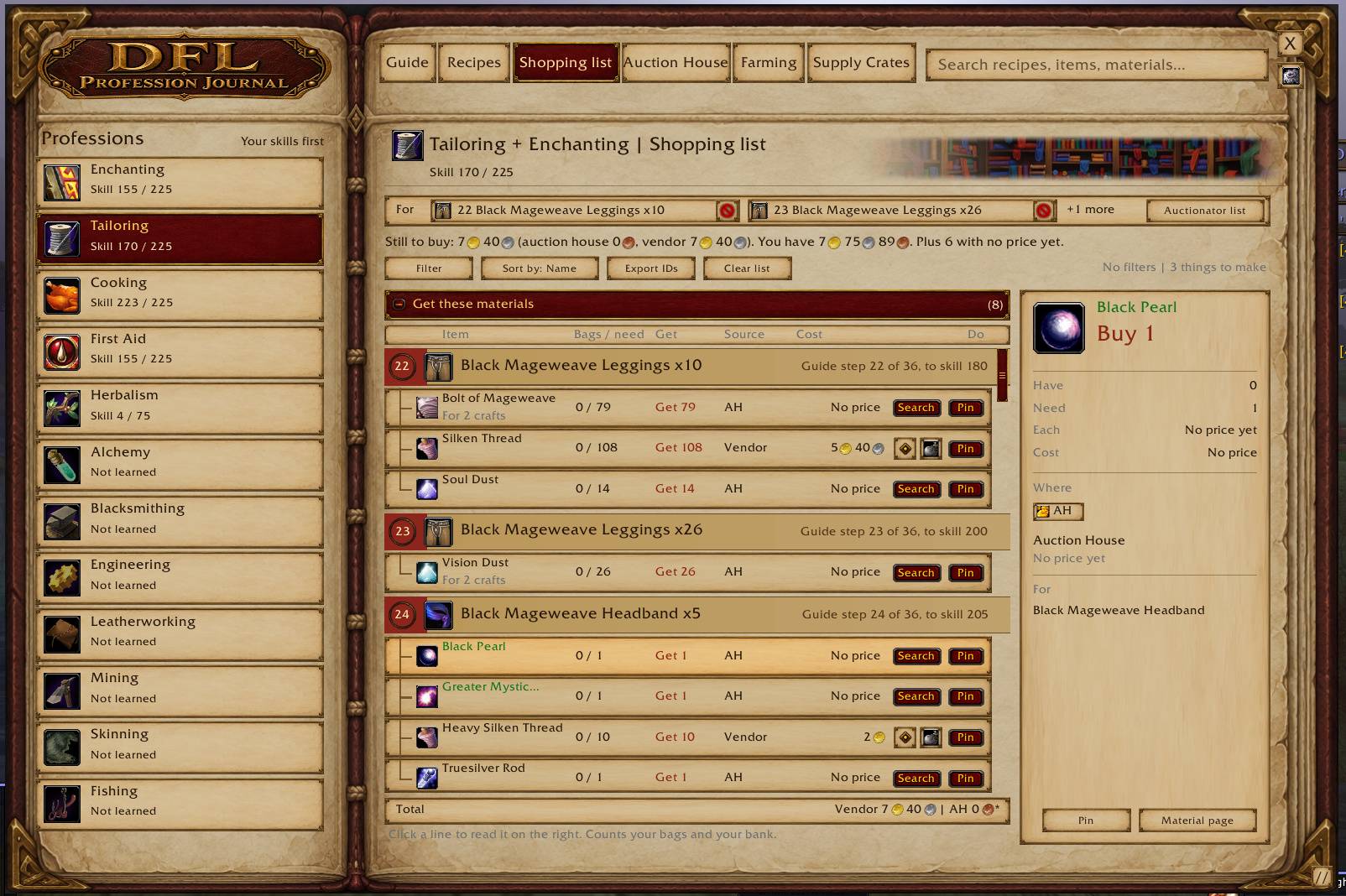
- One table for everything you need: Item, Bags / need, Get, Source and Cost, with a total that also says what to take from the bank.
- Filter, Sort by name or cost, Export IDs and Clear list.
- Each line can be pinned to the tracker. Where it applies, a line opens the vendor page, sets a waypoint, opens the recipe or the farm route, or searches the auction house.
- If you use Auctionator, one button sends the list to it.
Auction House tab (in the journal)
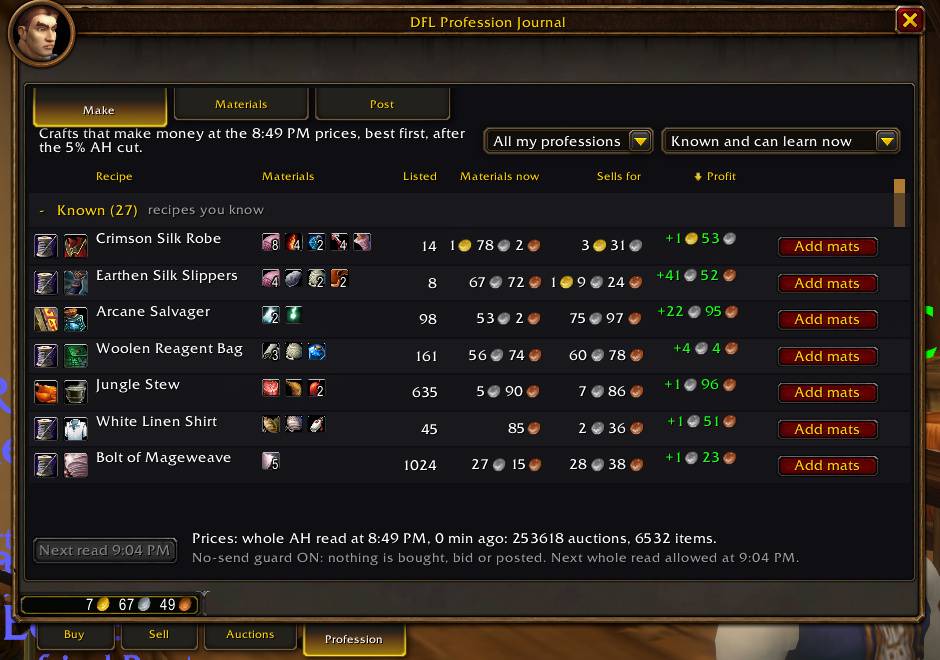
- Make: your crafts with Listed, Materials now, Sells for, Profit and Price age. Profit is shown after the 5% auction house cut.
- What I hold: what is in your bags with the auction house price, the vendor price and which is better.
Profession tab (in the game's auction window)
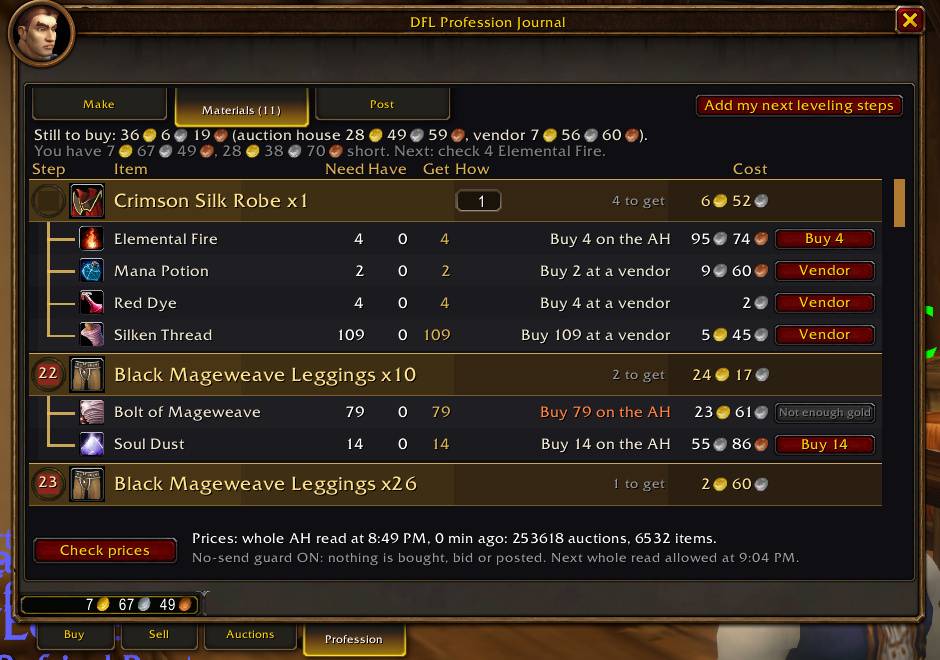
- The addon adds a tab named Profession to the auction window. It has three pages: Make, Materials and Post.
- Materials: each craft is a band with its materials listed under it. Each press buys one line, and only when the game's price is at or under the cost shown on the line.
- Post: a form in a fixed order: How many, Price, Time, Money, then the Post button. It tells you before you press Post when you cannot cover the deposit, and it shows when a vendor would pay more.
- Read prices reads the whole auction house when the game allows it. The game allows a whole read once every 15 minutes.
- A purchase is always your own click. Nothing is bought or posted from a slash command.
Farming
- A list of zones with the materials found there. A kill source shows a small bar for its drop rate.
- Open a zone to see each material with its source, coordinates, level and rate, plus Pin, Map and Open.
- Zones with something you still need come first. Follow farm route starts a route.
- Material pages show where a material comes from, a map with recorded spawn points, a numbered route, map pins and a waypoint.
- The new WoW Forever zones are listed: Riverglades, Zephras Isle, Mount Hyjal and Shen'dralas. A zone with nothing recorded yet says so.
- 76 materials sold by the Riverglades vendors show those vendors as a place to buy, with Pin and Map.
- The journal notes what creatures drop as you loot them. After a creature has dropped a material in 3 of your kills, Farming lists it as "Seen by you" with your count.
/pj lootprints what it has noted.
Supply Crates
- The crate recipes for your profession in groups by standing, with Favor, Skill and Known columns and a Type filter.
- The picked recipe shows the camp vendor with Pin and Map, its four requirement boxes and its materials.
- The page also shows your Merchant's Favor, your standing and where to turn crates in.
Profession window, tooltips and tracker
- A side panel beside the game's profession window lists Recipes you don't know yet. An icon on the window shows and hides it. Open recipe takes you to that recipe in the journal.
- A setting outlines your next route recipe in the profession list.
- Optional item tooltip lines for price, use, source and what an item disenchants into. The disenchant lines can be set to show only while you hold Shift.
- A Pinned tracker for the recipes and materials you pin.
- A LibDataBroker launcher for data bar addons.
- Item tooltips open just below the row you point at, not over the panel beside it.
- On a non-English client, item, recipe and spell names come from the game.
How to open it
- Type
/pjor/dflpj. - Click the minimap crest.
/pj minimapshows or hides it. - Bind a key under Key Bindings > AddOns > DFL Profession Journal. There are keys for the journal, the Guide, Recipes and the Pinned tracker.
- At the auctioneer, click the Profession tab at the bottom of the auction window.
Commands:
| Command | What it does |
|---|---|
/pj |
Open or close the journal |
/pj guide |
Open the Guide |
/pj recipes |
Open Recipes |
/pj shop |
Open the Shopping list |
/pj auction |
Open the Auction House tab |
/pj farm |
Open Farming |
/pj tailoring (or any profession name) |
Open the Guide for that profession |
/pj tracker |
Show or hide the Pinned tracker |
/pj menu |
Open Settings |
/pj scan |
Check the prices you need (auction window open) |
/pj scan full |
Ask for a whole auction house read (auction window open) |
/pj panel |
Show or hide the Recipes you don't know yet panel |
/pj loot |
Print what your kills dropped in each zone and how many vendor prices are saved |
/pj nosend |
Turn the no-send guard on or off. While it is on, buy, bid and post send nothing and say what they would do |
/pj scale 0.8 |
Set the window size |
/pj reset |
Centre the window at its default size |
/pj help |
List the commands |
Supply Crates has no command. Open it from its tab in the journal.
What is new since 3.16.76
- Farming lists the new WoW Forever zones, and the Riverglades vendors are in the journal. (3.16.95)
- The journal notes what creatures drop from your own kills and shows it in Farming as "Seen by you".
/pj lootprints it. (3.16.95) - Opening a merchant window saves what it sells and the prices, so missing vendor prices fill in as you play. (3.16.95)
- No frame rate drop the first time you open the Profession tab after logging in or a /reload. (3.16.94)
- Item tooltips open below the row you point at. (3.16.94)
- Post follows what is in the How many and Price boxes on every key you type, and refuses if they changed after the button was drawn. An empty price can never post. (3.16.93)
- Post checks that the item is still in the same bag slot before it sends. (3.16.93)
- Post is a labelled form: How many, Price, Time, Money, then the Post button. Nothing moves when you pick another item. (3.16.83)
- Materials shows every craft as a band with its route step number, its own cost, and its materials indented under it. Hidden route steps sit in one row at the bottom with Put back. (3.16.82)
- The Guide's step strip no longer shows open marks before filled ones. (3.16.81)
- The Shopping list's For chips show the craft's item icon. (3.16.81)
- A Post press while the game is busy now says so and sends nothing. A post the game drops ends the wait at once and says so. A post with no answer can no longer post twice. (3.16.80)
- The deposit is shown in whole silver, rounded up. (3.16.80)
/pj postlogprints what happened to your last post. (3.16.80)- One purchase at a time on Materials. The header says what the next press buys and how many presses follow. (3.16.79)
- Prices older than 30 minutes say how old they are in the tooltip and the profession window. (3.16.79)
- The Guide's Learn row has a More vendors list when more than one seller is recorded. (3.16.78)
- A Horde player is no longer sent to a trainer the game does not list for a recipe. (3.16.77)
- Gathering spots in the Guide are marked "not verified" again. (3.16.77)
- Auction window: the Materials buttons share one column width, every Post row says its best place to sell, item names use one font size, and the old price age column is gone (the age is in the row's tooltip).
- With the auction window open, the addon reads only the answers to its own searches. It no longer redraws for the searches of the game's own Buy and Sell tabs.
- Guide: compact top panel and larger numbered step boxes.
- Auction window Make tab: each craft shows its profession icon and its materials as icons with counts. Hover a material to see what it is; click it to open its recipe in the journal.
- Shopping list: materials are grouped under the craft they are for, with the guide step number.
- The same compact header is on Recipes, Shopping list, Auction House, Farming and Supply Crates.
- The slowdown with the auction window open is fixed.
- Post: the button always shows the price that is in the box, and it refuses to post when the price box is empty.
Known limits
- Made for the WoW Forever client 1.60.1 (Interface 16001).
- The buy buttons on Materials were checked in a test harness. No live purchase has been made with them yet.
/pj nosendlets you try them without sending anything. - When your saved prices are old, opening the auction house can start a whole read on its own.
- The new zones have little farm data yet. No Mageweave Cloth source is listed for Riverglades, because no source shows one. Your own kills fill it in.
- The game limits a whole auction house read to once every 15 minutes.
- Gathering spot data in the Guide is not verified for Forever. Those spots are marked "not verified".
- Some recipes have no recorded seller or drop source yet. They say "Vendor name not recorded" or "Drop source not recorded".
- Some recipe records come from one site only and are marked as not yet confirmed by a second.
- The combined routes are not a claim of the lowest gold cost.
- Sending a list to Auctionator needs Auctionator installed.
Installing by hand
Unzip every folder in the zip into Interface\AddOns: DFLProfessionJournal and its DFLProfessionJournal_Data_ profession folders. Each profession's data loads only when you open it. The CurseForge app does this for you. If you copied your addons over from the beta, delete any old DFLJourneymansJournal folder.
From the same maker
DFL Dungeon Journal, the dungeon and raid journal for WoW Forever.
Report a problem
Leave a comment on this CurseForge page. Please include the addon version, your profession and skill, and what you pressed. /pj errors prints the addon's own error log. For a problem with a post, add what /pj postlog prints.
DFL Profession Journal Team