PriestAssist
- By
Quality-of-life for priests: cooldown macros it writes for you, profiles that follow the content and your specialization, and a frame that shows when your Power Infusion target's major damage cooldown is up — and whether they are in range.
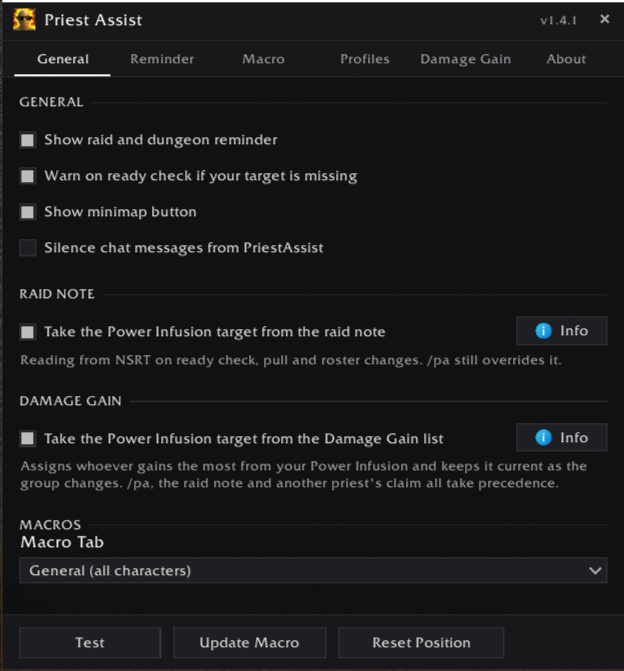
PriestAssist_General.png
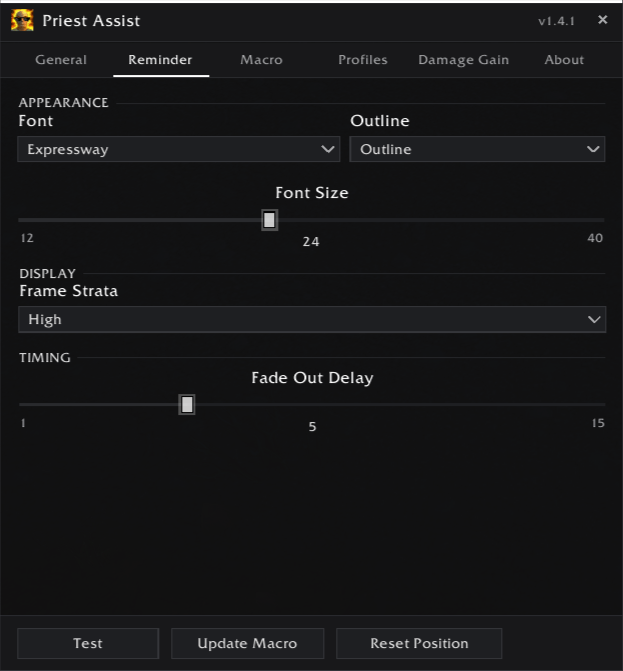
PriestAssist_Reminder.png
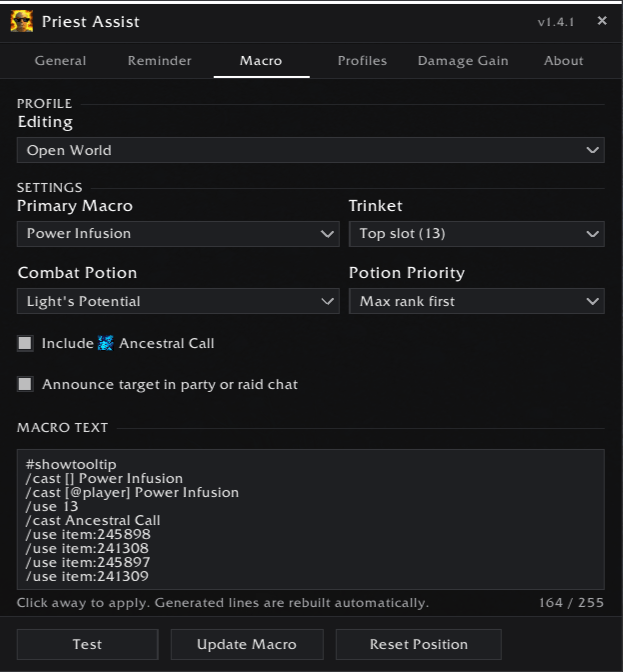
PriestAssist_Macro.png
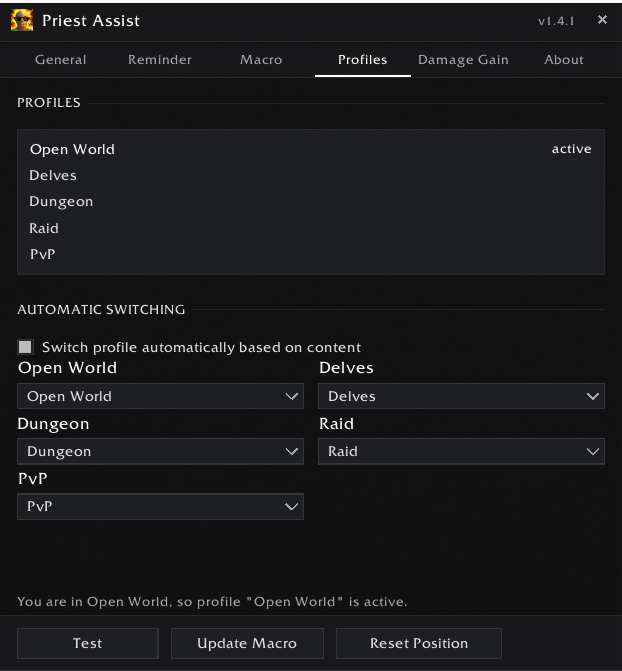
PriestAssist_Profiles.png
PriestAssist_DamageGain.png
PriestAssist_About.png
Description
PriestAssist
Without an addon, changing your Power Infusion target means opening the macro editor between pulls, retyping a name, saving and closing — every time the plan changes.
PriestAssist does that part for you. Target the player you want to buff and press one key, or click the minimap button, and your macros rewrite themselves.
Then it answers the harder question — when. A small frame shows your own Power Infusion beside your target's major cooldown, so you press yours the moment theirs goes up instead of guessing.
Six macros, always current
One macro per cooldown, created and maintained for you:
- PriestAssist PI — Power Infusion
- PriestAssist VF — Void Volley / Voidform
- PriestAssist UP — Ultimate Penitence, or Power Word: Barrier if that is what you talented
- PriestAssist EV — Evangelism
- PriestAssist HY — Divine Hymn
- PriestAssist AP — Apotheosis
Every priest gets all six, so changing specialization never leaves an empty slot on your bar. /pa rebuilds them around whoever you have targeted.
/cast [@Kelmar,help,nodead][] Power Infusion
/cast [@player] Power Infusion
If your target is dead or out of range the macro falls through to your current target and then to yourself, so the cooldown is never wasted.
Every setting is per macro
Trinket, racial and the Power Infusion line are chosen for each macro separately. Your damage cooldown can carry everything; a healing cooldown can carry nothing but itself.
The combat potion is the exception, because it is consumed rather than put on cooldown: one profile, one potion, and you pick which macro holds it.
Evangelism can be cast on your mouseover, so it does not land on you when nothing is targeted. Power Word: Barrier can be placed at your cursor, on yourself or on your mouseover.
See when to press it
Switch on the buddy frame and you get two icons: your own Power Infusion on the left, your target's major cooldown on the right. The right one lights up with a glow for exactly as long as their burst runs — that is your window to press Power Infusion.
A check mark or a warning triangle tells you whether they are in range, so you find out before you press it rather than after. (Coming soon in v1.10)
Cooldowns are known for 25 of the 26 damage specializations. Several are read from a buff that runs alongside the cooldown rather than from the cooldown itself, because some land on the enemy instead of the caster; an Info button lists every one of them.
A profile per kind of content, and per specialization
Open World, Delves, Dungeon, Raid and PvP each get their own profile. Each of the three specializations keeps its own set of those, because a healer taking Power Infusion for the raid's damage wants different lines than a Shadow priest.
Turn on automatic switching and the right profile applies the moment you zone in. Nothing is loaded or swapped — the same macros stay on your bars and only their contents change, so you never re-drag a button.
Assignments from the raid note
If your raid note has a PI: line naming you, PriestAssist reads your target out of it. MRT and NorthernSkyRaidTools are both supported, and the note always outranks the automatic pick — the raid leader's plan wins.
/pa note reports exactly what the parser sees, which is the quickest way to tell a note problem from a settings one.
Who is actually worth it
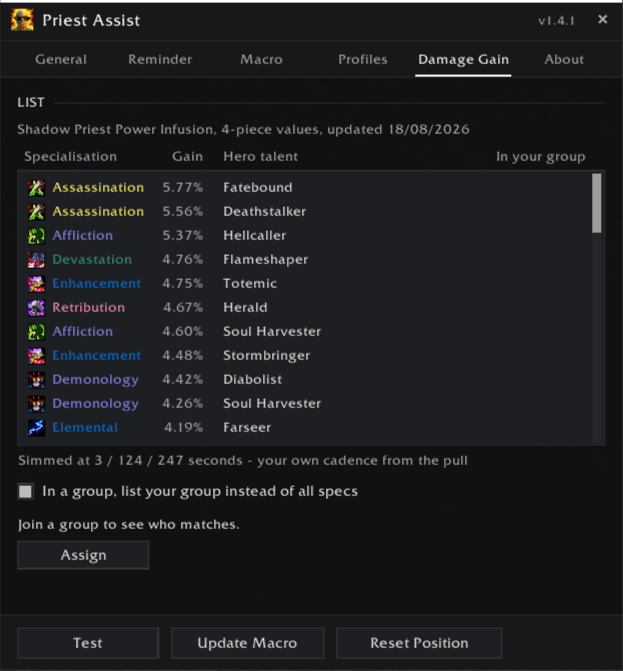
The Damage Gain tab ranks every specialization by what Power Infusion is worth on it, as a percentage and as absolute damage, from simulation data that is refreshed after tuning passes.
/pa top names the best targets in your group and who should take whom. Priests running the addon tell each other who they have claimed, so two of you do not infuse the same player.
Also worth knowing
- In your language. Spell names come from your client, so macros are correct on any locale. The interface is available in English or German.
- Key bindings. Set your target, pick the best one, toggle the buddy frame, open the settings.
- Combat safe. WoW blocks macro edits in combat, so changes are queued and applied the moment you drop out.
- Minimap button. Left-click updates, right-click opens the settings. Draggable and hideable.
- Reminder. A short notice when you zone into a raid or dungeon with no target set, so you notice before the first boss rather than after it.
Slash commands
| Command | What it does |
|---|---|
/pa |
Update the macros to your current target |
/pa open |
Open the settings panel |
/pa auto |
Assign whoever gains most, once |
/pa top X |
Best targets, and who should take whom |
/pa note |
Report what the raid note says |
/pa note top |
The same assignment as raid note lines to copy |
/pa comm |
Who else has a Power Infusion target |
/pa version |
What everyone in the group is running |
/pa buddy |
Toggle the buddy frame |
/pa reset |
Clear the Power Infusion target |
/pa show |
Preview the reminder |
/pa help |
List all commands |
Priests without the addon can ask in chat with !pa top. Incoming chat cannot be read inside dungeons and raids, where the game treats it as protected — there the command stays silent and /pa top is the way.
Custom macro lines are edited in the Macro tab, in the text field under the macro you pick.
Getting started
- Install and log in on a priest.
- Target the player you want to buff and press
/pa. The macros appear in your general macro tab. - Drag the ones you use to your action bars.
- Right-click the minimap button to set up trinkets, potions and the reminder.
- Optional: turn on the buddy frame in the Buddy tab, and automatic profiles in the Profiles tab.
Notes
- Retail only. Classic is not supported.
- LibSharedMedia-3.0 is optional — install it and your full font collection appears in the reminder settings.
- MRT or NorthernSkyRaidTools are only needed for raid note assignments.
- WoW caps macros at 255 characters. PriestAssist measures each one and refuses to write a macro that would be cut off, naming the setting to turn off.
- Macros live in the general tab by default, which holds 120. The character tab holds 18.
FAQ
Does anything update while I'm in combat?
No. WoW does not allow macros to be edited in combat, and no addon can work around that. The change is queued and applied the second you drop out. In practice you rarely notice: zone changes, ready checks and pulls all happen out of combat.
Do I need an English client?
No. Spell names are taken from your own client, so every locale gets the correct macro text.
Are profiles saved per character?
They are shared across your account, but split by specialization — two priests with the same specialization share settings, while Discipline and Shadow do not overwrite each other.
What happens to my profiles when I update?
They are carried over unchanged. Nothing looks different until you edit one.
Can I have a separate profile for Mythic+?
Not at the moment. Mythic+ shares the Dungeon profile on purpose: a key going live changes the difficulty mid-instance, and you do not want your macros rewritten seconds before the pull.
Can I edit the generated lines in the text field?
Only your own lines below them stick. The generated part belongs to the addon and is rebuilt from your settings and your target. If you change it anyway it is restored, and whatever you typed is kept as one of your own lines with a note in chat, so nothing disappears silently.
I talented Power Word: Barrier. What happens to the Ultimate Penitence macro?
The same macro casts Barrier instead — same name, same slot, same keybind, so nothing moves on your bar. Your Ultimate Penitence settings are kept and come back when you talent it again.
Does my target survive logging out?
A /reload and a reconnect keep it. A fresh login clears it, so you never start an evening still aimed at somebody from the last raid.
Something looks wrong. What should I send?
The full Lua error text if there is one, plus what you were doing at the time.
Feedback
Bug reports and feature requests are welcome on the GitHub issue tracker. Lua errors are much easier to fix with the full error text attached — BugSack or /console scriptErrors 1 will get it for you.
The PriestAssist Team