JulsanityUI DataBars
- By
ElvUI-style DataTexts, native to EllesmereUI. Two configurable bars (main + minimap), 19 built-in texts, cross-character gold via Syndicator/EllesmereUI Bags, background textures, profiles & Unlock-mode anchors. Retail only. No ElvUI needed.
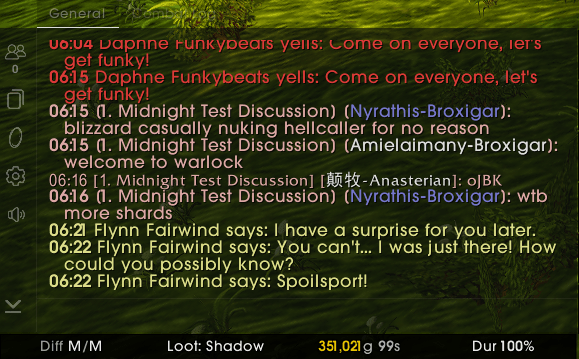
JulsanityUI_DataBars0.png
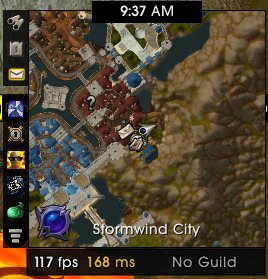
JulsanityUI_DataBars1.png
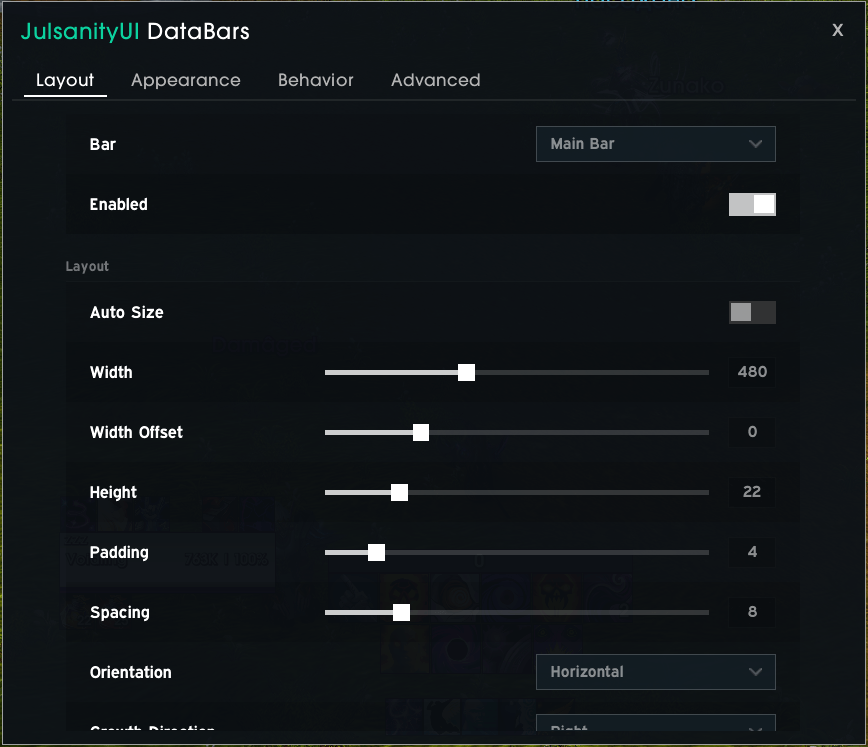
JulsanityUI_DataBars2.png
Description
JulsanityUI DataBars
A configurable DataText bar for Retail World of Warcraft that lives natively inside EllesmereUI. It reproduces the ElvUI DataText experience — clock, gold, durability, FPS/latency, item level, bags, reputation, Mythic+, spec and more — as native implementations.
Features
- Two independent bars — a main bar and a dedicated minimap bar, each with its own layout, appearance, behaviour, slots and anchor. The minimap bar auto-matches the minimap width and sits directly beneath it (still freely movable).
- Customise every datatext. Most datatexts have their own options in the Behavior tab, saved per slot — so you can run two clocks with different settings. For example: local vs. server time, gold as 485K / gold-only / "gold this session", FPS-only or MS-only, durability lowest vs. average, reputation as percent/standing/value, and much more.
- 20+ native DataTexts across four categories (see below).
- Cross-character gold in the Gold tooltip via Syndicator (Baganator): grouped by faction with class-coloured names, per-faction subtotals, the live Warband bank balance and a grand total. Falls back to EllesmereUI Bags, then to the current character. Data is read live and never stored.
- Addon memory at a glance — a dedicated Addons datatext (count of loaded addons + a tooltip listing every addon's memory usage and the total), plus addon memory in the System (FPS/MS) tooltip. Tooltips update live while open (paused in combat).
- Interactive datatexts — e.g. Difficulty (click to change dungeon/raid difficulty, incl. legacy 10/25-player raids), Specialization (right-click to set loot spec), Loot Spec (click to choose it).
- Full styling — font, size, outline, colours, background colour and background texture (LibSharedMedia), border, shadow, transparency, mouseover fade, combat auto-hide, and optional section separators between slots.
- Layout engine — horizontal/vertical orientation, growth direction, automatic or fixed sizing (the main bar can span the full screen), spacing and padding, per bar.
- Own profiles — an independent multi-profile system with create/copy/delete/reset/switch and compressed import/export strings.
- Native EllesmereUI integration — EllesmereUI-styled widgets, accent colour, pixel-perfect borders, and per-bar anchors in Unlock/Edit mode.
- Localized — English, German, French, Spanish (incl. esMX), Italian and Portuguese (Brazil).
Included DataTexts
- System: Time, Coordinates, System (FPS/MS), Durability, Addons
- Character: Gold, Item Level, Experience, Movement Speed, Bag Space, Reputation
- Social: Friends, Guild, Mail
- PvE: Mythic+ Score, Mythic+ Keystone, Great Vault, Specialization, Loot Spec, Difficulty
Requirements
- Retail only — Classic is not supported.
- EllesmereUI — hard dependency (styling, widgets, …).
- Optional: Syndicator (Baganator) or EllesmereUI Bags for cross-character gold.
Getting Started
Open the configuration in any of these ways:
- Type
/jdbar - Options → AddOns → "JulsanityUI DataBars" → the centered button
Move a bar via EllesmereUI Unlock/Edit mode. Use the Bar selector at the top of the config pages to switch between the main and minimap bar; each datatext's options appear under its slot in the Behavior tab.
Slash Commands
/jdbar— open the options window/jdbar reset— reset all bar positions/jdbar debug— toggle debug mode/jdbar debug dump— print the recent debug log
Credits
Built for and styled after EllesmereUI by Ellesmere — all rights to EllesmereUI belong to its author(s). Optional gold data via Syndicator/Baganator and EllesmereUI Bags. ElvUI is a feature reference only. This is an independent companion addon and is not affiliated with EllesmereUI or ElvUI.
Disclaimer
Please do not request support for it in the EllesmereUI Discord — use the addon's own CurseForge or GitHub page. Thank You!
JulsanityUI DataBars Team