PP Forever
PP Forever is a buff management addon for WoW Forever inspired by Pally Power, featuring customizable buff bars, duration tracking, and group assignments for Paladins, Priests, Mages, and Druids.
PP Forever.png
Configuration.png
Buff Assignments.png
Vertical Buff Bar.png

Vertical Compact Mode.png
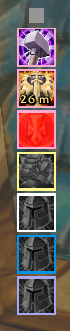
Vertical Ultra Compact Mode.png
Description
PP Forever
PP Forever is a compact buff-management addon for WoW Forever, inspired by Pally Power. Manage Paladin blessings and auras, coordinate group assignments, and keep track of missing or expiring buffs—all from a customizable buff bar.
PP Forever also supports Priests, Mages, and Druids, with simplified bars for their primary group buffs.
Paladin Buff Management
- Assign blessings by class, with individual player overrides through class pop-outs.
- Change assignments using the mouse wheel or right-click dropdown menus.
- Click to buff a player, prioritizing reachable members who need their assigned blessing.
- Cast learned Greater Blessings using right-click or a configurable modifier.
- Select from learned auras and track Righteous Fury with optional dedicated buttons.
- Disable assignment changes on the main bar to prevent accidental edits while keeping class pop-outs and Buff Assignments available.
Buff Assignments
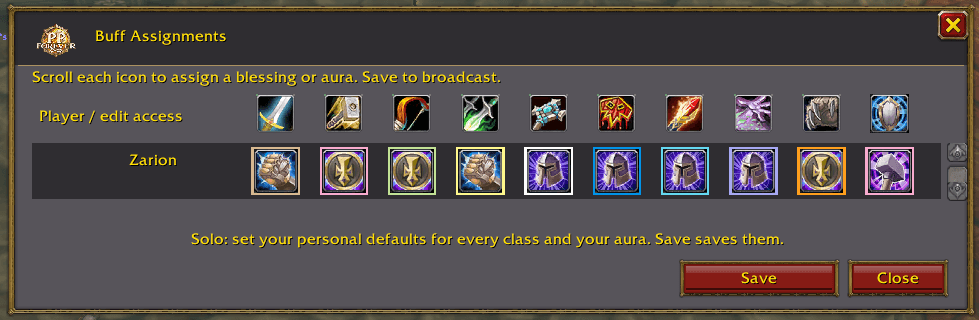
The Buff Assignments window organizes Paladins into rows, with columns for each class and an additional Aura column.
Set personal defaults while solo or coordinate assignments with other Paladins in your group. Party assignments remain unlocked; raid editing restrictions apply when the raid leader is a Paladin, with editing access available for designated addon users.
Assignment sharing between addon users is available where the client permits addon communication. Sharing is still being tested on the WoW Forever beta.
Priest, Mage, and Druid Support
Simplified class bars automatically use your highest learned rank of:
- Priest: Power Word: Fortitude
- Mage: Arcane Intellect
- Druid: Mark of the Wild
Click a represented class icon to buff a member of that class. These bars include the same timers, range checks, and warning options without requiring separate assignments for each class. Group-wide versions of these buffs are also recognized.
Timers and Buff Warnings
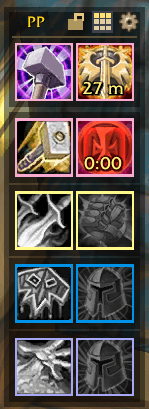
- See remaining buff duration directly on the icons.
- Red indicators warn when a buff has less than five minutes remaining.
- Missing buffs receive a red glow, with optional flashing.
- Class timers show the shortest duration among reachable recipients.
- Out-of-range and unavailable players do not trigger missing-buff warnings for otherwise buffed, reachable members.
- Icons turn gray when no member of that class is available and in range.
Three Display Modes
- Normal: Separate class and buff icons.
- Compact: Smaller buff icons positioned within the class display.
- Ultra Compact: Small assigned-buff icons with class-colored borders. Middle-click opens the class pop-out outside combat.
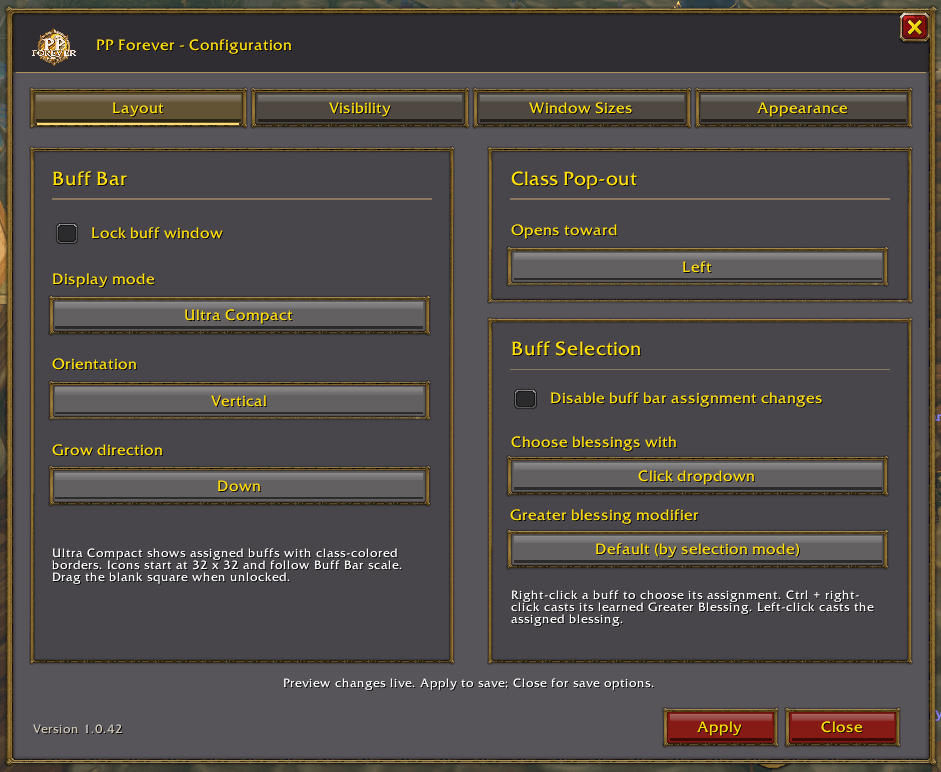
Choose horizontal or vertical orientation, growth direction, and class pop-out direction. Adjust the buff bar, player pop-outs, and Buff Assignments window with independent scale settings.
Make It Your Own
- Movable, lockable buff bar.
- Optional title bar and individual title-bar controls.
- Configurable backgrounds, borders, and icon colors.
- Class-colored icon borders.
- Optional Aura and Righteous Fury buttons.
- Optional hiding during combat.
- Toggleable buff and class tooltips.
- Live configuration previews with Apply to save.
- Save, Discard, or Cancel prompt when closing Configuration with unsaved changes.
Getting Started
Open Configuration with /pp config or left-click the minimap button.
Open Buff Assignments with /pp buffs or right-click the minimap button.
Hover over a buff icon for spell details and instructions that match your selected controls.
PP Forever is developed for the WoW Forever beta. Buff inspection, assignment changes, and addon communication remain subject to the client’s combat and API restrictions.
The PP Forever Team