Player Notes & Todo List
- By
Keep private notes on players, mobs, NPCs, and your own with a smart location aware todo list so you get reminders to do & get what you need!
Description
Player Notes & Todo List
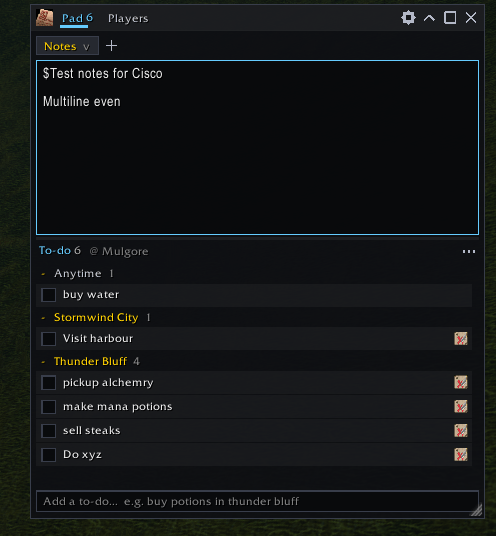
A small notepad, to-do list and private player notebook that stays open while you play, and reminds you of things at the right place and time.
Have you ever walked straight past the vendor you meant to check, or grouped again with the tank who ran off and pulled half the dungeon? This addon keeps those things written down. It reminds you when you arrive somewhere, and when you see that player again.
✨ Highlights
- 📝 Notes and to-dos in one compact window. It's small enough to keep open in combat, and expands when you need room to write.
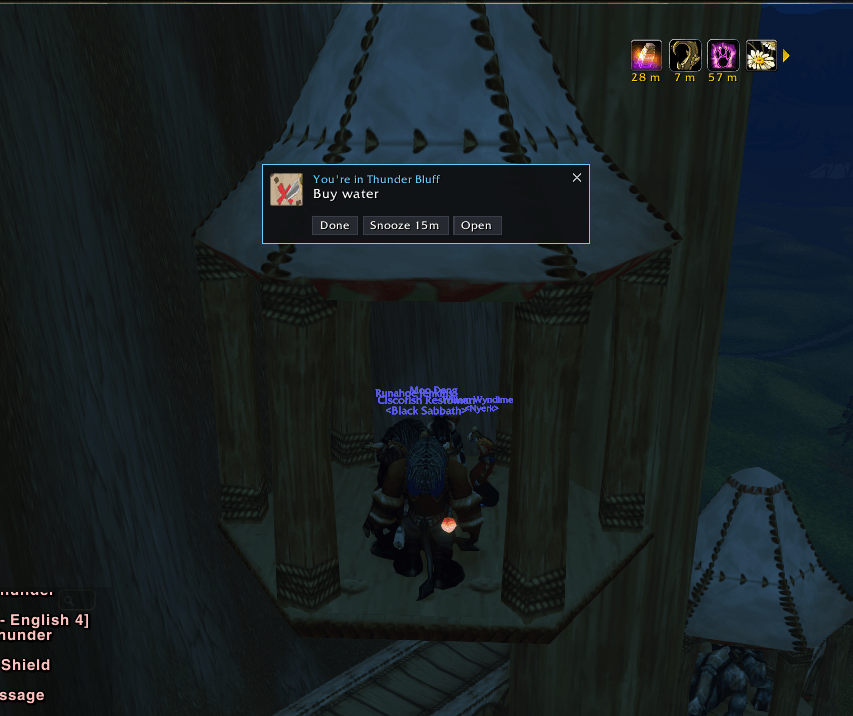
- 📍 Place reminders. Get reminded when you enter a zone, city, dungeon or subzone, e.g. "Buy mana potions" when you reach Thunder Bluff, or "Check the vendor for that rare recipe" in Goldshire. The places are searchable.
- 🗣️ Type like you talk. "Buy potions in Thunder Bluff" or "Raid invites tomorrow at 7pm": the place and time are picked up for you.
- ⏰ Time and date reminders. One-off, daily or weekly, with snooze.
- 👥 A private notebook on other players. Keep track of good and bad groupmates for dungeons, who's reliable, who was a jerk, who helped you out, and anything else you want to remember. Only you can see it.
- 🌍 Your notes follow you. They're shared across all your characters on a realm, Horde and Alliance alike, or kept private to one character if you prefer.
📝 Notepad + to-do list
- Split view: free-form notes on one side, a checklist on the other. A draggable divider sets the split, and dragging it to an edge hides one side.
- Adapts to the window size: side by side when the window is wide, stacked when it's narrow.
- Stays out of the way: it's compact by default. Collapse it to a title bar by double-clicking the title, make it big with one click, or drag the corner to any size. You can also lock it and set its opacity.
- Several note pages. Make one for raid strats, one for farming routes, one for a shopping list. Any page can be limited to a single character.
- Shift-click items into your notes to save item links, just like in chat.
- To-dos are grouped by place. Wherever you are comes first, marked "you're here", then Anytime, then every other place A–Z. Click a group to collapse it.
- Completed to-dos are hidden until you choose to show them, and you can clear them in one go.
📍 Reminders that find you
Place reminders
Pick from every place the game knows about: zones, cities, towns, subzones, dungeons and raids. Search as you type, or press + Here to use where you're standing.
- A reminder fires when you enter the place and keeps reminding you on every visit until you tick it off. It's built for the things you'd otherwise forget until your fourth trip back.
- Subzones respect their zone, so Crystal Lake in Elwynn Forest won't go off somewhere else with the same name.
- A short cooldown stops it from spamming you when you walk back and forth across a zone border.
- You can also set a reminder to fire only once.
NPC reminders
Get reminded when you talk to or target an NPC by name. For example, "Ask about the recipe" the next time you open Innkeeper Farley's window. It works for vendors, trainers, quest givers, bankers, the auction house and flight masters.
Time reminders
Set a date and time, or use quick buttons (+15m, +1h, +3h, Tomorrow). Reminders can be once, daily or weekly. Any you missed while logged off pop up when you log back in.
The alert
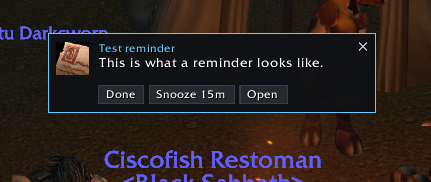
Each alert is a small card with Done, Snooze (15 minutes, or right-click for 5 minutes up to tomorrow) and Open. You can also get a center-screen message, a sound, a chat line and a taskbar flash, and turn each one on or off. Drag the cards anywhere and they stay there.
🗣️ Plain-English quick add
Type a to-do the way you'd say it:
| You type | You get |
|---|---|
Buy potions in Thunder Bluff |
"Buy potions" with a reminder in Thunder Bluff |
Visit the harbor in stormwind |
"Visit the harbor" with a reminder in Stormwind City |
Turn in quests when I get to Goldshire every day |
Reminder at Goldshire, repeating daily |
Check the AH in 2 hours |
Timed reminder 2 hours from now |
Raid invites tomorrow at 7pm |
Timed reminder tomorrow at 19:00 |
Put it in the bank |
Just a to-do. It only counts as a place if a real place has that name. |
Autocomplete: start typing a place after in, at, to, near or @ and a list of matching places appears. Use ↑/↓ and Tab or Enter to pick hard-to-spell places easily. There are also shortcuts for power users: @place and !30m.
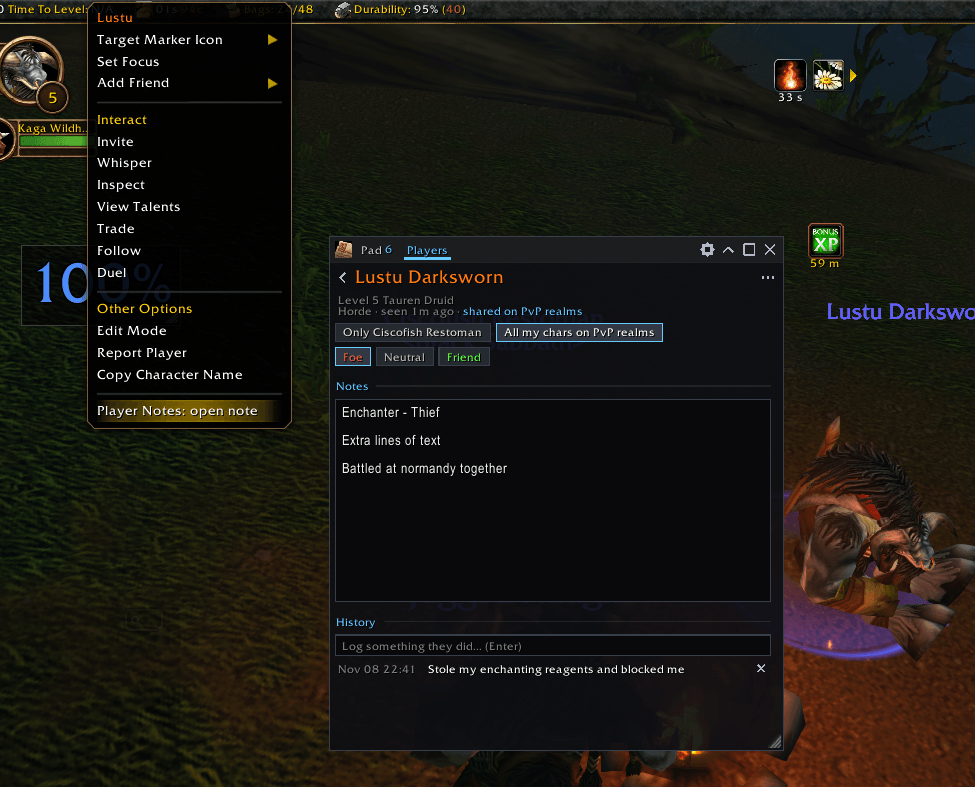
👥 Player notes: your private notebook on other players
Keep track of the people you play with, and the ones you'd rather not play with again.
- Foe / Neutral / Friend rating on every player.
- Free-form notes for anything at all: "Great healer, add for heroics", "Ninja-looted the boss drop", "Sold me the mats cheap", "Keeps pulling before the tank".
- A history log of dated entries, so you can record what happened and when: "Carried us through the dungeon", "Left mid-run", "Gave me a free portal".
- See your notes in context. Your rating and the first line of your note appear in the player's tooltip, so you spot good and bad players in your group, in the street or out in the world.
- Right-click a player on their portrait, party or raid frame, or in the guild list, then choose Player Notes to open or start a note.
- Notes on NPCs and mobs work too. They're handy for rare spawns, tricky quest givers or that one vendor.
- Search and filter by name, guild or note text, and show only foes or only friends.
- Private by design. Notes never leave your computer. Nobody else can see them, and nothing is sent to other players.
Across characters and factions
New notes are shared with every character on your account in that realm, on both factions, so your Alliance alt knows what your Horde main learned. Switch any note to Only this character to keep it private to that character.
- Classic: notes belong to your realm. Realms joined into a mega-server or connected-realm group share one set, worked out automatically from the game's connected-realm list.
- WoW Forever: characters use First Last names, and notes are kept per ruleset (PvE, PvP, RP, Hardcore). Shards and layers don't split your notes.
⌨️ Commands
| Command | What it does |
|---|---|
/tn |
Show or hide the window (/todo and /todonotepad also work) |
/tn add <text> |
Add a to-do (plain English works here too) |
/tn here <text> |
Add a to-do that reminds you at your current subzone |
/tn in 30m <text> |
Add a timed reminder (15m, 2h, 1d...) |
/tn note [name] |
Open a note on your target, or on a player by name |
/tn players |
Open the player notes |
/tn options |
Open the options |
/tn reset |
Reset the window's position and size |
You can also use the minimap button (left-click to toggle, right-click for options, drag to move), or the addon compartment on clients that have one.
🧩 Compatibility
- WoW Forever and Classic Era are actively tested.
- The single TOC also declares TBC/Anniversary, Wrath, Cata and MoP Classic, and Retail.
- No libraries needed. It's lightweight and self-contained, and it avoids Blizzard dropdown menus, the usual cause of taint errors.
Player Notes & Todo List Team